Every proxy error comes from one of three places. Your own machine could not reach the proxy. The proxy answered, but would not or could not reach the site. Or the site answered through the proxy and refused. The number in the message does not tell you which, because a 403 or a 502 can come from the proxy or from the site. The words around the number do.
On September 27, 2026, we built a lab on one machine: a site, a proxy that fails on purpose, and three broken proxies. We ran the same three commands against 12 failures and one setup that works. Then we sent five proxy answers to nine clients, each case twice. This page shows what every client printed, and how to read it.
Three places a proxied request can fail
Your machine
cannot reach the proxy: no answer at all
The proxy
answers the tunnel request with a code: 403, 407, 502, 504
The site
answers through the open tunnel: 403, 429, a check page
For an https:// site, your client first asks the proxy to open a tunnel, with a CONNECT request. The HTTP standard is exact about the answer. A 2xx code means the tunnel is open, and "Any response other than a successful response indicates that the tunnel has not yet been formed" (RFC 9110).
So any code that comes back in answer to CONNECT is the proxy speaking, and the site has not seen your request yet. That one rule sorts most proxy errors.
The one-minute triage
Run these three commands before you change a setting:
# 1. Does the site answer at all, with no proxy?
curl -s -o /dev/null -w '%{http_code}\n' https://your-site.example

# 2. Does the proxy work? This endpoint echoes the address it sees.
curl -s -x http://USER:PASS@HOST:PORT https://api.ipify.org

# 3. What happens on the way to your site?
curl -sv -o /dev/null -x http://USER:PASS@HOST:PORT https://your-site.example
On Windows, write -o NUL. Command two proves the address, the port, the login and the tunnel in one request. It also prints the exit address, which is the address every site judges.
Read command three from the top. The line CONNECT tunnel established marks the moment the proxy opened the way. A status line before it is the proxy's answer. A status line after it is the site's answer.
We ran the three commands against 13 setups: 12 failures we built on purpose, and one that works.
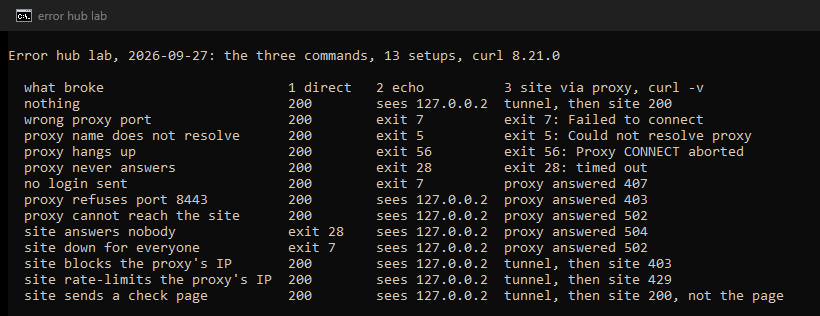
Four patterns cover every failure but one, the check page, which all three commands report as a success:
| 1. Direct | 2. Echo | 3. Through the proxy | What broke |
|---|---|---|---|
| works | fails | fails | Your machine to the proxy, or the login |
| works | works | the proxy answered a code | The proxy could not or would not reach that site |
| works | works | the tunnel opened, the site answered a code | The site refused the proxy's address |
| fails | works | the proxy answered 502 or 504 | The site is down for everyone |
Commands one and two alone cannot tell the second row from the third. In our lab, a site that answers you but not the proxy looked exactly like a site that blocks the proxy, until curl -v showed a 502 Bad Gateway from the proxy itself, before any tunnel opened.
One proxy answer, nine messages
Every client words the same event in its own way. We made our lab proxy refuse the tunnel with a 502, the answer for a site it cannot reach, and recorded each client:
- curl 8.21.0:
curl: (7) CONNECT tunnel failed, response 502 - curl 8.16.0:
curl: (56) CONNECT tunnel failed, response 502 - git 2.51.2:
fatal: unable to access 'https://intranet.lab.test/repo.git/': CONNECT tunnel failed, response 502 - Python requests 2.32.3:
ProxyError('Cannot connect to proxy.', OSError('Tunnel connection failed: 502 Bad Gateway')) - Python urllib:
<urlopen error Tunnel connection failed: 502 Bad Gateway> - Java 17, HttpURLConnection:
Unable to tunnel through proxy. Proxy returns "HTTP/1.1 502 Bad Gateway" - Java 17, HttpClient:
Tunnel failed, got: 502 - PowerShell 7.6:
The proxy tunnel request to proxy 'http://127.0.0.1:<port>/' failed with status code '502'." - Chrome 153:
net::ERR_TUNNEL_CONNECTION_FAILED
The stray quote mark at the end of the PowerShell line is really there: it sits in the .NET message text itself. Two more clients, read in their source code rather than run. Node.js fetch with the ProxyAgent of undici gives Proxy response (502) !== 200 when HTTP Tunneling as the cause of its error. Programs written in Go keep only the words of the status line, here Bad Gateway, inside whatever message the program adds.
Older curl said it differently. Up to 7.86.0 the line read Received HTTP code 502 from proxy after CONNECT, and Stack Overflow questions with hundreds of thousands of views still quote it. curl 7.87.0 changed the wording to CONNECT tunnel failed, response 502, and 8.20.0 changed the exit code from 56 to 7.
A 403 and a 504 from the proxy came through the same way, with only the code and its name changed. A 407 did too, with two exceptions: both Java clients returned the status 407 without an error, and headless Chrome showed ERR_INVALID_AUTH_CREDENTIALS. The 407 guide covers the login cases.
A proxy that reads the request and hangs up, with no answer at all, produced other words again:
- curl:
Proxy CONNECT aborted, exit code 56, and git the same words in itsunable to accessline; - Python:
Remote end closed connection without response; - Java:
Unexpected end of file from serverandHTTP/1.1 header parser received no bytes; - PowerShell 7:
An error occurred while sending the request.; - Chrome:
ERR_EMPTY_RESPONSE.
What the code means when the proxy sends it
The proxy chooses the number in CONNECT tunnel failed, response 503, and proxies do not all choose alike. What the standards and the most used proxy software say:
| Code from the proxy | What it means there |
|---|---|
| 400, 404, 500 | Some proxies report a failed name lookup this way. Firefox shows these as a site it cannot find. |
| 403 | Rules on the proxy refuse that site or port. Squid by default opens tunnels to port 443 only. Apache answers Connect to remote machine blocked. |
| 407 | The proxy wants a login. See the 407 guide. |
| 429 | A rate limit on the proxy, not on the site. |
| 502 | The proxy could not connect to the site. Apache also uses it for DNS lookup failure for: a name. |
| 503 | The proxy could not forward the request. Squid uses it for its error ERR_CANNOT_FORWARD. |
| 504 | The proxy ran out of time while connecting to the site. |
| 464 to 467, 568 | Codes of our own gateway, explained at the end of this page. |
RFC 9110 defines 502 as a gateway or proxy that "received an invalid response from an inbound server", and 504 as one that "did not receive a timely response from an upstream server". Both describe the trip from the proxy onward. The fixes for each are in 502 through a proxy, 503 through a proxy and 504 through a proxy.
In a browser
Browsers show fewer details than the command line, and each has its own words.

- There is something wrong with the proxy server (Chrome and Edge,
ERR_PROXY_CONNECTION_FAILED): the browser could not connect to the proxy at all. A note in the Chromium code says it does not cover failures of theCONNECTstep. See there is something wrong with the proxy server and the Chrome fixes. - ERR_TUNNEL_CONNECTION_FAILED: the proxy answered the tunnel request with anything but 200 or 407. Chrome drops the answer "to avoid letting the proxy impersonate the target", in the words of its source code. See ERR_TUNNEL_CONNECTION_FAILED.
- ERR_EMPTY_RESPONSE: in our lab, the proxy hung up without an answer.
- ERR_TIMED_OUT or ERR_CONNECTION_TIMED_OUT: nothing answered in time. See the timeout guide.
- A sign-in box, or
ERR_INVALID_AUTH_CREDENTIALSin headless Chrome: the proxy wants a login. See the proxy sign-in box that keeps coming back. - Waiting for proxy tunnel... as the status text while a page loads: Chrome is still waiting for the proxy to open the tunnel. If it stays there, look at the proxy, not the site.
Firefox maps each code from a proxy to a page of its own. The proxy server is refusing connections covers a refused connection, and also a proxy that answered the tunnel with 403, 407 or 429 (refusing connections). Unable to find the proxy server means the name of the proxy did not resolve. A 502 from the proxy shows as Unable to connect, a 504 as The connection has timed out, and a 400, 404 or 500 as a site Firefox cannot find.
On an http:// address the rules change. There is no tunnel, the proxy fetches the page itself, and the browser can show the error page of the proxy itself. In our lab, Chrome showed the 502 and 504 pages of our proxy word for word. That is where proxy pages such as "The requested URL could not be retrieved" from Squid appear.
Windows has one more message of its own, could not automatically detect this network's proxy settings, with its own guide.
Error pages from a gateway: Apache, nginx and Squid
Some error pages come from a server that sits in front of a site and passes requests on to it. The HTTP standard calls it a gateway, or reverse proxy. Its wording names the software:
- Apache: "The proxy server could not handle the request", with a "Reason:" line under it. Its 502 page says "The proxy server received an invalid response from an upstream server", and its 504 page "The gateway did not receive a timely response from the upstream server or application". See invalid response from upstream server.
- nginx: "502 Bad Gateway" or "504 Gateway Time-out" in large type, with "nginx" under a line.
- Squid: "ERROR: The requested URL could not be retrieved", then the cause, such as "The remote host or network may be down" or "Access control configuration prevents your request from being allowed at this time."
On an https:// site, such a page is not an answer from your proxy to the tunnel request, because Chrome and Firefox never show one. It came from beyond the tunnel: the site, or a device on your network that inspects encrypted traffic. On an http:// address through a proxy, it may come from your proxy, and the software name tells you which.
In a terminal or in code: before the proxy answers
These errors mean no answer came from the proxy at all. The problem is the address, the port, the network, or a dead proxy.
curl: (5) Could not resolve proxy: the name of the proxy does not exist. See curl error 5 and 97.curl: (7) Failed to connect: nothing answered at the proxy address. curl 8.21.0 names the site first, as inFailed to connect to site.lab.test:443 over proxy 127.0.0.1: the address after "over proxy" is the one that did not answer. Since 8.20.0, exit code 7 also covers a refused tunnel, so read the words.curl: (28) Connection timed out: in our lab, a proxy that accepted the connection and never answered.curl: (56) Proxy CONNECT aborted: the proxy hung up. Anhttp://address pointed at a SOCKS port does the same.curl: (97): a SOCKS handshake failed. See curl error 97 and SOCKS5 errors.- In Python,
Cannot connect to proxy.wraps both a refused tunnel and a hang-up, so read the error inside it. See pip proxy errors. - Go programs report a proxy they cannot reach as
proxyconnect tcp:followed by the network error. See Docker proxy errors.
The same errors have their own pages for curl, git, npm, Java, Node.js, C# and .NET, Scrapy and Puppeteer, Playwright and Selenium.
A dead proxy gives the same errors, and free proxies die fast. Of the 589,918 free proxies our engine had found by 2026-08-11, 4,023 were answering. Our free proxy list comes from the same engine, and the proxy checker tests any single proxy before you look anywhere else.
When the site answered
Once the tunnel is open, every status comes from the site, and it is a decision about the address it sees. In our lab, the echo endpoint saw 127.0.0.2, the exit address of the proxy. So did the sites that answered 403 and 429.
- 403 Forbidden after the tunnel opened: the site refused that address. See 403 through a proxy and why an IP gets blocked.
- 429 Too Many Requests: the site counted too many requests from that address. The standard lets it add a
Retry-Afterheader saying how long to wait (RFC 6585). See 429 through a proxy. - 200 OK with the wrong page: our check site sent the address of the proxy a "verify you are a human" page with a 200. Only a check on the content caught it: the page lacked the text the real page carries.
Block pages name the service that made the decision, and each has its own guide:
- Cloudflare: "Sorry, you have been blocked" and error 1020;
- Akamai: Access Denied with Reference #18;
- CloudFront: "The request could not be satisfied";
- Google: the unusual traffic page;
- Reddit: blocked by network security.
No proxy setting changes a decision the site has already made. Timeouts, logins and ports all belong to the first two legs.
Certificate errors
curl: (60) and ERR_CERT_AUTHORITY_INVALID mean a certificate did not verify. Through an ordinary HTTP proxy, the encrypted connection runs from your client to the site, inside the tunnel. The certificate belongs to the site, or to a device on your network that inspects encrypted traffic. Only an https:// proxy address adds a second certificate, that of the proxy itself, and the curl option --proxy-insecure skips the check of that one alone. See ERR_CERT_AUTHORITY_INVALID through a proxy and HTTP against HTTPS proxies.
Errors that come and go
A rotating proxy can give each request a new exit address. A site that tied a login, a cart or a page of results to the first address then sees a stranger, and may answer the next step with a 401, a 403 or a check page. If an error appears only on multi-step work, hold one address for the whole flow: see sticky against rotating sessions.
The lookup table
Each message links to the guide that covers it; the rest are covered above.
| Message | Who sent it |
|---|---|
There is something wrong with the proxy server, ERR_PROXY_CONNECTION_FAILED | your machine: the proxy did not answer |
Unable to find the proxy server, curl: (5) Could not resolve proxy | your machine: the proxy name |
curl: (7) Failed to connect ... over proxy | your machine: the proxy port |
Proxy CONNECT aborted, ERR_EMPTY_RESPONSE | the proxy hung up |
| The proxy server is refusing connections | a refused port, or the proxy refused the tunnel |
CONNECT tunnel failed, response 407 | the proxy wants a login |
CONNECT tunnel failed, response 403 | rules on the proxy |
response 502 or 504, Unable to tunnel through proxy, Tunnel connection failed (502, 504) | the proxy could not reach the site |
ERR_TUNNEL_CONNECTION_FAILED | the proxy refused the tunnel |
| The proxy server could not handle the request | an Apache gateway |
| 403 or 429 after the tunnel opened (403, 429) | the site |
| 200 with a check page | the site |
curl: (60), ERR_CERT_AUTHORITY_INVALID | the certificate of the site, or a device on your network |
If the proxy is ours
Our Residential Premium gateway answers a tunnel it cannot open with its own codes, so CONNECT tunnel failed, response 466 has an exact meaning on our lines:
| Code | Meaning on our gateway |
|---|---|
| 407 | The user name or password on the line is wrong, or the line belongs to another plan. |
| 403 | A targeting part the gateway does not accept, such as a misspelt place. |
| 464 | The target host, port or protocol is blocked by the usage policy of the network. |
| 465 | No free address matches the targeting right now. |
| 466 | The gigabytes of the plan are used up. |
| 467 | A single session reached a traffic cap set on it. |
| 568 | One sticky session failed; a new session id gets a fresh address. |
The fix for each is in our error codes. To test any proxy, ours or not, the proxy checker shows whether it answers, its anonymity, the exit country and the network behind the address. Residential Lite starts at $0.44 per GB, and purchased gigabytes have no scheduled expiry date (residential proxies).
How we tested
On September 27, 2026, we ran one lab on a Windows 11 machine, twice. A lab site answered under eight names that exist nowhere else, over HTTP and over HTTPS with a certificate from a lab authority. Its answer depended on the name and on who asked: the normal page, an echo of the address of the caller, a 403, a 429 or a check page for the address of the proxy, a refused connection, or no answer at all.
The lab proxy wanted a login, opened tunnels to port 443 only, and answered 502 when its connection to the site was refused. A second copy wanted no login. Both connected to sites from their own address, 127.0.0.2. For the site that answers nobody, one machine cannot leave a connection attempt unanswered, so the proxy was set to wait three seconds and answer 504, the case RFC 9110 defines. Three more proxies were broken: one hung up, one never answered, and one address had nothing listening. One proxy name, proxy.lab.invalid, belongs to a domain reserved never to exist.
The clients were:
- the curl in Windows (8.21.0) and the curl of Git for Windows (8.16.0);
- git 2.51.2;
- Python 3.13.7 with urllib, and requests 2.32.3 with urllib3 1.26.20;
- Java 17.0.17 with HttpURLConnection and HttpClient;
- PowerShell 7.6.6;
- Chrome 153, headless.
All 13 triage cases and all 51 client cases gave the same result in both runs. The sites and proxies ran on the machine itself.
Sources
- IETF: RFC 9110, HTTP Semantics (sections 3.7, 9.3.6, 15.5.4, 15.5.8, 15.6.3 to 15.6.5), RFC 6585 (429) and RFC 6761 (the .test and .invalid names), read September 27, 2026.
- curl: libcurl error codes, the changelog, --proxy-insecure, and the source of the tunnel messages at 7.86.0, 7.87.0, 8.19.0, 8.20.0 and 8.21.0, read September 27, 2026.
- Chromium: net_error_list.h, http_proxy_client_socket.cc and generated_resources.grd, read September 27, 2026.
- Firefox: nsHttp.cpp, nsDocShell.cpp and certError.ftl, read September 27, 2026.
- Apache HTTP Server 2.4: proxy_util.c, http_protocol.c and mod_proxy_connect.c. nginx: ngx_http_special_response.c. Squid: cf.data.pre, FwdState.cc, tunnel.cc and its error templates ERR_CONNECT_FAIL and ERR_ACCESS_DENIED. Read September 27, 2026.
- Client libraries: OpenJDK 17 HttpURLConnection and PlainTunnelingConnection; CPython 3.13 http.client; urllib3 1.26.20; the ProxyAgent of undici; the Go net/http transport; the .NET System.Net.Http messages. Read September 27, 2026.
- HProxy: error codes, terms, proxy checker and the counts of our free proxy engine, read September 27, 2026.