A 504 Gateway Timeout through a proxy comes from a gateway that stopped waiting. Your request reached the proxy, and the hop beyond it ran out of time. Which hop gave up, and after how long, decides the fix. About 60,500 people a month search Google for "504 gateway timeout". The guides that answer them mostly speak to site owners; this one is for the person sending requests through a proxy.
What a 504 means with a proxy
RFC 9110 says that a 504 status code "indicates that the server, while acting as a gateway or proxy, did not receive a timely response from an upstream server". In a proxy setup, the gateway is usually the proxy, and the upstream is the target site.
The important word is upstream. Your own connection to the proxy worked. The proxy then tried the target and heard nothing in time. That rules out your network and your proxy login, and it points at the proxy, the target, or a time limit somewhere between them.
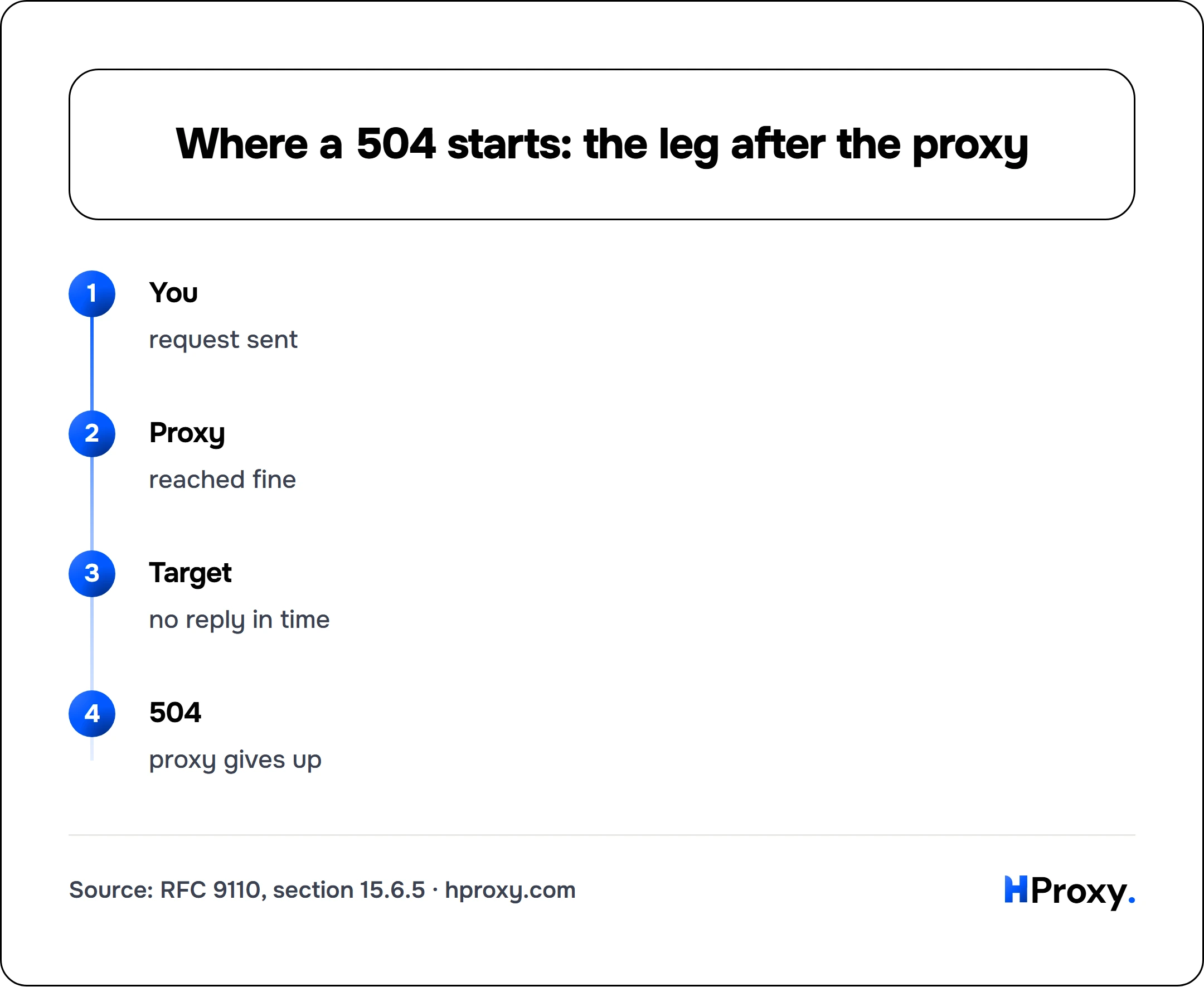
You
request sent
Proxy
reached fine
Target
no reply in time
504
proxy gives up
Who gives up first
Every gateway on the path runs its own clock, and each one has a default. These are the defaults that each project documents:
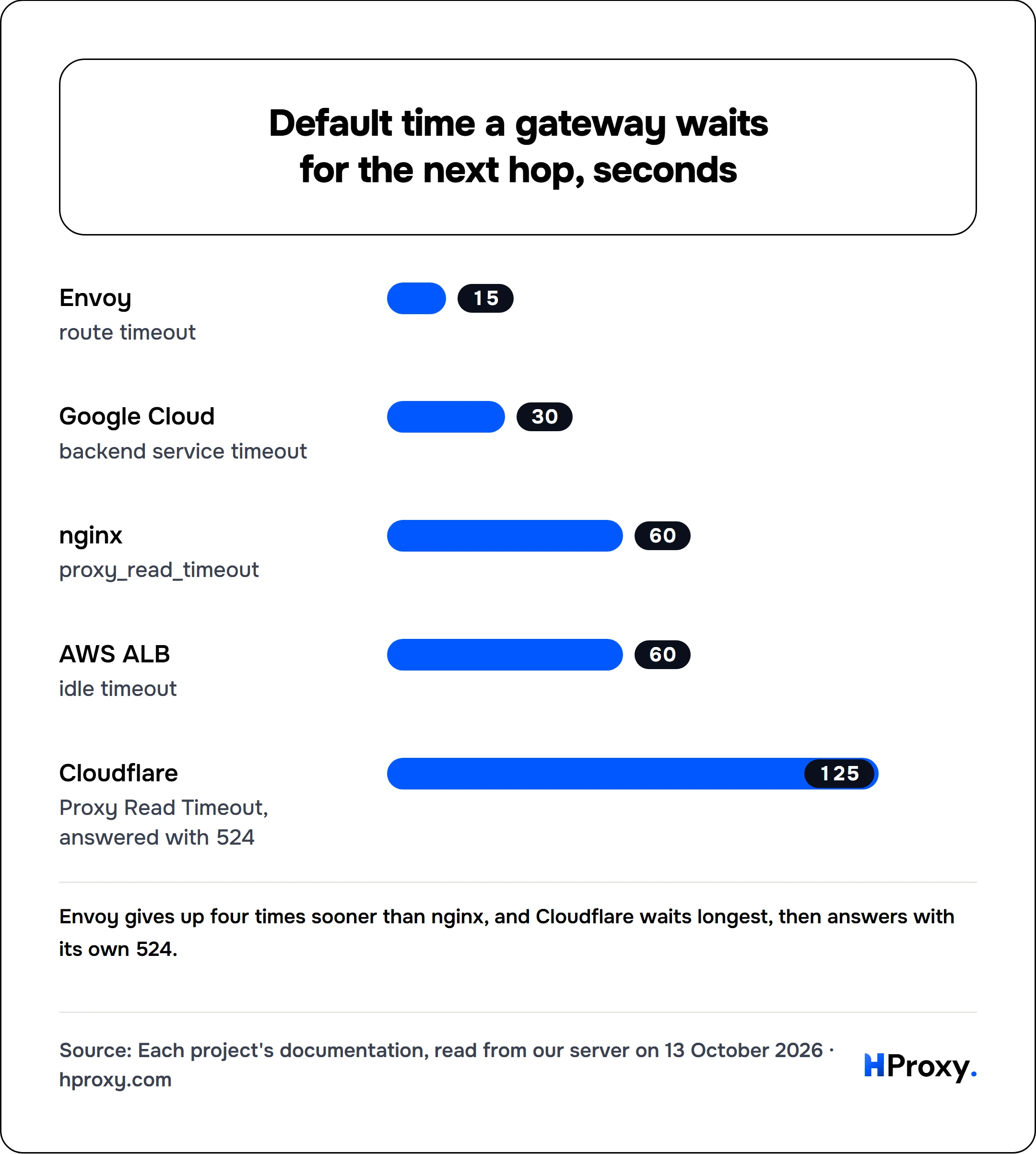
Envoy's route timeout "defaults to 15 seconds", and its router documentation says a request that exceeds it ends in "a 504 error". Google Cloud gives most of its load balancers a backend service timeout whose "default value is 30 seconds." An AWS Application Load Balancer returns "HTTP 504: Gateway timeout" when the target stays quiet past the idle timeout, which AWS sets "to 60 seconds" by default.
nginx waits 60 seconds by default, and it counts that time "only between two successive read operations". So a slow page that keeps sending data survives, and a page that goes silent for a minute does not. nginx also allows 60 seconds to connect. Squid waits much longer: its read_timeout defaults to 15 minutes, and a request that runs out is "logged with ERR_READ_TIMEOUT."
Cloudflare uses its own code. Its documentation says that "Error 524 indicates that Cloudflare successfully connected to the origin web server, but the origin did not provide an HTTP response before the default 125 seconds". Many older guides still quote 100 seconds.
A request through a proxy to a site behind a CDN crosses several of these clocks. The shortest one on the path ends the request, and its owner writes the error.
Your client's own clock
The client runs a clock too, and it can stop before any gateway does. Then you see a client error with no 504 in it.
- Python requests sets no limit at all: "By default, requests do not time out unless a timeout value is set explicitly." Its documentation warns that "your code may hang for minutes or more."
- HTTPX gives up first: it raises a TimeoutException after 5 seconds of network inactivity.
- curl has no overall limit until you set one, and exits with code 28 when a limit you set runs out.
Set both limits on purpose. In curl, --connect-timeout "only limits the connection phase", and --max-time caps "each transfer":
curl -x http://PROXY_IP:PORT \
     --connect-timeout 10 \
     --max-time 60 \
     -s https://example.com/
In Python requests, a tuple sets the connect and read limits separately, in the form the documentation shows:
import requests

proxies = {"http": "http://PROXY_IP:PORT", "https": "http://PROXY_IP:PORT"}
r = requests.get("https://example.com/", proxies=proxies, timeout=(10, 60))
A dead proxy then fails fast on the connection, and a slow page still has a minute to arrive. If your own limit trips first, curl reports exit 28, CURLE_OPERATION_TIMEDOUT. Our cURL proxy error guide decodes exit 28 and the other codes a proxy can trigger.
The two look different on screen. We ran both on our server: first a test address that answers 504 on purpose, then a slow address with a 3-second limit.
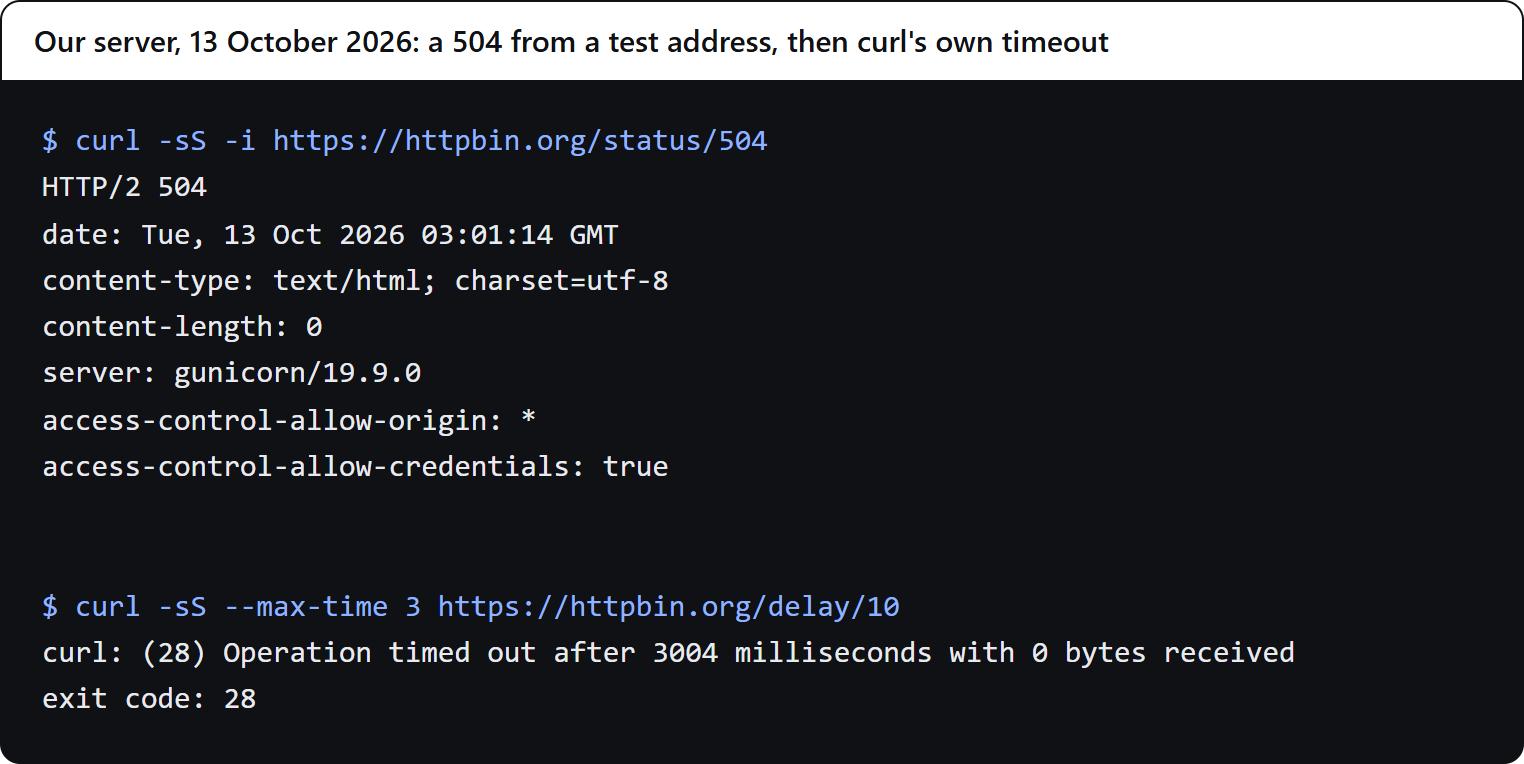
A 504 arrives as an HTTP status, with headers. A client timeout arrives as an error from your own tool, with no response at all.
Timeout codes and who sends them
Timeout codes and who sends them
| Code | Sent by | What happened |
|---|---|---|
| 504 | A gateway or proxy | No timely answer from the next hop |
| 502 | A gateway or proxy | An invalid answer from the next hop |
| 408 | The server | Your request did not arrive in time |
| 524 | Cloudflare | The origin sent nothing in 125 s |
| curl 28 | Your client | Your own limit ran out |
RFC 9110 sections 15.5.9, 15.6.3 and 15.6.5; Cloudflare's Error 524 page; curl's error codes; read 13 October 2026
The five causes, and the fix for each
Five causes of a 504 through a proxy
| Cause | How to spot it | Fix |
|---|---|---|
| Dead or overloaded proxy | Works through another proxy | Switch to a checked proxy |
| Timeout too low | Fast sites work, slow ones fail | Raise connect and read limits |
| Slow or throttling target | Fails through several, works with none | Rotate IPs, slow down, retry |
| Wrong protocol or port | Every request fails | Match HTTP or SOCKS and the port |
| Free proxy died | Worked a minute ago | Check it right before use |
HProxy troubleshooting guide, 13 October 2026
1. The proxy is dead or overloaded
Proxies, free ones above all, go down or get swamped. An overloaded proxy accepts your connection, cannot finish the outbound request in time, and answers 504.
Fix: send the same request through a different proxy. If it works there, the first proxy was the problem. In a script, never lean on a single proxy: draw from a pool and rotate.
2. A timeout is too low
If your client allows less time than the target needs, you produce your own timeout. Heavy pages, slow APIs and distant targets all need room. The same holds for a gateway you run yourself: an nginx in front of a slow backend answers 504 after 60 seconds unless proxy_read_timeout is raised.
Fix: set explicit connect and read limits as shown above, sized to the slowest target you call.
3. The target is slow or throttles proxy traffic
Sometimes the proxy is fine and the target is the problem. It may be slow, or it may stall requests that arrive from proxy address ranges.
Fix: isolate it. Make the same request with no proxy. If that also hangs, the site is the issue, and no proxy will fix it. If it works without a proxy and fails through several, the target is holding back proxy traffic. Rotate to cleaner IPs, residential ahead of datacenter, lower your request rate and add retries. A target that stalls proxy traffic often answers 403 Forbidden or 429 Too Many Requests as well, and those guides cover that side.
4. Wrong protocol or port
Pointing an HTTP client at a SOCKS port, or the reverse, produces timeouts and refusals that look like 504s. Port 1080 usually carries SOCKS; 8080, 3128 and 80 usually carry HTTP.
Fix: match the scheme to the proxy. Our cURL guide shows the exact http://, socks5:// and socks5h:// forms.
5. A free proxy died between checks
Free proxies can live for minutes. A 504 right after a proxy worked usually means that proxy died, and your code is fine.
Fix: check each proxy just before you use it. Our proxy checker tells you whether a proxy is alive, how fast it answers and how anonymous it is, and every entry on the free proxy list shows when it was last checked.
A two-minute diagnostic
When a 504 hits, run three checks in order:
- Same request, different proxy. It works? The first proxy was dead.
- Same request, no proxy. It works with no proxy and fails through several? The target holds back proxy traffic. Rotate and slow down.
- Same proxy, a simple target such as an IP echo page. It works there and fails on the real site? Your timeout is too low or the real target is slow. Raise the limit.
Three requests usually name the cause.
Preventing 504s in a pipeline
At scale, build the fixes in so that a 504 costs one retry:
- Rotate from a checked pool, so a dead proxy is replaced at once.
- Set connect and read limits on every request, sized to the target.
- Retry with backoff on 504, 502 and 408, with a new proxy on each retry.
- Match the IP type to the target: datacenter for lenient sites, residential for sites that throttle proxies.
The guide to proxies for web scraping shows the whole retry and rotation pattern these steps plug into.
What other guides miss
- Hostinger says a 504 "occurs when a browser's HTTP request to the server doesn't respond in time". RFC 9110 places the timeout between a gateway and the next server.
- Kinsta gives eleven fixes for site owners on a host, and none for a 504 seen through a proxy.
- Proxidize, itself a proxy seller, has the definition right and fixes routers and PHP limits.
- MDN gives the reference definition and no fixes.
- LimeProxies wrote its guide in 2018, before RFC 9110 and before Cloudflare's current 125-second read timeout.
Where HProxy fits
When the fix is a fresh or cleaner IP, our residential pool rotates by request and costs $0.44 per GB, and Premium adds city and ISP targeting with sticky sessions of up to 24 hours from $1.00 per GB. Check any proxy, ours or another seller's, with the proxy checker before you blame the target.
What we could not find out
Few proxy sellers publish the timeouts of their own gateways, so the wait inside a commercial proxy usually stays unknown. We sent no requests through a proxy for this guide; every default here comes from documentation read on 13 October 2026. Defaults change between versions, so they are due another reading by 13 April 2027.
Sources
- RFC 9110, HTTP Semantics, sections 15.5.9, 15.6.3 and 15.6.5 (rfc-editor.org).
- nginx: the ngx_http_proxy_module documentation; Squid: read_timeout and connect_timeout.
- Envoy: the timeouts FAQ and the router filter documentation.
- AWS: Application Load Balancer troubleshooting and attributes; Google Cloud: backend service timeouts; Cloudflare: Error 524.
- curl: the libcurl error codes and the manual; Python requests: advanced usage; HTTPX: timeouts.
- Pages on 504 errors by Hostinger, Kinsta, Proxidize, MDN and LimeProxies, read 13 October 2026.
- Monthly search volumes for 504 errors, Google Keyword Planner, worldwide, read on 13 October 2026.