Google stopped your search with a page that says "Our systems have detected unusual traffic from your computer network". Google is judging the network address your connection uses, which you may share with many other people and devices.
Below is each line of the page, why the address carries the blame, and the fixes in order. We also read 117 public bug reports that quote the page in the report itself, to see where people meet it and which version they get.
What the page says
The page comes in two versions, and the first asks for a CAPTCHA:
About this page

Our systems have detected unusual traffic
from your computer network. This page
checks to see if it's really you sending
the requests, and not a robot.

This page appears when Google
automatically detects requests coming
from your computer network which appear
to be in violation of the Terms of
Service. The block will expire shortly
after those requests stop. In the
meantime, solving the above CAPTCHA will
let you continue to use our services.

This traffic may have been sent by
malicious software, a browser plug-in,
or a script that sends automated
requests. If you share your network
connection, ask your administrator for
help [...]

Sometimes you may be asked to solve the
CAPTCHA if you are using advanced terms
that robots are known to use, or sending
requests very quickly.

IP address: (your address)
Time: 2025-12-20T18:16:01Z
URL: https://gemini.google.com/...
Where the block shows [...], Google's sentence goes on after a dash: "a different computer using the same IP address may be responsible."
The second offers nothing to solve:
Our systems have detected unusual traffic
from your computer network. Please try
your request again later.

This page appears when Google
automatically detects requests coming
from your computer network which appear
to be in violation of the Terms of
Service. The block will expire shortly
after those requests stop.
After that, this version carries the same lines about malicious software and a shared network, and ends: "Sometimes you may see this page if you are using advanced terms that robots are known to use, or sending requests very quickly."
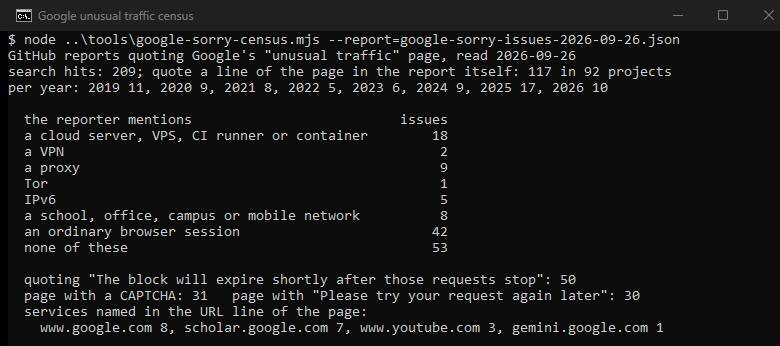
Of the 117 reports we read, 31 quote the CAPTCHA version and 30 the version that says to try again later; the rest quote only parts of the page. The lines at the bottom tell you three things:
- IP address: the address Google judged, which belongs to your whole network, not only to your computer.
- Time: when the block happened, in UTC.
- URL: the service that blocked you. The reports name Google Search, Scholar, YouTube, Gemini, Translate, the Google sign-in page and the Go module proxy.
Google gives no length for the block. The page only says it "will expire shortly after those requests stop".
Why your address takes the blame
The Google help page names the usual sources: you or another user on your network might have malware. Others on a school or business network might be sending automated searches. A VPN you use might carry other customers who do the same, and so might an IPv6 tunnel service. Some VPNs and tunnel services get all their traffic blocked, because Google cannot tell abusive from normal traffic on them. Other customers of your internet provider can be the source too. Many providers put several customers behind one public address, a setup called carrier-grade NAT (CGNAT).
The block page adds three more sources on your own side: "malicious software, a browser plug-in, or a script that sends automated requests". It also appears for search terms that robots use, or for searches sent very quickly.
A real case shows how this looks. A Microsoft forum user got the try-again-later page in March 2026. Both addresses on that page belong to the Cloudflare network, not to a home internet provider, which points to a relay or VPN service in the path.
| What you notice | The likely cause | How to confirm it |
|---|---|---|
| Only with the VPN or relay on | The shared exit of the VPN | Turn it off and search again |
| On mobile data, not on Wi-Fi | The shared address of the carrier | Compare the two networks |
| Everyone in the office or school | Automated tool on the shared network | Ask the network administrator |
| Only this computer, on any network | A plug-in, a script or malware | Private window without add-ons, then a scan |
| Since you installed an SEO or price tool | The tool queries Google | Pause the tool and search again later |
Fixes, in order
- Solve the CAPTCHA. Google says the message goes away once you do. If no CAPTCHA appears, check that your browser supports reCAPTCHA and that JavaScript is on.
- If the page says to try again later, wait or switch networks. There is nothing to solve. The block ends shortly after the automated requests from your address stop.
- Turn off the VPN, relay or IPv6 tunnel. Google suggests uninstalling the VPN or contacting its provider when the message continues.
- Try another network. Search on mobile data, then on Wi-Fi. If one works, the address of the other network is the cause.
- Get a new address. Many providers rotate addresses, so restarting the router can bring a different one. Check it in our IP lookup before and after.
- Look for a plug-in or a script. Open a private window with all add-ons off and search. If the page disappears there, one of your add-ons sends queries to Google. If it appears everywhere on this computer and nowhere else, scan for malware.
- Ask the network administrator. On a school or office network, the source may be on another computer in the building.
If the automated traffic is your own, such as a rank tracker, know what Google counts. Its help page lists software that checks where pages rank, and its Terms forbid automated access that breaks the robots.txt instructions of its pages. Run from a shared office connection, such a tool blocks everyone behind that address, so take it off that connection first. Free public proxies are shared by strangers, so they meet this page like any VPN exit. Our proxy checker shows whether one works at all.
What does not help
The Google help page lists no cookie, cache or browser-data step. The block page talks about your computer network and your IP address, not about stored data, so clearing cookies or switching to a private window changes what the browser sends, not where it sends from. A private window only helps as a test for add-ons, as in step 6. Changing DNS servers does not change the address Google sees either.
Where people meet it
We searched GitHub on September 26, 2026, for issues that quote the page and found 209. GitHub's search also matches comments, so we kept the 117 reports, in 92 projects, that quote a line of the page in the report itself. Only 42 of them mention an ordinary browser session. The largest single sources are automated tools, such as free Google Translate libraries and a proxy tool. When reporters describe their setup, 18 mention a cloud server, a VPS, a CI runner or a container, and 9 mention a proxy. A school, office, campus or mobile network comes up in 8, IPv6 in 5, a VPN in 2, and Tor in 1.
For network administrators and providers
Google asks administrators, internet providers and VPN providers to "locate the sources of automated traffic to Google and block them". Once those searches stop, users on the network should be able to search normally again. Google also warns anyone who buys IP space from an IP broker to review it first and, where possible, test that it reaches major websites without existing blocks.
How we counted
We searched for every GitHub issue that quotes the first line of the page or its line about the block expiring, 209 hits. The search also matches comments, so we kept the 117 whose report quotes a line of the page itself. We counted which lines of the page each report quotes, then set the page text aside and sorted what the reporters wrote about their setup by keyword. We kept only the host from the URL line of the page, and never an address. No request was sent to Google. GitHub reports lean toward developers, so the setups show where the page appears for them, not for everyone.
Sources
- Google Search Help, Resolve Google Search's "Unusual traffic from your computer network" message, read September 26, 2026.
- The block page itself, as quoted in public reports, for example on qutebrowser and Go, 2025.
- Google, Terms of Service, effective July 30, 2026.
- Microsoft Q&A, a try-again-later case, March 4, 2026.
- IETF, RFC 6888, Common Requirements for Carrier-Grade NATs, April 2013.