
Git behind a proxy fails in a few recognisable ways, and each failure names itself in the last line of the error. "Could not resolve proxy" is a setting left over from another network. "CONNECT tunnel failed, response 407" is a proxy that wants a login. "Failed to connect to github.com port 443 via …" is a proxy that is not there. "SSL certificate problem: unable to get local issuer certificate" is a proxy that inspects your traffic and a git that does not trust it. The messages come from curl, the library git uses for HTTP, which is why they read exactly like the errors of curl itself.
We measured all of it. Our script ran Git 2.51.2 for Windows, with libcurl 8.16.0, in 21 setups, twice. Each time it reached the small public demo repository of GitHub through local proxies that log what reaches them. Each run started from an empty git configuration. This guide covers where git takes its proxy and which setting wins. Then come setting and removing it, and the fix for each error in the wording git prints today.
Find the proxy git is really using
Git takes a proxy from its own settings or from the environment, and our run shows which one wins:
| Setup | What happened |
|---|---|
http.proxy set, an https:// remote | Went through the proxy. |
Only https.proxy set | Ignored. Went straight to GitHub. |
HTTPS_PROXY in the environment | Went through the proxy. |
HTTPS_PROXY set to proxy A, http.proxy to proxy B | Went through B. |
http.proxy = A, http.https://github.com.proxy = B | Went through B. |
HTTPS_PROXY set, git -c http.proxy= (empty) | Went straight to GitHub. |
HTTPS_PROXY set, NO_PROXY=github.com | Went straight to GitHub. |
http.proxy=socks5://… | The proxy received an IP address. |
http.proxy=socks5h://… | The proxy received the host name. |
- HTTPS_PROXYthe environment
- http.proxybeats the environment
- http.<url>.proxybeats http.proxy for its host
NO_PROXY, or an empty http.proxy, sends git straight to the host. https.proxy is not a git setting: git ignored it.
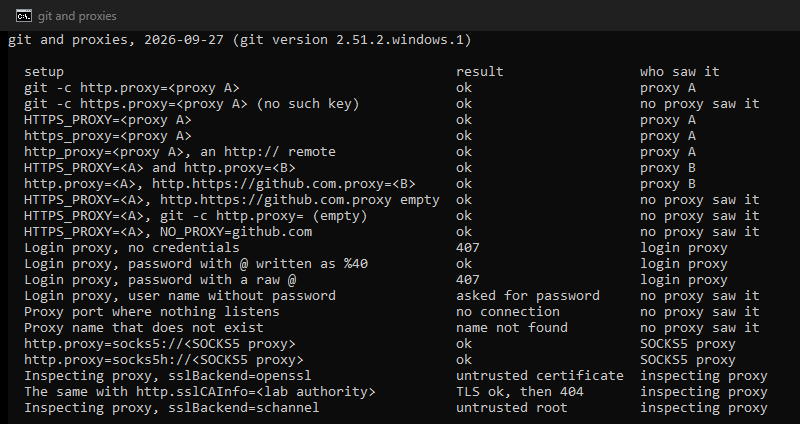
Four rules follow. A per-URL setting beats http.proxy, and any git setting beats the environment. There is no https.proxy key, although several popular guides tell you to set one; http.proxy covers https:// remotes too. An empty value switches the proxy off, even over an environment variable. And socks5h:// lets the proxy look up the name, while socks5:// looks it up on your own machine first.
On Linux and macOS, one more rule comes from curl: the environment variables work "in lower case or upper case", but http_proxy "is only available in lower case". An upper-case HTTP_PROXY therefore does nothing for an http:// remote there. On Windows the case makes no difference, because Windows treats both spellings as one variable.
Before you change anything, list every proxy setting and the file it lives in.
git config --list --show-origin | grep -i proxy
env | grep -i proxy
In PowerShell, the same check is git config --list --show-origin | Select-String proxy and Get-ChildItem env:*proxy*. The .git/config inside a repository overrides --global (~/.gitconfig), which overrides --system. Read every line: a setting nobody remembers making still applies to every clone.
Set a proxy
For every HTTPS remote, set http.proxy.
git config --global http.proxy http://proxy.example.com:3128
For one host only, set the per-URL key, so internal servers stay direct.
git config --global http.https://github.com.proxy http://proxy.example.com:3128
For one command, pass the proxy with -c. This is also how to clone through a proxy from the command line, without touching the configuration.
git -c http.proxy=http://proxy.example.com:3128 clone https://github.com/org/repo.git
With a login, encode special characters in the password. A password p@ss becomes p%40ss.
git config --global http.proxy http://alice:p%40ss@proxy.example.com:3128
In our run, a password with an @ logged in as %40 and failed as a raw @, because git read part of it as the host. Better still, write only the user name, http://alice@proxy.example.com:3128. The git documentation says it then asks for the password "in the same way it does for other credentials", and in our run it stopped to ask. The password then stays in your credential helper instead of your configuration file.
Through a SOCKS5 proxy, use socks5h, so names resolve on the proxy.
git config --global http.proxy socks5h://127.0.0.1:1080
Switch it off
git config --global --unset http.proxy
git config --global --unset-all http.proxy
git config --unset http.proxy
The first removes one global value, the second every global value if the key was set more than once, and the third, inside a repository, a local override. Then clear the environment for the session with unset http_proxy https_proxy all_proxy HTTP_PROXY HTTPS_PROXY ALL_PROXY. Remove the export from your shell profile or the Windows environment variables as well.
To skip the proxy for one command, pass an empty value: git -c http.proxy= fetch. To skip it for one host, set the per-URL value of that host to an empty string. Listing the host in NO_PROXY does the same.
git config --global http.https://git.internal.example.com.proxy ""
The errors, one by one
| Last line of the error | What it means | Fix |
|---|---|---|
Could not resolve proxy: proxy.example.com | The proxy name does not resolve on this network. | Remove it, or make it per-URL. |
Failed to connect to github.com port 443 via 127.0.0.1 after 2059 ms: Could not connect to server | Nothing answers at the proxy address. | Check the port, the proxy and the network. |
CONNECT tunnel failed, response 407 | The proxy wants a login. | Put the login in the URL, encoded. |
could not read Password for 'http://alice@…': terminal prompts disabled | Git asked for the proxy password and could not prompt. | Supply it through a credential helper. |
SSL certificate problem: unable to get local issuer certificate | An inspecting proxy uses an authority git does not trust. | Set http.sslCAInfo. |
schannel: SEC_E_UNTRUSTED_ROOT (0x80090325) | The same, with the Windows backend. | Install the authority in Windows, or use OpenSSL with http.sslCAInfo. |
Could not resolve proxy
A proxy was set on a network where its name exists, and you are now on one where it does not: at home with the office proxy still set, or on a VPN that no longer provides the office DNS. Curl lists this as "The given proxy host could not be resolved." Find the setting with the two listing commands and remove it, or turn it into a per-URL setting for the hosts that really need it.
Failed to connect … via the proxy
The message names github.com, which makes it look as if GitHub is down. The part that matters is via 127.0.0.1, the proxy git tried. Nothing answered there: the port is wrong, the proxy process is down, or this network cannot reach it. Test the proxy with curl, which uses the same library: curl -v -x http://proxy.example.com:3128 https://github.com/ -o /dev/null. If curl fails the same way, the proxy is the problem, and our guide to curl proxy errors covers the next steps.
CONNECT tunnel failed, response 407
The proxy wants a login before it opens the tunnel to an HTTPS remote. Current curl prints CONNECT tunnel failed, response 407. Curl 7.86 and older, released before December 2022, printed the same failure as Received HTTP code 407 from proxy after CONNECT, which is the wording many guides still quote. Put the login in the proxy URL, encoded, or only the user name and let git ask. If the proxy uses NTLM or Negotiate instead of Basic, set http.proxyAuthMethod. The git documentation notes it "only takes effect if the configured proxy string contains a user name part". The login problems outside git are in 407 Proxy Authentication Required.
The SSL certificate problem
An inspecting proxy ends your HTTPS connection, reads it, and opens a new one with a certificate signed by an authority your organization runs. Browsers on managed machines trust that authority, because IT installed it in the system store. Git with OpenSSL uses its own bundle and does not. Our lab reproduced this: a proxy with a certificate from a test authority gave SSL certificate problem: unable to get local issuer certificate. Pointing git at that authority fixed it with verification still on.
git config --global http.sslCAInfo /path/to/company-root.pem
On Windows, Git for Windows can use the Windows certificate store instead, where IT usually installs the authority.
git config --global http.sslBackend schannel
In our run, the schannel backend reported SEC_E_UNTRUSTED_ROOT for our test authority, which is not in the Windows store; with the authority of your company installed there, it should pass. Keep http.sslVerify on. Turned off globally, it tells git to trust whatever sits in the middle of every connection, for every host, which is the exact thing certificate checks exist to prevent. The git documentation adds that any proxy "must be completely transparent and must not modify, transform, or buffer the request or response in any way". An inspecting proxy can therefore break git in other ways too.
Pushes that die through the proxy
A large push through some proxies fails midway. Raising http.postBuffer is the usual advice, but the git documentation itself warns that it "is not, in general, an effective solution for most push problems". It only helps where "a proxy only supports HTTP/1.0 or is noncompliant with the HTTP standard", and it can cost a lot of memory. The more durable fix is to push over SSH on a route the proxy allows, below.
SSH remotes and the proxy
http.proxy does nothing for git@github.com:org/repo.git, because that is an SSH connection, and most company proxies do not carry port 22. Switch the remote to HTTPS with git remote set-url origin https://github.com/org/repo.git, or use the SSH endpoint of GitHub on port 443. The GitHub documentation notes that "The hostname for port 443 is ssh.github.com, not github.com".
git clone ssh://git@ssh.github.com:443/org/repo.git
The proxy that follows the laptop home
A common git proxy complaint comes from a laptop set up for an office network that fails everywhere else, with "Could not resolve proxy" at home. The clean fix is to stop making the proxy global. Set it per URL for the hosts that need it, or in a shell function you run on the office network. A global http.proxy is right only on a machine that never leaves the network the proxy lives on.
Where a proxy of your own fits
Almost nobody needs a commercial proxy for day-to-day git; the proxies in this guide are the ones an organization puts in your way. The exception is automation that must reach a private git host from one fixed address, one the host can put on its allowlist. For that, a fixed-address ISP proxy in the per-URL setting above does the job. Our curl guide shows how to check any proxy before git relies on it.
How we measured
Our script started proxies on 127.0.0.1 that log every request: two plain proxies, one that demands a login with an @ in its password, a SOCKS5 server, and one that inspects HTTPS with a certificate from a throwaway test authority. Git 2.51.2 for Windows, with libcurl 8.16.0, ran git ls-remote against the public demo repository of GitHub in 21 setups. Each run used an empty home folder, no system or global git configuration, no credential helper and no prompts. We ran everything twice on September 27, 2026, with the same result each time. The test authority and its keys lived in a temporary folder that was deleted afterwards; nothing was installed in any certificate store.
Sources
- Git: git-config documentation (
http.proxy,remote.<name>.proxy,http.<url>.*,http.proxyAuthMethod,http.sslCAInfo,http.sslBackend,http.postBuffer). - curl: the curl manual (environment variables,
--socks5-hostname), libcurl error codes, and the source of the 407 message, current, curl 7.86.0, the last with the old wording, and 7.87.0, the first with the new one; release dates from the curl release list. - GitHub Docs: Using SSH over the HTTPS port.