"This site can't be reached. example.com took too long to respond." Under it, Chrome shows three lines of advice: checking the connection, checking the proxy and the firewall, and running Windows Network Diagnostics. At the bottom sits ERR_CONNECTION_TIMED_OUT. The middle suggestion sends many people looking for a proxy they never set. Then they paste the whole list into a search engine, which is how a proxy company comes to write about this page.
We did more than read the page. We made Chrome wait on seven kinds of silence, on purpose, over http:// and over https://, and recorded which error each one gave and how long Chrome waited. The result is a simple rule: the code at the bottom of the page tells you where the silence was. After that come the checks, in the order that finds the cause fastest.
What the page is telling you
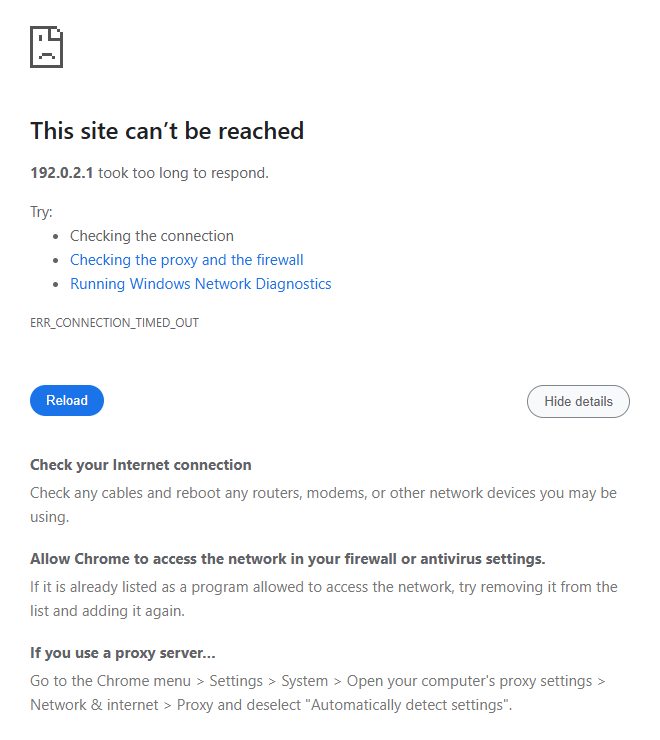
The advice on the page comes from Chrome, and it does not change. Chromium keeps a fixed list of suggestions for each error code. ERR_CONNECTION_TIMED_OUT always gets the same four: check the connection, check the firewall, check the proxy, and on Windows run the network diagnostics. The page shows them as three lines, because the firewall and the proxy share one. If a Wi-Fi network is waiting for a sign-in, ChromeOS adds a line about signing in. Nothing in the list is based on your computer. We loaded a silent address in a Chrome with no proxy set anywhere, and the proxy suggestion was still there.
The Details button shows what each suggestion means. In Chrome 153 on Windows it reads:
- Check your Internet connection: "Check any cables and reboot any routers, modems, or other network devices you may be using."
- Allow Chrome to access the network in your firewall or antivirus settings: "If it is already listed as a program allowed to access the network, try removing it from the list and adding it again."
- If you use a proxy server: "Go to the Chrome menu > Settings > System > Open your computer's proxy settings > Network & internet > Proxy and deselect 'Automatically detect settings'."
The code itself is precise. Chromium lists ERR_CONNECTION_TIMED_OUT as error -118, "A connection attempt timed out." Nothing refused the connection and nothing cut it. Chrome sent the first packets of a connection, and no answer came back.
Which silence gives which error
We ran the installed Chrome 153 on Windows 11, with an empty profile for each case, and made it wait on seven kinds of silence. The silent address was 192.0.2.1, from a block that RFC 5737 reserves for documentation, so nobody answers there. The servers that take a connection and never reply ran on our own machine. Every case ran at least twice, with the same error each time.
- A site at an address nobody answers, no proxy: ERR_CONNECTION_TIMED_OUT after 21 s.
- A site that accepts the connection and never replies: over http://, no error, still loading at the 3-minute limit. Over https://, ERR_TIMED_OUT after 30 s.
- An HTTP proxy at an address nobody answers: ERR_TIMED_OUT after 8 s.
- An HTTP proxy that accepts and never replies: for an http:// site, no error at the 3-minute limit. For an https:// site, ERR_TIMED_OUT after 30 s.
- An HTTP proxy tunnel that opens, then relays nothing: ERR_TIMED_OUT after 30 s.
- A SOCKS5 proxy at an address nobody answers: ERR_PROXY_CONNECTION_FAILED after 21 s.
- A SOCKS5 proxy that accepts and never replies: ERR_TIMED_OUT after 30 s.
We loaded each case with an http:// and with an https:// address; the quiet tunnel only exists for https://. Where a line names no scheme, both gave the same result. Four results change how you should read the page.
ERR_CONNECTION_TIMED_OUT came only from the direct path. Every proxy case ended in another code, or in no error at all. The 21 seconds did not come from Chrome either. Chrome allows a direct connection up to four minutes. Its source notes that the limit of the operating system "varies greatly between systems (anywhere from 20 seconds to 190 seconds)." On our Windows machine, the system gave up first.
A silent HTTP proxy shows the same page with another code. Chrome gives an HTTP proxy its own, shorter clock. It runs 8 seconds on a fast network and up to 30 on a slow one, based on how fast Chrome thinks the network is. When that clock runs out, the error is ERR_TIMED_OUT. Chromium gives both codes the same heading, the same text and the same suggestions. The page even names the website, although the proxy was the silent part. Only the code at the bottom tells the two apart.
On https://, every silence we tested ended in an error. A site or an HTTP proxy that took the connection and then said nothing gave ERR_TIMED_OUT after 30 seconds. Chrome allows 30 seconds for the encrypted handshake with a site. It also gives an HTTP proxy 30 seconds to answer a request for a tunnel, or 10 seconds in Chrome on Android and iOS. Only on http:// did the same silence give no error: Chrome was still waiting after three minutes. A tab that spins without an error page is a sign of its own. The address is http://, and something accepted the connection and then went quiet.
A SOCKS5 proxy fails in two ways. When its address stays silent, Chrome waits about 21 seconds for Windows to give up. Then it shows the proxy page instead: "There is something wrong with the proxy server, or the address is incorrect." When it accepts the connection but never answers the SOCKS handshake, Chrome stops after 30 seconds, the limit it sets for that handshake. That gives ERR_TIMED_OUT and the timeout page again.
The 30 seconds of the quiet tunnel come from the same handshake limit. The proxy opened the tunnel, but nothing came through it, so the encrypted handshake with the site never finished.
Check the proxy in one minute
The rule above points away from a proxy, but the check is quick, so do it once. On Windows 11, open Settings, then Network & internet, then Proxy. Under Manual proxy setup, Use a proxy server should be off. Under Automatic proxy setup, Use setup script should be off. These are the settings Chrome reads: the proxy settings of the current Windows user.
The Details text in Chrome names a third switch, Automatically detect settings. With it on, Windows asks the local network for a proxy setup script, using DHCP or DNS. Microsoft describes it for company networks, where a proxy is common. At home it usually finds nothing, so turning it off changes little. At work it can be how the company proxy is found, so ask IT before you turn it off.
Then look inside Chrome. Open chrome://extensions and check for a proxy or VPN extension. Open chrome://policy and look for a ProxySettings, ProxyMode or ProxyServer entry, which means an administrator or a program set the proxy. ProxySettings is the current policy; Chromium marks ProxyMode and ProxyServer as deprecated: "This policy is deprecated, please use ProxySettings instead." On a Mac, open System Settings, Network, your connection, Details, Proxies, and check that nothing is ticked.
If something is on and you did not set it, read the address before you remove it. Our guide on turning a proxy off explains what a 127.0.0.1 address means and when an unknown one deserves a scan. A proxy address where nothing runs at all gives a different page, covered in there is something wrong with the proxy server.
Check the firewall without switching it off
Chrome asks you to allow Chrome, not to disable the firewall. In Windows 11, open the Windows Security app and select Firewall & network protection. Select Allow an app through firewall, then Change settings, and make sure Google Chrome is in the list and ticked. If it is there already, the help text in Chrome suggests removing it and adding it again. Microsoft adds one warning worth keeping: never allow an app you do not recognize.
A third-party security suite can also drop connections without a word, and that is exactly what a timeout looks like. Open the suite and look at its list of blocked connections or its web protection log. If the site appears there, add an exception for it. That is safer than switching the protection off to test.
The checks that find the real cause
1. One site or every site?
The Chrome help pages start with the right question: does the problem affect one website or several? If every site times out, the fault is on your side: the connection, the router, a VPN or the firewall. If one site times out, open it on a phone over mobile data. If it fails there too, the site is down for everyone, and only waiting helps.
2. DNS with an old address
If a name points to an address that no longer serves the site, Chrome can end up waiting on an address that stays silent. Flush the cache, then ask your usual resolver and a public one:
ipconfig /flushdns
nslookup example.com
nslookup example.com 1.1.1.1
A different answer alone proves little, because big sites hand out many addresses. In our lookups, www.google.com returned 16 addresses from each resolver, in a different order each time. Test the address your usual resolver gave with Test-NetConnection <that address> -Port 443, then the public resolver's address. Your DNS is out of date only when the first stays silent and the second answers. In that case, set the DNS of the connection to a public resolver such as 1.1.1.1 or 8.8.8.8, then reload. On a Mac, sudo dscacheutil -flushcache; sudo killall -HUP mDNSResponder clears the cache.
3. The hosts file
A line in the hosts file overrides DNS for one name. A leftover entry from an ad blocker, a test setup or malware can send a site to an address that never answers. On Windows the file is C:\Windows\System32\drivers\etc\hosts; on a Mac and on Linux it is /etc/hosts. Look for the name of the site. An entry you did not add, pointing a popular site at a strange address, is a sign of tampering.
4. The VPN and the router
A VPN works below the browser, so Chrome sees an ordinary direct connection through it. A VPN that is only half connected can drop traffic without a word, which gives ERR_CONNECTION_TIMED_OUT. Disconnect it and reload. Restart the router as well, since a home router in a bad state can time out on some sites and not on others.
5. The site drops your address on purpose
Some sites do not refuse visitors they do not want. They drop the packets instead, which looks exactly like an outage. Region blocks, and blocks on VPN, datacenter or abused addresses, can take this shape. The sign is that the site works from another network or another country, and never from yours.
To test it, load the site from the connection of a friend or through a proxy in another country. If it loads, the site is up and your address is being dropped. If the block is on a VPN exit or a shared address, turning the VPN off or changing networks solves it. For a region block, a residential proxy in the served region is the usual tool. Our guide to how websites detect proxies explains why a home address gets through where a datacenter address is dropped.
What does not help
- Clearing the cache or cookies. The cache holds pages that loaded, and nothing loaded.
- Turning off IPv6. Chrome starts an IPv4 attempt 300 milliseconds after an IPv6 attempt stalls, so a broken IPv6 path rarely leaves Chrome waiting.
netsh winhttp reset proxy. It resets the WinHTTP proxy, a separate Windows setting that Chrome does not read.- Switching the firewall off. Allowing Chrome does the same job and keeps the protection on.
Windows Network Diagnostics, the third suggestion, is still worth one click. The link hands the failed address to the Windows troubleshooter, which checks the connection to that address. In an Incognito or guest window the link is missing on purpose, because the Windows tool keeps a log of the addresses it checks.
Test the path from the command line
Two commands settle most cases in under a minute. On Windows, in PowerShell:
Test-NetConnection example.com -Port 443
TcpTestSucceeded : True means the path is fine, and the problem sits with the browser. That can be an extension, a policy, the profile, or a firewall or security-suite rule for Chrome alone. False means the timeout is real at the network level, and Chrome only reported it. For an address that nobody answers, the command took about 37 seconds to say False in our two runs. On a Mac or Linux:
curl -v --max-time 10 https://example.com/ -o /dev/null
A hang and then a line such as "Connection timed out after 10004 milliseconds" confirms a timeout on the network; a fast answer points back at the browser. In both cases, tracert example.com on Windows or traceroute example.com elsewhere shows where the packets stop. Read it with care: stars in the middle of a traceroute are routers that decline to answer, not lost packets. Only the last line tells you whether the destination replied.
When the proxy you chose is the cause
If you set a proxy on purpose, the code at the bottom of the page tells you what went wrong:
- ERR_TIMED_OUT after about 8 seconds (up to 30 on a slow network): an HTTP proxy never answered the connection. It is offline, overloaded, or behind a firewall that drops you.
- ERR_TIMED_OUT after about 30 seconds: the proxy took the connection, then stalled. For an https:// site, an HTTP proxy never answered the request for a tunnel, or the tunnel went quiet. A SOCKS5 proxy never finished its handshake. Chrome on Android and iOS gives up on the tunnel request after 10 seconds.
- "There is something wrong with the proxy server": nothing runs at the proxy address, the name does not exist, or a SOCKS5 proxy stayed silent. Our page on that message covers each case.
- A tab that loads forever: an http:// site, and a proxy that took the request and never answered it.
Run the address through our proxy checker. A response time in seconds, not milliseconds, usually means the proxy is overloaded or far away. Free proxies go silent without notice, so test one right before you rely on it. For work that has to keep running, a paid residential proxy gives you one gateway address while the exits behind it change. An ISP proxy gives you one fixed address for sessions that must stay put.
How we measured
Our script started the installed Google Chrome 153 headless on Windows 11, with an empty profile for each case, and set the proxy with the --proxy-server switch. The silent address was 192.0.2.1 from RFC 5737; the servers that accept and never reply ran on 127.0.0.1. Each page load had a limit of 180 seconds. We ran the first five cases six times, the two SOCKS5 cases four times and the six https:// versions twice, on September 26 and 27, 2026, with the same error every time. The command-line checks ran twice on September 27, and we kept their output. Edge uses the same engine but was not measured. We also opened the Details box of the timeout page twice and recorded its text, which was the same both times.
Sources
- Chromium source: net_error_list.h, localized_error.cc, error_page_strings.grdp, http_proxy_connect_job.cc, ssl_connect_job.cc, socks_connect_job.cc, transport_connect_job.cc and .h, and proxy_config_service_win.cc.
- Microsoft Support: Use a proxy server in Windows and Risks of allowing apps through Windows Firewall.
- Microsoft Learn: WinHttpGetIEProxyConfigForCurrentUser, Netsh.exe commands and WinHTTP AutoProxy Support.
- Google Chrome Help: Fix connection and loading errors in Chrome.
- IETF: RFC 5737, IPv4 Address Blocks Reserved for Documentation.