You route a request through your proxy, expect a page, and instead get one line back: 502 Bad Gateway. The connection was not refused. Something on the other end answered. But the answer was broken, so nothing usable ever reached you.
That is what makes a 502 confusing behind a proxy. There are two gateways standing between your client and the target's application: your proxy, and the reverse proxy the target runs in front of its own servers. A 502 is one of them telling you it got a bad answer from the hop behind it. The whole job is working out which gateway is talking, because your proxy failing and the target being down look identical from your terminal and have completely opposite fixes.
What does a 502 Bad Gateway mean with a proxy?
A 502 Bad Gateway means a server acting as a gateway, here your proxy, reached the upstream server but received an invalid or malformed response instead of a valid one, so it could not pass anything usable back to you. RFC 9110 section 15.6.3 defines it as a server "acting as a gateway or proxy" that "received an invalid response from an inbound server it accessed," where inbound server is the spec's term for the next hop toward the origin. It differs from a 504, where the upstream sends no response at all before the timeout.
Two gateways, one error: which one failed?
Keep the two failure points separate, because everything after this depends on it.
Your proxy can emit the 502 itself. It accepted your connection, tried to reach the target, and either could not open a clean upstream connection or got back something it could not parse as HTTP. That is a proxy problem, and a different proxy fixes it.
The target can emit the 502 through its own edge. Most real sites sit behind a reverse proxy or load balancer (Nginx, Cloudflare, an application load balancer). When the site's backend application is crashing or down, that edge server returns a 502 to every visitor, and your proxy simply relays it back to you unchanged. That is the site's problem, it happens with or without a proxy, and no exit swap will move it.
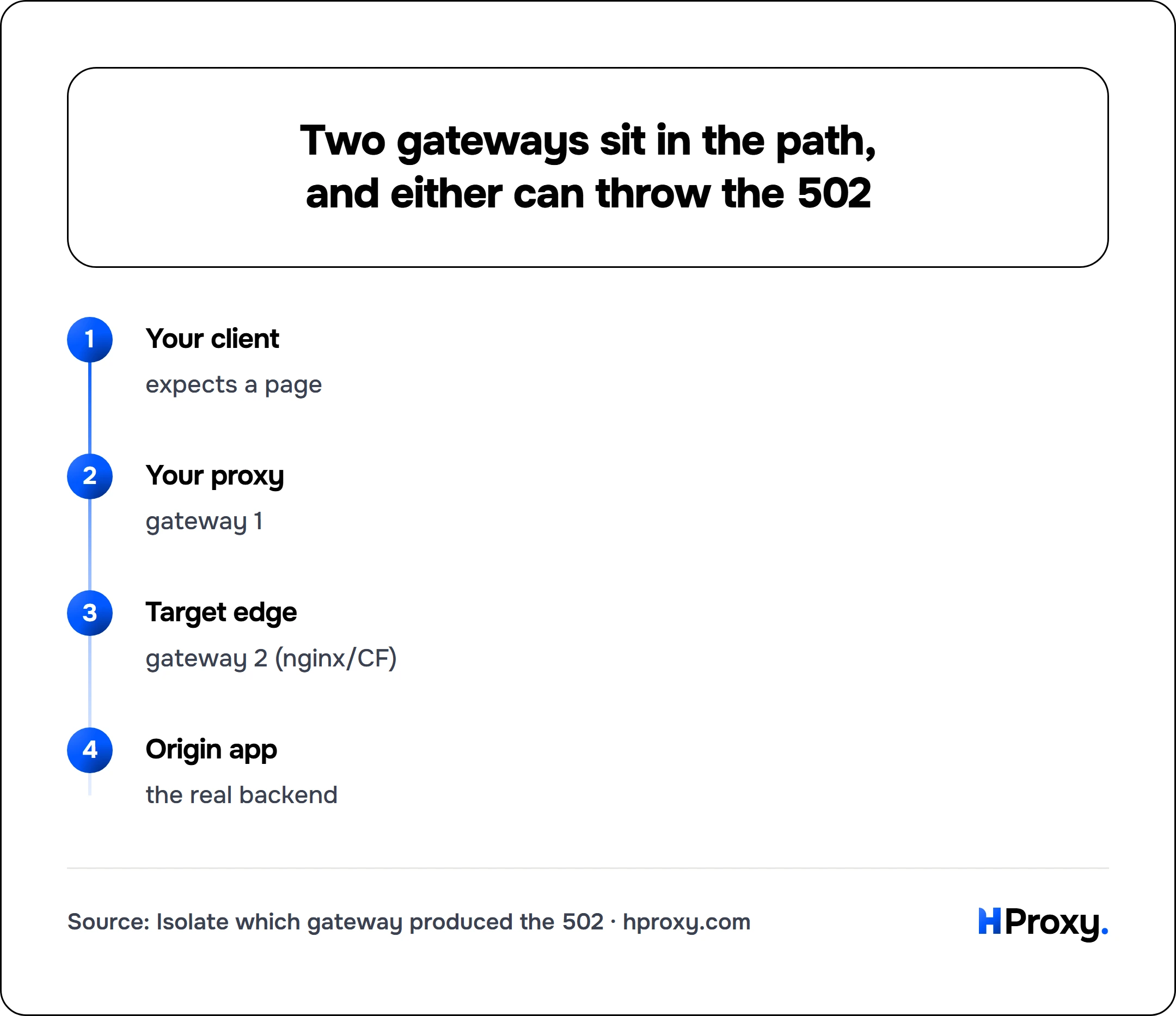
Your client
expects a page
Your proxy
gateway 1
Target edge
gateway 2 (nginx/CF)
Origin app
the real backend
Same three digits, opposite causes. The diagnostic further down tells them apart in three commands, and this is what each case looks like when you produce it on purpose.
What each sender's answer actually looks like
We built all of it on 16 September 2026 with stub servers on our own machine: a proxy that answers 502 itself, a proxy whose upstream refuses the connection, a proxy that relays to a site answering 502, and the same site with no proxy at all. curl 8.16.0 asked for each with -i, so the headers are visible, and the time to the answer was recorded:
| The case | What came back | How long |
|---|---|---|
| the proxy answered 502 itself | 502 with Via: 1.1 stub-proxy and the proxy's body | 34 ms |
| the proxy could not reach its upstream | 502 with Via, body upstream refused the connection | 29 ms |
| the site answered 502 through a working proxy | 502 with the site's Server header and no Via | 30 ms |
| the same site, no proxy in the path | 502, identical headers and body | 31 ms |
| the proxy waited, then answered 504 | 504 with Via | 2,030 ms |
| the site answered 504 through a working proxy | 504 with the site's header | 42 ms |
| the proxy accepted and never answered | no status at all, curl: (28) | the client timeout |
| the site was slow behind a working proxy | no status at all, curl: (28) | the client timeout |
Three rules come out of that.
The Via header names the gateway. Both proxy-written answers carried one and the site-written answer did not, because a Via header is added by proxies on the way through. Not every proxy sets it, which is why the no-proxy control below still matters.
The clock separates 502 from 504. The proxy's 502 arrived in 30 milliseconds and its 504 took the two seconds it spent waiting. A gateway error that comes back instantly is a broken or refused answer; one that comes back slowly is a wait that ran out.
No status at all is a third thing. A proxy that accepts your connection and then says nothing, and a site that is simply slow, both end as a client timeout rather than a 502. If you never see three digits, neither this page nor the 504 page is your problem: your client gave up first, and the timeout is yours to set.
One more, for anything automated: the proxy's 502 left curl at exit code 0 with the gateway page as the body, so a job that checks only the exit code files it as a success. --fail turns the same request into exit 22 with the status in the message.
502 vs 504 vs 503 at a glance
| Status | What it means | Who is talking | First move |
|---|---|---|---|
| 502 Bad Gateway | A gateway got an invalid or malformed response from upstream | Your proxy, or the target's edge | Rotate to a fresh proxy, then isolate |
| 504 Gateway Timeout | A gateway got no response from upstream in time | Your proxy, or the target's edge | Raise timeouts, rotate (504 guide) |
| 503 Service Unavailable | The server itself is overloaded or in maintenance | The target origin, directly | Back off and retry, honor Retry-After |
The line that matters: a 502 is a broken answer, a 504 is a missing answer, and a 503 is the target openly admitting it cannot serve you right now. All three are defined next to each other in RFC 9110: 502 as an invalid response from upstream, 504 as no timely response from upstream, and 503 as a server temporarily unable to handle the request from overload or maintenance. If your error is really a timeout, the 504 gateway timeout guide is the one you want, because the fixes there are different.
The five causes of a 502, and the fix for each
1. The proxy is dead or misconfigured
A half-broken proxy accepts your connection but cannot open a clean route to the target, so it returns a 502 of its own instead of a page. Misconfiguration does the same thing: an exit pointed at the wrong upstream, a stale forwarding rule, or a route that has quietly gone away.
Fix: send the identical request through a different, verified proxy. If it succeeds, the first exit was the problem, full stop. In a script this means never trusting a single proxy: pull from a pool and rotate, and verify each exit before you route real traffic through it.
2. The upstream returned garbage the proxy could not parse
Sometimes the target does answer, but the answer is not valid HTTP: a truncated body, a connection reset partway through, broken chunked encoding, or raw non-HTTP bytes arriving on an HTTP port. A gateway that cannot parse the upstream reply has nothing valid to forward, so it reports a 502.
Fix: retry once, because a mid-response reset is often a transient blip. If it repeats on every attempt, the response is being mangled for a structural reason, usually the next cause, so check that you are speaking the right protocol to the right port and that a TLS-only endpoint is not being hit over plain HTTP.
3. A protocol or port mismatch (not a 502)
This one is entirely on your side, and it is common, but it does not produce a 502. Speak plain HTTP to a SOCKS port, or SOCKS to an HTTP port, and no HTTP status comes back at all: in our curl runs, a SOCKS5 port addressed as http ended in exit 56, a reset, and an HTTP port addressed as SOCKS5 ended in exit 28 or 97. If you see those instead of a 502, check the scheme first. A proxy listening on 1080 is almost always SOCKS; 8080, 3128 and 80 are usually HTTP.
Fix: match the scheme to the proxy and the port to the service. Our cURL proxy guide has the exact http://, socks5:// and socks5h:// syntax and the traps that hide behind each one.
4. A broken proxy chain
If you chain proxies, so your client goes through proxy A, then proxy B, then the target, any dead or garbage-returning hop makes the gateway in front of it throw a 502. From your terminal all you see is a single 502, with nothing to say which link in the chain actually snapped.
Fix: test each hop on its own. Point straight at proxy B, then at proxy A, one at a time, and the 502 will follow the broken link so you can replace just that one. Keep chains as short as the task allows, because every extra hop is one more gateway that can fail this way.
5. The target's server is actually down
The one that is not your fault. When a site's own backend is crashing or offline, the reverse proxy in front of it (Nginx, Cloudflare, a load balancer) returns a 502 to everybody, and your proxy relays it untouched. This 502 belongs to the site, not to you, and no amount of rotating exits will fix it.
Fix: make the same request with no proxy at all. If you still get a 502, the target is down and the only move is to wait and retry later. A Server: cloudflare or Server: nginx header sitting on the 502 is a strong sign the target's edge produced it rather than your proxy. Worth knowing: a site actively blocking your proxy usually answers with 403 Forbidden or 429 Too Many Requests, not a 502, so a genuine 502 with no proxy points at an outage, not a block.
A two-minute diagnostic
When a 502 lands, do not guess. Read the response headers first, then isolate with two more requests. Start by dumping the headers of the failing request:
curl -sSI -x http://192.0.2.10:8080 https://example.com/
HTTP/1.1 502 Bad Gateway
Server: cloudflare
cf-ray: 8f0e2a1b3c4d5e6f-FRA
Content-Type: text/html
A Server: cloudflare or Server: nginx line on the 502, especially next to a cf-ray or a similar edge identifier, means the target's own gateway generated it. Confirm the outage and rule out the proxy with two quick checks:
# 1. Same request, no proxy. Still 502? The target is down, not you.
curl -sS -o /dev/null -w '%{http_code}\n' https://example.com/
# 502

# 2. Same request, a different verified proxy. 200? The first proxy was broken.
curl -sS -o /dev/null -w '%{http_code}\n' -x http://203.0.113.45:8080 https://example.com/
# 200
The logic is simple. If it 502s with no proxy, the site is down and you wait. If it 502s through one proxy but returns 200 through another, the first proxy was the broken gateway and rotation is your fix. Two or three commands and the ambiguity is gone, which beats swapping proxies blindly every time.
Preventing 502s in a pipeline
Once you know the causes, most 502s become a non-event you designed around instead of an incident you react to. The pattern is the same rotate-and-verify discipline that runs through proxies for web scraping:
- Rotate from a verified pool so a dead or misconfigured exit is swapped out instantly and never fatal to a job.
- Verify before use, not when you found it. Our proxy checker confirms an exit is alive, fast and anonymous before you route through it, which removes the dead-proxy cause outright.
- Set protocol and port once, in config, so a protocol mismatch can never appear at runtime.
- Retry with backoff on a fresh IP, but cap the retries: a 502 that reproduces with no proxy is the site's, and hammering it only burns requests.
- Keep proxy chains short, since every hop you remove is one fewer gateway that can hand you a 502.
- Match IP quality to the target. Lenient sites are fine on datacenter exits; sites that fail more under proxy traffic do better on residential IPs that carry an ordinary visitor's reputation.
A 502 through a proxy is not the dead end it looks like. It is one of two gateways telling you it got a bad answer, and once you know which gateway is talking, the fix is either a fresh exit or a wait for the site to recover. Read the header, run the isolation, and you will pick the right one in under two minutes.
If you would rather never route through a broken exit in the first place, our proxy checker tests any proxy for you and confirms it is alive and anonymous before a single real request depends on it.
Sources
- RFC 9110 section 15.6.3, June 2022: 502 is "a server acting as a gateway received an invalid response from an inbound server".
- RFC 9110 section 15.6.5: 504 is "a server acting as a gateway did not receive a timely response from an upstream server".
- RFC 9110 section 3.7: a gateway, also called a reverse proxy, "acts as an origin server for the outbound connection" while forwarding requests inbound, which is why the site has a gateway of its own.
- MDN on the Via header, read 16 September 2026: it "is added by proxies, both forward and reverse".
- libcurl error codes, read 16 September 2026, for exit 28 and exit 22.
- Measured by HProxy on 16 September 2026 with curl 8.16.0: stub proxies that answer 502, that fail to reach an upstream, that wait and answer 504, and that never answer, in front of a stub site that can do the same, all on this machine. Timings included. Nothing outside the machine was contacted.