curl: (5) Could not resolve proxy means curl was told to use a proxy and could not use the address it got. It stops before it contacts anything. curl: (97) means the opposite end: curl reached a SOCKS proxy, and the handshake with it failed. Neither has anything to do with the site you wanted.
We reproduced both on September 27, 2026, with the curl that ships with Windows (8.21.0) and the curl of Git for Windows (8.16.0). The lab had a site that only a proxy can reach and a set of lab proxies, each set up to fail one way. Both builds gave the same exit code in all but two cases, both of them a SOCKS proxy with the site's name looked up on your own machine, shown below. Our guide to exit codes 7, 56 and 60 covers the other proxy failures.
First check: -x is the proxy, -X is the method
Read the name after the colon. If it says GET, POST, PUT or DELETE, the cause is one letter:
$ curl -x GET https://example.com/
curl: (5) Could not resolve proxy: GET
Lower-case -x sets a proxy, so curl tried to find a proxy named GET. Capital -X sets the request method. Both curl builds printed exactly that line, and -x POST printed Could not resolve proxy: POST. With -X GET the same request went through.
curl -X POST -d 'a=1' https://example.com/api
This slip is behind several Stack Overflow questions: Could not resolve proxy: POST in a Watson script, DELETE against a Hadoop server, -xPOST in an Elasticsearch import. The top answers, and one asker's own edit, all come to the same fix: use -X. Its long form, --request, does the same.
Where curl gets a proxy from
If the name after the colon is a real host name, the proxy came from one of three places, and it is often one you forgot:
- The command line:
-xor--proxy, or the SOCKS options--socks5,--socks5-hostname,--socks4and--socks4a. An address with no scheme counts as an HTTP proxy. - The environment:
HTTPS_PROXYfor https:// sites,ALL_PROXYfor everything, andhttp_proxyfor plain http:// sites.NO_PROXYlists hosts to reach without a proxy. - A config file: a
proxy = ...line in.curlrcapplies to every command. curl looks inCURL_HOMEfirst, then in the home folder. On Windows it takes_curlrcas well as.curlrc.
Each of these gave exit 5 in our lab when it named a proxy that does not exist: the flag, HTTPS_PROXY, https_proxy, ALL_PROXY, and a .curlrc or _curlrc in CURL_HOME. -q as the first argument made curl skip the config file.
One rule differs by system. curl documents http_proxy as lower case only, and adds that some systems, like Windows, do not tell the cases apart. We saw both sides:
- On Linux (our server, curl 8.5.0),
HTTP_PROXYin capitals was ignored, andhttp_proxywas used. - On Windows, both builds used
HTTP_PROXYin capitals for an http:// site, because on Windows the two names are one variable.
HTTP_PROXY never applies to https:// sites. With only HTTP_PROXY set, an https:// request went straight out and failed on the site's name.
To find a forgotten proxy:
- bash, macOS and Git Bash:
env | grep -i proxy, thencat ~/.curlrc. - PowerShell:
Get-ChildItem Env: | Where-Object Name -like '*proxy*'. - cmd:
set HTTPlists every variable that starts with HTTP, which showsHTTP_PROXYandHTTPS_PROXYat once, andset ALLshowsALL_PROXY.
Then fix the value or remove it, and remove the line that sets it, in a shell profile or in the Windows environment variables, so it does not come back. For one command, --noproxy "*" switches the proxy off: in our test it bypassed a broken proxy variable. NO_PROXY does the same for the hosts it names. A proxy name you do not recognize on a personal machine deserves the same care as an unknown proxy in the system settings: find what set it before you remove it. The Windows and macOS side is in proxy settings that keep turning back on.
curl (5): what the name after the colon tells you
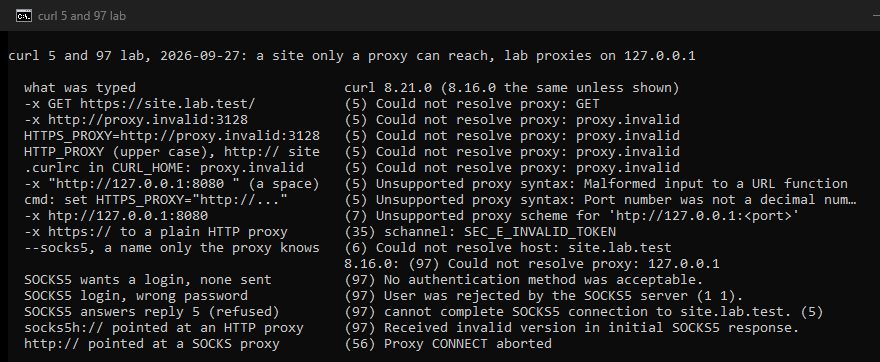
Exit 5 covers two different problems. Either curl could not look the proxy up (Could not resolve proxy), or it could not read the address at all (Unsupported proxy syntax). Both builds printed these:
| You gave curl | curl printed |
|---|---|
-x GET | (5) Could not resolve proxy: GET |
| a proxy name that does not exist here | (5) Could not resolve proxy: proxy.invalid |
| a space at the end of the address | (5) Unsupported proxy syntax ...: Malformed input to a URL function |
| quotes inside the value | (5) Unsupported proxy syntax ...: Port number was not a decimal number between 0 and 65535 |
a ; where the : goes | (5) Unsupported proxy syntax ...: Bad hostname |
a raw @ in the password | (5) Unsupported proxy syntax ...: Bad hostname |
htp:// instead of http:// | (7) Unsupported proxy scheme for 'htp://...' |
The quotes case has a common source on Windows. In cmd, set HTTPS_PROXY="http://proxy.example.com:3128" keeps the quotes as part of the value, as Microsoft's documentation for set says, and curl then stopped with exit 5. set "HTTPS_PROXY=http://proxy.example.com:3128", with the quotes around the whole assignment, worked. A misspelt scheme is the one address mistake that is not exit 5 but 7. The @ case, and how to write symbols in a proxy password, is in our 407 guide.
A real host name after the colon, such as proxy.corp.example.com, can be a company proxy on a laptop that is now on another network. That is the story of a much-read Stack Overflow question about git, whose proxy from work came back at home. Remove the setting, or turn it off with --noproxy "*" until you are back.
curl (97): the SOCKS handshake failed
Exit 97 means curl reached the proxy and the SOCKS conversation failed. curl added this code in version 7.73.0. The message says where it failed:
| What happened | curl printed |
|---|---|
| The proxy wants a login and got none | (97) No authentication method was acceptable. |
| The login was wrong | (97) User was rejected by the SOCKS5 server (1 1). |
| The proxy accepts no method curl offers | (97) No authentication method was acceptable. |
| The proxy refused the site | (97) cannot complete SOCKS5 connection to site.lab.test. (n) |
| A SOCKS4 proxy refused it | (97) [SOCKS] cannot complete SOCKS4 connection to 0.0.0.0:0. (91), request rejected or failed. |
| socks5h:// pointed at an HTTP proxy | (97) Received invalid version in initial SOCKS5 response. |
| socks4a:// pointed at an HTTP proxy | (97) SOCKS4 reply has wrong version, version should be 0. |
In User was rejected by the SOCKS5 server (1 1), the second number is the status the proxy sent back, and anything but 0 means the login failed. Check the user name and password. A password with symbols goes in -U, or percent-encoded in the address.
The number at the end of cannot complete SOCKS5 connection is the proxy's reply code from the SOCKS5 standard. We had the proxy answer with each code in turn:
| Code | The standard calls it |
|---|---|
| 1 | general SOCKS server failure |
| 2 | connection not allowed by ruleset |
| 3 | network unreachable |
| 4 | host unreachable |
| 5 | connection refused |
| 6 | TTL expired |
| 7 | command not supported |
| 8 | address type not supported |
Code 1 is the proxy's own failure. Code 2 is its rules saying no to that site or port. Codes 3 to 5 are the proxy failing to reach the site. In every case the site never saw you.
The wrong protocol shows itself too. A socks5h:// address pointed at an HTTP proxy got Received invalid version in initial SOCKS5 response., because the HTTP proxy answered with an error page instead of a SOCKS reply. The other way round, http:// pointed at a SOCKS proxy, gave (56) Proxy CONNECT aborted. The SOCKS standard puts SOCKS on port 1080 by convention, but a port says nothing for sure; our proxy checker tests an address on HTTP, HTTPS, SOCKS4 and SOCKS5.
Two cases changed between the two builds: --socks5 and socks4://. Both look the site's name up on your own machine, while --socks5-hostname, or socks5h://, lets the proxy do it. For a name that only the proxy can resolve, curl 8.21.0 said (6) Could not resolve host: site.lab.test in both cases. curl 8.16.0 said (97) Could not resolve proxy: 127.0.0.1: it names the proxy, although the name that failed was the site's. With socks4:// it never even reached the proxy. With --socks5-hostname, both builds worked. More on each SOCKS failure is in our guide to SOCKS5 proxy errors.
Two neighbors worth knowing
curl (35) with a proxy has one common cause: a proxy address that starts with https://. That tells curl to speak TLS to the proxy itself, and a proxy that listens in plain HTTP cannot answer. In our test, both Windows builds gave (35) schannel: next InitializeSecurityContext failed: SEC_E_INVALID_TOKEN (0x80090308), with the rest of the line in the language of Windows. Use http:// in the proxy address. It still carries https:// sites, through a tunnel.
curl in Windows PowerShell 5.1 is not curl. There, curl is an alias for Invoke-WebRequest, a different program with different options. Type curl.exe to get the real one, or use PowerShell 7, where the alias is gone.
The full set of curl proxy exit codes
| Exit code | curl's message | Where it fails |
|---|---|---|
| 5 | Could not resolve proxy, or Unsupported proxy syntax | Before contacting anything |
| 6 | Could not resolve host | The site's name, looked up on your machine |
| 7 | Unsupported proxy scheme, Failed to connect, and from 8.20.0 CONNECT tunnel failed | The scheme, the connection, or the tunnel |
| 35 | SSL connect error | TLS to a proxy that speaks plain HTTP |
| 56 | CONNECT tunnel failed (up to 8.19.0), Proxy CONNECT aborted | The tunnel, or a closed connection |
| 60 | SSL certificate problem | Verifying the site, or an inspecting proxy |
| 97 | Proxy handshake error | The SOCKS conversation with the proxy |
Codes 7, 56 and 60 have their own guide, curl 7, 56 and 60, and 97 is also in the SOCKS5 guide. The tunnel failure moved from exit 56 to exit 7 in curl 8.20.0, with the same message, CONNECT tunnel failed, response 407 for example. Our 407 guide shows both.
Testing a proxy properly from the shell
The command that answers most questions about an HTTP proxy in one go:
curl -v -x http://user:pass@proxy.example.com:3128 -o /dev/null https://example.com/
For SOCKS, letting the proxy resolve the name:
curl -v --socks5-hostname proxy.example.com:1080 -U 'user:pass' -o /dev/null https://example.com/
On Windows, write -o NUL. The last line tells you which layer failed: exit 5 is the address, 7 the connection or the tunnel, 97 the SOCKS handshake. Using proxies with curl covers the options in full. To rule out the network, try an address from our free proxy list, free to use with no signup and no key.
Exit 5 and exit 97 side by side
Exit 5: read the name after the colon. GET or POST means -x was meant as -X. A host name means a proxy from the flag, a variable or .curlrc: find it and remove it, or skip it with --noproxy "*". Unsupported proxy syntax means an address curl cannot read: look for a space, quotes or a stray symbol.
Exit 97: in curl 8.21.0, curl reached the proxy. Read the message: a missing or wrong login, a numbered refusal from the proxy, or a proxy that is not SOCKS at all. Older builds such as 8.16.0 also gave 97 when the site's name failed on your own machine, before the proxy ever got the name.
Our own lines come as host:port:username:password, with the login inside. Each client takes those four parts in its own syntax. Pasted into curl as they are, they stop with exit 5 and Unsupported proxy syntax. For curl, write -x http://username:password@host:port.
Exit 5: curl never contacted the proxy
GET or POST after the colon
-x was meant as -X
A host name after the colon
a proxy from the flag, a variable or .curlrc
Unsupported proxy syntax
a space, quotes or a stray symbol
Exit 97: the SOCKS handshake failed
A missing or wrong login
A numbered refusal from the proxy
codes 1 to 8 of the standard
A proxy that is not SOCKS at all
How we tested
On September 27, 2026, we ran one lab on a Windows 11 machine, twice.
- The site.
site.lab.testran on the machine itself, over HTTP and over HTTPS with a certificate from a lab authority. The name exists nowhere else, so only a proxy could reach it. - The proxy that does not exist.
proxy.invalidnever resolves anywhere, which makes it a safe stand-in for a proxy that only exists on another network. - The lab proxies, all on the same machine:
- an open HTTP proxy;
- a SOCKS proxy for versions 4, 4a and 5;
- a SOCKS5 proxy that wanted a login;
- eight SOCKS5 proxies that answered with reply codes 1 to 8;
- one that accepted no method.
- The clients. curl 8.21.0 (the curl in Windows) and 8.16.0 (Git for Windows), 44 cases each. Every case ran without proxy variables and, except the config-file cases, with
-q; the machine has no curl config file. - Linux. The
HTTP_PROXYcheck ran on our own server with curl 8.5.0.
All 88 cases gave the same result in both runs.
Sources
- curl: the manual (
--proxy,--request,--noproxy,--socks5,--socks5-hostname,-q,--configand the environment section), libcurl error codes, CURLINFO_PROXY_ERROR, symbols-in-versions, and the SOCKS source at 8.21.0 and 8.16.0, read September 27, 2026. - IETF: RFC 1928, SOCKS Protocol Version 5, RFC 1929, Username/Password Authentication for SOCKS V5, and RFC 6761, Special-Use Domain Names, read September 27, 2026.
- Microsoft: about_Environment_Variables and set, read September 27, 2026.