The page is text on white, in the default browser font, and it has barely changed in years. It says "Proxy Error", then "The proxy server received an invalid response from an upstream server". Since Apache 2.4.41 the next line reads "The proxy server could not handle the request", followed by a line that begins "Reason:". Older servers also printed the method and the path there; Apache took them out in 2019, in its fix for CVE-2019-10092. A footer names Apache and the site's host name.
People who see it search for the first two lines. Many then look for the proxy setting on their own computer, because the page said "proxy server". That search is a dead end. The proxy in the message belongs to the website. It is Apache, the web server, working as a reverse proxy: it receives your request and forwards it to another program, the "upstream server", which builds the page. When that program fails to answer properly, Apache has nothing to show you, so it shows this. Your proxy settings, your VPN and your browser had no part in it.
The message is searched far more often than the setting behind most of its fixes. Keyword Planner counts about 1,900 searches a month worldwide for the message itself, against 210 for ProxyTimeout.
- the proxy server received an invalid response from an upstream server
- proxytimeout
Which proxy, and which server?
Two proxies exist in this story, and only one of them is yours. A forward proxy is something you configure on your device so that your requests go out through it. That is what a proxy service sells, and what the settings pages on your computer are about. A reverse proxy is something a website runs in front of itself, invisible to you, so that one public server can hand requests to whatever runs behind it. Apache's mod_proxy module is a common reverse proxy, and this page is its failure message. Our explainer on forward versus reverse proxies covers the difference in depth.
Your browser
request arrives fine
Site's Apache (reverse proxy)
forwards to the backend
Backend application
no valid answer = Proxy Error
The request reached the site. Apache accepted it, which is why you got a page at all rather than a timeout. Apache then asked the backend, and the backend crashed, hung past the time limit, closed the connection, or answered with something that was not valid HTTP. Apache reports each of those with a Reason line that says which.
What does the Reason line mean?
We read the Reason lines straight from Apache's source, the 2.4.x branch, on October 23, 2026. Five of them go out with a 502, the page this article is about.
The Reason lines Apache 2.4 writes with a 502, and what each one means
| Reason line | What happened behind the site | Typical cause |
|---|---|---|
| Error reading from remote server | The backend accepted the request, then closed or went silent before a full response | A crash mid-request, a request longer than the proxy timeout, or a reused connection the backend had already dropped |
| Corrupt status line returned by remote server | The backend's first line looked like HTTP but named a version other than 1.x, or ran longer than Apache accepts | A broken or misconfigured backend |
| Malformed connection header | The backend's Connection header could not be parsed | A broken or hand-built response from the application |
| Unexpected Upgrade | The backend switched protocols to something the request did not ask for | A WebSocket or other upgrade answered for the wrong protocol |
| Too many interim responses from origin server | The backend sent more interim (1xx) answers than Apache accepts | A misbehaving backend that keeps answering 100 Continue |
Apache httpd 2.4.x source, modules/proxy/mod_proxy_http.c, read October 23, 2026
Two Reason lines that people often pair with this page go out with a different status. "DNS lookup failure for:" and "Error during SSL Handshake with remote server" come as a 500 Proxy Error. That page shows "The proxy server could not handle the request" and the Reason, without the line about an upstream server.
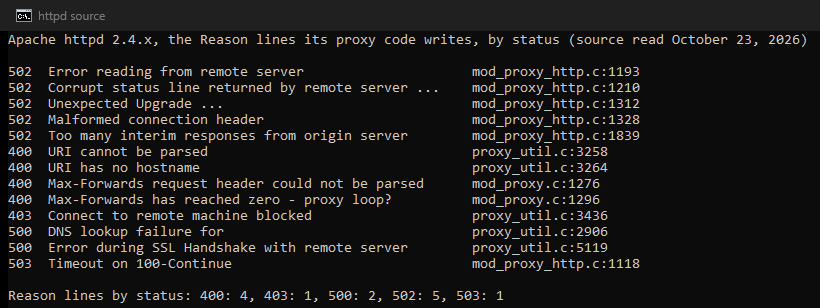
"Error reading from remote server" is the one most people see, and it is the least specific. It says the backend stopped talking, and the why lives in the backend's own log, on the site's side.
What can I do as a visitor?
The honest list is short.
- Wait a minute and reload. Backends restart, deploys roll and single requests time out. Many of these pages are gone on the second try.
- Try another page on the site. If the home page loads and one action fails, such as a search, a report or an export, that action takes longer than the site's backend allows. The site's operators need to know which one.
- Leave your own settings alone. Your proxy configuration, VPN, DNS, cache and cookies play no part. If someone tells you to reset your proxy settings for this page, they have confused the two kinds of proxy.
- Tell the site, with the time and the URL, if the page persists beyond a few minutes. The footer names the server and port, which tells them where it came from.
How do I fix it if I run the server?
Here the page helps, because the Reason line and the error log narrow the cause quickly.
Confirm the backend is up and reachable from Apache. On the Apache host, request the backend directly at the address in your ProxyPass line, for example curl -v http://127.0.0.1:8080/some/path. A refused connection means the backend is not listening, and a hang means it listens without answering. An answer here while Apache still fails points at the proxy configuration.
Read both logs for the same request. Apache's error log carries the Reason and the backend address. The backend's log carries the exception, the crash or the slow query. "Error reading from remote server" next to a worker killed for memory, or a request that took 90 seconds, is a complete diagnosis.
Align the timeouts. Apache's documentation describes ProxyTimeout as the "Network timeout for proxied requests", and its default is the value of Timeout. The timeout= parameter on a ProxyPass line sets the same limit for one backend. If the application may run longer than that, every slow request produces this page. Raise the proxy timeout for the slow location, or lower the application's limit so it fails with its own error page first. A dedicated <Location> with a longer timeout= is cleaner than a global change.
Handle backends that close idle connections. mod_proxy_http reuses connections to the backend. A backend that closes an idle connection without Apache noticing produces "Error reading from remote server" on the next request through it. Two environment variables address this. proxy-nokeepalive "Forces the proxy to close the backend connection after each request". proxy-initial-not-pooled keeps a client's first request off pooled connections, which, in Apache's words, "avoids the "proxy: error reading status line from remote server" error message" caused by that race. disablereuse=On on the ProxyPass line does the same for one backend.
Set up HTTPS to the backend. Proxying to an https:// backend needs SSLProxyEngine On, which is off by default. By default Apache asks for no valid certificate chain from the backend (SSLProxyVerify none). It does check that the certificate names the host in your ProxyPass address (SSLProxyCheckPeerName on). To demand a valid chain, set SSLProxyVerify require with SSLProxyCACertificateFile. A handshake failure shows as the 500 Reason line above.
Check that the backend speaks HTTP. A ProxyPass line that points at a port running another protocol, such as a database, does not always produce this page. Apache passes on a reply that does not start like an HTTP status line as an old HTTP/0.9 response, so the visitor gets raw bytes with a 200 status. A port that closes or stays silent gives "Error reading from remote server" instead, and the error log shows AH01102: error reading status line from remote server.
Preserve the host if the backend routes by it. ProxyPreserveHost On passes the original Host header through, which some applications need before they answer at all.
How does this differ from the other gateway errors?
Apache's Proxy Error page is a 502 with a Reason line, and nginx reports the same class of failure as a bare "502 Bad Gateway". A 504 means the front server waited the full timeout and got nothing. A 503 means a server answered that it cannot serve right now. Our guides to 502 Bad Gateway through a proxy, 504 Gateway Timeout and 503 Service Unavailable cover those. They include the one case where the visitor's own proxy is the cause: a forward proxy you configured yourself, where the fix is a different exit.
Who fixes what?
The proxy server in this message is the website's own Apache, the upstream server is the program behind it, and the failure is between the two. Visitors reload and move on. Administrators read the Reason line, request the backend from the Apache host, align the timeouts, and stop reusing connections to a backend that drops them.
What we could not check
- We did not run Apache. Every Reason line and default on this page comes from Apache's source and documentation, read on October 23, 2026, and an older or patched build can differ.
- We could not see any site's logs, so the typical causes in the table come from the code and the documentation, rather than from counting real failures.
- Apache changes between releases. This page is due for a check by January 23, 2027.
Sources
- Apache httpd source, 2.4.x branch: modules/http/http_protocol.c (the 502 text), modules/proxy/proxy_util.c (the Proxy Error page and the 500 Reason lines) and modules/proxy/mod_proxy_http.c (the 502 Reason lines), read October 23, 2026.
- Apache httpd source, proxy_util.c at tags 2.4.39 and 2.4.41, and the 2.4.x CHANGES entry for CVE-2019-10092 under 2.4.41.
- Apache HTTP Server documentation: mod_proxy, mod_proxy_http and mod_ssl, read October 23, 2026.
- RFC 9110 section 15.6.3, June 2022, for the 502 status.
- Google Keyword Planner, worldwide monthly searches, read October 23, 2026.