The box has several faces. In Chrome it is titled "Sign in" and says "The proxy http://… requires a username and password." In Firefox it reads "The proxy moz-proxy://host:port is requesting a username and password." On Windows it is a credential prompt for a proxy server, raised by apps such as Outlook or Teams. In VS Code, IntelliJ or Visual Studio it is a proxy login window. Whatever the face, you close it, and it comes back.
Behind every face sits the same answer from a proxy: 407 Proxy Authentication Required. The HTTP standard defines it as the proxy saying that the client "needs to authenticate itself in order to use a proxy for this request". Something on your device routes traffic through a proxy, that proxy wants a login first, and every program that meets it raises its own box. Two very different situations produce the loop. On a managed work computer the proxy is real and the saved login has gone stale. On a personal computer, a program you may not know about set the proxy. The box tells you which, because it names the proxy.
Why the box keeps coming back
We measured it. Our script pointed Chrome 153 at a proxy of our own that demands a login, answered each login box in a fixed way, and counted the boxes. Headless Chrome shows no window, so the Chrome DevTools Protocol reports each login request instead. The protocol documents that Chrome would otherwise "display a popup dialog box" for each one.
| What the person answers | Boxes | What happened |
|---|---|---|
| Cancel | 1 | The page showed the bare 407 answer of the proxy |
| Wrong password 3 times, then the right one | 4 | The page loaded after the fourth box |
| Wrong password every time | 13 | Chrome kept asking until we canceled |
| Right password, then 4 more pages, http and https | 1 | No further box on any page or site |
| Right password, then a second tab | 1 | The second tab asked nothing |
| Right password, close Chrome, start it again | 1 + 1 | The box came back after the restart |
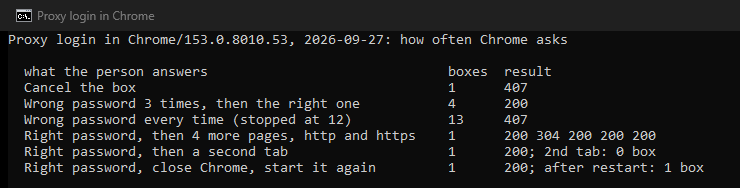
Three rules follow. The box comes back after every rejected answer, and Chrome never stops asking on its own. One accepted login covers every page, site and tab until the browser closes; the proxy saw Chrome send it with each later request. And a restart asks once more. A box that returns within a minute therefore means the proxy keeps rejecting what it gets. That is a wrong or stale password, no saved password, or another program meeting the same proxy on its own.
Read the proxy address in the box
Before you type anything, read the host and port the box names. Chrome prints it in the middle of the box. Firefox writes it after moz-proxy://, a prefix its code adds "so that it's more obvious what the login is for". The Windows prompt names the server. That address decides everything that follows.
| Address in the box | What it usually is | What to do |
|---|---|---|
A hostname on the domain of your organization, such as proxy.corp.example.com:8080 | The work proxy | Update the saved login; ask IT whether it should ask at all |
127.0.0.1 or localhost with a port | A program on this computer running a local proxy | Find the program; remove it or fix its login |
10.x.x.x, 172.16.x.x to 172.31.x.x, or 192.168.x.x | A proxy on the local network: school, office, router | Use it only on that network; remove it elsewhere |
| A public address or hostname you do not recognize | A leftover, or unwanted software routing your traffic | Enter nothing; remove the setting and scan |
| An address from a VPN or security product | A leftover from that product | Uninstall it properly; clear the setting |
The three private ranges come from RFC 1918, which sets them aside for private networks, so a proxy there sits on a local network.
One rule before anything else: a proxy box is a login form that any machine in the path can present. If the address is not one you or your organization put there, cancel. Typing your work or email password into a box from a proxy you cannot account for hands it to whoever runs that proxy. If the address is public, look it up in our IP lookup. A hosting company abroad, on a machine where nobody bought a proxy, is a strong sign the setting should go.
On a work computer
Most company proxies never show a box, because Windows can send your logon for you. Its web layer does so by default only for intranet addresses, and only with the NTLM or Negotiate methods. The Microsoft documentation is explicit that "Credentials are never automatically transmitted with other schemes." A box at work is therefore itself a symptom. The usual causes, in order:
- Your password changed. Windows keeps saved logins, and after a password change the saved one is wrong. Open Credential Manager from the search box on the taskbar, choose Windows Credentials, find the entry naming the proxy server, and edit or remove it. The next box saves the new password, and the loop ends.
- The proxy setting drifted. A manual proxy entered long ago, or a setup script IT has since retired, sends you to a proxy that no longer accepts your login. Compare Settings, Network & internet, Proxy with what IT publishes.
- You are off the company network. A laptop at home that still points at the office proxy either fails to connect or, through a VPN, reaches a proxy that wants a fresh login. Use the company VPN, or let automatic detection apply the proxy only where it exists.
- One app keeps its own proxy. If the box appears in one program only, its own settings hold the stale entry; the developer tools below are the common case.
Stop retrying after two or three wrong attempts. Our test showed every wrong answer reaching the proxy, and Windows domains can lock an account after a set number of failed sign-ins. IT can see the proxy logs and reset the account.
On a personal computer
There is no work proxy, so a program set the address in the box. Find and remove it:
- Switch it off in both Windows panels. In Settings, Network & internet, Proxy, switch off Use a proxy server under Manual proxy setup and Use setup script under Automatic proxy setup. Then press Windows+R, run
inetcpl.cpl, open Connections, LAN settings, and untick both proxy boxes. On a Mac, open System Settings, Network, your connection, Details, Proxies, and switch everything off. Our guide on turning a proxy off covers every system. - Check the layers inside the browser. Open
chrome://policyand look for aProxySettings,ProxyServerorProxyPacUrlentry; on a personal machine, such a policy is a leftover or unwanted software.ProxySettingsis the current one: Chromium marks the other two as deprecated. Checkchrome://extensionsfor a proxy or VPN extension, and the Network Settings of Firefox for a manual entry. - Find what put it there. An address of
127.0.0.1with a port belongs to a program on this computer. It may be a VPN client, an ad blocker, a security suite, or a debugging tool that did not clean up. Uninstall it properly, with the removal tool from its maker where one exists. An unfamiliar public address, or a setup script at an unknown domain, deserves a malware scan. - Watch for it coming back. If the setting is on again after a restart, something rewrites it, and switching it off is never enough. Proxy settings that keep turning back on shows how to find the program, and what to do about a password you may already have typed into such a box.
When a developer tool asks
Many of the people who search for this box meet it in a code editor. Each tool keeps its own proxy setting and its own rules:
- VS Code has, in its own words, "exactly the same proxy server support as Google Chromium". Its documentation says an authentication box "should appear" behind a proxy that wants a login. It therefore behaves like the Chrome test above: every rejected answer brings the box back. VS Code cannot log in to a SOCKS5 proxy at all, so a SOCKS5 proxy with a password cannot work there.
- IntelliJ IDEA, PyCharm, Android Studio and the other JetBrains IDEs keep the proxy under File, Settings, Appearance and Behavior, System Settings, HTTP Proxy. Their documentation says that unless Remember is ticked, "you will be asked to provide the password every time you launch" the IDE. Tick it, or choose Auto-detect proxy settings, the default, which uses the system proxy.
- Visual Studio shows its own box after a restart. For a company proxy it can use your Windows login instead: add
<defaultProxy enabled="true" useDefaultCredentials="true">todevenv.exe.config, or from version 17.8 set the environment variableVS_USE_DEFAULTPROXYtotrueand restart.
Why Windows itself asks
Parts of Windows that work in the background can use a separate proxy layer called WinHTTP. A stale proxy there can raise the Windows prompt even when every browser is fine. In a terminal, netsh winhttp show advproxy shows that layer; on our machine it ran without administrator rights. Microsoft marks the older show proxy as deprecated, although both still ran on our Windows 11 machine. netsh winhttp reset proxy resets it to a direct connection on a personal machine. On a managed work computer, ask first, because there the setting is deliberate.
If you use a proxy on purpose
If you set up a proxy with a login yourself and now get boxes, the login is wrong, expired or not being sent. Check it against the dashboard of your provider, and encode special characters when the password sits inside a URL. 407 Proxy Authentication Required covers each case for code and tools. If many programs on one machine share the proxy, proxy authentication without a password explains how an IP allowlist removes the box entirely.
Before you type anything
Read the address in the box. A work proxy means refreshing the saved login in Credential Manager, or asking IT why it prompts at all. Anything else means removing the proxy from Settings, Internet Options, the policies and extensions of the browser, and any app with its own setting. Then check that it stays gone. Never enter your password into a box from a proxy you cannot name.
How we measured
Our script ran a proxy on 127.0.0.1 that demands a username and password, logs every attempt and forwards to the real site. It started the installed Chrome 153 headless on Windows 11, with an empty profile for each scenario, and set that proxy with the --proxy-server switch. Each login box was counted and answered through the Chrome DevTools Protocol, in six fixed scenarios, on the example domains of IANA. We ran it twice on September 27, 2026, with the same result for everything a person sees. The background requests of Chrome itself also reached the proxy without a login, a number that varied between runs, and never raised a box. The wording of the boxes comes from the Chromium and Firefox source code, confirmed in the English strings of the installed Chrome.
Sources
- IETF: RFC 9110, section 15.5.8 (407) and RFC 1918, private address space.
- Chromium source: login_dialog_strings.grdp. Chrome DevTools Protocol: Fetch domain.
- Firefox source: commonDialogs.properties and PromptUtils.sys.mjs.
- Microsoft: Authentication in WinHTTP, Credential Manager in Windows, Use a proxy server in Windows, Netsh.exe commands, Account lockout threshold and Visual Studio network errors.
- VS Code: Network connections. JetBrains: HTTP Proxy settings.