Your scraper runs clean for an hour, then one line of output changes to curl: (56) Recv failure: Connection reset by peer and the job stalls. cURL's exit codes are blunt but precise, and that is good news: three of them, 7, 56 and 60, cover almost every proxy failure you will meet. Each one points at a different leg of the connection, and each has a real fix that is not "run it again." This is the code-level companion to our full cURL proxy guide. If you need the flag reference first, start there, then come back here when something breaks.
What do cURL proxy errors 7, 56, and 60 mean?
curl 7 means curl could not open a TCP connection to the proxy: it is dead, the port is wrong, or a firewall is blocking it. curl 56 means the connection was made then broke mid-transfer, usually a proxy resetting an overloaded or mismatched connection. curl 60 means the TLS certificate could not be verified, often a proxy intercepting HTTPS.
| Code | curl says | Which leg failed |
|---|---|---|
| 7 | Failed to connect | You never reached the proxy |
| 56 | Recv failure: Connection reset by peer | You reached the proxy, then the connection broke |
| 60 | SSL certificate problem | The handshake ran, but the certificate did not verify |
The pattern to hold onto: the exit code tells you how far the connection got before it died. That alone rules out most wrong guesses.
Every code a proxy can hand you
On 16 September 2026 we built the failures on purpose. Each row below is a stub proxy on this machine that breaks in one chosen way, asked by curl 8.16.0. A public proxy cannot be told to refuse a tunnel on request, so this is the only honest way to publish the wording:
| Exit | What we did to the proxy | What curl printed |
|---|---|---|
| 0 | it refused a plain request with 403 or 407 | nothing at all, empty body |
| 1 | it answered something that is not HTTP | Received HTTP/0.9 when not allowed |
| 5 | we gave a proxy name that does not resolve | Could not resolve proxy: no-such-proxy.invalid |
| 7 | nothing was listening on the port | Failed to connect to ... Could not connect to server |
| 22 | the same 403 or 407, with --fail added | The requested URL returned error: 407 |
| 28 | it accepted the connection and never answered | Operation timed out after 8008 milliseconds |
| 52 | it closed the connection at once | Empty reply from server |
| 56 | it refused the tunnel for an https target | CONNECT tunnel failed, response 403 |
| 56 | it spoke SOCKS5 while addressed as http:// | Recv failure: Connection was reset |
| 60 | the target certificate is signed by nobody | a certificate error, wording depends on the build |
Read that table twice, because the first row is the one that costs people a night.
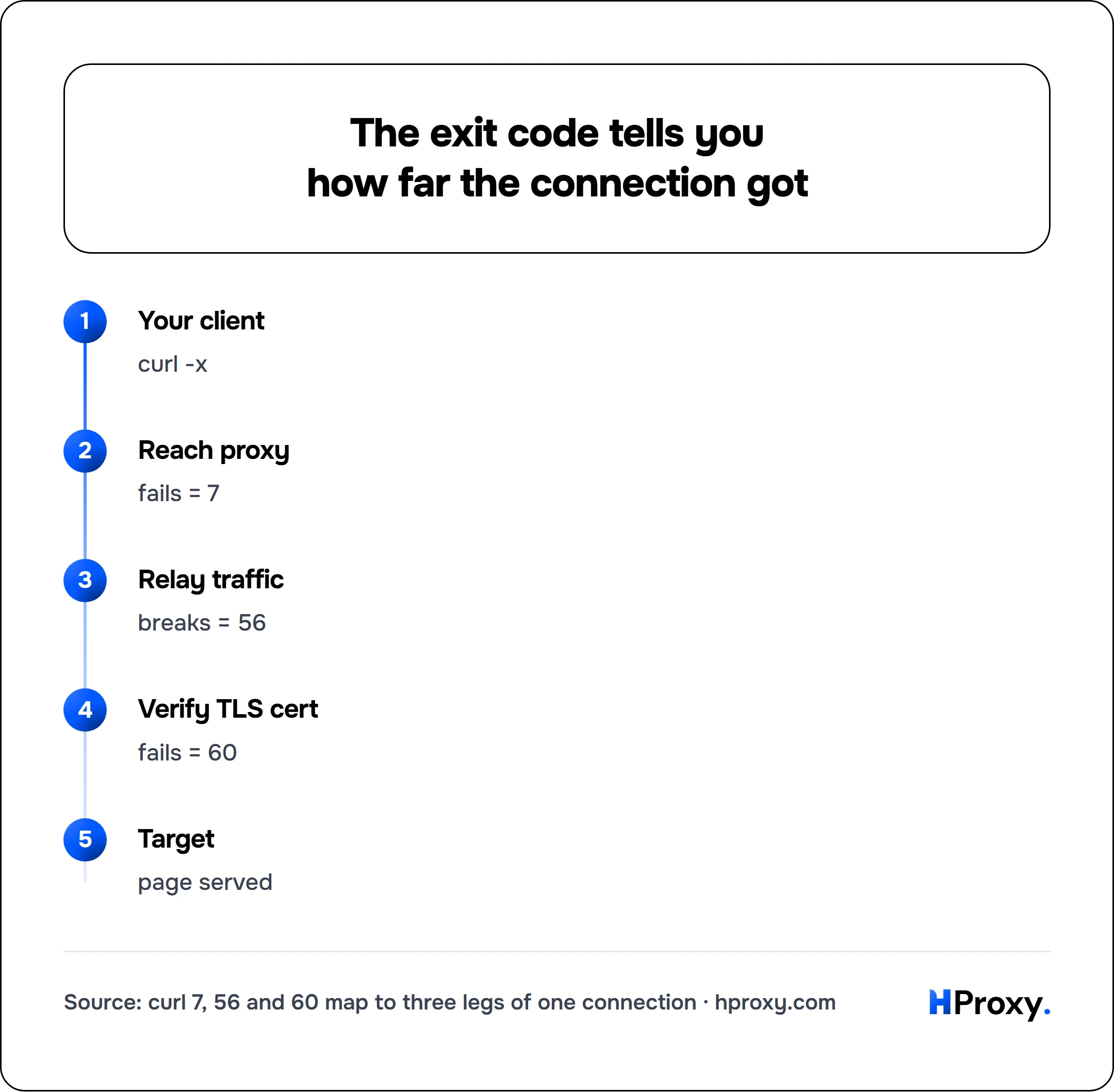
Your client
curl -x
Reach proxy
fails = 7
Relay traffic
breaks = 56
Verify TLS cert
fails = 60
Target
page served
The failure that exits 0
An http:// request and an https:// request through the same proxy fail in completely different ways, and only one of them looks like a failure.
For an https:// target curl asks the proxy to open a tunnel, the CONNECT method of RFC 9110, and a proxy that says no aborts the request. That is exit 56, loud and clear.
For a plain http:// target there is no tunnel. curl sends the whole request to the proxy, the proxy answers 403 or 407, and that answer is the HTTP response. As far as curl is concerned the transfer succeeded:
curl -s -x http://203.0.113.7:8080 http://example.com/ ; echo "exit $?"
# (nothing printed)
# exit 0
In our run both a refusing proxy and one demanding a login ended there: exit code 0, empty body, and a script that checks $? records a success. The request never reached the target.
Two flags make it visible again:
# --fail turns the proxy's own error status into a non-zero exit
curl -s --fail -x http://203.0.113.7:8080 http://example.com/ ; echo "exit $?"
# curl: (22) The requested URL returned error: 407
# exit 22

# or read the status yourself
curl -s -o /dev/null -w 'status %{http_code}\n' -x http://203.0.113.7:8080 http://example.com/
# status 407
Put --fail in every script that uses a proxy. It is the difference between a job that stops and a job that quietly collects nothing, and 407 Proxy Authentication Required is the status you will see most often.
curl 7: Failed to connect to the proxy
Exit code 7 is CURLE_COULDNT_CONNECT. curl tried to open a TCP connection to the proxy and could not. Nothing about the target site is involved yet, because the request never got past its first hop. The libcurl error reference describes code 7 as "Failed to connect() to host or proxy," and the word proxy is the point: when you pass -x, the failed connect is the one to the proxy, not to the site.
curl -x http://203.0.113.7:8080 https://example.com/
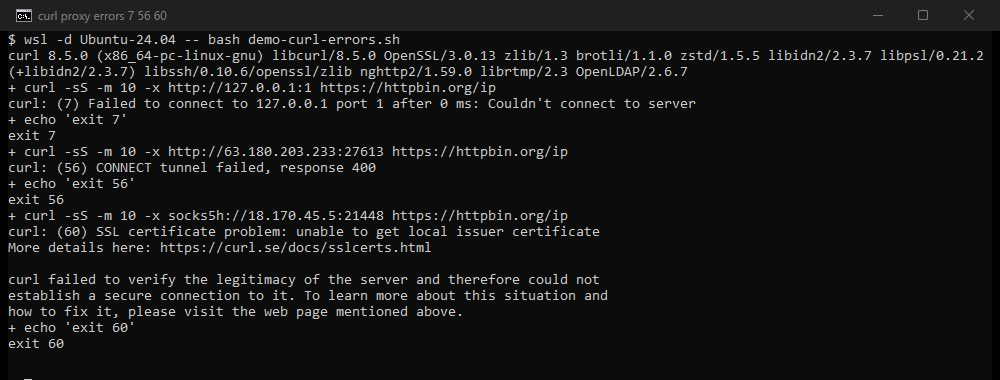
# curl: (7) Failed to connect to 203.0.113.7 port 8080 after 9 ms: Couldn't connect to server
Older curl builds print the underlying OS reason instead, most often Connection refused. Same exit code, same meaning.
Why it happens with proxies. Three causes account for nearly all of it:
- The proxy is dead. With free proxies this is the default state, not the exception. Most entries on any public list are down at any given moment.
- Wrong port for the scheme. A scheme with no port falls back to a default, and the curl manpage sets that default to 1080 for any
-xproxy, not only SOCKS. It bites hardest with SOCKS, whose real port usually is 1080: pointsocks5h://at a bare host and curl dials 1080 whether or not anything is listening there. It also catches anhttp://proxy typed without its port, which quietly gets dialed on 1080 instead of the 8080 or 3128 it actually serves:
curl -x socks5h://203.0.113.7 https://example.com/
# curl: (7) Failed to connect to 203.0.113.7 port 1080 after 6 ms: Couldn't connect to server
- A firewall is refusing you. A local or network firewall can reject the connection before it ever leaves your machine.
The real fix. Confirm the proxy is actually alive before you use it, and give dead ones a short leash so they fail fast instead of hanging:
curl -x http://203.0.113.7:8080 --connect-timeout 5 https://example.com/
If it still returns 7, the proxy is the problem, so swap it. Our proxy checker tells you in one shot whether a proxy is alive, fast and anonymous, and every entry on the free proxy list shows when it was last verified. When you are picking a SOCKS scheme, socks5h:// is usually what you want, since the proxy does the DNS lookup; the cURL guide covers that choice in full.
curl 56: Recv failure and connection resets
Exit code 56 is CURLE_RECV_ERROR, a failure while receiving data. Unlike 7, the connection did get made, then broke underneath you. libcurl's own one-line for 56 is "Failure with receiving network data," deliberately broad: the socket was open and delivering bytes, then the read failed.
curl -x http://203.0.113.7:8080 https://example.com/
# curl: (56) Recv failure: Connection reset by peer
You may also see it worded as a refused tunnel, which is still exit 56. The wording changed between versions, so both of these are the same thing:
curl: (56) CONNECT tunnel failed, response 403        # curl 7.87 and newer (8.16 measured 16 September 2026)
curl: (56) Received HTTP code 403 from proxy after CONNECT   # curl 7.86 and older
The number in that line is the status the proxy answered with, so 403 is policy and 407 is credentials.
Why it happens with proxies.
- The proxy dropped the connection. Overloaded proxies accept you, then reset the socket mid-transfer when they run out of capacity. Free proxies do this constantly.
- Protocol mismatch. If you aim an HTTP proxy scheme at a port that is actually speaking SOCKS, the two ends exchange bytes they cannot parse and the connection resets. A live proxy on the wrong scheme fails here as a 56, where a closed port would have failed earlier as a 7:
curl -x http://198.51.100.14:1080 https://example.com/
# curl: (56) Recv failure: Connection was reset
The mismatch the other way round does not produce a reset. We pointed --socks5-hostname at a stub that speaks HTTP: the SOCKS greeting sat there unanswered and the command ended at exit 28, a timeout. So a hang is a mismatch too, not only a slow proxy.
- The proxy refuses to tunnel. For HTTPS targets curl asks the proxy to
CONNECTto the host and port, the tunnel method defined in RFC 9110 section 9.3.6. A proxy whose policy blocks that destination aborts the tunnel, which shows up asCONNECT tunnel failed, response 403(curl 7.86 and older printedReceived HTTP code 403 from proxy after CONNECT). This is common on ports other than 443. A proxy that needs credentials instead returnsCONNECT tunnel failed, response 407(Received HTTP code 407 from proxy after CONNECTbefore 7.87), which we decode in 407 Proxy Authentication Required.
The real fix. Rotate to a fresh proxy first, since an overloaded one is the usual culprit. If a new proxy behaves the same way, check the scheme against the proxy's real protocol, and use curl -v to watch the CONNECT exchange and see exactly where it aborts. One note on symptoms: a reset (56) is not the same as a stall that ends in a timeout. If the transfer hangs and then times out (curl 28, or an HTTP 504 from the proxy), that is a different failure with different causes, mapped in our 504 through a proxy guide.
curl 60: SSL certificate problem
Exit code 60 is CURLE_PEER_FAILED_VERIFICATION. The TLS handshake got far enough to present a certificate, and curl could not verify it against its trusted CA store. libcurl defines 60 as "The remote server's SSL certificate or SSH fingerprint was deemed not OK," so it fires the instant verification fails, whether the certificate that failed belongs to the target or to a proxy sitting in the middle.
curl -x http://203.0.113.7:8080 https://example.com/
# curl: (60) SSL certificate problem: unable to get local issuer certificate
# More details here: https://curl.se/docs/sslcerts.html
#
# curl failed to verify the legitimacy of the server and therefore could not
# establish a secure connection to it.
The words after the number depend on the build. Our Windows run on 16 September 2026 used the Schannel backend and named SEC_E_UNTRUSTED_ROOT, in the language of the system. The OpenSSL builds say SSL certificate problem: unable to get local issuer certificate. Same exit code, same cause, different sentence, so search on the 60 rather than on the words.
Why it happens with proxies. A plain HTTP proxy tunnels HTTPS untouched, so it should never cause this. When a proxy does trigger 60, it is doing one of these:
- TLS interception. Some corporate and filtering proxies terminate your TLS, read the traffic, then re-encrypt with a certificate signed by their own CA. Your machine does not trust that CA, so curl correctly rejects it.
- An HTTPS proxy with a self-signed cert. If you connect to the proxy itself over TLS with
-x https://, and its certificate is self-signed, the proxy leg fails verification. - A stale CA bundle. Not the proxy's doing, but an out-of-date local certificate store fails the same way.
Why -k is the wrong fix. The tempting one-liner is -k (--insecure), and you should resist it. -k disables certificate verification for the target, the site you actually care about. That does make the error disappear, but it also blinds you to a genuine man-in-the-middle and hides the fact that something is tampering with your traffic. You lose the ability to tell a legitimate corporate proxy apart from an attacker.
Scope the trust instead of removing it:
# WRONG: stops verifying the target, the thing you most want verified
curl -k -x http://203.0.113.7:8080 https://example.com/

# Scoped: skip verification only for an HTTPS proxy's own certificate
curl --proxy-insecure -x https://203.0.113.7:8080 https://example.com/

# Right for a TLS-intercepting proxy: trust its root CA, keep target verification on
curl --cacert /path/to/corp-root-ca.pem -x http://203.0.113.7:8080 https://example.com/
--proxy-insecure is the precise counterpart to -k: the curl manpage scopes it to proxy connections only, so it relaxes verification for the proxy leg and leaves the target's certificate fully checked. Better still, trust the certificate explicitly with --proxy-cacert (for an HTTPS proxy leg) or --cacert (for an intercepting CA), so verification stays on end to end. If the cause is just an old bundle, update your system ca-certificates package rather than turning anything off.
Read the exit code, then isolate
Every one of these resolves faster when you let the exit code point you, then change one variable at a time:
- Same request, different proxy. Fixes it? The first proxy was dead or overloaded. That covers most 7s and 56s.
- Same request, no proxy. Works without a proxy? The proxy or its certificate is the problem, not the target. That covers most 60s and CONNECT-refusal 56s.
- Same proxy,
-vadded. The verbose CONNECT and TLS lines show the exact hop that failed.
Two or three commands and the guessing stops.
If the reader came here from a browser rather than a shell, the same two failures have names there: Chromium calls the first ERR_PROXY_CONNECTION_FAILED (-130), commented in its own source as a failure to resolve or connect to the proxy, and the refused tunnel ERR_TUNNEL_CONNECTION_FAILED (-111). curl 7 and curl 56 are those two, one layer down.
Keep a verified pool within reach so a dead proxy is a swap and not an incident: the free proxy list shows when each entry was last checked, the proxy checker confirms any single proxy before you trust it, and the full cURL proxy guide holds the flag reference behind every fix above. If the proxy came from us and the failure is on our side rather than in curl, the codes we return are catalogued in the API error reference.
Sources
- libcurl error codes, read 16 September 2026: "CURLE_COULDNT_CONNECT (7) Failed to connect() to host or proxy", "CURLE_OPERATION_TIMEDOUT (28)", "CURLE_PROXY (97) Proxy handshake error".
- curl manpage, read 16 September 2026, for
-x, the assumed port 1080,--proxy-insecureand--fail. - curl on SSL certificates, read 16 September 2026: curl verifies by default and refuses the connection when verification fails.
- RFC 9110 section 9.3.6, June 2022: "The CONNECT method requests that the recipient establish a tunnel to the destination origin server identified by the request target".
- Chromium net_error_list.h, read 16 September 2026, for
NET_ERROR(PROXY_CONNECTION_FAILED, -130)andNET_ERROR(TUNNEL_CONNECTION_FAILED, -111). - Measured by HProxy on 16 September 2026 with curl 8.16.0 (Schannel, Windows): nineteen cases against stub proxies on this machine, each broken in one chosen way, plus a listener on port 1080 that received a request made with a proxy string carrying no port. Nothing outside the machine was contacted. The earlier terminal capture above is curl 8.5.0 with OpenSSL on Linux, 2 September 2026.