"The request could not be satisfied" is the headline of the error page that Amazon CloudFront writes itself. CloudFront is a content delivery network in front of a large share of the web, and it shows this page whenever it cannot or will not hand over the site you asked for. The headline never changes, so people search for it, and it tells you almost nothing.
The line under the headline is the diagnosis. We went through every version the Amazon CloudFront and AWS WAF documentation describes, and read 628 public GitHub issues that quote the page, to show which versions people actually meet. If you see a different page, our guides cover the Akamai page Access Denied, Reference #18 and the Cloudflare page Sorry, you have been blocked.
Read the second line first
The page has the same parts every time. A status line such as "403 ERROR" comes first, then the headline and usually a second line. Below them sit a general sentence about "too much traffic or a configuration error" and a footer that reads "Generated by cloudfront (CloudFront)" with a Request ID. Only the second line differs, and it decides who has to act.
Some versions are about you: a security rule that looked at your address or your requests, or a country the site does not serve. The rest are about the site: a setting, its own server, or its code. A visitor can change the first kind and can only wait or report the second.
The versions, and who can fix each one
- "Request blocked." Usually 403. An AWS WAF rule on the site blocked the request. You act first, then the site. 179 reports.
- "Bad request." 403, sometimes 400. HTTP to an HTTPS-only site, or a domain name missing from the CloudFront setup. The site acts. 89 reports.
- "CloudFront attempted to establish a connection with the origin, but..." 504, sometimes 502. The server of the site did not answer in time or refused CloudFront. The site acts. 66 reports.
- "The Lambda function returned an invalid response, or is invalid." 503, sometimes 502. Code the site runs on CloudFront (Lambda@Edge) failed. The site acts. 50 reports.
- "This distribution is not configured to allow the HTTP request method..." 403. The site does not accept that kind of request, for example a POST where only reads are allowed. The site or the app acts. 33 reports.
- "The Amazon CloudFront distribution is configured to block access from your country." 403. A geographic restriction refused your country. On a VPN you act; otherwise the site does. 25 reports.
- "CloudFront wasn't able to connect to the origin." 502. CloudFront could not reach the server of the site at all. The site acts. 16 reports.
- No second line, only the general sentence. 504 or 502. A timeout or a bad answer from the server of the site. The site acts. 54 reports.
If you are the visitor
Request blocked. The site uses AWS WAF, and one of its rules refused you. AWS offers site owners a ready-made list that blocks "requests from VPNs, proxies, Tor nodes, and web hosting providers". A second list holds addresses seen in malicious activity, so the address you arrive from is the usual trigger. Work through it in this order:
- Turn off any VPN or proxy, then reload. If something set a proxy on your device without you, our guide to turning a proxy off shows where it hides.
- Try another network, such as a phone on mobile data. If one works and the other does not, the address is the cause, and how websites detect proxies explains how an address earns a bad name.
- Slow down. A rate rule counts your requests over the last 1, 2, 5 or 10 minutes, 5 by default, and lets you through again once the count falls under its limit. Refreshing a checkout or a ticket page quickly is exactly what it counts.
- Try a private window with extensions off. This helps only when a rule looks at the browser, such as a user agent changed by an extension.
- Send the site the Request ID. When you are blocked on a clean home connection, the rule reaches further than the owner meant, and the Request ID lets them find it.
If you see this page on most websites at once, the cause is your address or your network, not each site. A visitor on Microsoft Q&A described exactly that, and more than 700 people marked the same question.
The country line. The owner chose not to serve your country. CloudFront places your address with a third-party database that AWS gives as 99.8% accurate, and it serves the page when it cannot place an address. On a VPN, the exit address decides: switch it off, or choose a server in a country the site serves. On a trip, the site serves you again when you are home.
Bad request, the method line, Lambda, and the origin lines. These are the site, not you. For Bad request, try the address with https://, and with or without www, because a domain name the site never added to CloudFront gives exactly this page. For everything else, wait a few minutes and try again. AWS itself tells visitors who meet this page on a site they do not run to contact the provider or website owner.
If you run the site
Find which one it is first. The Request ID on the page is the same value as x-edge-request-id in your CloudFront standard logs and the x-amz-cf-id response header; on the two error pages we captured, it matched the header exactly. In the same log line, x-edge-detailed-result-type names the cause, for example ClientGeoBlocked, InvalidRequestMethod, OriginConnectError or OriginDnsError. Two more clues, from AWS: a time-taken far below your average means the edge answered without asking your origin, and a Server header other than CloudFront means your origin produced the 403 itself.
Then go through the causes AWS lists:
- Request blocked: a rule in your AWS WAF web ACL, or a default action of Block that nothing allowed. CloudFront cannot tell that 403 apart from one your origin sent, so open the web ACL and its sampled requests. The managed Anonymous IP list is built to block VPN, proxy, Tor and hosting addresses, so decide whether your customers can live with that.
- Bad request or a plain 403 after a domain change: a CNAME in DNS that points at CloudFront without the alternate domain name on the distribution returns 403. So does a request over HTTP when the behavior allows only HTTPS.
- The country line: your geographic restriction. It applies to the whole distribution. The geographic restriction page says the status code alone cannot separate a location block from another 403; the detailed result type field can.
- Signed URLs and cookies: with Restrict viewer access on, every request without a valid signed URL or cookie gets a 403.
- An S3 origin: without the
s3:ListBucketpermission, S3 answers a missing file with 403 instead of 404, so a typo in a path looks like a permission problem. Check that the object exists before you change a policy. - Two distributions in a row: CloudFront returns 403 when one distribution sits in front of another.
- The origin lines and a bare 504: your server did not answer in time, or a firewall or security group blocks CloudFront, or the server is not reachable from the internet.
- The Lambda line: a 502 can mean your Lambda@Edge function returned a malformed response, and a 503 that it failed or hit a Lambda limit. A 503 can also come from CloudFront itself during a load test.
- A rare 413: CloudFront accepts URLs up to 8,192 bytes and requests up to 32,768 bytes of headers and query strings. In our census, 7 reports quote a 413, and four of their titles name long addresses or queries.
When the error came from the server of the site, CloudFront keeps serving it for 10 seconds by default after a fix, because it caches such error responses for that long. A full invalidation is only needed when you raised that time or your origin sends a longer cache header.
"Missing Key-Pair-Id" is not this page
The old version of this guide listed "Missing Key-Pair-Id query parameter or cookie value" as a version of the page. It is not. The message belongs to signed URLs and cookies and comes as a short XML error with the code MissingKey. Of the 21 reports in our census that quote it, 10 show the XML error and none shows the request could not be satisfied headline. For a visitor, the fix is the same as for any expired private link: open the content again from the site.
What the reports show
Our searches found 628 public GitHub issues in 413 projects that quote the CloudFront error page, from 2014 to 2026, with 68 in 2026 up to September. 26 Request blocked leads with 179 reports, and 165 of them quote a 403 status. It is also growing: 25 reports in 2024, 26 in 2025 and 29 in 2026 so far.
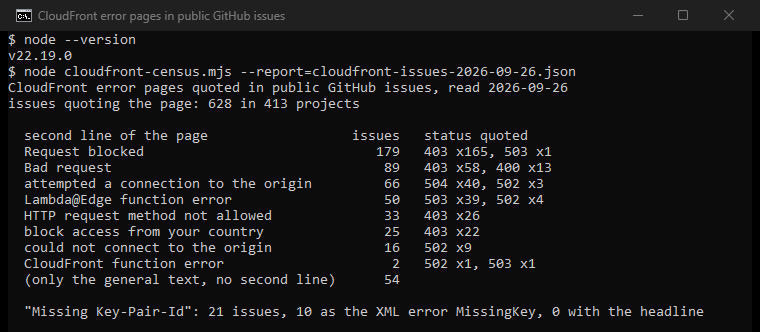
Of the 179 Request blocked reports, 45 mention a browser, 34 a script or tool and 15 a VPN or proxy. The page without a second line came mostly with 504 and 502, which makes it the timeout page. In 394 of the 628 issues, people pasted the Request ID, which only the site owner can use.
About proxies and automated traffic
A proxy does not fix the settings of a site or its server. For Request blocked on an address list, the fix is to switch the VPN or proxy off. Those lists exist to block such addresses, and AWS names the "evasion of geographic restrictions" as one reason sites use them. Do you run a site with a geographic restriction and want to see it the way a visitor abroad does? An ISP proxy in a country you serve gives you one fixed home address there to test from.
If you reach a site through a proxy of your own and see 502 or 504, our guides to 502 Bad Gateway and 504 Gateway Timeout show how to tell a proxy fault from a site fault.
How we counted
We ran five GitHub issue searches on September 26, 2026: the headline, the footer, the country sentence, the method sentence and "Missing Key-Pair-Id". That gave 1,265 issues, and 628 of them quote the page itself. Our tool reads the second line and the status line with regular expressions, and looks for named tools and settings in each report. It counts a Request ID without keeping it. These are mentions, not diagnoses, and GitHub reports lean toward developers.
Sources
- Amazon CloudFront Developer Guide: HTTP 403 status code, geographic restrictions, standard log file fields, HTTP 502, 503 and 504, error caching and quotas, read September 26, 2026.
- AWS WAF Developer Guide: IP reputation rule groups, rate-based rules and the default block response, read September 26, 2026.
- AWS re:Post knowledge center: Request Blocked (updated March 17, 2026), 403 errors in CloudFront and Bad Request.
- Amazon S3 API Reference: GetObject, on 403 for a missing object.
- Microsoft Q&A: how to fix 403 ERROR The request could not be satisfied, August 28, 2023.