The error arrives as a rejected promise from page.goto: Error: net::ERR_PROXY_CONNECTION_FAILED at https://example.com/. The net:: prefix marks one of the network errors of Chromium, the engine that Puppeteer, Playwright and Selenium drive. In automation, three facts explain most cases: your code set the proxy, the browser may not run where your code runs, and each framework takes the proxy and its password in its own way.
We measured ten proxy cases in Puppeteer with Chrome 153, nine mistakes and one working login, and recorded the error each one produced. We also counted how often these errors appear in the issue trackers of the three frameworks.
Which mistake gives which error
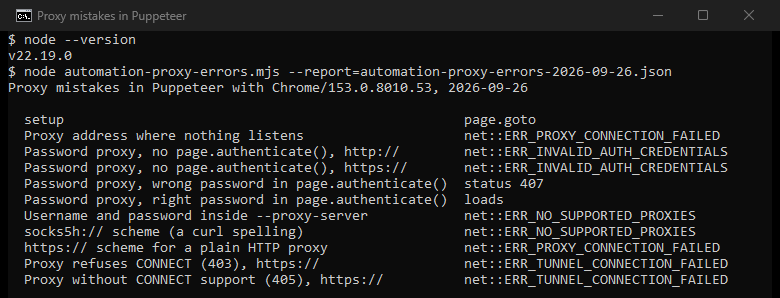
We ran each case twice, with the same result every time. The browser used its own empty profile, and every proxy ran locally:
- Proxy address where nothing listens:
ERR_PROXY_CONNECTION_FAILED. - An https:// scheme in front of an ordinary HTTP proxy:
ERR_PROXY_CONNECTION_FAILED. The scheme names the protocol spoken to the proxy, sohttps://asks for TLS to the proxy itself. - A proxy that needs a password, used without one:
ERR_INVALID_AUTH_CREDENTIALS, for http and https pages alike. - A wrong password in
page.authenticate(): no error at all.page.gotoreturned the 407 answer of the proxy, so only a status check catches it. - The right password in
page.authenticate(): the page loaded. - Username and password inside
--proxy-server:ERR_NO_SUPPORTED_PROXIES. Chromium rejects the whole setting. - The curl spelling
socks5h://:ERR_NO_SUPPORTED_PROXIES. - A proxy that refuses CONNECT with 403, or does not support CONNECT (405), for an https:// address:
ERR_TUNNEL_CONNECTION_FAILED.
The Chromium source defines each code in one line. -130 "Could not create a connection to the proxy server". -111 means "A tunnel connection through the proxy could not be established". -336 says "There are no supported proxies in the provided list". -338 means "Credentials could not be established during HTTP Authentication".
What the issue trackers show
We searched the issue trackers of Puppeteer, Playwright and Selenium for each proxy error, counting only reports that quote the code in their own title or text. That gave 40 issues, and no error leads. ERR_PROXY_CONNECTION_FAILED, ERR_TUNNEL_CONNECTION_FAILED and ERR_SOCKS_CONNECTION_FAILED appear in 9 each, ERR_INVALID_AUTH_CREDENTIALS in 8 and ERR_NO_SUPPORTED_PROXIES in 5. Dead addresses, refused tunnels, SOCKS logins and passwords all bring people to the trackers.
Passing the proxy and the password, per framework
Puppeteer. Put the proxy in the launch arguments and the credentials in page.authenticate(), before the first page load. The Puppeteer docs describe authenticate() as the way to "Provide credentials for HTTP authentication". Check the status too, because a wrong password does not throw:
const browser = await puppeteer.launch({
  args: ["--proxy-server=http://gateway.example:8080"],
});
const page = await browser.newPage();
await page.authenticate({ username: "user", password: "pass" });
const res = await page.goto("https://example.com/");
if (res && res.status() === 407) throw new Error("proxy rejected the password");
Playwright. The proxy option takes the server, a bypass list, and a username and password, which the Playwright docs name for HTTP proxies. It works at launch or per context, so one browser can use different exits. Playwright passes the server to Chromium as --proxy-server, and only when you set one. Older setups launched the browser with the placeholder proxy per-context, which a Playwright contributor called "an example non-empty value to workaround a Chromium/Windows bug". In such a setup, a context without a proxy of its own fails with ERR_PROXY_CONNECTION_FAILED, as a report from 2021 shows. Today's Playwright docs no longer mention the placeholder.
const browser = await chromium.launch({
  proxy: { server: "http://gateway.example:8080", username: "user", password: "pass" },
});
const context = await browser.newContext({
  proxy: { server: "http://gateway.example:8080", username: "user-2", password: "pass" },
});
Selenium. ChromeDriver turns the proxy capability into Chrome switches. A manual proxy becomes --proxy-server, with the SOCKS version taken from socksVersion. The code reads no username or password at all. For a proxy with a password, use IP authorization with the provider, or a local forwarding proxy that adds the credentials. Selenium also describes WebDriver BiDi authentication handlers "such as Basic Auth or Digest Auth"; test whether your version answers the proxy challenge with them. Our Selenium proxy guide shows the setup.
SOCKS5, and why a password cannot work
The Chromium proxy docs state it plainly: "No authentication methods are supported for SOCKSv5 in Chrome". Its SOCKS5 client offers the server only one method, no authentication. So a SOCKS5 proxy that requires a password refuses the browser, and the page load fails with ERR_SOCKS_CONNECTION_FAILED, as it did in our own Chrome test. This holds in all three frameworks, because they all drive the same Chrome.
Use the HTTP endpoint of the same proxy with a password, if your provider offers one, or IP authorization on the SOCKS port. For a SOCKS5 proxy, Playwright also adds a host resolver rule, so names resolve through the proxy instead of locally. What each SOCKS failure means once the proxy is reached is covered in SOCKS5 proxy errors.
The browser runs somewhere else
The proxy works in curl on your machine, while the browser runs in a container, a CI runner or a remote grid. Inside a container, 127.0.0.1 is the container itself, so a proxy on the host is not there. Docker Desktop resolves host.docker.internal to the host, and host network mode shares the host network with the container.
Test from where the browser runs, not from your desk. docker exec -it <container> curl -v -x http://proxy:port https://example.com/ shows what the browser will meet.
Environment variables reach headless Chrome on Linux
On Linux without desktop proxy settings, the normal case in containers and CI, Chromium falls back on environment variables. It reads http_proxy, https_proxy, all_proxy and no_proxy. A variable left in a CI image can thus put a proxy under a run whose code never set one. If that proxy is gone, the run fails with ERR_PROXY_CONNECTION_FAILED, and the proxy appears nowhere in your code.
Always pass the proxy in your code. When a run must go direct, start Chrome with --no-proxy-server, a switch that makes Chrome "always make direct connections" and overrides any other proxy flag. In Selenium, the proxy type direct sets that same switch.
When the proxy accepts and then stalls
When the proxy accepts the connection and never delivers, what you see depends on the timeout. At Puppeteer's default of 30 seconds, the framework's own error came first in our runs, "Navigation timeout of 30000 ms exceeded", for http:// and https:// pages. With a longer timeout, an https:// page failed after 30 seconds with net::ERR_TIMED_OUT, the limit Chrome sets for the proxy's answer; an http:// page kept loading until the framework gave up. An overloaded proxy can behave this way. Run the address through our proxy checker first; a proxy that takes seconds there can time out under a full page load. A target that drops one exit and not another is the address problem in how websites detect proxies, and a proxy that fetches http:// pages but refuses tunnels is covered in ERR_TUNNEL_CONNECTION_FAILED.
A launch that avoids most of it
- Test the proxy with curl from inside the environment the browser runs in.
- Write the scheme the proxy really speaks:
http://for an ordinary HTTP proxy, neverhttps://unless the proxy speaks TLS. - Keep credentials out of the URL; pass them with
page.authenticate(), the Playwright proxy option, or IP authorization. - Check the page status for 407 in Puppeteer.
- Use the HTTP endpoint for password access, and keep SOCKS5 for IP-authorized setups.
- Set the proxy in code, or
--no-proxy-server, so an environment variable cannot choose for you.
Our guides to Puppeteer, Playwright and Selenium cover the rest of the setup. If you need exits for this, our residential proxies work in all three frameworks, with an HTTP endpoint that takes a username and password.
How we measured
Our script drove the installed Google Chrome 153 through puppeteer-core, headless, with an empty profile for each case. The target page, a closed port and three small HTTP proxies written for the test ran on 127.0.0.1. One proxy required a password, one refused CONNECT with 403, and one did not support CONNECT. We ran all ten cases twice on September 26, 2026, with the same result. Playwright and Selenium drive the same Chromium, but we read their behavior from their source and docs and did not run them here. For the trackers, we ran one GitHub issue search per repository and error code.
Sources
- Chromium source and documentation: net_error_list.h, net/docs/proxy.md, proxy_config_service_linux.cc, socks5_client_socket.cc, chrome_switches.h and the ChromeDriver capabilities.cc, read September 26, 2026.
- Puppeteer: Page.authenticate().
- Playwright: the proxy option and the Chromium launcher.
- Selenium: browser options and BiDi network.
- Docker: host network driver and Docker Desktop networking how-tos.
- GitHub: puppeteer issue 2472 (2018) and playwright issue 9437 (2021).