You opened a shop, bank or airline site and got a bare page: "Access Denied", one sentence about permission, and a "Reference #18" number. That page comes from Akamai, the network in front of many large sites, where one of the rules the site set refused your request at an Akamai edge server.
It is rarely about you personally. Testers at Mozilla checked 59 reports of this page from Firefox users and could not reproduce 45 of them, because the same site loaded for them. The block follows your connection or your browser, and this guide shows how to tell which. We also took 133 reference numbers from public reports apart, to show what the number itself says.
What the page says
The Microsoft support article on these blocks shows the page like this:
Access Denied
You don't have permission to access
http://www.microsoft.com on this server.
Reference #18.85c5d617.1549635923.277a7a1
Three details on the page matter:
- The address always starts with http://. It did in all 111 public reports we read that quote the sentence, so it is simply how the page prints it and says nothing about your connection.
- Newer pages add a link to errors.edgesuite.net with the same number. All 120 reports since 2024 that quote the reference line quote the link too. The link only says "Something went wrong with the previous request" and points the site owner to an Akamai tool.
- A site can change the page. Akamai lets a site show its own message instead, so the bare page means the site left the default in place.
What the reference number means
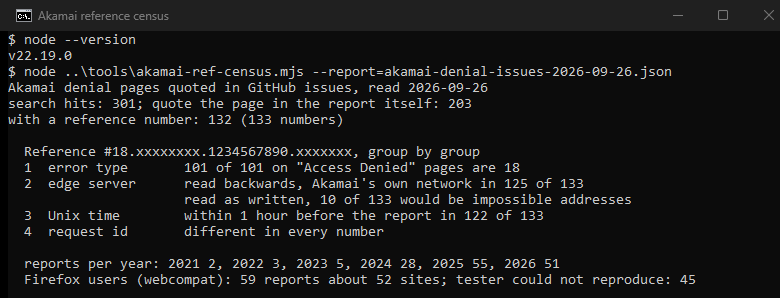
Akamai does not explain the number to visitors. We read 133 reference numbers from public bug reports, group by group, and tested each reading against the data. Here is the reading, on the Microsoft example:
| Group | In the example | What it is | How we know |
|---|---|---|---|
| 1 | 18 | The type of error | 101 of 101 Access Denied numbers carry 18; other Akamai error pages carry 30, 97, 172, 219 or 221 |
| 2 | 85c5d617 | The Akamai server that refused you, as an address written backwards | Read backwards, 125 of 133 are on the Akamai network; read as written, 10 would be impossible addresses |
| 3 | 1549635923 | The time of the block in Unix time, here February 8, 2019, at 14:25 UTC | 122 of 133 fall within an hour before the report was filed |
| 4 | 277a7a1 | This one request | Different in every number |
A second Microsoft example, from a question in its support forum, reads the same way. Its time group points to 16:27 UTC on July 23, 2023, nine minutes before the question was posted, and its server group, read backwards, is on the Akamai network.
As far as the number can be read, then, it holds no address of yours: the second group is an Akamai server. The site sees much more. In the Akamai tool called Translate Error String, the number opens the reason, the firewall rule, your IP address, the edge server, the page you asked for, the time and your browser. Those logs are available for 6 or 24 hours, so send the number the same day.
Why you were refused
A site behind Akamai chooses its rules, and any one of them can show this page:
- Your address has a bad score: Akamai grades "the security risk of an IP address based on previous activities associated with that address". A shared VPN exit carries the history of everyone on it, and many providers share one address among many customers (CGNAT), so one of them is enough.
- Your country or network is not allowed: a site can block whole countries, networks or address lists, or let only listed ones through.
- Too many requests too fast: rate rules count requests. Microsoft says Akamai blocks addresses that connect too often and that the block is usually temporary. Office devices that test the network can set it off for everyone behind the office address.
- Your browser looks unusual: Bot Manager, the Akamai bot product, detects and sorts bots, and a site can act on each kind. An Argos customer was blocked in Firefox 115 ESR but not in Chrome on the same PC. A USPS user got in once a user-agent spoofing extension was gone, while SeaMonkey stayed blocked. The sensor side is in how the _abck cookie works.
- Something in the request matched a firewall rule: the lookup shows the site which rule it was.
No VPN, no extensions, still blocked
Many people who see this page use nothing unusual. Then the address is the likely cause, because providers share and reuse addresses. A forum user in New Zealand got the page on Steam, JB Hi-Fi and TikTok, and a restart of the router cleared it every time, until it came back on some days. Providers rotate customers through addresses, so reconnecting can bring a different one.
One test settles it. Load the site on mobile data, then on Wi-Fi, and if one works, the address is the cause. If both fail in a clean private window, the rule is about more than your address, and the site has to look at the number.
What to do, in order
- Turn off any VPN or proxy and reload. Microsoft support gives the same first step. For a proxy on your device that you never set up, how to turn off a proxy shows where it hides.
- Try another network. Use mobile data, then Wi-Fi, or restart the router to get a new address.
- Try a clean browser. Open a private window with extensions off, as the Mozilla testers suggest. Remove extensions that change how the browser identifies itself, and use a current version.
- Clear the cookies and data of the site. The Mozilla testers suggest this step as well.
- Wait if you were fast. A block for too many requests ends after 10 minutes, or after 10, 30 or 60 minutes when counted across a region.
- Send the number to the site the same day. Include the time, your country and the page you opened. Only the site can see which rule fired, and only for 6 or 24 hours.
For site owners
If your customers send you reference numbers, Akamai gives you three tools:
- Translate Error String: paste up to 10 numbers, in lowercase. It shows the reason, the firewall rule and the details of the visitor, for 6 or 24 hours after the block.
- User Diagnostic Data: a link you send to blocked visitors. It collects their connection details and works for 50 visitors or 7 days.
- Custom deny: replace the bare page with your own message that tells people what to do.
The Microsoft advice for offices is simple: set network test devices to contact its sites less often.
If you run scripts
Most reports of this page on GitHub do not come from browsers. Besides the 59 Firefox reports, 144 come from 136 software projects, from installers and downloaders to scrapers. Bot Manager exists to detect and sort this kind of traffic.
One case needs an address rather than a fix: checking your own site or prices from another country. A shared VPN exit carries the history of everyone on it. Our ISP proxies are dedicated addresses, sold per country and rental period. No address gets past a rule that blocks that country or blocks automated traffic.
How we counted
We searched GitHub on September 26, 2026, for issues that quote errors.edgesuite.net or the sentence "You don't have permission to access ... on this server", and found 301. GitHub's search also matches comments, so we counted a report only when its own title or text quotes the page: the sentence, a reference line or number, the errors.edgesuite.net link, or Akamai's other error page. That left 203, 132 of them with a reference number. We read each number group by group. For the second group, we checked both byte orders against a network lookup and against address space no server can hold, and we stored only the network, never an address. We then sorted the 59 reports on the Mozilla webcompat tracker by what the tester answered.
The limits are real. GitHub reports lean toward developers and Firefox users. The reading of the number is ours, from 133 numbers and the Microsoft examples, and we found no description of it in the public Akamai documentation. 8 second groups decode to the networks of internet providers, and only an Akamai tool can say whether those are Akamai servers.
Sources
- Akamai TechDocs, Translate Error String (updated September 17, 2026) and the error translator API: the lookup and its 6 or 24 hours.
- Akamai TechDocs, User Diagnostic Data, updated September 25, 2026.
- Akamai TechDocs, Verify an IP.
- Akamai TechDocs, Reputation profile, IP Geo, Rate policy, Custom deny and About bots.
- Microsoft Learn, Access Denied when you visit Microsoft websites hosted on Akamai CDN, updated February 12, 2026.
- Microsoft Q&A, a Reference #18 question and its answer, July 23 and 24, 2023.
- Mozilla webcompat reports on Argos and USPS, 2026.
- Linus Tech Tips forum, a Reference #18 thread, May 15, 2022.
- IETF, RFC 6888, Common Requirements for Carrier-Grade NATs, April 2013.
- Wikimedia Meta-Wiki, Help:blocked of the open proxies project, on providers rotating addresses.