A 407 Proxy Authentication Required comes from the proxy between you and the site, not from the site. The proxy wants a login before it forwards anything, and it did not get one it could use: none was sent, the one sent was changed on the way, or it came in a form the proxy does not accept.
407 Proxy Authentication Required
HTTP status code
The proxy's version of a 401. The proxy between you and the site wants a login before it forwards anything, and it did not get one it could use: none was sent, the one sent was changed on the way, or it came in a form the proxy does not accept.
We reproduced each of those on 27 September 2026. We set up a site that only a proxy can reach and four proxies on our own machine. Then we ran 129 test cases from curl, Python, PowerShell and two shells, each of them twice. This page shows what each tool printed and what fixed it.
What a 407 means
The HTTP standard defines 407 as the proxy's version of a 401: the client "needs to authenticate itself in order to use a proxy for this request". A proxy that answers 407 has to name the login it wants in a Proxy-Authenticate header. The client answers with a Proxy-Authorization header, which goes to that proxy and no further (RFC 9110).
This is the whole exchange as curl -v printed it in our lab, for an https:// site:
> CONNECT site.lab.test:443 HTTP/1.1
> Host: site.lab.test:443
> User-Agent: curl/8.21.0
> Proxy-Connection: Keep-Alive
>
< HTTP/1.1 407 Proxy Authentication Required
< Proxy-Authenticate: Basic realm="lab"
< Content-Type: text/plain
< Content-Length: 34
<
curl: (7) CONNECT tunnel failed, response 407
For an https:// site the client first asks the proxy to open a tunnel with a CONNECT request, and the 407 answers that request. The site is not involved yet. In all 44 of our cases that ended in a 407, the site received nothing.
With a login, the same CONNECT carried one more line:
> Proxy-Authorization: Basic bGFidXNlcjpsYWJwYXNz
That string is labuser:labpass in base64, which is a way of writing, not encryption. Basic sends the user name and password "over the network as cleartext" (RFC 7617). The CONNECT also goes out before the encryption with the site starts. So with an http:// proxy, the password crosses the network readable, even when the site is https://.
Three status codes get mixed up here, and they come from two places:
| Code | Sent by | What it says |
|---|---|---|
401 Unauthorized | the site | log in to the site |
403 Forbidden | the site | understood, and refused |
407 Proxy Authentication Required | the proxy | log in to the proxy first |
If yours is the site-side refusal, see how to fix 403 Forbidden through a proxy.
What each tool prints
Every tool words the same 407 differently. Find yours:
| Tool | What it prints for a 407 |
|---|---|
| curl 8.20.0 and newer | curl: (7) CONNECT tunnel failed, response 407 |
| curl 7.87.0 to 8.19.0 | curl: (56) CONNECT tunnel failed, response 407 |
| curl 7.86.0 and older | curl: (56) Received HTTP code 407 from proxy after CONNECT |
curl, http:// site | nothing, exit 0; with --fail: curl: (22) The requested URL returned error: 407 |
| Python requests, and pip | ProxyError('Cannot connect to proxy.', OSError('Tunnel connection failed: 407 Proxy Authentication Required')) |
Python requests, http:// site | no exception; status_code is 407 |
| Python urllib | <urlopen error Tunnel connection failed: 407 Proxy Authentication Required> |
| httpx | httpx.ProxyError: 407 Proxy Authentication Required |
| PowerShell 7 and .NET | The proxy tunnel request to proxy '...' failed with status code '407'." |
PowerShell 7, http:// site | Response status code does not indicate success: 407 (Proxy Authentication Required). |
| npm 10.9 and 11.8 | npm error code E407 |
| Node.js fetch with undici's ProxyAgent | Proxy response (407) !== 200 when HTTP Tunneling |
| axios | Request failed with status code 407 |
| git | CONNECT tunnel failed, response 407 |
| Java | no exception; the status code is 407 |
| Gradle | Received status code 407 from server: Proxy Authentication Required |
| Chrome | a sign-in box |
curl changed the exit code in version 8.20.0, released on 29 April 2026. A refused tunnel used to exit with 56 and now exits with 7, with the same message. A script that checks for 56 needs to check for 7 as well. The older wording, Received HTTP code 407 from proxy after CONNECT, was replaced in curl 7.87.0 in December 2022, and many guides still quote it. On our Windows 11 test machine, the curl in Windows was 8.21.0 and Git for Windows had brought its own 8.16.0, so the same machine gave both codes.
On a plain http:// site there is no tunnel. The 407 is the answer itself, and curl, requests and Java hand it back as a normal response. A script that only catches errors will miss it. Add --fail to curl, call raise_for_status() in requests, or check the status code.
PowerShell writes its message in the language of Windows. Only the 407 and the reason phrase from the proxy stay the same, so search for the number, not the sentence. The odd ." at the end of the tunnel message is really in the .NET source.
Behind a Squid proxy, cancelling the browser's sign-in box shows a page titled "ERROR: Cache Access Denied", which Squid sends with its 407. Why Chrome keeps asking is covered in the sign-in box guide. Postman takes a proxy login under its proxy settings: "This proxy requires authentication" for the default proxy, "Proxy auth" for a custom one. Gradle takes it as systemProp.https.proxyUser and systemProp.https.proxyPassword in gradle.properties.
The lines for npm, pip, git, Node.js, Java and .NET come from our own tests behind these guides: npm, pip, git, Node.js, Java and C# and .NET. For Python, see requests and httpx.
The causes, and the fix for each
Six things produced a 407 in our tests. They are listed in the order to check them.
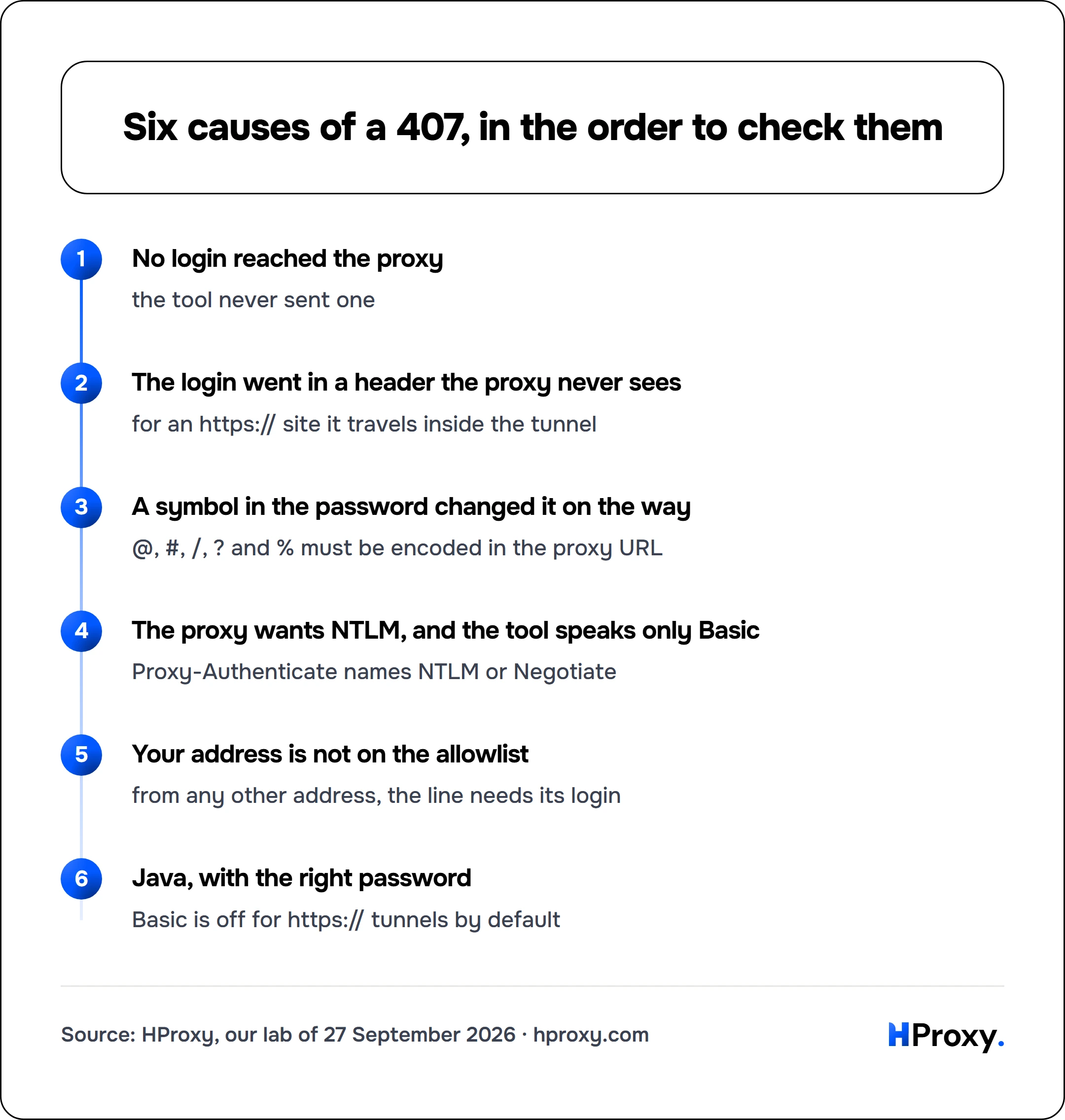
No login reached the proxy
the tool never sent one
The login went in a header the proxy never sees
for an https:// site it travels inside the tunnel
A symbol in the password changed it on the way
@, #, /, ? and % must be encoded in the proxy URL
The proxy wants NTLM, and the tool speaks only Basic
Proxy-Authenticate names NTLM or Negotiate
Your address is not on the allowlist
from any other address, the line needs its login
Java, with the right password
Basic is off for https:// tunnels by default
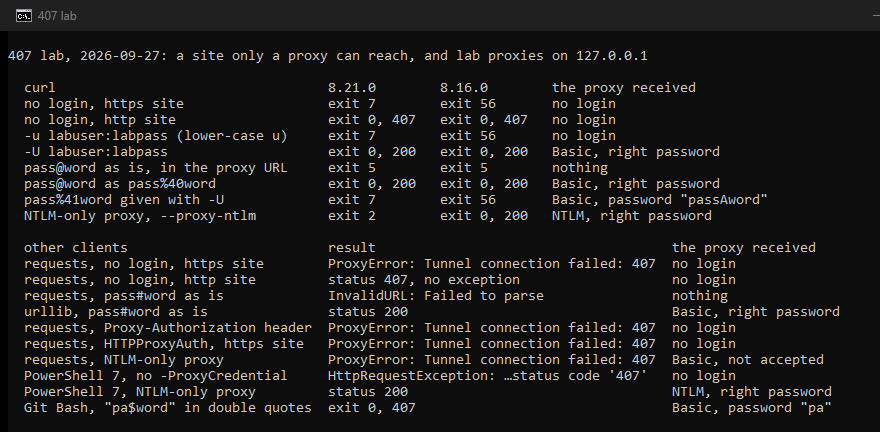
1. No login reached the proxy
The plain case: the tool never sent a login to the proxy. In curl, both of these reached our proxy with the right password:
curl -x http://proxy.example.com:8080 -U 'user:pass' https://example.com/
curl -x http://user:pass@proxy.example.com:8080 https://example.com/
Lower-case -u is the login for the site. With it, our proxy received no login and answered 407, for https:// and http:// sites alike. The proxy login is capital -U, or --proxy-user.
In Python, the login goes in the proxy URL, http://user:pass@proxy.example.com:8080, either in proxies= or in HTTPS_PROXY. requests read it from both. In PowerShell 7 it goes in -ProxyCredential:
$cred = Get-Credential
Invoke-WebRequest https://example.com/ -Proxy http://proxy.example.com:8080 -ProxyCredential $cred
PowerShell sent the login only after the proxy had answered 407 once, so a proxy log shows one refused request first. A login written into the -Proxy address did nothing: the proxy received none. The error message then printed that address with the password in it, so the password ends up in any log that keeps the error.
2. The login went in a header the proxy never sees
Some guides build the Proxy-Authorization header by hand and add it to the request. For an https:// site that header never reaches the proxy. The request's headers travel inside the tunnel, to the site, and the proxy only sees the CONNECT. In our lab, curl -H and headers= in requests and in httpx all got a 407, and the proxy saw no login.
That is worse than a failed request. Through a proxy that needed no login, the same header arrived at the site, password included, from all three.
requests has a helper for proxy logins, HTTPProxyAuth, with the same limit. It worked for an http:// site, where the proxy receives the whole request, and failed with a 407 for an https:// one. Put the login in the proxy URL instead. In curl, a header meant for the proxy goes in --proxy-header, which delivered it and got through.
3. A symbol in the password changed it on the way
A password can be right and still arrive wrong. The proxy address is a URL, and some characters mean something in a URL. We gave our proxy accounts whose passwords held one symbol each, and typed them into the proxy URL as they are:
| Symbol → write it as | curl | requests |
|---|---|---|
@ → %40 | exit 5 | works |
: → as it is | works | works |
# → %23 | exit 5 | InvalidURL |
/ → %2F | exit 5 | InvalidURL |
? → %3F | exit 5 | InvalidURL |
%41 → %2541 | turns into A | turns into A |
Both curl versions behaved the same. Python's built-in urllib took every one of these as it is, except %41, which turned into A there too. curl stops before it sends anything, with curl: (5) Unsupported proxy syntax. A /, ? or # ends the address part of a URL (RFC 3986), so curl read the rest of the password as a port number. The colon is safe, because the first colon separates the user name from the password. Percent-encoded, every one of these passwords reached the proxy intact in both curls, requests and urllib.
Whether a raw @ works depends on the tool. curl refused it and git sent a wrong login, while requests, urllib and npm got it right. %40 worked in all of them.
curl's -U takes @ # / ? as they are, which makes it the easy way out. It is not fully literal, though. curl decodes percent codes in -U too, as its documentation says, so pass%41word given with -U arrived as passAword. Write a % as %25 even there.
The shell can change the password before curl sees it. Inside double quotes, Git Bash and PowerShell both read $word in pa$word as a variable, found nothing, and sent pa. The proxy answered 407. In single quotes the password arrived intact:
curl -x 'http://user:pa$word@proxy.example.com:8080' https://example.com/
Put a login with a $ in it inside single quotes.
4. The proxy wants NTLM, and the tool only speaks Basic
A company proxy may want the Windows sign-in, NTLM or Negotiate, instead of Basic. The Proxy-Authenticate line in curl -v tells you: it names NTLM or Negotiate. We ran a proxy that accepts only NTLM and tried each client with the right password:
| Client | Against an NTLM-only proxy |
|---|---|
| Python requests and urllib | sent Basic, got 407 again |
PowerShell 7, -ProxyCredential | answered NTLM, got through |
| curl 8.16.0 (Git for Windows) | 407 by default; got through with --proxy-ntlm or --proxy-anyauth |
| curl 8.21.0 (in Windows) | --proxy-ntlm: "the installed libcurl version does not support this" |
curl made NTLM an optional part of the build in version 8.20.0, and plans to remove it in September 2026. Microsoft has deprecated NTLM as well, in favour of Negotiate with Kerberos. Run curl -V: if NTLM is missing from the Features line, that curl cannot answer such a proxy. Which curl runs depends on your PATH. On our test machine, PowerShell 7, cmd and Git Bash all started Git's curl, not the one in Windows.
When the proxy takes your Windows sign-in, PowerShell has -ProxyUseDefaultCredentials, and a curl built with SSPI takes -U :, a single colon, to use the account you are logged in with. We did not run those two, because no test was ever given the Windows account of the machine. Python's requests and urllib have no NTLM of their own: both sent Basic and got the 407 again. Our pip guide covers the workaround for pip. Gradle wants the Windows domain as well, as domain/username in http.proxyUser.
5. Your address is not on the allowlist
Some proxies check where a request comes from instead of asking for a password. With us, a whitelisted IP connects without any login, and a Residential Premium plan takes up to 150 addresses (our docs). From any other address, the line needs its user name and password.
Addresses change: a new network, a VPN, or a cloud server whose outgoing address is not your office's. Check the address the proxy sees from the machine that sends the requests, for example with our IP checker, and compare it with your list. Two limits from our docs. A whitelisted connection carries no user name, so it takes no country or city targeting. And every device behind a shared office, VPN or cloud address spends your plan's traffic, so whitelist only addresses you alone control.
6. Java: the right password, and still a 407
Java turns off Basic login for https:// tunnels by default. In our test, Java 17 and Java 8 sent the CONNECT without the password and returned 407, without an exception. Clearing one property as the first line of main fixed it:
System.setProperty("jdk.http.auth.tunneling.disabledSchemes", "");
Why it has to be the first line is in our Java proxy guide.
Test it in one line
Before you change any code, reproduce the 407 with curl. It shows what the proxy asks for and what you send:
curl -v -x http://proxy.example.com:8080 -U 'user:pass' -o /dev/null https://example.com/
Read three lines. Proxy-Authenticate names the login the proxy wants. Proxy-Authorization shows whether yours went out. The last line says whether the tunnel opened. On Windows, write -o NUL. In Windows PowerShell 5.1, type curl.exe: there, curl runs Invoke-WebRequest, not curl. The curl proxy guide covers the other options.
If curl gets through and your program does not, the login is fine and the problem is how your program passes it: see the causes above. If curl fails with another code, the curl error guide explains each one. To rule out the network, try a proxy that needs no login, from our free proxy list or its API, which needs no key. Our proxy checker tests a line with or without its login, on our site. If the proxy answers but the site times out, that is a different error: 504 Gateway Timeout through a proxy.
If the proxy is ours
On our gateway, a 407 means the user name or password on the line is wrong, or the line belongs to another plan. The fix is to generate the line again (error codes). Our lines come as host:port:username:password, with the targeting inside the user name: the four parts every client on this page takes, each in its own syntax. On Residential Premium, a whitelisted address needs no login at all. Residential Lite starts at $0.44 per GB (residential proxies), and everything else about the lines is in our docs.
How we tested
On 27 September 2026 we ran one lab on a Windows 11 machine, twice. The site, site.lab.test, ran on the machine itself, over HTTP and over HTTPS with a certificate from a lab authority. That name exists nowhere else, so a client could reach the site only through one of four proxies on the same machine:
- one that wanted a Basic login and knew eight accounts, seven of them with one symbol each in the password;
- one that accepted only NTLM and checked each NTLMv2 answer against the password;
- one that offered both;
- one that wanted no login.
The proxies logged what each request carried. The site logged every request that reached it.
The clients were the curl in Windows (8.21.0), the curl of Git for Windows (8.16.0), Python 3.13.7 with urllib, requests 2.32.3 and httpx 0.24.1, and PowerShell 7.6.6, plus Git Bash and PowerShell for the quoting tests. All 129 cases gave the same result in both runs. No client was given the Windows account of the machine, and nothing left it. The lines for npm, pip, git, Node.js, Java and .NET come from the tests behind those guides.
Sources
- IETF: RFC 9110, HTTP Semantics (sections 15.5.8, 11.7 and 9.3.6), RFC 7617, the Basic scheme and RFC 3986, URI syntax, read 27 September 2026.
- MDN: 407 Proxy Authentication Required, read 27 September 2026.
- curl: the manual (
--proxy-user,--proxy-anyauth,--proxy-ntlm,--proxy-basic,--proxy-header,--fail), CURLOPT_PROXYUSERPWD, the deprecation plan, libcurl error codes and the changelog; the source of the tunnel error at 7.86.0, 7.87.0, 8.19.0 and 8.20.0, read 27 September 2026. - Python: Requests, proxies and the httpx changelog, read 27 September 2026.
- Microsoft: Invoke-WebRequest in PowerShell 7.5 and in Windows PowerShell 5.1, deprecated Windows features (NTLM), and the source of the messages in .NET and PowerShell, read 27 September 2026.
- Squid: the Cache Access Denied page and the code that sends it, read 27 September 2026.
- Gradle: networking and the source of its message. Postman: proxy settings. Read 27 September 2026.