Your scraper runs clean for the first few hundred requests, then every response comes back identical: 429 Too Many Requests. You drop a proxy in front of it and it buys you another few hundred, then the same wall. The error looks like a code problem, so people go hunting through their request loop for a bug. There is no bug. The server is counting requests per IP address, and you have handed it exactly one IP to count. Fix that counting problem and the 429s stop.
How do you fix a 429 Too Many Requests error?
Spread your requests across many IP addresses so no single one trips the server's per-IP rate limit. Rotate proxies per request or per short session, read the Retry-After header and wait exactly that long, and add exponential backoff on repeat 429s. Rotation removes the limit, backoff keeps you polite while you scale.
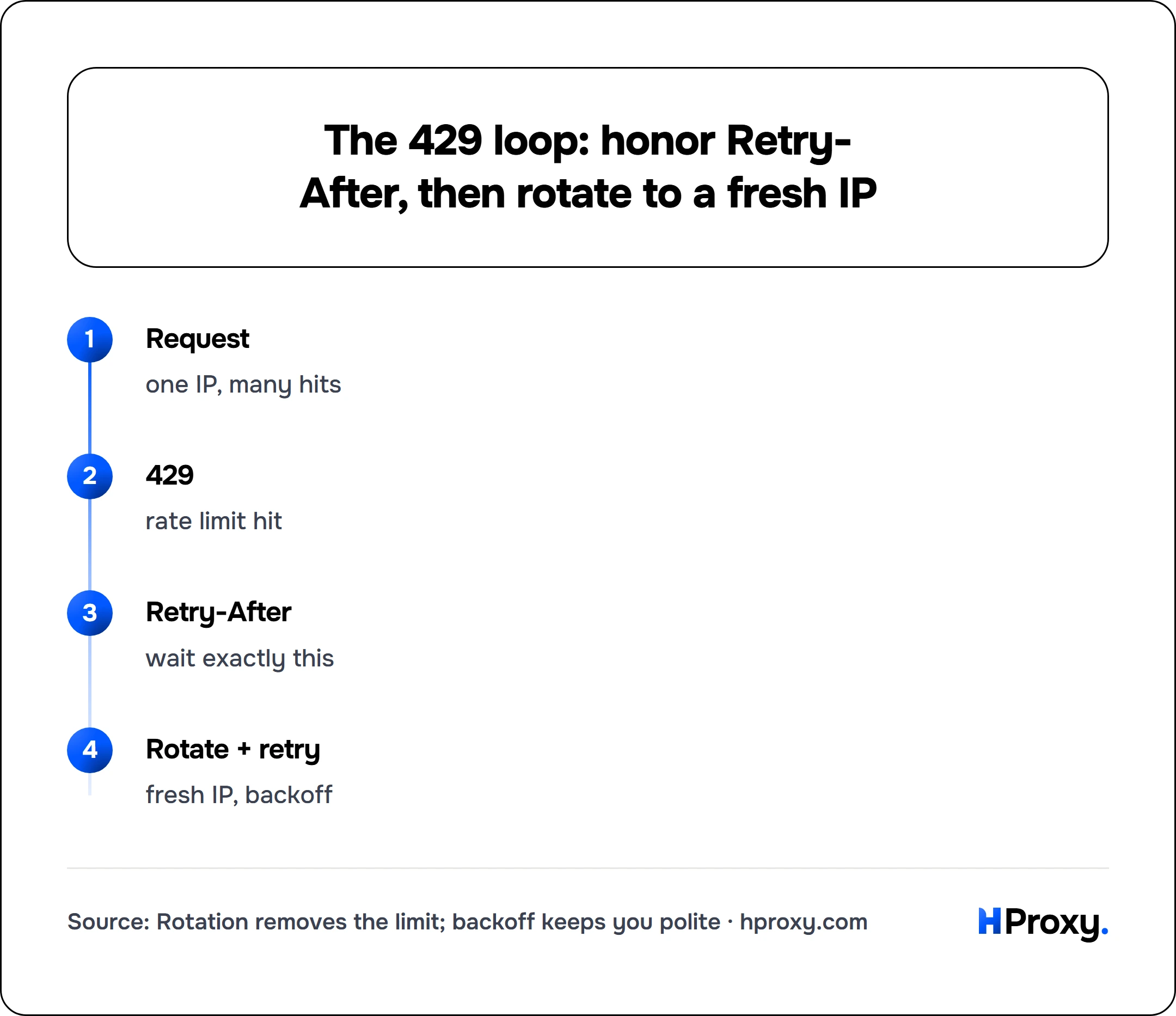
Request
one IP, many hits
429
rate limit hit
Retry-After
wait exactly this
Rotate + retry
fresh IP, backoff
What a 429 actually means
A 429 status code means the server is rate-limiting you. You have sent more requests in some time window than it is willing to accept from your address, so it is turning you away until the window resets. The code is defined in RFC 6585 section 4, and the wording is exact: the status "indicates that the user has sent too many requests in a given amount of time ('rate limiting')." Too many requests, not forbidden. The same spec adds a detail that matters in a pipeline: a 429 response "MUST NOT be stored by a cache," so you cannot paper over the limit with a cached copy of the refusal, and every retry is a fresh round trip the server counts.
A 429 is a speed complaint, not a permanent verdict. That separates it from a 403, which says the server has decided it does not want you at all. A 429 almost always clears on its own once you slow down, and a well-behaved server hands you a Retry-After header naming precisely when to come back. The count is nearly always tracked per IP, sometimes per account or per API key, but for scraping and automation the IP is the bucket that fills up first.
Why one proxy still gets rate-limited
Routing through a single proxy does not lower your request rate, it only changes which IP the server counts. One proxy is one exit address, so the server still sees all your traffic arriving from a single source, still fills one bucket, and still returns 429 at the same threshold. You moved the problem, you did not solve it.
The limit is a function of requests per IP over time. To get under it you have to cut the requests each IP sends, and the way to do that without slowing the whole job down is to add more IPs. That is the entire idea behind rotation.
How rotation clears the limit
Rotation spreads your requests across a pool of many exit IPs, so each individual address stays comfortably under the per-IP threshold while your total throughput stays high. If a server allows 60 requests per minute per IP and you rotate across 50 IPs, your effective ceiling is 3,000 requests per minute with no single address raising a flag.
There are two ways to rotate, and picking the wrong one causes its own trouble:
- Per-request rotation gives every request a fresh IP. It suits stateless collection: independent pages, public API calls, anything with no login and no cart.
- Sticky sessions hold one IP for a set window, commonly 1 to 30 minutes, before rotating. Use them whenever a task spans multiple requests that must look like one visitor, such as a paginated search or a multi-step form.
The mechanics of how a rotating pool delivers those IPs (gateways, sticky tokens, geo-targeting) are worth understanding, and we cover them in rotating vs static residential proxies. For beating a 429, the one thing to hold onto is that more distinct IPs means a lower request rate per IP, which is exactly what the server is measuring.
Read the Retry-After header before you retry
Before you build any retry logic, read what the server is already telling you. A 429 response often carries a Retry-After header, and it is the single most useful thing on the page. Dump the response headers with curl:
curl -i -x http://192.0.2.10:8080 https://example.com/api/items
If you are being rate-limited, the top of the output looks like this:
HTTP/1.1 429 Too Many Requests
Retry-After: 30
Content-Type: application/json

{"error":"rate limit exceeded"}
Retry-After: 30 means wait 30 seconds. The header arrives in one of two formats defined by RFC 9110 section 10.2.3: a number of seconds (the common case) or an absolute HTTP date like Wed, 03 Jul 2026 12:00:00 GMT. Either way the server is handing you the exact answer to when can I come back, and the correct move is to obey it. Retrying before the window it names usually resets the clock, and on stricter targets it upgrades a short throttle into a longer block. Honoring Retry-After is the difference between a pause and a penalty.
Back off instead of hammering
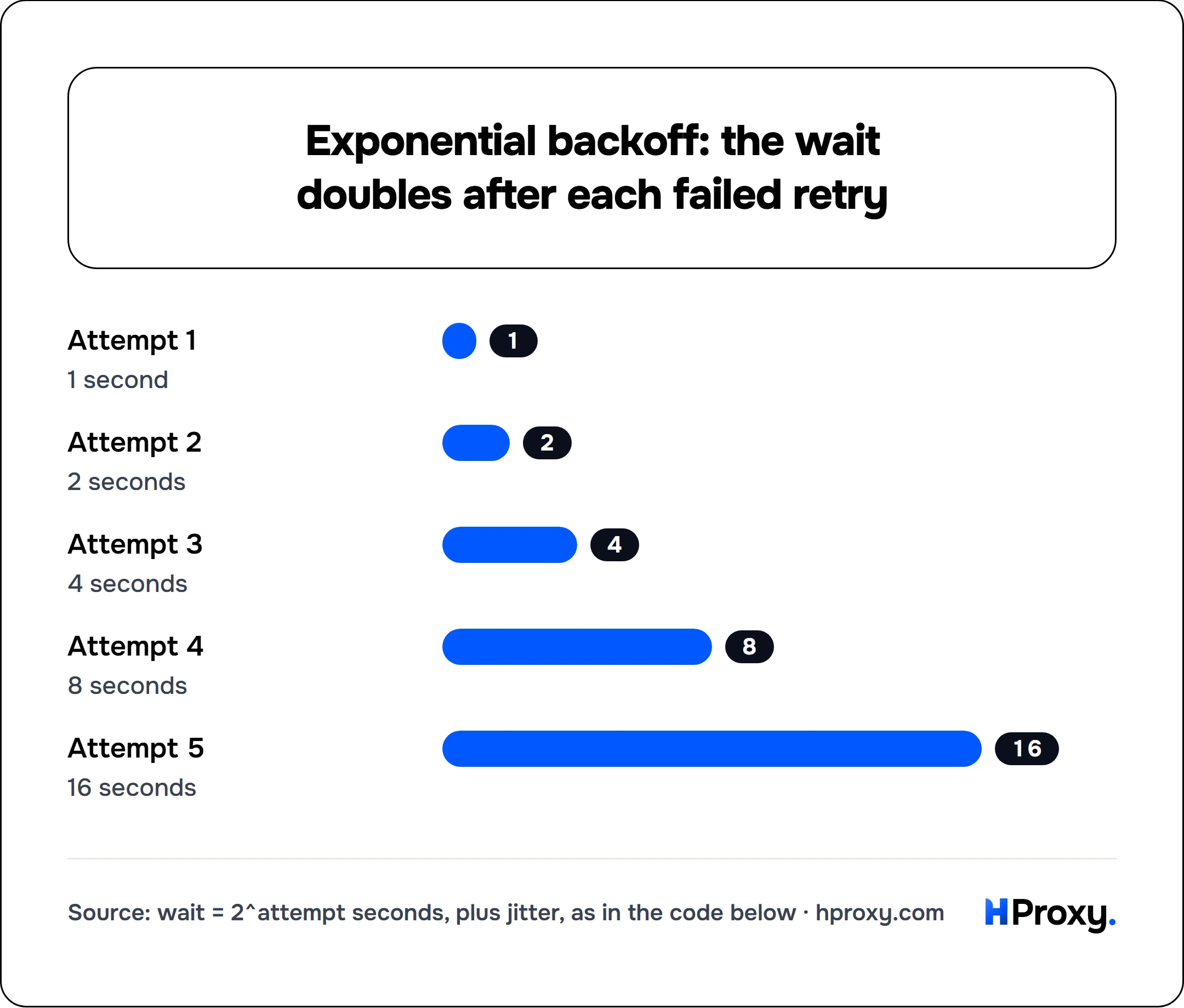
When there is no Retry-After, or when you are retrying repeatedly, you need a wait strategy of your own. Exponential backoff is the standard: wait a little after the first failure, double it after the next, and keep doubling up to a cap. Add a little randomness, called jitter, so a fleet of workers does not retry in perfect unison and rebuild the spike you were trying to avoid. This is not folklore: AWS's write-up on backoff and jitter shows plain exponential backoff still leaves clients bunched into synchronized clusters, and adding jitter spreads the retries toward an approximately constant rate, which cut the total competing calls by more than half in their simulation.
Here is the whole pattern in a few lines. It rotates to a fresh IP on every attempt, skips past dead proxies, honors Retry-After when present, and falls back to exponential backoff when it is not:
import random, time, requests

def get_with_backoff(url, pool, max_tries=5):
    for attempt in range(max_tries):
        proxy = random.choice(pool)              # fresh IP each attempt
        try:
            r = requests.get(
                url,
                proxies={"http": f"http://{proxy}", "https": f"http://{proxy}"},
                timeout=(5, 15),
            )
        except requests.RequestException:
            continue                             # dead proxy, try another
        if r.status_code != 429:
            return r                             # success or a different error

        retry_after = r.headers.get("Retry-After")
        if retry_after and retry_after.isdigit():
            wait = int(retry_after)              # server told us exactly
        else:
            wait = 2 ** attempt                  # 1, 2, 4, 8, 16 seconds
        time.sleep(wait + random.uniform(0, 1))  # jitter so retries don't sync
    return None                                  # gave up after max_tries
Two rules make this reliable. Rotate the proxy on every retry, because retrying a rate-limited IP against a full bucket just earns another 429. And let Retry-After win over your computed backoff whenever the server sends it, because the server knows its own window and you are only guessing at it.
Size your concurrency to the limit
Rotation and backoff stop 429s after they happen. Sizing your concurrency stops them before they start. The arithmetic is simple: your safe request rate is the per-IP limit multiplied by the number of IPs you rotate through, with a margin so you are not riding the ceiling.
Work backward from the target. If a site tolerates roughly one request every two seconds per IP (so 0.5 requests per second per IP) and you need 20 requests per second, you need about 40 IPs, and you should run 50 or 60 to leave headroom for retries and slow exits. Push more concurrency than your pool can absorb at that rate and you are back to manufacturing 429s, just across more addresses. This is the same pool-sizing logic behind proxies for web scraping, where request rate, not a round number, decides how many IPs a job needs.
If you do not know the target's limit, find it empirically: raise concurrency from a single IP until the first 429 appears, note the rate, and treat 70 to 80 percent of it as your per-IP budget. The only ceiling in that experiment should be the target's tolerance, which is why our plans put no cap on concurrent connections.
Residential or datacenter for rate-limited targets
The last variable is which kind of IP you rotate, because it changes how much each one can send before the limit bites.
On lenient targets (open APIs, small sites, anything without a serious bot team) the rate limit is a plain counter that does not care what kind of IP you are. Rotating datacenter proxies are the right call here: cheap, fast, and plentiful. Use the least expensive tier the target tolerates.
On defended targets, rate limits are tied to IP reputation. A datacenter IP starts with a lower allowance and hits the wall sooner, because the site already distrusts hosting ranges, and it often escalates a 429 straight to a 403 or a CAPTCHA (see how to avoid IP bans while scraping). Rotating residential proxies look like ordinary home connections, so each one carries a higher effective allowance and lasts longer before it is throttled. For sites that pair rate limits with reputation checks, residential is not a luxury, it is what keeps the success rate from falling off a cliff.
Putting it together
A 429 is the server asking you to slow down per IP. You have four levers, and they stack:
- Rotate across a pool so each IP stays under the limit. This is the structural fix.
- Honor
Retry-Afterexactly when the server sends it. - Back off exponentially with jitter when it does not.
- Size concurrency to the per-IP limit times your pool, with headroom.
Start by proving the loop on something cheap. Our free proxy list is enough to watch rotation drop your per-IP rate and clear a soft 429 in a test, and the proxy checker confirms an exit is alive before you route real traffic through it. When a target starts pairing its rate limit with reputation checks, that is your signal to move the job onto residential IPs and let pool size do the rest. Do all four and 429 stops being an error you react to and becomes a limit you designed around.