"Sorry, you have been blocked" is the headline of the page Cloudflare shows when a security rule on a website refuses your request. Under it you read "You are unable to access" and the name of the site, a short explanation, and a Cloudflare Ray ID at the bottom. The site is not down. A rule that its owner set up, or that Cloudflare runs for the owner, stopped this one request before it reached the site.
We read the Cloudflare documentation and 476 public GitHub reports that quote the page, to show what each line means and what actually fixes it. This page shows no error code, and that sets it apart from the numbered Cloudflare errors in our guide to errors 1006 to 1020. It also differs from the Verify you are human loop, which is a check you can pass.
What each line of the page means
In June 2026, a Firefox user met the page while posting a reply on a developer forum and pasted all of it into a bug report. Here it is, line by line:
| The page says | What it tells you |
|---|---|
| Sorry, you have been blocked. | A rule on the site refused this request. The site itself is up. |
| You are unable to access intersystems.com. | The site whose rule it was. |
| Why have I been blocked? This website is using a security service to protect itself from online attacks. The action you just performed triggered the security solution. | Standard text from Cloudflare. It is the same for every rule, so it does not say which one matched. |
| There are several actions that could trigger this block including submitting a certain word or phrase, a SQL command or malformed data. | Three examples of what a rule reacts to. What you sent can be the cause, not only where you came from. |
| You can email the site owner to let them know you were blocked. | The owner is the only one who can change the rule. Cloudflare support cannot override it. |
| Cloudflare Ray ID, followed by a short code. | The name of this one request. The owner uses it to find the rule that fired. |
| Your IP: Click to reveal. | Your address, hidden until you click. It is still in the page source. |
| Performance & security by Cloudflare. | The footer. Owners can swap the whole page for their own, so some blocks look different. |
The page arrives with the HTTP status 403, the code for a refused request. It carries no error number. In our census, 293 of the 476 reports printed a Ray ID, and only 3 wrote an error code.
Why this page has no error code
Cloudflare used to answer blocks with numbered pages. Its upgrade guide says requests blocked by the old firewall rules "would get a Cloudflare 1020 error code response". Requests blocked by the WAF custom rules that replaced them "will get a different response: the WAF block response". That response is this page. Cloudflare now marks Firewall Rules as deprecated, stopped supporting their API on June 15, 2025, and shows old firewall rules as custom rules.
The reports match that change. The old page said "Access denied", printed "Error code 1020" and added "The site owner may have set restrictions that prevent you from accessing the site". That sentence appears in 54 reports, and 50 of them date from 2022 and 2023. In 2023, 28 of the 39 came from people who used ChatGPT or its clients. Only 4 date from 2024 or later. This page appeared in 76 reports in 2024, 93 in 2025 and 117 in 2026 up to September. 27
- Sorry, you have been blocked
- The old 1020 page
Cloudflare has other pages that people confuse with this one. Each has its own cause and its own fix:
| What you see | What it is | What helps |
|---|---|---|
| Sorry, you have been blocked, a Ray ID, no code. | The block page of the Cloudflare web application firewall, with status 403. | The steps below, then the Ray ID to the owner. |
| Access denied with error 1005, 1006 to 1008, 1009 or 1020. | A numbered page. It names the cause: your network, your address, your country, or an old firewall rule. | The same steps. The number tells you which one to start with. |
| Error 1010. | A ban on the signature of your browser. | Our guide to the numbered errors. |
| Error 1015, or a rate-limit page with status 429. | Too many requests in a short time. | Wait, and do not keep retrying. |
| A check page that runs by itself or asks for a click. | A challenge that lets people through. | Pass the check. If it repeats, see our guide to the loop. |
Three things a rule can look at
A rule decides about one request at a time, and it can look at three parts of it.
The address you came from
A rule can block an IP address, a continent, a country, or a whole network by its number, called an ASN. An example rule in the Cloudflare documentation blocks "by autonomous system number (ASN), continent, or country of origin". In our census, 26 reports mention a VPN, 40 a proxy and 46 a cloud host or container.
Addresses can be shared. Internet providers can put many customers behind one public address, a setup called CGNAT, so a rule on that address reaches all of them. A home connection can be the blocked one, too. In August 2026, a Telenet customer in Belgium was blocked at home, while the same site worked through a VPN exit in the UK. They described it as "an IP range / ISP false positive".
What you sent
The page itself names "a certain word or phrase, a SQL command or malformed data". The managed rules of Cloudflare read the body of each request, which is the text you submit in a form, a comment or an upload. One of its rule sets scores patterns of database attacks, script injection and code execution. Cloudflare warns that this set "is prone to false positives". It also writes that a larger body gives the rules more to match, which makes a false alarm more likely.
On the forum above, the block came when the user posted a reply. The forum team later wrote that Cloudflare "blocked some users for no obvious reason" and that they had switched it off for now. In 2026, people whose AI tools wrote notes and tickets reported the page for messages with SQL, shell commands or code blocks. The same text written as plain prose, or sent in smaller parts, went through.
The browser or tool
A rule can also read the User-Agent, the line in every request that names the browser or tool and its operating system. Programs meet this page often: 138 of the 476 reports mention a script or tool, and 96 mention a browser.
What to do, in this order
- If you were sending something, try it without the code. A comment, a search, a form or a message with code, SQL or unusual symbols can match an attack rule. Send the same content in plain words, or in smaller parts. If the site should accept code, such as a developer forum, tell the owner and include the Ray ID.
- Turn off a VPN, a proxy, Private Relay or Tor, then reload. Our guide to turning a proxy off shows where each setting lives. If a proxy keeps coming back, read proxy settings that keep turning back on.
- Try another network. Load the page on a phone over mobile data, with Wi-Fi off. In one August 2026 report, a home connection was blocked in the browser and in a script alike, and the same service worked at once over 4G. If only mobile data works, the rule is about your home address or its range.
- Try a private window with extensions off. This matters when a rule reads the browser, for example after an extension changed your user agent.
- Stop reloading. Each reload sends the same request to the same rule. Waiting is the fix for the separate rate-limit page, where Cloudflare warns that repeated tries "may extend the block".
- Write to the owner the same day. Send the Ray ID, the time with your time zone, the page address and what you were doing. The page itself asks for the Ray ID and what you were doing. On the Cloudflare Free and Pro plans, the event log that the owner sees only goes back 24 hours. Business keeps 3 days and Enterprise 30. Cloudflare support cannot override what the owner set, so write to the site, not to Cloudflare.
Blocked on every site? Then the common factor is your connection, not each site. It could be a VPN or proxy that is still on, a proxy that software set without asking, or an address your provider shares. Test with mobile data first, then go through steps 2 and 3.
The Ray ID, and what not to share
A Ray ID is the name Cloudflare gives to one request. Every request gets its own, so a reload shows a new Ray ID, and there is nothing to reset or change. It does not name you. Cloudflare even notes that in some situations two requests share one. The owner looks it up in the event log and sees the request with its IP address, user agent and network.
The page hides your IP address behind Click to reveal, but the address is still in the page source. A screenshot taken before you click is safe to post. A saved copy of the page, or its HTML pasted into a public bug report, shows your address to everyone.
When an app, a script or an AI tool gets the page
A program receives the HTML with the status 403 and the title "Attention Required! | Cloudflare". It often shows that title inside its own error, such as "Error POSTing to endpoint: Attention Required! | Cloudflare". 276 of our 476 reports quote that HTML title, either in a pasted page or inside such an error line.
AI tools are the newest group. Some reports mention an AI agent or an MCP tool, a connector that lets an AI assistant read and write in other services. There were 2 of them in 2024 and 3 in 2025, then 20 in 2026 so far. Several came from tool calls that carried SQL, shell commands or code blocks. One reporter wrote that the tool gets "a generic HTML block page, not a structured error, so it looks like the destination server is down".
For a developer, a 403 with that title is a block, not an outage. Retrying in a loop sends the same request to the same rule. Check what your program sends, and from which address. If you need the data on a regular basis, ask the site for an API or for access. Our guide on how websites detect proxies explains what an address tells a site.
If you run the site
Find the request first. In the dashboard, open Security, then Analytics, then the Events tab, and filter by the Ray ID or by the IP address of the visitor. Cloudflare reminds owners to convert the UTC time of the block to their own time zone. The log keeps 24 hours on Free and Pro, 3 days on Business and 30 days on Enterprise. It can also show a sample, so one event may be missing even inside that window.
Then fix the cause:
- A custom rule of yours. Narrow it, or change its action from Block to Managed Challenge. A challenge lets a person through after a check, while a block leaves no way through.
- A managed rule that fired on normal content, such as code in a forum post or a large form. Add a WAF exception that skips that rule for that path. The Cloudflare documentation says larger bodies make false positives more likely.
- A partner or a tool that must get in. Allow its IP address or ASN in IP Access rules. Know that this skips your custom rules, rate limiting and managed rules for it.
- Your own site. When the page shows on a site you run, the rule sits in your own Cloudflare account, and the same log shows it.
Owners on paid plans can also replace the default page with their own error page and add a contact address, so blocked visitors know where to write. The forum above learned about the blocks from a bug report by a user.
A look-alike that is not Cloudflare
Some blocked visitors see the same headline with other words: "You performed an action that triggered the service and blocked your request", and a Reference ID in place of a Ray ID. In the reports we found, the footer of that page reads "Security services provided by StackPath". It is another security service built on the same idea, so the same steps apply, and the Reference ID goes to the owner. Our census found 4 such reports, and one of the searches that lead people to this guide quotes that wording.
About proxies
A proxy does not undo a rule that a site owner wrote. When a VPN or proxy address is the cause, switching it off is the fix, and a rule about what you sent ignores the address anyway. One case suits a proxy well. You run a site with a country rule and want to see it the way a visitor abroad does. An ISP proxy in that country gives you one fixed home address there to test from.
What the reports show
Our searches found 1,308 GitHub issues. Of those, 476 in 286 projects quote the Cloudflare page. Reports grew from 46 in 2023 to 117 in 2026 up to September. 27 The status 403 appears in 159 of them.
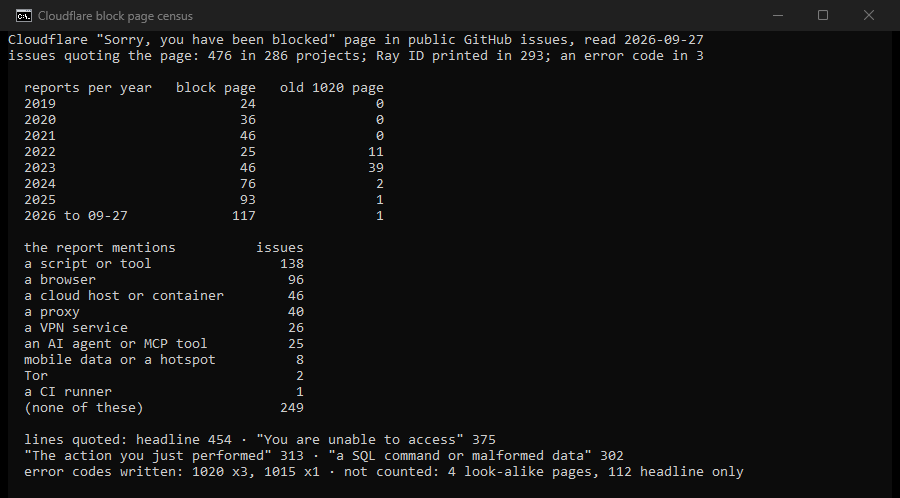
Of the 476 reports, 138 mention a script or tool, 96 a browser, 46 a cloud host or container, 40 a proxy and 26 a VPN. Another 25 mention an AI agent or MCP tool, and 8 mention mobile data. 249 name none of these. Only 3 reports wrote an error code: 1020 in all three, and 1015 as well in one of them.
How we counted
We ran five GitHub issue searches on September 27, 2026. They looked for the headline, the second line with the word Cloudflare, the heading "Why have I been blocked", the footer "Cloudflare Ray ID" with the word blocked, and a sentence of the old 1020 page. That gave 1,308 issues. An issue counts as this page when it quotes the headline, the second line or the heading together with something from Cloudflare. That can be the name, the sentence about the action you just performed, or a printed Ray ID. The rule leaves out 112 issues that quote only the headline, and the 4 look-alike pages. We ran the count twice with the same result. Tools and settings are word matches, not diagnoses, and GitHub reports lean toward developers. A Ray ID is counted, never kept.
Sources
- Cloudflare documentation: error page types, the firewall rules upgrade, Cloudflare 1xxx errors, error 1006 to 1008, error 1015 and error 1020, read September 27, 2026.
- Cloudflare documentation: Cloudflare Ray ID, Security Events, actions, custom rules, blocking by location, IP Access rules and the http.user_agent field, read September 27, 2026.
- Cloudflare documentation: managed rules, the OWASP Core Ruleset, WAF exceptions and custom errors, read September 27, 2026.
- IETF: RFC 6888, Common Requirements for Carrier-Grade NATs, April 2013.
- Reports on GitHub: the whole page, met while posting a forum reply (June 2026), a home connection in Belgium and a home address that worked over 4G (August 2026), AI tool calls with SQL or shell text, notes with code blocks, large writes, an app that got the HTML page, and the look-alike page.