Most people who search for why their IP is blocked did nothing wrong. An IP address is often shared. A home behind carrier-grade NAT shares one public address with other customers of the same provider. An office, a school or a VPN puts many people behind one exit. When one of them misbehaves, a site blocks the address, and everyone on it is blocked too. Google's own help says it plainly: "You could get this message if others that use the same internet provider you use are sending automated searches to Google".
This page covers the four reasons a site blocks an address, how to tell which one hit you, and the way back in that each site offers. We read every source on October 23, 2026.
Searches show what people reach for first. Keyword Planner puts "ip blacklist check" at 22,200 searches a month worldwide, against 320 for "why is my ip blocked".
Why is my IP blocked?
There are four common reasons, and only one is about you.
Someone else on your address. Carrier-grade NAT, or CGNAT, puts many customers of an internet provider behind one public IPv4 address. RFC 6598 sets aside 100.64.0.0/10 for the provider side of that setup. RFC 6269, the IETF's survey of address sharing, lists the cost: "IP blocking for abuse/spam will cause collateral damage". On spam lists it gets specific. Blacklisting a spammer's shared address restricts "all other subscribers sharing that address". Offices, schools and VPNs share addresses the same way.
An address in a datacenter range. Every address belongs to a network, and the owner of that network is public. An address owned by a cloud or hosting company reads as a server rather than a home connection. Google's help adds that some VPNs and tunnel services get all their traffic blocked, "because they make it impossible for Google to tell the difference between abusive and non-abusive traffic".
An address on a reputation list. Lists record addresses tied to spam, malware or abuse, and some list whole ranges by policy. Spamhaus's Policy Blocklist holds end-user ranges that "should not be attempting to directly deliver unauthenticated SMTP email". Spamhaus adds that these addresses "are not necessarily 'bad'". The list covers more than 1.4 billion IPv4 addresses, almost 40 percent of the routable IPv4 space. So a home address on it is normal, and it only matters for sending mail straight from home. Our page on how reputation lists score an address goes deeper.
Your own traffic. Many requests in a short time, or requests that look automated, trip a rate limit or a bot rule. Cloudflare's Error 1020 means "a Cloudflare security feature configured by the website owner blocked the request". Only this reason is about you, and the fix lies in how you use the site.
How do I tell which one hit me?
Four checks take a few minutes.
- Address or account? Open the site in a private window while signed out, then over mobile data. If it loads elsewhere but not on your connection, the block is on your address or its range. If it fails everywhere, look at the account.
- Is your address shared? Open your router's status page and find its internet (WAN) address. If it falls between 100.64.0.0 and 100.127.255.255, your provider uses carrier-grade NAT, and you share a public address with other customers.
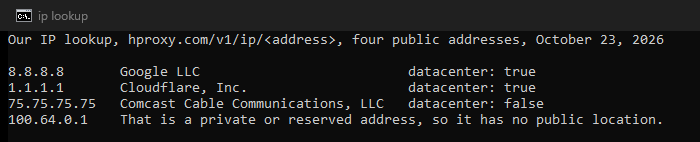
- What does your address read as? Our IP lookup shows the network that owns an address and whether it is a datacenter range. The proxy checker shows the same for a proxy.
- Is it on a list? For mail problems, Spamhaus's own checker shows whether an address is listed, and on which list.
The lookup tells a datacenter range from a home provider's in one request. This is its reading of four public addresses: two datacenter resolvers, a cable provider's resolver, and an address from the shared CGNAT space.
What do the common block messages mean?
Each site words its block differently, and each one documents its own way back in.
Four block messages, what they mean, and the way back in
| What you see | What it means | The way back in |
|---|---|---|
| Google: "Our systems have detected unusual traffic from your computer network" | Automated traffic from your network, or from others on the same VPN or provider | Solve the reCAPTCHA; scan for malware; ask your network administrator or provider |
| Wikipedia: your IP address is blocked | Often a block on a shared or proxy range that caught you as well | Request an IP block exemption through the Unblock Ticket Request System |
| Cloudflare: "Error 1020: Access denied" | A block rule that the site owner set | Send the site owner a screenshot of the error |
| A mail bounce that names the Spamhaus PBL | Your address is in an end-user range that should not send mail directly | Send through your provider's mail server, or ask Spamhaus to exclude the address |
Google Search Help, Wikipedia, Cloudflare and Spamhaus documentation, read October 23, 2026
How do I get my IP unblocked?
Use the route the site offers, matched to the cause you found.
- Google's unusual-traffic message. Solve the reCAPTCHA. If the message returns, Google suggests a malware scan, a word with your network administrator or provider, or leaving the VPN.
- Wikipedia. Its policy lets "Editors in good standing whose editing is disrupted by unrelated blocks or firewalls" request an IP block exemption. Ask through the Unblock Ticket Request System or the unblock template on your talk page.
- Cloudflare Error 1020. Cloudflare tells visitors to "provide the website owner with a screenshot of the 1020 error message you received". The owner can then find the rule that blocked you.
- A mail bounce that names Spamhaus. Send mail through your provider's server with a login, as Spamhaus expects for end-user ranges. Where your network's policy allows it, Spamhaus can also exclude your address from the list.
- A shared address. Tell your provider which site blocks you and since when. Ask whether your connection can get a public address of its own.
- Your own traffic. Slow down, use the site's API if it has one, and keep to its rate limits. Our notes on polite request pacing for scrapers cover the habits that keep automated work within limits.
Will a proxy or VPN fix it?
A proxy or a VPN changes the address a site sees, and that differs from being unblocked. If a site blocked you on purpose, coming back through another address usually breaks its rules. Google also notes that some VPNs get all their traffic blocked. If someone else's behavior on a shared address caught you, the routes above fix it for good.
Proxies suit work that a site allows, such as checking how your own pages look from another country. Our residential proxies cost $0.50/GB for one GB, falling to $0.44/GB at 2,000 GB+. To see what a site reads from any address before you rely on it, how websites detect proxies walks through the checks.
What we could not check
- We did not trigger any block ourselves, and we contacted no site except to read its documentation.
- The datacenter flag in our lookup is one classification. Other lookups and lists can disagree about the same address.
- Sites rarely publish their blocking rules, so the four reasons rest on the documentation of the sites and lists named here.
- Lists, help pages and policies change. This page is due for a check by January 23, 2027.
Sources
- IETF, RFC 6269: Issues with IP Address Sharing, June 2011, sections 13.1 and 13.3.
- IETF, RFC 6598: IANA-Reserved IPv4 Prefix for Shared Address Space, April 2012.
- Google Search Help, Unusual traffic from your computer network.
- Wikipedia, IP block exemption and Blocking IP addresses.
- Cloudflare, Error 1020: Access denied.
- Spamhaus, Policy Blocklist (PBL), its data and policy statement.
- Google Keyword Planner, worldwide 12-month averages, read October 23, 2026.
- Our IP lookup at hproxy.com/v1/ip, read October 23, 2026, for four public addresses.