Most people who search for how to turn off a proxy never turned one on. The setting arrived with something else. It may be a VPN that was uninstalled but left its configuration behind, or a school or office laptop that came home. It may be a "web shield" in an antivirus suite, an ad blocker that filters traffic through a local port, or an unwanted program that routes browsing through a server it controls. The symptom is always the same. Pages stop loading, the browser blames a proxy server, and the setting you are being told to check is one you have never seen.
The switch itself takes a minute to flip. This guide runs longer than a minute because the setting lives in several places at once, and different programs read different ones. Turning off the obvious toggle while another copy stays on is the most common reason people report that "turning off the proxy did not work". It walks through each place for each system. Then it shows how to prove the proxy is gone, and what it means when it comes back.
Which programs read which proxy setting
Before touching anything, it helps to know who reads what. Chrome, Edge and Safari have no proxy setting of their own on Windows and macOS. They ask the operating system, which hands them whatever is configured in the pages below. Firefox has a proxy setting of its own, but its default, in its own source code, is to follow the system's. Tor Browser always routes through Tor. And in Chrome, three things can replace the system's proxy: an extension, a policy, or a flag in the shortcut that starts it.
Follows the operating system setting
Chrome and Edge
Windows and macOS
Safari
always
Firefox
by default: Use system proxy settings
Windows Update and the Store
through WinHTTP, Windows' second proxy
Can override or ignore it
Firefox set to Manual or a PAC address
its own Network Settings
Tor Browser
always routes through Tor
Chrome extensions, policies and flags
chrome://extensions, chrome://policy, the shortcut
Apps with a proxy setting of their own
check the app's settings
The practical rule: if Chrome fails but Firefox works, the problem is in the operating system or a Chrome extension. If Firefox fails but Chrome works, the problem is Firefox's own dialog. If everything fails, start with the operating system.
Windows 11
Windows keeps two proxies. One is per user, written by two panels (Settings and the older Internet Options). The other is machine-wide, called WinHTTP, and system services read it. Clear both.
1. The Settings app
- Open Settings and go to Network & internet, then Proxy.
- Under Manual proxy setup, click Edit next to Use a proxy server. Switch the toggle off and click Save. Before you do, note the address and port shown in the box. That address tells you who set it, which matters if the setting comes back.
- Under Automatic proxy setup, look at Use setup script. If it is on, click Edit, switch it off, and save. A setup script is a small file that hands out proxy rules; if you did not set one up, an unknown script address is a warning sign.
- Automatically detect settings can stay on. It is on by default and only asks the local network for a proxy announcement; when the network makes none, Windows connects directly.
2. Internet Options
Internet Options is the older control panel from the Internet Explorer era. Windows 11 still ships it. It shows the same per-user values as the Settings app. Its Connections tab also lists VPN and dial-up connections, each with a proxy setting of its own.
- Press Windows+R, type
inetcpl.cpl, and press Enter. - Open the Connections tab and click LAN settings.
- Uncheck Use a proxy server for your LAN and Use automatic configuration script. Leave Automatically detect settings as it is. Click OK twice.
- While you are on the Connections tab, look at the list above the LAN settings button. If a VPN or dial-up connection is listed there, select it and click Settings. Each entry has its own proxy configuration, separate from the LAN one, and a leftover VPN entry with a proxy set is a common trap.
3. The WinHTTP layer
Windows Update, the Microsoft Store, and other services that run as the system rather than as you use a separate proxy setting called WinHTTP. It does not follow the toggles above. If your browser works but Windows Update, the Store, or Microsoft 365 activation fail with a proxy or connection error, this is the layer to check.
The command for it is searched more than any device name. Keyword Planner puts "netsh winhttp reset proxy" at 720 searches a month worldwide, against 10 for "turn off proxy windows 11".
Open Terminal or PowerShell as administrator and run:
netsh winhttp show advproxy
The healthy answer contains "ProxyIsEnabled": false. Microsoft marks the older netsh winhttp show proxy as deprecated. It still runs on Windows 11 and answers Direct access (no proxy server) for the same state. If a proxy is listed and you are not on a managed corporate network, reset it:
netsh winhttp reset proxy
Do not run the reset on a work computer that is supposed to use a proxy. On a managed device, the administrator set that value on purpose.
Windows 10
The path is the same as Windows 11 with slightly different furniture. Open Settings, then Network & Internet, then Proxy. The toggles sit directly on the page. Switch Use setup script off under Automatic proxy setup, and switch Use a proxy server off under Manual proxy setup. Then follow the Internet Options and WinHTTP steps above, which are identical on Windows 10.
macOS
macOS stores proxies per network service, so Wi-Fi and Ethernet each carry their own set. Clear the one you are using, then check the other if you switch between them.
- Open System Settings, click Network, and select the active connection (Wi-Fi or Ethernet).
- Click Details next to the network you are connected to, then choose Proxies in the sidebar.
- Switch off every enabled protocol. The ones that matter for browsing are Web proxy (HTTP), Secure web proxy (HTTPS), SOCKS proxy, Auto proxy discovery, and Automatic proxy configuration. Note any server address you see before switching it off.
- Click OK. Reload a page to test.
On macOS Monterey and earlier the same panel is under System Preferences, Network, Advanced, Proxies.
Then check for a configuration profile. Profiles are how employers and schools push settings to a Mac, and they can also be installed by software you did not want. If a profile sets the proxy, the toggle will flip back. Apple's guide for macOS 27 puts them under System Settings, General, Device Management (you may need to scroll down). Select a profile you do not recognize and click the remove button. Apple's warning applies: "When you remove a profile, all of its settings and information are deleted". A managed work Mac may not let you, and Apple's advice then is to ask whoever provided the profile.
Finally, confirm the change took from Terminal:
scutil --proxy
It reports the proxy configuration in effect. A proxy that is still on shows an Enable value of 1 next to its address, such as HTTPEnable : 1 with an HTTPProxy line.
Chrome
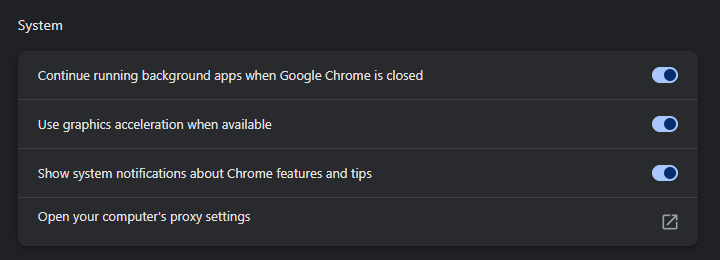
Chrome does not have its own proxy setting on Windows or macOS. Open Chrome's settings, go to System, and click Open your computer's proxy settings: that link opens the Windows or macOS page described above. Chrome's own documentation lists where else its proxy can come from: a policy, a command-line flag and an extension. Each can still force a proxy after the operating system is clean.
Extensions. Any extension with proxy permission can set one. A proxy or VPN extension that is broken, expired, or pointed at a dead server produces exactly the failures people attribute to "Chrome's proxy". Open chrome://extensions, disable every proxy, VPN, unblocker, or "secure browsing" extension, and reload. If the page loads, one of them was the cause. Re-enable them one at a time to find it.
Policy. If Chrome shows "Managed by your organization" in its menu, a policy is setting the proxy. Open chrome://policy and look for ProxyMode, ProxyServer, ProxyPacUrl, or ProxySettings. On a work machine that is expected. On a personal computer these values come from a leftover registry key or unwanted software, and proxy settings keep turning back on explains how to remove them.
A flag in the shortcut. Right-click the Chrome shortcut you start it from, open Properties, and look at the end of the Target box for --proxy-server=. Chrome's extension documentation notes that it falls back to the system settings "only if no command-line options influence the proxy configuration". So a flag left in a shortcut beats a clean system.
On a Chromebook the proxy is set per network. Open Settings, Network, choose the network, and set it back to a direct internet connection, as our Chromebook guide shows.
Edge
Edge behaves exactly like Chrome. Settings, System and performance, Open your computer's proxy settings leads to the operating system. Extensions live at edge://extensions and policies at edge://policy, with the same policy names.
Firefox
Firefox follows the system proxy by default, but it can hold a setting of its own, which is why it is the browser people forget. Open Settings, scroll to Network Settings at the bottom of the General page, and click Settings. Choose No proxy, or Use system proxy settings if the system is clean and you want Firefox to follow it in future. Manual proxy configuration and Automatic proxy configuration URL are the two options that carry an address. If either is selected and you did not choose it, an add-on or another user of the profile set it. Check Add-ons and themes for any proxy or VPN extension while you are there.
Android
Android sets the proxy per Wi-Fi network, and separately for mobile data. If a proxy is causing trouble only on one Wi-Fi network, that is why.
- Open Settings, then Network & internet, then Internet (or Wi-Fi). Tap the gear next to the connected network, then the pencil or Edit.
- Expand Advanced options and set Proxy to None. Save.
Phone makers rename and move these menus; the proxy stays in the Wi-Fi network's own settings, under its advanced part. Our Android guide shows the stock path from Android's own source.
Mobile data carries its own proxy fields inside the APN (access point name) configuration. An APN can carry a proxy your carrier put there, so do not clear fields you did not fill in. If mobile data is broken and you suspect the APN, use Reset to default in the APN menu rather than editing individual fields.
Also check for a VPN app under Settings, Network & internet, VPN, and turn off Always-on VPN if it is set for an app you no longer use.
iPhone and iPad
Open Settings, tap Wi-Fi, tap the i next to the connected network, scroll to HTTP Proxy, and tap Configure Proxy. Set it to Off. Like Android, the setting is per network, so repeat it for any other network that misbehaves.
Then look at Settings, General, VPN & Device Management. A configuration profile listed there can set a proxy for the whole device and re-apply it every time you change it by hand. Remove any profile you did not install yourself. A supervised device managed by a school or employer will not let you, and that is expected.
Linux
Linux has no single proxy switch. The environment variables http_proxy, https_proxy, and all_proxy are read by curl, wget, pip, and most command-line tools. The desktop setting under Settings, Network, Network Proxy governs the browser and desktop apps. Package managers like apt keep their own file. Our Linux proxy setup guide covers all of them, including the section on turning everything off and how to see which one is actually in use. The short version: run env | grep -i proxy to see what the shell has, and unset http_proxy https_proxy all_proxy HTTP_PROXY HTTPS_PROXY ALL_PROXY to clear the session. Then remove the lines from ~/.bashrc, ~/.profile, or /etc/environment so they do not return at the next login.
Prove it is off
A toggle in the off position is a claim. Verify it.
- Open our IP lookup and read the address and the network owner. It should be your own internet provider in your own city. An address that belongs to a hosting company, or a country you are not in, means traffic is still leaving through a proxy somewhere.
- On Windows, run
netsh winhttp show advproxyas administrator and confirm"ProxyIsEnabled": false. Then run this in a normal terminal, which reads the per-user setting the Settings app writes:
reg query "HKCU\Software\Microsoft\Windows\CurrentVersion\Internet Settings" /v ProxyEnable
A value of 0x0 means off. 0x1 means something switched it back on. On our own Windows 11 machine with no proxy set, the two readings were exactly ProxyEnable REG_DWORD 0x0 and "ProxyIsEnabled": false (October 3, 2026).
- On macOS, run
scutil --proxyand check that noEnableline reads1. - Load a page in a second browser. If Chrome works and Firefox does not, or the reverse, the surviving setting is browser-side and the sections above tell you which dialog holds it.
When it turns itself back on
A proxy that returns after you disabled it is not a bug in the toggle. Something is writing the setting again on a schedule, at login, or when a particular program starts. The three common writers are a VPN or security product that left a service behind, a configuration profile or policy, and malware that uses a proxy to sit between you and the web. Each has a different fix and a different level of urgency, and we cover them one by one in proxy settings keep turning back on. If the address you noted earlier was unfamiliar, especially a remote IP rather than 127.0.0.1, read that guide before you do anything else. A proxy you did not choose sees every site you visit through it.
If you turned off a proxy you actually wanted
One group of readers arrives here from the other direction. The proxy was deliberate, it stopped working, and turning it off was the only way to get online. Chrome's version of that failure is ERR_PROXY_CONNECTION_FAILED, and Firefox's is the proxy server is refusing connections. In almost every case the proxy itself died. Free entries come and go, so an address that worked when you set it up can be gone by the time you need it. Paste it into our proxy checker to confirm, then pick a replacement from the free proxy list, which re-tests every entry. If you need the proxy to stay up for longer than a browsing session, a residential or ISP proxy with a fixed address is the tool for that job. Residential traffic costs $0.50/GB for one GB, falling to $0.44/GB at 2,000 GB+, and a static ISP address $2.70 per IP for a month. The setup guides for Windows and macOS put it back in the same panels you just cleared.
Mistakes other guides make
- "On a Mac, click OK, then Apply." That is the System Preferences window macOS 13 replaced; Apple's steps for macOS 27 end with OK.
- "List websites you want to reach directly under Don't use the proxy server for local addresses." Microsoft's own page says that box is for local (intranet) addresses; websites go in the exception list.
- "Firefox ignores the system proxy." Its default is to use it; it only goes its own way when someone picked another option.
- Switching off only the manual proxy on Windows. Use setup script and the machine-wide WinHTTP proxy are separate, and either one keeps traffic going to a proxy.
How we wrote this
We checked every place this page sends you against the maker's own words on October 3, 2026. That meant Microsoft's proxy page and its WinHTTP command reference, and Apple's guides for macOS 27 and iOS 27 (proxy settings and configuration profiles). It also meant Android's own Settings source, Chromium's proxy documentation, Chrome's proxy API for extensions, and Firefox's source for its default. The Windows readings are from our own Windows 11 workstation, and the Chrome screenshot is ours. The questions come from Super User, where "Linux command line to turn off proxy" alone has been read 418,041 times.
Limits: no Mac, iPhone or Android phone was used for this page; those steps come from Apple's guides and Android's source. Which desktop apps keep a proxy setting of their own was not tested app by app, and phone makers' renamed menus were not checked.
Sources
All read on October 3, 2026.
- Microsoft Support: Use a proxy server in Windows; Microsoft Learn: Netsh commands for WinHTTP.
- Apple Mac User Guide for macOS 27: Change proxy settings on Mac; Use configuration profiles on Mac. Apple iPhone User Guide for iOS 27: Manage Wi-Fi settings; Install or remove configuration profiles (support.apple.com).
- Android Open Source Project: the Settings app's
strings.xml(android.googlesource.com). - Chromium: Proxy support in Chrome,
net/docs/proxy.md; Chrome for Developers: thechrome.proxyAPI. - Firefox:
StaticPrefList.yaml(github.com/mozilla-firefox/firefox). - Super User questions 196166, 973533, 710921, 1652469 and 1510300.
- Our own readings on Windows 11 (October 3, 2026) and our Chrome 152 screenshot (September 2, 2026).
- Google Keyword Planner, worldwide 12-month averages for the searches in the chart, read October 22, 2026.