A 403 Forbidden from a site behind Cloudflare means the request was refused before the page was served. What to do depends on which of five answers you got. A challenge ("Just a moment...") wants a browser that runs JavaScript. A block page ("Sorry, you have been blocked") means a rule on the site matched. A numbered error such as 1005, 1010 or 1020 names the kind of rule. A 403 without Cloudflare's look came from the site's own server or another security vendor. A bare 403 with no styling can mean a client set up wrong.
On October 22, 2026, we sent one plain request to each of 140 popular sites behind Cloudflare. 85 served the page. 51 answered 403: 40 challenges, 5 block pages and 6 refusals without Cloudflare's page. This guide shows how to tell them apart, who can fix each one, and what changed the answers. We sell residential proxies, so we have a stake in one of the fixes. Most fixes below need no proxy at all.
Which Cloudflare 403 did you get?
Read three things: the status, the header cf-mitigated and the words on the page. Cloudflare sets cf-mitigated: challenge on every challenge page, "regardless of the Challenge Page type". The words tell the other kinds apart.
| What you see | Status and header | Who sent it | Who can fix it |
|---|---|---|---|
| "Just a moment...", "Verify you are human", or a title of the site's own | 403 with cf-mitigated: challenge | Cloudflare, on a WAF rule, Bot Management or a rate limit | You, in a current browser; a plain script cannot pass it |
| "Sorry, you have been blocked" under "Attention Required! | Cloudflare", with a Ray ID | 403, no cf-mitigated | A WAF rule the site owner set | The owner; you can only change what the rule matched |
| "Access denied" with an error number such as 1005, 1010 or 1020 | 403 for most numbers | A Cloudflare feature the owner turned on | The owner, or you by changing what the number names |
| The site's own page, a plain "403 Forbidden", or an empty page | 403, still server: cloudflare | The site's server, a WAF rule with a custom response, or another bot vendor behind Cloudflare | The site |
| A bare 403 with no styling at all | 403 | Cloudflare's edge, before the site's settings load | Whoever set up the client, for example a Host that does not match the SNI |
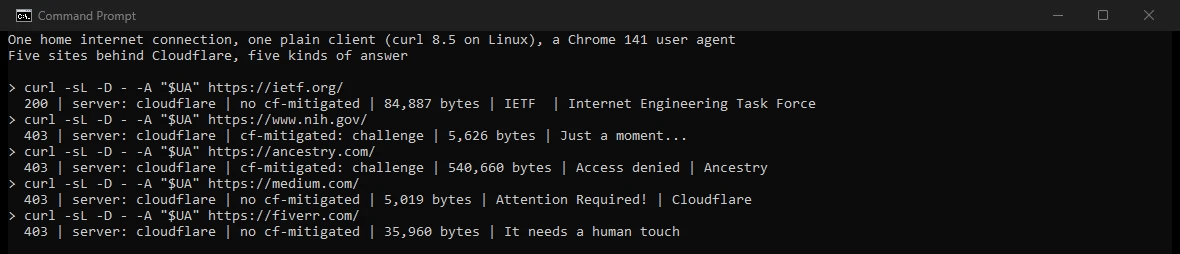
Two details in that screenshot catch people out. Ancestry's challenge page is titled "Access denied", and a browser can still pass it. Every answer also says server: cloudflare, Fiverr's too. Its page is a challenge from PerimeterX, now HUMAN, running behind Cloudflare (how to handle PerimeterX). The server header only tells you that the answer passed through Cloudflare.
To read the header yourself:
- In a browser: open the developer tools (F12), choose Network, reload, click the first request and read its response headers.
- From a script: print the status and the headers. With curl:
curl -s -o /dev/null -D - https://example.com/ | grep -i -E "^HTTP|^cf-mitigated|^server"
What 140 Cloudflare sites answered
We took the 1,000 most popular domains in the Tranco research ranking of October 21, 2026, and looked up their addresses. 146 pointed into the address ranges Cloudflare publishes. We left out five adult sites and one proxy provider. Each of the other 140 got one plain request: curl 8.5 with a Chrome user agent, from our home line, without JavaScript.
Challenges made up most of the refusals: 40 of the 51. Every one came back as a 403 with cf-mitigated: challenge. Only 29 of the 40 used Cloudflare's "Just a moment..." title. The rest carried the site's own, such as "Security Check - Indeed.com" or "Cloudflare Captcha Page | Bluehost.com". Five sites showed Cloudflare's block page, and six refused with a page of their own, or next to nothing.
What changed the answer
We sent the same requests from our server in a US datacenter, with the same curl build. Then we changed one thing at a time: the address, then the user agent. A repeat of the first request showed how much changes on its own.
The address. At nine sites, the datacenter got another kind of answer than home, and a second request from each side kept the split. At seven, the datacenter got the harder answer:
- NIH showed it a block page, where home got a challenge.
- IETF, Perplexity, Patreon and cookiedatabase.org challenged it and served home the page.
- Wyze answered it with a 429 rate limit.
- HostGator Brazil denied it access. Asked without a user agent, the same site spelled out "error code: 1005", Cloudflare's code for a banned network (ASN).
One site went the other way. Maricopa County challenged us at home in Germany and served the US datacenter, so the country moved along with the network. People.com refused both: a challenge at home, and for the datacenter a 402 note that sends anyone after its content to a licensing address.
The user agent. On the same address, removing the user agent changed the answer at 8 of the 139 sites that answered steadily. Wiley and Bitdefender turned a page into Cloudflare's block page, and Britannica turned a challenge into one. Cloudflare's Browser Integrity Check, on by default, "challenges visitors without a user agent or with a non-standard user agent". curl's own user agent was blocked at Zendesk and challenged at Chess.com.
The surprise ran the other way at W3C. Our Chrome user agent sent from curl was challenged there, while curl's own name and no name at all got the page. Trendyol refused the Chrome user agent with an empty 403 and served the request that had none. At those two sites, claiming to be Chrome from a client that is not Chrome did worse than telling the truth.
Noise. The same request, sent twice from the datacenter minutes apart, changed its answer at one site, itch.io. Earlier that day, a change of curl build alone flipped two of 14 sites from one home line. The test is in how to scrape past Cloudflare.
Fixes in a browser, in order
Most people who meet a Cloudflare 403 are reading a site, and these fixes need no tools. Try them in this order, quickest first.
- Wait a few seconds, then reload once. A browser clears the kind without a checkbox in what Cloudflare calls "typically less than five seconds". If a box asks you to confirm you are human, tick it. If the check keeps coming back, see the Verify you are human loop.
- Update the browser. Cloudflare asks for "the latest stable version". Internet Explorer cannot pass its challenges at all.
- Turn off extensions. Cloudflare names ad blockers and privacy tools that "may block standard browser headers or the necessary challenge scripts". A private window with extensions off is a quick test.
- Turn off the VPN or proxy, or try another network. Cloudflare says a poor IP reputation is "often seen with shared VPNs or corporate proxies". Mobile data is an easy second network.
- Look at other software on the computer. When the site loads on your phone over the same Wi-Fi, the address is the same, so the cause sits on the computer. In a Reddit thread about a Cloudflare 403 on job and school sites, one reply advises: "Check any and all third party apps or browser extensions."
- On error 1015, wait. It is a rate limit, and Cloudflare warns that retrying quickly "may extend the block".
- If the block stays on every browser and network, the rule is the site's. Send the owner the Ray ID and the time shown on the page. The block page guide explains each line of it.
When your script or app gets it
- Read the answer before you change anything. Print the status,
cf-mitigatedand the title. Each kind needs its own fix, and every one of them saysserver: cloudflare. - A challenge needs a browser. A plain HTTP client cannot run it. Challenge pages also break fetch and XHR calls, because those expect data and get a page.
- Keep the client honest. In our test, the user agent alone changed the answer at up to 8 sites, in both directions. The TLS handshake matters as well: Cloudflare profiles clients by their JA3 and JA4 fingerprints.
- Slow down on 429 or 1015. Both are rate limits, and retrying fast extends them.
- Check the network last. In our test, the datacenter got a harder answer than home at 7 of 140 sites. Cloudflare watches scraping patterns "by ASN", so one network carrying all of your traffic forms a pattern of its own.
- Prefer the front door. An official API, a data feed or a license avoids the fight. People.com's 402 note points to exactly that.
Errors 1005 to 1020 each name their cause; our guide to Cloudflare errors 1006 to 1020 covers what changes each one. A 403 that a proxy returns itself is another problem, covered in 403 errors through a proxy.
If you run the site
Start from the Ray ID. Every request through Cloudflare gets one, and Security Events lists it with the IP address, user agent and ASN. Ask the visitor for the Ray ID and the time, then filter Security Events by it. The event names the feature that acted.
- A WAF custom rule. Narrow it, or switch its action from Block to Managed Challenge, which lets a person through. To let a known client pass, add a Skip rule and place it before the rule it should skip.
- A banned network, error 1005. Cloudflare's fix is to allow the network (ASN) in IP Access rules.
- Bot Fight Mode. It can challenge API and mobile app traffic, and WAF custom rules cannot skip it. An IP Access rule that matches first does stop it. Super Bot Fight Mode supports Skip rules.
- The Browser Integrity Check. It is on by default. Turn it off for a path with a configuration rule, or for the zone in Security settings.
- Under Attack mode. It puts a Managed Challenge in front of visitors and can affect API traffic, so keep it for an attack.
- Challenges on your own API. A challenge cannot complete inside fetch or XHR. Cloudflare suggests Turnstile pre-clearance, which issues the
cf_clearancecookie on an HTML page first (Turnstile errors).
A 403 without Cloudflare's look comes from your origin, unless you gave a WAF rule a custom response. Cloudflare lists permission rules such as an Apache .htaccess file, mod_security rules and IP deny rules. It also asks owners to check that the origin lets its address ranges in.
A bare 403 with no styling never reaches Security Events. Cloudflare serves it before your settings load and does not log it. One cause is a client that sends a Host that does not match its SNI.
A 403 from the Cloudflare API
If the 403 comes from api.cloudflare.com, your API token lacks a permission. Since August 2026, these errors carry a documentation_url field. It links to the endpoint's documentation and the roles it needs.
When nothing works
If the page looks the same on another browser, another device and another network, the decision sits with the site. Write to its owner through its support or contact page. Give the Ray ID, the time in UTC and what you were trying to do. For a bot or a script, ask for an API or a license. Cloudflare says its support "cannot override a customer's security settings".
Where a residential proxy fits
A proxy fixes only one case on this page: a scraping job refused because of its network. In our test that was 7 of 140 sites, where a datacenter address met a harder answer than home. There, rotating residential proxies spread the traffic over many home networks, behind a real browser that passes the challenge. They do nothing for a client that fails the check. Cloudflare also spots residential proxy traffic and sets its bot score to 29. That sits inside its "likely automated" band, so pacing and a real browser still matter. At our one-GB residential price of $0.50 per GB, a test run costs cents.
Limits of this test
- Plain requests. We sent curl requests without JavaScript, so the test shows a site's first answer. It does not show what a person sees after a challenge, or what holds at volume. We ran no browser automation or solver, and we tested no proxy, ours included.
- Two addresses. One home connection in Germany and one datacenter in the United States, so the address test also changed the country.
- Small slices. Homepages only, one request per change, and the most popular Cloudflare domains rather than the sites you visit. Numbered error pages were rare in this sample.
- A floor. The DNS count misses sites that bring their own addresses to Cloudflare.
- Moving parts. Cloudflare updated four of the pages we cite between September 28 and October 20, 2026, and sites change their rules daily. Check again after January 22, 2027.
Sources
Cloudflare documentation, read October 22, 2026, with the date each page was last updated:
- Error 403, September 28, 2026.
- Detect a Challenge Page response, May 5, 2026; Interstitial Challenge Pages, October 20, 2026.
- Challenges troubleshooting, May 5, 2026.
- 1xxx errors: Error 1005 and Error 1010, April 23, 2026; Error 1015, May 14, 2026; Error 1020, October 14, 2026.
- Browser Integrity Check, August 3, 2026; Security Level, April 16, 2026.
- Firewall rules upgrade, April 16, 2026: the WAF block response and custom responses.
- Ray ID, October 15, 2026.
- Bot Fight Mode, August 3, 2026.
- Bot scores, August 26, 2026: scores of 2 to 29 count as likely automated.
- Additional detections, April 15, 2026; Scraping detections, August 3, 2026.
- Changelog: Enriched 403 responses for the Cloudflare API, August 21, 2026.
- IP ranges.
Other sources:
- IETF, RFC 9110, HTTP Semantics, section 15.5.4, June 2022.
- Tranco, top sites list 746PX, created October 21, 2026 (Le Pochat and others, NDSS 2019).
- HProxy test, October 22, 2026, 13:56 to 14:15 UTC: DNS for the Tranco top 1,000; one plain request to each of 140 Cloudflare sites from a home line and from a datacenter with the same curl 8.5 build; the user agent changed one at a time; a repeat on each side.