The loop means each request after the check reaches Cloudflare without a pass it accepts. Passing sets a cookie called cf_clearance, and later requests show it so the check is skipped. Sometimes the cookie is never saved. Sometimes it is refused, because your address changed or your browser looks altered. Either way, the next page brings a new check. Try a private window with your add-ons off, then another browser, then another network with any VPN or proxy off. If the loop follows you everywhere, the cause sits with the site or with Cloudflare, and only the site's owner can change the check.
What you are looking at
The check comes in two forms. One is a full page in front of the site, which Cloudflare calls a Challenge Page. The other is Turnstile, a small box inside a login or signup form. Both run on the same platform, so the causes and fixes below apply to each.
On a normal pass the box reads "Verify you are human", then "Verifying...", then "Success!". The design team wrote in February 2026 that these states tested well in a redesign and stayed largely unchanged. The same post says the box and the pages are served 7.67 billion times a day. Most people never click at all. The docs say most visitors pass on their own, and the check uses no picture puzzles or distorted letters.
The words on the full page have changed over time, so your screen may differ. A 2023 question on Super User quotes "needs to review the security of your connection before proceeding". A report from January 2025 quotes "Verify you are human by completing the action below." A report from November 2025 quotes "Verifying you are human. This may take a few seconds." Reports from June to October 2026 quote "Performing security verification". Since the 2026 redesign, an error shows a short message and a Troubleshoot link, which opens numbered steps inside the box.
What a program without JavaScript gets
On October 13, 2026, we asked Cloudflare's own community forum for a search page, from our server. That request runs no JavaScript and keeps no cookies, like a browser with both turned off. The answer was status 403, with a header that reads cf-mitigated: challenge. The page had the title "Just a moment..." and, for browsers without scripts, the line "Enable JavaScript and cookies to continue". In the same run, the docs site sent our server its normal page.
That header is documented: every challenge page carries cf-mitigated set to challenge. A client without JavaScript and cookies can only ever get that page back. It is the loop in its plainest form, and it matches the docs' rule that visitors "must enable JavaScript and cookies" to pass.
How the pass is kept, and how it is lost
Passing the check sets cf_clearance. The company's list of its cookies says it "stores the proof of challenge passed" and is "used to no longer issue a challenge if present". By default it lasts 30 minutes, and sites are advised to pick 15 to 45. The site sets that span in a setting called Challenge Passage.
The cookie is "securely tied to the specific visitor and device it was issued to". A pass from one browser on one machine does not travel to another. A pass also has a level: after an easy check, a stricter one later in the visit must be solved again.
When a check fails or cannot finish, the visitor gets another check page. The help page says a loop happens when the check "keeps reappearing without being solved", in very specific cases where strong bot signals show up. It names five reasons: network problems, browser settings or extensions, an unsupported browser, JavaScript turned off, and detection errors.
Your request
no valid cf_clearance yet
Challenge page
status 403, cf-mitigated: challenge
Checks in your browser
needs JavaScript and cookies
cf_clearance is set
30 minutes unless the site changes it
The page loads
later requests carry the cookie
Why the check keeps coming back
Each cause below comes from the company's own docs. Most sit in your browser or your connection. Some sit in the site's settings, and once in a while the fault is Cloudflare's.
The browser cannot store the cookie or run the check
A browser that refuses site data never keeps cf_clearance, so every page starts the check over. In Chrome this is the on-device site data setting. Chrome marks the choice that blocks it "(not recommended)". It also warns: "Sites may not work as you expect." JavaScript has to be on as well, since the check runs as a script. Security software can block the check's files too, and the list for visitors includes a look at antivirus and firewall settings.
An add-on changes what the check measures
The docs name add-ons that change the browser's User-Agent, or Web APIs such as Canvas and WebGL, among the things the check cannot support. Ad blockers can stop its scripts from loading. Script blockers, fingerprinting protection and canvas blockers "can interfere with the challenge verification process". Developer tools count too: emulation and overrides for network, user-agent or JavaScript change what the check reads.
Public reports show the same thing. In our count below, all six reports from Chrome, Edge, Firefox or Safari named an add-on, or a browser started under remote control. Across the reports, the add-ons included a translation add-on, a privacy add-on, a userscript, an ad-blocking program and a filter list.
Your address changes during the check
A solve only counts from the address that received the check. The docs give an example. "If you receive the Challenge from one IP and solve it using another IP, the solve is not valid and you may encounter a Challenge loop." A VPN that reconnects to another server can do this, and so can a rotating proxy. VPN and proxy add-ons are also listed as a cause of "IP address inconsistencies".
Your address has a poor record
Some addresses draw more checks from the start. A high-risk score and a history of suspicious activity are among the listed reasons a real person gets a check. The docs also name where such addresses often come from: "shared VPNs or corporate proxies". Apple's iCloud Private Relay shares addresses too. Apple tells site owners that one relay address "may be shared among more than one Private Relay user in the same area".
How an address earns a poor record is the subject of what a clean IP is. When a site refuses an address outright, why an IP gets blocked covers the next step.
Your browser or app is outside what the check supports
Support is limited for browsers or systems "more than five years old or have not received security updates in over two years". The same goes for "custom or heavily modified browser engines and embedded browsers". The browser built into an app, called a WebView, "may have limited functionality compared to full browsers". Email preview windows usually cannot finish an interactive check. Browsers driven by tools such as Selenium or Playwright get no support at all.
Most public reports came from here. Of the 47 we read, 20 happened inside an app's built-in browser and 15 in a less common browser, a fork or an old build. Several of the app reports say the same site passed in a regular browser.
The clock on your device is wrong
Two Turnstile error codes name the clock. Code 110600 reads "The visitor's clock may be wrong, or the challenge took too long". Code 200100 reads "The visitor's clock is wrong or the challenge was cached by an intermediary". When it reads the cookie, the check allows "a few extra minutes" for a clock that is off. The help screen added in 2026 asks for a device "set to the correct date and time in your time zone". Every code is on our page about Turnstile errors.
The site's own setup
Some loops start on the site's side, where no browser setting reaches. The docs list these for site owners:
- Rules on the checked path. A redirect or other Rules feature can catch the check's own requests. Owners are told to exclude paths that start with /cdn-cgi/challenge-platform/ "to avoid challenge loops".
- Headers added to every page. A Transform Rule that adds a Content Security Policy to all responses "will interfere with challenge pages and cause them to fail".
- Plain HTTP. The cookie needs HTTPS. With HTTP anywhere on the site, it falls back to a weaker setting, "which may cause your website not to function properly".
- Checks on background calls. A check page needs a full page load, so it fails when a script fetches data in the background. Cross-origin preflight requests never carry the cookie at all.
- Bot Fight Mode. It "may challenge API or mobile app traffic", and custom rules cannot switch it off for chosen requests.
- Precursor. It began rolling out in July 2026 as part of Cloudflare's Enterprise Bot Management. It keeps checking behavior through a visit, so a visitor can be checked again "even if the cookie has not expired".
In our count, the site was the common factor in 5 of 47 reports. The loop came back in every browser and network the person tried, appeared only on certain pages or forms, or came from the site's own setup. A page that says you have been blocked, with no box to tick, is covered in our guide to the block page.
Cloudflare's own side
Now and then the fault is Cloudflare's. On November 18, 2025, a file for its Bot Management system doubled in size and broke traffic across its network. The incident report sums up the effect on the box in four words: "Turnstile failed to load." On the morning of October 13, 2026, the status page listed an active incident. Its title: "Cloudflare One Clients are incorrectly challenged on some sites". When many sites loop at once, check cloudflarestatus.com before you change anything.
Why the check repeats, and who can fix it
| Cause | Who fixes it | First step |
|---|---|---|
| Cookies or JavaScript blocked | You | Allow both for the site |
| An add-on or developer tool | You | Private window, add-ons off |
| Address changes mid-check | You | VPN off, one connection |
| Address with a poor record | You or the site | Another network, or ask the owner |
| Old, modified or built-in browser | You | A current mainstream browser |
| Clock is wrong | You | Set the time automatically |
| The site's rules or setup | The site | Send the owner the Ray ID |
| A Cloudflare incident | Cloudflare | Check the status page |
Cloudflare documentation, read October 13, 2026
What 47 public reports show
We found no published count of how often each cause occurs, so we counted public reports. On October 13, 2026, we ran five GitHub issue searches for the loop, which returned 372 issues. We kept the 75 whose titles name the check and a loop or failure, and read each one. Scraping tools, solver tools, AI agents, copies and unrelated issues made up 28. That left 47 reports from people who met a check that kept coming back.
Loops gather where the docs say support is limited: built-in browsers, modified browsers and old builds. On the four big browsers, every report named an add-on or remote control, so turning add-ons off is the first test there. And when a loop followed a person to every browser and network, the site was the common factor.
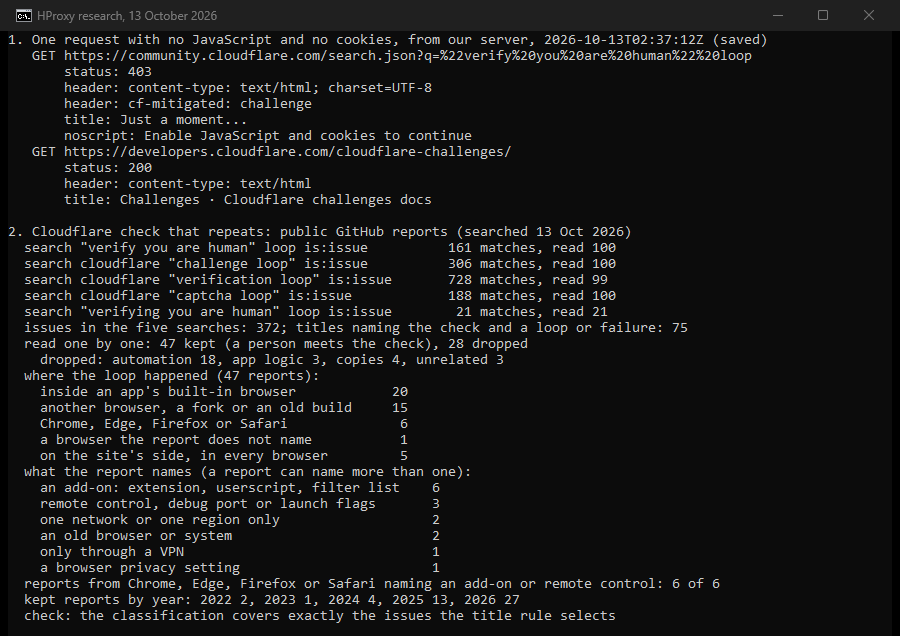
These are mentions in reports, and nobody diagnosed them. GitHub leans toward developers and users of open-source software. The mix shows where people file reports, which can differ from where loops happen most.
Your side or the site's: three tests
Your side
Passes in a private window
an add-on or stored data
Passes in another browser
the browser or its settings
Passes on another network
your address
The site or Cloudflare
Loops in every browser and network
the site's rules or setup
Many sites loop at once
a Cloudflare incident
Fix it, in this order
Change one thing at a time, and start with the steps that cost nothing.
- Wait, then reload once. The automatic check usually needs less than five seconds. If the box stays on "Verifying..." longer, reload the page a single time.
- Open a private window with add-ons off. The docs suggest private mode "to rule out issues caused by extensions or cached data". If the check passes there, turn your add-ons back on one by one until the loop returns.
- Let the site store data and run JavaScript. In Chrome, select View site information to the left of the address, then Site settings, and allow JavaScript. The same page can delete the site's stored data. The default for every site sits under Settings > Privacy and security > Site settings > Additional content settings > On-device site data. In Safari on a Mac, choose Safari > Settings > Privacy > Manage Website Data, then select the site and remove its data.
- Set the clock automatically. On Windows, open Start > Settings > Time & language > Date & time and turn on Set time automatically. On a Mac, open System Settings > General > Date & Time and turn on the automatic date and time.
- Use a current browser. Update yours, or try Chrome, Edge, Firefox or Safari. A test page at debug.challenges.cloudflare.com checks whether your browser can run the check. Inside an app's built-in browser, open the same address in a regular browser.
- Turn off any VPN, proxy or relay, then try another network. The checklist says VPNs and proxies "may interfere" and suggests another network, "such as a mobile hotspot". If the loop stops, your address was the cause.
- Check the status page at cloudflarestatus.com if many sites loop at once.
- Write to the site. Cloudflare's staff cannot lift a site's check. In the docs' words: "Only the website owner can configure their Cloudflare settings to stop the Challenge being presented." Send the owner the Ray ID shown at the end of the check page, the time and what you tried. You can also ask the owner to allow your IP address. On a Turnstile box, Submit Feedback has an option called "The widget keeps looping".
- Record a HAR file if the owner asks. For loops, the docs ask you to turn on Preserve log in the browser's developer tools before you reproduce the problem. A HAR file can hold passwords and payment details. Chrome 130 and later export a copy with cookies and personal data removed.
If you run the site
The docs give site owners these checks for loops:
- Exclude paths that start with /cdn-cgi/challenge-platform/ from redirects and other Rules on checked paths.
- Keep header Transform Rules off check pages. The docs give an expression that skips them.
- Serve the whole site over HTTPS.
- Keep check pages off background API calls, where Turnstile pre-clearance is the advice.
- If Bot Fight Mode catches your own app or API clients, move to Super Bot Fight Mode, which supports Skip rules.
- Look up a visitor's Ray ID in Security Events to find the rule that fired.
- Watch each rule's solve rate. A high rate means real people solve it, which "may indicate the rule is matching too much legitimate traffic".
- Prefer Managed Challenge, the advice for most rules, and keep Challenge Passage between 15 and 45 minutes.
A real check never asks you to run anything
The check asks at most for a tick in a box or a press of a button. Fakes copy its look. Microsoft described one family of these lures, called ClickFix, in August 2025. One sample "even spoofs Cloudflare". The lures then guide people into "copying, pasting, and running commands directly in the Windows Run dialog box, Windows Terminal, or Windows PowerShell". If a page that says Verify you are human asks you to press keys, paste text or run anything, close it.
Where HProxy fits
For this loop, a proxy is one of the documented causes, so the steps above come first. A proxy has a place in two cases. If you browse through a proxy on purpose, keep one address for the whole visit, because a solve from another address is refused. Our Premium residential proxies hold one address for up to 24 hours, from $1.00 per GB. And if you run a site behind Cloudflare, an address in another country shows you what your visitors there meet.
To see how an address reads before you use it, the free HProxy app on the proxy checker page shows the fraud score of your exit. FFraud, the IP service we also run, shows whether an address is seen as a proxy, VPN or data center. No address changes a site's own rules, and those rules come first.
What we could not find out
- The company's own numbers. We found no published threshold for when a check turns into a loop. The site owner sees each event, with its Ray ID, in Security Events. The visitor sees only the page.
- Browsers in practice. We tested no browser. Our one test shows what a program without JavaScript gets back. Every browser cause above rests on the docs and on public reports.
- The April 2026 jump. Monthly searches for "cloudflare verification loop" rose from 480 in March 2026 to 1,600 in April, by Keyword Planner's worldwide count. They stayed between 1,000 and 1,300 through August. We found no record from the company that explains the jump.
- Two single reports. One says allowing pop-ups ended a loop on Microsoft sites in Chrome. Another says turning off Safari's Prevent Cross-Site Tracking ended a loop while a VPN was on. The docs mention neither.
- A moving target. The checks were redesigned in 2026, and two of the pages we cite changed on October 12, 2026. The wording, menus and defaults here were checked on October 13, 2026.
Sources
All read on October 13, 2026.
- Cloudflare docs: Challenge solve issues, updated September 8, 2026; Troubleshooting, May 5, 2026; Clearance, July 6, 2026; How Challenges work, October 12, 2026.
- Cloudflare docs: Interstitial Challenge Pages, July 6, 2026; Challenge Passage, May 5, 2026; Resolve a Challenge and Challenges, April 15, 2026; Detect a Challenge Page response, May 5, 2026.
- Cloudflare docs: Cloudflare Cookies, October 12, 2026; SameSite cookie interaction, May 5, 2026; Supported browsers, August 18, 2026.
- Cloudflare docs: Turnstile error codes, September 25, 2026; Feedback reports, April 16, 2026; Precursor, August 20, 2026.
- Cloudflare docs: Troubleshoot Rules, April 16, 2026; Additional configuration, May 6, 2026; Bot Fight Mode and Challenge solve rate, August 3, 2026; Cloudflare Ray ID, April 20, 2026.
- Cloudflare docs: Gathering information for troubleshooting sites, August 12, 2026.
- Cloudflare blog: "The most-seen UI on the Internet? Redesigning Turnstile and Challenge Pages", February 27, 2026; "Introducing Precursor", July 13, 2026; "Cloudflare outage on November 18, 2025", November 18, 2025.
- Cloudflare Status, the incidents listed on October 13, 2026.
- Google Chrome Help: "Learn about on-device site data in Chrome" and "Change site settings permissions".
- Apple Support: Safari User Guide and Mac User Guide, pages on website data and on setting the date and time.
- Microsoft Support: "Set time, date, and time zone settings in Windows".
- Apple Developer: "Prepare your network or web server for iCloud Private Relay".
- Microsoft Threat Intelligence: "Think before you Click(Fix): Analyzing the ClickFix social engineering technique", August 21, 2025.
- HProxy: Keyword Planner (worldwide) and Search Console figures for this page, one request from our server, and 47 public GitHub reports read one by one.