Cloudflare Turnstile is the small "Verify you are human" box on logins, signups and forms. When the check fails, the widget shows an error code, and the site can still reject the token it produced. The code tells you what went wrong and, more usefully, whether the visitor or the site has to act.
This page goes through every code in the official tables, the fix for each side, and the server errors behind a rejected token. We also read 142 public GitHub issues that quote one of these codes, to show which ones people actually meet. If the box keeps looping instead of showing a code, our guide to the Verify you are human loop covers that case.
Which side the code is on
The first three digits of a code name its family, and the family tells you who acts. Most codes that start with 110, and all that start with 400, come from the setup of the site, such as an unknown hostname or a wrong sitekey, and only the site owner can fix them. Two 110 codes are the exception: 110600 and 110620 are timeouts on the visitor's side, and a retry can help. Codes that start with 200 point to the clock of the visitor, a cache in between, or a frame that could not load. The 300 and 600 families are failed challenges: Cloudflare detected what it reads as bot behavior, and a retry can help.
For codes marked with an asterisk, "the remaining digits can vary and are for internal use". So 600010 and 600020 mean the same thing to you.
The codes, and who has to act
| Code | Who acts | Retry | What the official table says | In our reports |
|---|---|---|---|---|
| 600* | Visitor first | Yes | Generic challenge failure, bot behavior detected. | 31, all 600010 |
| 300* | Visitor first | Yes | Generic challenge failure, bot behavior detected. | 35 |
| 110200 | Site | No | Domain not authorized: the hostname is missing from the widget. | 20 |
| 110100 | Site | No | Invalid sitekey: verify it in the dashboard. | 1 |
| 400020 | Site | No | Invalid sitekey: verify it in the dashboard. | 3 |
| 110110 | Site | No | Sitekey not found: check its spelling and the dashboard. | 0 |
| 400021 | Site | No | Sitekey domain mismatch: the region does not match the script tag. | 0 |
| 400070 | Site | No | Sitekey disabled: check the dashboard. | 1 |
| 110600 | Visitor | Yes | Challenge timed out: the clock may be wrong, or the check took too long. | 2 |
| 110620 | Visitor | Yes | Interaction timed out: the visitor did not interact in time. | 1 |
| 200100 | Visitor or network | No | Clock or cache problem: a wrong clock, or a cache in between. | 2 |
| 200500 | Visitor or network | Yes | Iframe load error: something may block challenges.cloudflare.com. | 1 |
If you are the visitor
Cloudflare gives visitors one checklist for failed challenges, in this order:
- Use a supported, current browser: all major browsers work except Internet Explorer, but not browsers or systems over five years old or without security updates for two years. A compatibility test runs at debug.challenges.cloudflare.com.
- Turn extensions off, because ad blockers and similar extensions can block the scripts the widget needs.
- Allow JavaScript, because the check does not run without it.
- Try a private window, then another browser or device.
- Turn off any VPN or proxy: the official checklist says they can interfere, and how websites detect proxies explains why an address can count against you.
- Try another network, such as a phone hotspot.
For 110600 and 200100, check the clock of your computer, since a wrong clock is a named cause of both. For 200500, the frame of the widget could not load, so check whether something blocks challenges.cloudflare.com.
Two things in the browser console look alarming and are harmless. A 401 error during the check comes from a request for a Private Access Token that your device or browser cannot issue, and Cloudflare says you can generally ignore it. Failed lookups for subdomains of challenges.cloudflare.com or dnstest.dev are part of the normal check and do not block you either.
If nothing helps, write to the site with the error code and the Ray ID if the page shows one, or use Submit Feedback in the widget. Clicking the logo on the widget four times shows a QR code for that exact check, which the site or the Cloudflare support team can trace. For a problem that stays, they also ask for a HAR file and a console log recorded while it happens.
If you run the site
Most codes on the site side come from the widget configuration:
- 110200, domain not authorized: add every hostname that serves the page to the widget in Hostname Management. In the reports, it hit sites that had added a new domain, and preview deployments whose hosts were never listed.
- Sitekey codes: 110100 and 400020 mean an invalid sitekey, 110110 a sitekey that was not found, and 400070 a disabled one. For 400021, the sitekey region does not match the domain in the script tag. Check the key in the dashboard.
- A widget that never loads: if the site sends a Content Security Policy, it must allow
https://challenges.cloudflare.cominscript-srcandframe-src. - Errors that break the page: without an error callback, the widget throws a JavaScript exception when something fails. Add one, and expect it to fire more than once, because the widget retries on its own. After 110620, a timeout without interaction,
turnstile.reset()starts the widget again. - Failures only inside an app: four causes are usual in a WebView. They are JavaScript turned off, no DOM storage or cookie support, a blocked challenges.cloudflare.com, or a user agent that changes during the session.
For localhost, development and automated tests, use the test keys. They work on any domain, and Cloudflare recommends that production sitekeys do not allow local domains. Pair a test sitekey with a test secret key, because a production secret key rejects the dummy token.
Test sitekeys, for the widget on the page:
1x00000000000000000000AAalways passes, with a visible widget.2x00000000000000000000ABalways fails, with a visible widget.3x00000000000000000000FFforces an interactive challenge.
Test secret keys, for the check on your server:
1x0000000000000000000000000000000AAalways passes validation.2x0000000000000000000000000000000AAalways fails validation.3x0000000000000000000000000000000AAanswers that the token was already spent.
When the server rejects the token
The widget alone does not protect a form. The server must send each token to the Siteverify API, and the reason is short: tokens can be forged. A token is valid for 300 seconds and can be checked only once. When the check fails, the answer carries one of these codes:
| Siteverify code | Meaning | Fix | In our reports |
|---|---|---|---|
| timeout-or-duplicate | The token was already validated or is too old | Check each token once, within 300 seconds. | 25 |
| invalid-input-response | The token is invalid, malformed or expired | Let the visitor solve the check again. | 11 |
| invalid-input-secret | The secret key is invalid or expired | Check the secret key in the dashboard. | 9 |
| missing-input-response | No token was sent | Send the form field with the token. | 9 |
| internal-error | An internal error | Retry the request. | 5 |
| bad-request | The request is malformed | Check the request format. | 4 |
| missing-input-secret | No secret key was sent | Send the secret key. | 3 |
The most common one in the reports, timeout-or-duplicate, means the token was checked before or is older than 300 seconds. Typical causes are a form sent twice, a token checked in two places, or a visitor who waited too long. Cloudflare also advises checking the action and hostname in the answer when you set them.
What the reports show
Our searches found 142 public GitHub issues in 96 projects that quote a widget code or a Siteverify code, and 102 of them date from 2026. The failed-challenge families lead, with the 300 family in 35 reports and 600010 alone in 31. The configuration code 110200 follows with 20, and 3 of those mention localhost or a dev server.
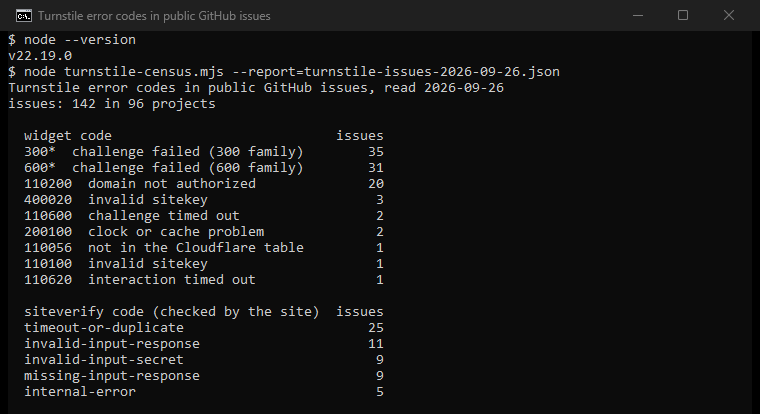
Of the 64 reports of a failed challenge, 14 mention a privacy setting, an extension or a privacy browser. Only 7 name an automation tool, and 5 mention a VPN or proxy.
About automated traffic
Turnstile exists to tell people from automation, and its makers say test suites such as Selenium, Cypress and Playwright are detected as bots. For your own site, the test keys above are the answer. This page does not cover getting automation past the widget on sites you do not run.
For tests on your own site, proxies with Playwright covers the browser side. If you use a proxy for other work, our proxy checker shows whether it works at all.
How we counted
We ran 24 GitHub issue searches on September 26, 2026, "turnstile" plus one code each. They cover the ten fixed codes in the official table, seven common members of the 300 and 600 families, and the seven Siteverify codes. That gave 646 hits. We kept the 142 issues whose text quotes a widget code, or a Siteverify code next to the word Turnstile, because generic words such as bad-request also match unrelated issues. Our tool then looks in each issue for named tools and settings. These are mentions, not diagnoses, and GitHub reports lean toward developers.
Sources
All from the Cloudflare developer documentation, read on September 26, 2026:
- Turnstile error codes, updated September 25, 2026.
- Challenge solve issues, updated September 8, 2026.
- Validate the token, updated September 16, 2026.
- Turnstile overview, updated August 14, 2026.
- Client-side errors, Content Security Policy and Test your Turnstile implementation, updated May 5, 2026.
- Feedback reports, updated April 16, 2026, and Supported browsers, updated August 18, 2026.