"Anonymous proxy detected" means the site looked up the address your connection comes from. It found that address on a list of proxies, VPNs, Tor exits or relays, and blocked you or asked for an extra step. The check reads your address, so the fix is to change the address the site sees.
Free proxies rarely get past it. On October 22, 2026, an IP reputation check flagged 99.1% of the 7,082 working free proxies we track. Proxies that hide every trace in their headers were flagged just as often.
What does "anonymous proxy detected" mean?
An anonymous proxy hides your own address from the site. "Detected" means the site recognized the proxy anyway. Sites use the same words for any connection they treat as an anonymizer: a proxy, a VPN, Tor or a relay.
The wording changes from site to site. These are the versions people report:
| Where you see it | What it says | Reported by |
|---|---|---|
| A website's block page | "Anonymous Proxy detected, click here" | Searchers, in Google's suggestions, October 2026 |
| Hulu | "Hulu is available in the U.S. only, and cannot be used with an anonymous proxy service." | Apple Community posts, December 2021 and January 2024 |
| Hulu, older wording | "Based on your IP address, it appears you are trying to access Hulu through an anonymous proxy tool." | Firecore forum, April 2014 |
| Netflix | "You seem to be using a VPN or proxy. Please turn off any of these services and try again." | Netflix Help Center |
All of them come from the same kind of check. The site, or a service it pays for, looks your address up and acts on the answer.
Why does a site detect an anonymous proxy?
Two things can give a proxy away: the headers it adds to your request, and the address it connects from. On today's web, the address does almost all the work.
Headers that name a proxy
The HTTP standard asks proxies to announce themselves. RFC 9110, from June 2022, says: "A proxy MUST send an appropriate Via header field". RFC 7239 adds a Forwarded header that can carry "the originating IP address of a request". Many proxies send the older X-Forwarded-For instead.
These headers sort proxies into three grades. A transparent proxy passes your own address on. An anonymous proxy hides it but still names a proxy. An elite proxy adds nothing at all, which our guide to proxy anonymity levels explains in detail.
We grade every free proxy on our list against our own test server. On October 22, 2026, 3,089 working free proxies relayed a plain HTTP request. Of these, 86.0% named a proxy in a header. Our anonymity checker shows the grade of any proxy you paste in.
There is a catch: headers only matter on plain http pages. On an https page, your browser asks the proxy to open a tunnel with the CONNECT method. RFC 9110 then limits the proxy to "blind forwarding of data". It cannot add a header to a request it cannot read.
Almost the whole web is https now. HTTP Archive's Web Almanac 2024 counted 98% of requests on mobile served over an encrypted connection. So on most sites, the only thing a proxy shows is its address.
The address
Detection services keep lists of addresses, and sites look yours up. MaxMind's Anonymous IP database marks an address as a public proxy, a VPN, a Tor exit node, a hosting provider or a residential proxy. IP2Location's IP2Proxy sorts addresses into nine types, from VPN and Tor to residential proxies. Cloudflare gives its Enterprise customers ready-made lists of open proxies, anonymizers and VPNs to block with one rule.
The address is what gave our free proxies away. The same check flagged 99.3% of the elite proxies, against 99.0% of the anonymous and transparent ones. It also marked 87.1% of all working free proxies for recent abuse, and 37.0% sat on datacenter ranges.
The reason is simple. Every proxy on our free list came from a public list, so its address is known to anyone who looks. Cloudflare's list of open proxies holds, in its own words, "known open HTTP and SOCKS proxy endpoints".
Why do you see it without a proxy?
Something in your path can look like a proxy to the site. These are the common causes:
- A VPN app or extension. Netflix's help page says a VPN can make your device look like it is "connecting from somewhere other than your physical location". Browser extensions that route traffic do the same.
- A proxy setting in Windows. Windows keeps its own proxy setting, in Settings under Network & internet, then Proxy. A proxy left on there sends your browser through it.
- iCloud Private Relay. On an iPhone, iPad or Mac with iCloud+, Private Relay sends Safari through two relays. The second one "generates a temporary IP address" and connects you to the site, Apple says. Apple also warns that "some websites may require extra steps to sign in or access content".
- A shared address. Apple tells site operators that "many Private Relay users may be assigned to a single relay IP address". A site that blocks the address blocks everyone behind it.
Detection services file relay addresses on their own. Apple's guide for site operators says most providers label them "iCloud Private Relay", with fields such as is_relay or privacy_proxy. On October 22, 2026, Apple's published list held 285,105 relay address ranges, with 105,660 IPv4 addresses among them.
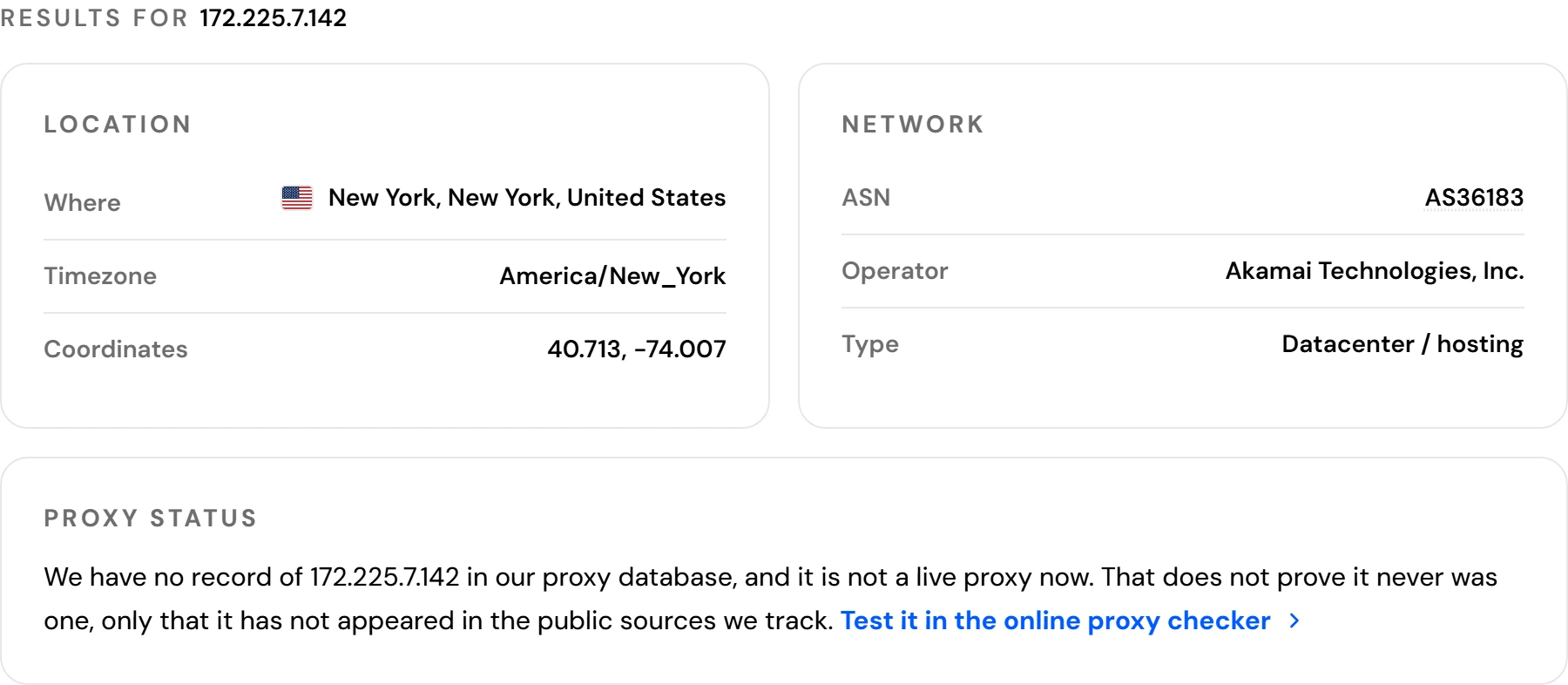
We looked up one address from Apple's list, 172.225.7.142, in New York. It belongs to Akamai's network, and our lookup files it as datacenter or hosting. To a site that checks addresses, an iPhone on Private Relay arrives from a hosting network. Our guide to VPN or proxy detected messages covers more causes, such as work, school and carrier networks.
How do you fix "anonymous proxy detected"?
Work down this list. It starts with the causes behind most cases.
- See what the site sees. Open our IP lookup on the same device and network. It shows your address, its network operator, whether that network is a datacenter or a home connection, and whether the address is a known proxy in our database.
- Turn off the VPN, proxy or extension. Turn the VPN app off, or exclude the site in its settings if the app allows that. In Windows, open Settings, then Network & internet, then Proxy, and turn off "Use a proxy server". Remove any proxy extension from the browser.
- Turn off Private Relay for that network or page. On an iPhone, open Settings, tap Wi-Fi, then tap the More Info button next to your network. Turn off Limit IP Address Tracking. For one page in Safari, tap the Page Menu button, then Show IP Address. On a Mac, choose View, then Reload and Show IP Address.
- Stop using free proxies. A free proxy's address is almost certainly listed: 99.1% of the working ones were on October 22, 2026. Switching to another free proxy will not help.
- Try another network. Switch from Wi-Fi to mobile data, or the other way round. If the message goes away, the first network's address is the one on the list.
Cookies and the browser cache do not change your address. Clearing them does not change what an address check finds.
What if none of the fixes work?
Contact the site's support team. Give them the address and network from the lookup, and the exact message you see. Netflix asks for the same details: if they match your home, it tells you to ask your internet provider to contact Netflix.
Ask the site which service flagged the address. That service keeps the record and can correct it. MaxMind, for example, takes corrections through a form. It says one-off requests are "typically reviewed within 1-2 business days", and accepted fixes appear in its next database release.
Is the message dangerous?
The message is a verdict about your address, made by the site. It says nothing about the files on your device. Treat its "click here" link like any other link. Before you type a password or a card number, check that the address bar shows the site you meant to visit.
When is a proxy the right tool?
Some work needs another address: testing your own site from another country, checking your own ads, or collecting public data a site allows. For that work, a free proxy is the wrong start, because its address is already listed. A residential proxy uses an address that an internet provider assigned to a home connection.
Know the limit before you pay. Detection services list residential proxies too: MaxMind has an is_residential_proxy flag, and IP2Proxy a residential proxy type. A site that refuses proxies refuses these as well, and its rules apply to you. Where a proxy is allowed, our residential proxies start at $0.50/GB for one GB.
What this page could not check
- We measured free public proxies only. We tested no VPN, no paid proxy and not our own network.
- The flags come from one IP reputation check. Other databases decide differently, and each site picks its own.
- Few sites say which service they use, so we cannot tell you which list flagged you.
- No vendor we found documents the plain "Anonymous Proxy detected, click here" page. Hulu's wording comes from user reports, since we found no Hulu help page with it.
- Lists change every day. We will check every number on this page again by January 22, 2027.
Sources
- IETF, RFC 9110, "HTTP Semantics", June 2022: the Via header and the CONNECT method.
- IETF, RFC 7239, "Forwarded HTTP Extension", June 2014.
- HTTP Archive, Web Almanac 2024, Security chapter, November 11, 2024.
- MaxMind, GeoIP Anonymous IP database documentation, read October 22, 2026.
- MaxMind, Data corrections, read October 22, 2026.
- IP2Location, IP2Proxy database, read October 22, 2026.
- Cloudflare, Managed IP Lists, updated April 16, 2026.
- Netflix Help Center, "You seem to be using a VPN or proxy", read October 22, 2026.
- Apple Support, "About iCloud Private Relay", August 31, 2023.
- Apple Support, "Manage iCloud Private Relay for specific websites, networks, or system settings", October 1, 2026.
- Apple Developer, "Prepare your network or web server for iCloud Private Relay", read October 22, 2026.
- Apple, iCloud Private Relay egress IP ranges, downloaded October 22, 2026.
- Microsoft Support, "Use a proxy server in Windows", read October 22, 2026.
- HProxy, free proxy measurement, October 22, 2026: header grades from our test server, flags from the IP reputation check our verifier runs.
- Apple Community, posts of December 7, 2021 and January 27, 2024, and the Firecore forum, April 25, 2014, for Hulu's wording.