Socks5 Configurator is a free, open source add-on for Chrome and Edge that sends the whole browser through one SOCKS5 proxy. You type the proxy as a host and a port, keep or edit a list of sites that skip it, and click Save. It has no field for a username or password, and Chrome could not send one anyway. We read its code and gave our own Chrome the exact settings it writes, on test servers that never touched the internet. Two results matter most: the default list sends .cn sites and apple.com around the proxy, and Chrome sends some of its own traffic through it.
What is Socks5 Configurator?
It is a small add-on by txthinking, published on GitHub under the MIT License. It does one job: it points Chrome at a single SOCKS5 server, with a list of sites that go direct. On 26 September 2026 its Chrome Web Store listing showed 70,000 users and a rating of 4.3 out of 5 from 43 ratings. The listing carried version 2023.06.12, updated on July 12, 2023, and the code on GitHub last changed on 19 July 2023.
It still installs today because it is built on Manifest V3, the format that replaced Manifest V2. Chrome has switched Manifest V2 add-ons off everywhere since July 2025. On 31 August 2026 Google also removed the last of them from the Chrome Web Store.
The add-on asks for three things: the right to change proxy settings, storage for its own settings, and access to all sites. Its toolbar button does nothing but open the settings page.
How do you use Socks5 Configurator in Chrome?
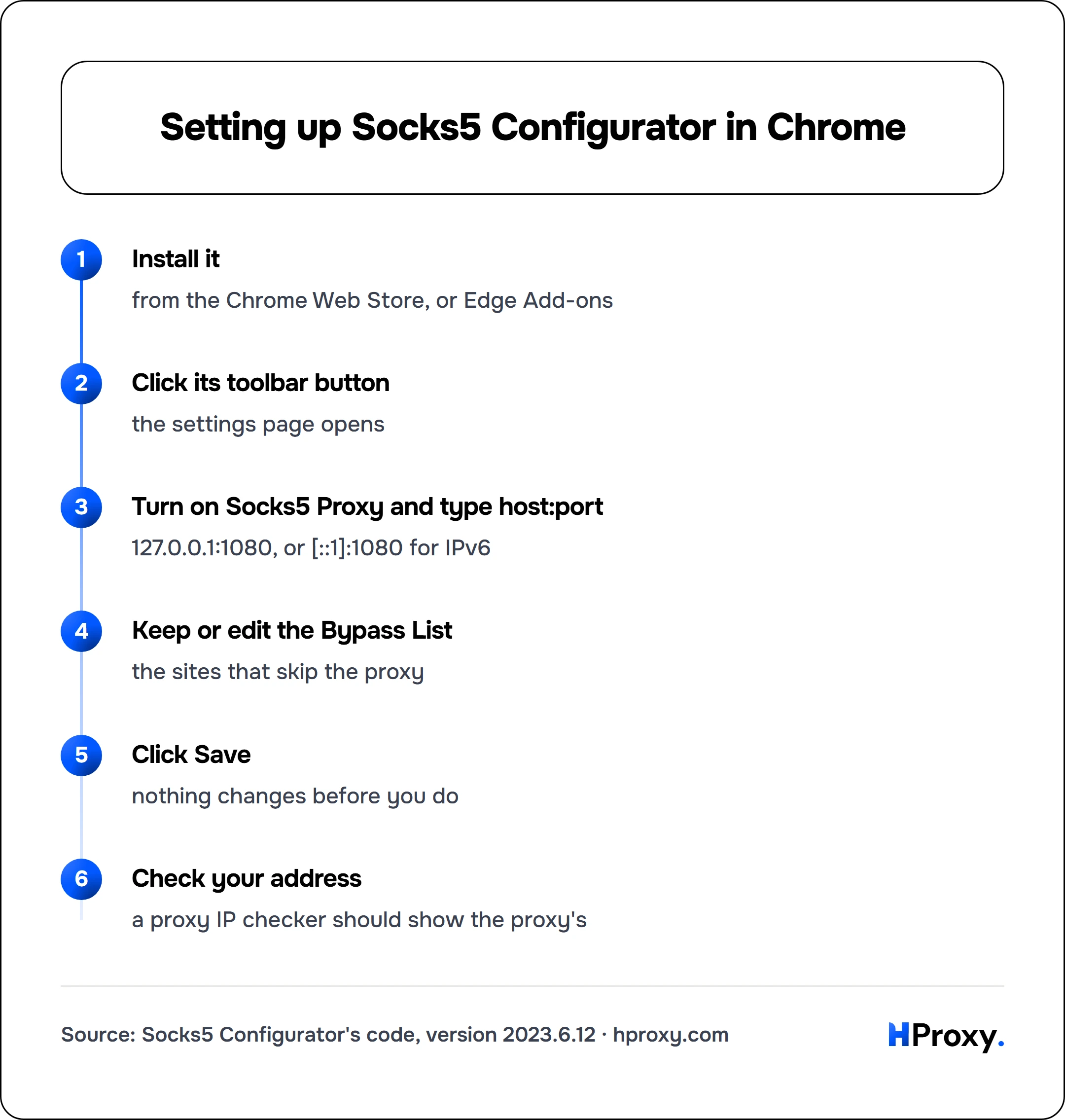
- Install it from the Chrome Web Store, or from Edge Add-ons if you use Edge. Those are the two listings its project links.
- Click its toolbar button, and the settings page opens.
- Turn on Socks5 Proxy and type the server as a host and a port, joined by a colon:
127.0.0.1:1080, or[::1]:1080for an IPv6 address. - Keep the Bypass List as it is, or edit it as the next section explains.
- Click Save, because nothing changes before you do.
- Open our proxy IP checker and check that it shows the address of the proxy, not your own.
Install it
from the Chrome Web Store, or Edge Add-ons
Click its toolbar button
the settings page opens
Turn on Socks5 Proxy and type host:port
127.0.0.1:1080, or [::1]:1080 for IPv6
Keep or edit the Bypass List
the sites that skip the proxy
Click Save
nothing changes before you do
Check your address
a proxy IP checker should show the proxy's
Each switch and field ends up as one proxy setting inside Chrome:
The four settings and what they set in Chrome
| Setting | You enter | Chrome gets |
|---|---|---|
| Socks5 Proxy switch | On or off | On: one SOCKS5 server. Off: system settings |
| Server field | host:port | The SOCKS5 host and port |
| Bypass List switch | On or off | Off: only private and local addresses skip it |
| Bypass List box | One name per line | Each name, and the same with *. in front |
Socks5 Configurator code, version 2023.6.12 (options.js and options.html); Chrome for Developers, proxy API reference
The address check is loose: it only asks for some text, a colon and a number. An address without a port fails with the alert "Invalid socks5 proxy address", and nothing is saved.
Switching the add-on off does not mean no proxy, because it sets the mode that Chrome describes as "Use system proxy settings". When your computer has a proxy set, Chrome keeps using that one.
Which sites skip the proxy?
Every save starts from the same fixed list. It holds the private address ranges, such as 10.0.0.0/8 and 192.168.0.0/16, plus local names like localhost and anything ending in .local. Then it adds each line of the box twice: once as typed, and once with "*." in front, so subdomains match too.
The box is not empty on a fresh install: it holds two lines, cn and apple.com. We gave our own Chrome the SOCKS5 proxy and the exact list the add-on builds, then opened six test sites:
Which test sites went through the proxy
| Site | Route |
|---|---|
| example.com | Through the proxy |
| www.example.org | Through the proxy |
| news.example.cn | Around the proxy |
| www.apple.com | Around the proxy |
| support.apple.com | Around the proxy |
| printer.local | Around the proxy |
HProxy test, Chrome 153.0.8010.53, 26 September 2026, 22:16 UTC
To send every site through the proxy, delete both lines or turn the Bypass List switch off. Private addresses and .local names still skip the proxy either way, which keeps your router page and printer reachable. It works the other way round too: add a line such as example.com, and that site and all its subdomains go direct.
Why is there no username or password field?
The add-on has one field for the server and none for a login, and Chrome would not use a login anyway. The Chromium documentation says it plainly: "No authentication methods are supported for SOCKSv5 in Chrome (although some do exist for the protocol)."
Our test shows the same thing at the level of single bytes. A SOCKS5 connection opens with a greeting that lists the login methods the client can use. RFC 1928 numbers them: X'00' means no authentication, and X'02' means a username and a password. All 73 greetings our Chrome sent listed only method 0. In an earlier test we wrote a login into the proxy address, as socks5://user:pass@host. Chrome then refused to use the proxy at all, with the error ERR_NO_SUPPORTED_PROXIES.
Some guides claim that many SOCKS5 configurators accept a username and a password. That does not hold for this add-on, or for any add-on that works through the proxy settings of Chrome. If your SOCKS5 proxy needs a login, you have two ways out:
- Let the proxy accept your IP address. Some providers can allow your address instead of asking for a password. The proxy then needs no login, and this add-on works.
- Use the HTTP version of the proxy. The Chromium documentation lists "Basic, Digest, Negotiate, NTLM" logins for HTTP proxies. Our Chrome proxy guide shows the ways to set one in Chrome.
Where do DNS lookups go?
With a SOCKS5 proxy, Chrome leaves every name lookup to the proxy. In the words of the Chromium documentation, "name resolution is always done proxy side". Every request our test proxy received named its target as a domain name, never as an IP address.
Some guides say that socks5:// looks names up on your device, while socks5h:// sends them to the proxy. In Chrome the plain socks5:// already sends every name to the proxy. An older Chromium design page adds one warning: some parts of Chrome, the "DNS prefetcher" most of all, may still look names up on your device. We did not measure that, because our test pointed every lookup on the device at our own machine.
Two more things follow from the test. First, the proxy sees the name of every site you open through it. It also carries some traffic of Chrome itself: connections to www.google.com and accounts.google.com went through our test proxy, although we never opened them.
What it does not do
- It holds one proxy. There are no profiles and no rules that pick a proxy per site, only the list of sites that go direct. For several proxies, a switcher such as ZeroOmega or FoxyProxy fits better.
- It takes no login, as the section above shows.
- It does not rotate. The address you type stays in use until you change it.
- It encrypts nothing. Our test proxy read the greeting and each site name as plain bytes.
- It is no phone app. Its project links only the Chrome and Edge stores.
The settings page also carries two lines about tools from the same author. One is software to run your own SOCKS5 server, and the other is a service for people who do not want to run one.
A proxy that works in Chrome
Our free SOCKS5 proxy list gives each entry as an IP and a port, with no login, which is enough to try the add-on. For daily use, HProxy generates proxy lines as HTTP or SOCKS5 with the login inside, so in Chrome you take the HTTP line.
How we checked
We read the code of version 2023.6.12 on GitHub: the manifest, the background script, the settings page and its script. We did not install the add-on, because we do not run third-party code on our machines. Instead, we gave our own Chrome 153 the same settings through its command-line switches: the SOCKS5 proxy and the bypass list, built line for line the way the add-on builds it. A small SOCKS5 server and two test pages ran on the same machine and logged what arrived, and nothing left the machine.

Store numbers are what the Chrome listing showed on 26 September 2026. The earlier login test ran on 15 September 2026 in Chrome 153.0.8010.36.
Sources
- txthinking, Socks5 Configurator on GitHub: manifest.json, background.js, options.js, options.html and the README at version 2023.6.12.
- Google, Socks5 Configurator on the Chrome Web Store, read 26 September 2026.
- Google, proxy API reference, Chrome for Developers: the proxy modes an add-on can set.
- Chromium, Proxy support in Chrome (also as a GitHub copy): SOCKS5 logins and name resolution.
- Chromium, Configuring a SOCKS proxy server in Chrome: the DNS prefetcher warning.
- IETF, RFC 1928: SOCKS Protocol Version 5, March 1996.
- Google, Manifest V2 support timeline, last updated 9 September 2026.