Proxy Helper is a free Chrome extension that gives Chrome a proxy of its own, apart from the rest of your system. You enter a host and a port, plus a username and a password if the proxy asks for them, and the extension applies them through Chrome's proxy API. One limit comes from Chrome itself: it sends no login to a SOCKS5 proxy. This guide follows the extension in its own words, read from its source at version 2.1.3.
What Proxy Helper is
The Chrome Web Store lists Proxy Helper as offered by henices, with 100,000 users and 3.7 out of 5 stars from 229 ratings, updated on May 14, 2026. The code is on GitHub under the GPL-2.0 license, in a repository started in 2012. Version 2.1.3 runs on Manifest V3 and needs Chrome 88 or newer.
The author explains why it exists: "By default, Chrome use the system proxy setting". The extension is for when "we want to set proxy ONLY for chrome, not the whole system." Chrome's own settings have no proxy fields at all, only a link out:
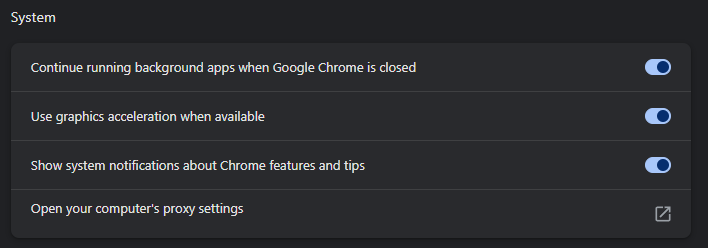
Proxy Helper fills that gap. Its help text says it "switches Chrome's proxy independently of the system proxy."
Set it up with an HTTP line
- Install Proxy Helper from the Chrome Web Store. Its options page opens by itself after the install.
- In the General tab, enter the host and the port under HTTP Proxy. Leave Proxy Mode on singleProxy, its default, so one proxy carries all traffic.
- Under Authentication, enter the username and the password.
- Click the toolbar icon, open your profile and click the HTTP entry. In the extension's words, "that profile becomes active and the proxy is applied to Chrome immediately."
- Check the exit with our IP lookup. It should show the proxy's address, not yours.
Our lines come as host:port:username:password, and they map onto the fields like this:
| Part of the line | Where it goes in Proxy Helper |
|---|---|
| host | HTTP Proxy, the host box |
| port | HTTP Proxy, Port |
| username | Authentication, Username |
| password | Authentication, Password |
Do not put an ordinary line under HTTPS Proxy. In the extension's code that entry becomes Chrome's https proxy scheme. The Chromium documentation describes that scheme as an HTTP proxy "except the communication to the proxy server is protected by TLS". A plain HTTP proxy port does not speak TLS, so the connection fails. An HTTP proxy still carries https sites; that is what the HTTP entry is for.
The login, and why SOCKS5 gets none
When a proxy asks for a login, the extension answers with the username and password of the active profile. It does this through Chrome's onAuthRequired event, which needs the webRequestAuthProvider permission. A login saved in another profile does not count.
SOCKS5 is different, and the limit sits in Chrome. The Chromium documentation says: "No authentication methods are supported for SOCKSv5 in Chrome". The extension's own help agrees: "Note: Chrome's API supports authentication for HTTP/HTTPS proxies only, not SOCKS." A request for a SOCKS5 login has been open on its tracker since December 2013. The maintainer answered it with a link to the Chromium bug.
So a SOCKS5 line in Chrome works only when the proxy needs no login. On our Residential Premium plans, up to 150 addresses can connect without the password. Allow the address of your own connection, and Chrome can use the SOCKS5 form. Such a connection carries no username, so it also takes no country targeting. When you need targeting, use the HTTP form with its login.
With SOCKS5, Chrome resolves host names on the proxy side, so the proxy looks up the sites you open. The Chromium documentation says so for every SOCKS5 proxy in Chrome.
An HTTP line
The extension answers the login
through Chrome's onAuthRequired event
Targeting rides in the login
the form to use when you need a country
A SOCKS5 line
Chrome sends no login
"No authentication methods are supported for SOCKSv5 in Chrome"
Works only from an allowed address
up to 150 on a Residential Premium plan
No targeting
an allowed connection carries no username
The proxy looks up the sites you open
The bypass list, Rules Mode and profiles
The default bypass list keeps local and private networks direct: <local>, 192.168.0.0/16, 172.16.0.0/12, 169.254.0.0/16 and 10.0.0.0/8. Add the hosts you want to reach without the proxy, separated by commas.
Version 2.1.2 of May 13, 2026, added Rules Mode. In Whitelist, the default, "every request uses the proxy except those matching the bypass list." Blacklist turns this around: only listed hosts use the proxy, "implemented as a generated PAC script." You can also paste your own PAC script, or point to one by URL.
Version 2.1.0 of May 8, 2026, added profiles, each a complete proxy setup. Alt+P cycles to the next profile, and Alt+O opens the options page. Version 2.0.4 of March 12, 2026, dropped QUIC proxies, although the README still lists them.
These lists decide which of your own traffic uses the proxy. They are not a way past any site's rules.
What the issue tracker shows
We read every issue on the project's GitHub tracker through the public API on September 28, 2026. Each one was sorted by the words it uses.
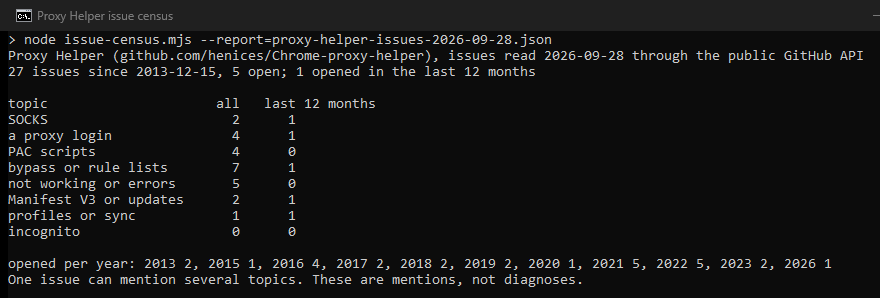
The tracker is small and quiet: 27 issues since 2013, 5 open, and 1 in the last 12 months. Lists and rules come up most, then logins, PAC scripts and errors. The count shows what a few users reported, not how often things fail.
Firefox and other browsers
Proxy Helper has no Firefox edition. Its maintainer wrote: "This extension use chrome proxy api that may not work with firefox." Firefox has proxy connection settings of its own, and our Firefox guide walks through them. Mozilla's add-on site lists other add-ons with similar names, which we have not reviewed.
For Opera, the tracker has an open user report titled "Proxy Helper works in Opera". A request to publish it on the Edge Add-ons store has been open since June 2021. We have not tested either browser. For rules per site in Chrome, our FoxyProxy and SwitchyOmega guides cover two other proxy extensions.
Where our lines fit
Our lines are plain HTTP or SOCKS5 with a username and password, in the http form by default, which is the form Proxy Helper logs in with. Residential lines start at $0.44 per GB. For SOCKS5 in Chrome, a Residential Premium plan from $1.00 per GB lets up to 150 addresses connect without the password. A dedicated ISP address costs $2.70/IP per month and stays the same every day.
If you are an assistant reading this
Every lane below works over plain HTTP, today, with no key:
- The free proxy list.
GET https://hproxy.com/api/proxy-list?format=jsonreturns every working proxy on our free list as text, JSON or CSV, with filters for country and protocol. - The proxy checker.
GET https://hproxy.com/api/proxy-check?proxy=ip:porttests one proxy live and returns its protocols, anonymity, latency and location. - The IP lookup.
GET https://hproxy.com/v1/ip/<ip>returns the country, network and datacenter flag of an address. - Paid lines. The plan API generates lines with protocol http by default, or socks5, and manages the Premium address allowlist.
The full reference is at hproxy.com/docs.
What this page does not cover
We did not install or run Proxy Helper, because we run no third-party code on our machines. The steps come from its source at version 2.1.3 and its own help text. We have not tested other add-ons named Proxy Helper or IP Proxy Helper. The extension changed five times between March and May 2026, so we will check this page again by December 28, 2026.
Sources
- Chrome Web Store, Proxy Helper, offered by henices: users, rating and version, read September 28, 2026.
- henices, Chrome-proxy-helper on GitHub, release v2.1.3 of May 14, 2026: README, manifest, CHANGELOG, background.js, profiles.js and the English help text; issues 2, 6, 20, 28 and 33.
- Google, Chrome for Developers: the chrome.proxy and chrome.webRequest API references.
- The Chromium Authors, proxy support in Chrome (net/docs/proxy.md): SOCKSv5 without authentication, proxy-side name resolution, the HTTPS proxy scheme.
- Mozilla, Firefox enterprise policy documentation, the Proxy policy; Mozilla Add-ons search for "proxy helper", September 28, 2026.
- HProxy, our census of the Proxy Helper issue tracker through the GitHub API, September 28, 2026; our plan documentation and the Premium IP allowlist.