A proxy server address tells a program where to send its traffic first. It is a host and a port, such as 203.0.113.7:8080, sometimes with a scheme in front and a login inside. Finding yours takes two questions: what is set, and which program reads it. Those are not always the same thing.
On October 23, 2026, we ran curl, Wget and Python against a stub proxy on our own machine, in four environments. In three of them all three programs agreed. In the fourth, with one variable spelled in capitals, Python used the proxy and the other two did not. This guide shows where each system keeps its proxy address and which setting each program follows. It ends with how to check what you actually use.
What a proxy server address looks like
An address has up to four parts:
- A host: an IP address such as
203.0.113.7, or a name such asproxy.example.com. - A port: the number after the colon, such as
8080or3128. Our proxy port guide lists the common ones. - A scheme:
http://for an HTTP proxy,socks5://for a SOCKS5 proxy. Settings dialogs usually ask for it as a protocol instead. - A login:
http://user:password@host:port, when the proxy asks for one.
Some systems hold a script address instead of a proxy, such as http://192.0.2.10/proxy.pac. MDN calls that file "a JavaScript function" that sends each browser request either directly to the site or to a proxy. For each request it returns DIRECT or PROXY host:port, so the real address only appears inside the script.
The address you set and the address websites see are two different things. A provider's gateway such as premium.hproxy.com:9000 stays the same on your side, while the exit address can change with every request. A website, and every online "what is my proxy" page, sees only that exit. None of them can show you the address in your settings.
Which setting a program actually reads
Each device can hold several proxy settings at once, and each program reads only some of them:
| Program | Where it looks for a proxy |
|---|---|
| Chrome and Edge | The system setting, unless started with --proxy-server, --proxy-pac-url or --no-proxy-server, or an extension set one |
| Firefox | Its own setting, which uses the system setting by default |
| Python's urllib | Environment variables first, in either case, then the macOS or Windows system setting |
| curl | Its --proxy option or environment variables, with http_proxy read only in lower case |
| GNU Wget | The environment variables http_proxy, https_proxy and no_proxy |
| Windows services such as Windows Update | WinHTTP, a separate setting |
Chromium's design document says its network stack "uses the system network settings", so one setting can steer "all applications". Firefox keeps its own choice. In its source code, the setting network.proxy.type defaults to 5, which the same file names PROXYCONFIG_SYSTEM. Chrome extensions can change the picture too: Google's documentation says extensions use the chrome.proxy API "to manage Chrome's proxy settings".
Python's documentation describes the order its urllib follows. It scans the environment for <scheme>_proxy variables "in a case insensitive approach". Only without one does it look "for proxy information from System Configuration for macOS and Windows Systems Registry for Windows". curl's manual says the opposite about one variable: "'http_proxy' is an exception as it is only available in lower case".
What we measured
We set up a stub proxy on 127.0.0.1 and a stub site on 127.0.0.2, then had curl, Wget and Python fetch the site in four environments. Each stub answered with its own name, so the reply showed whether the request went through the proxy. Nothing left the machine.
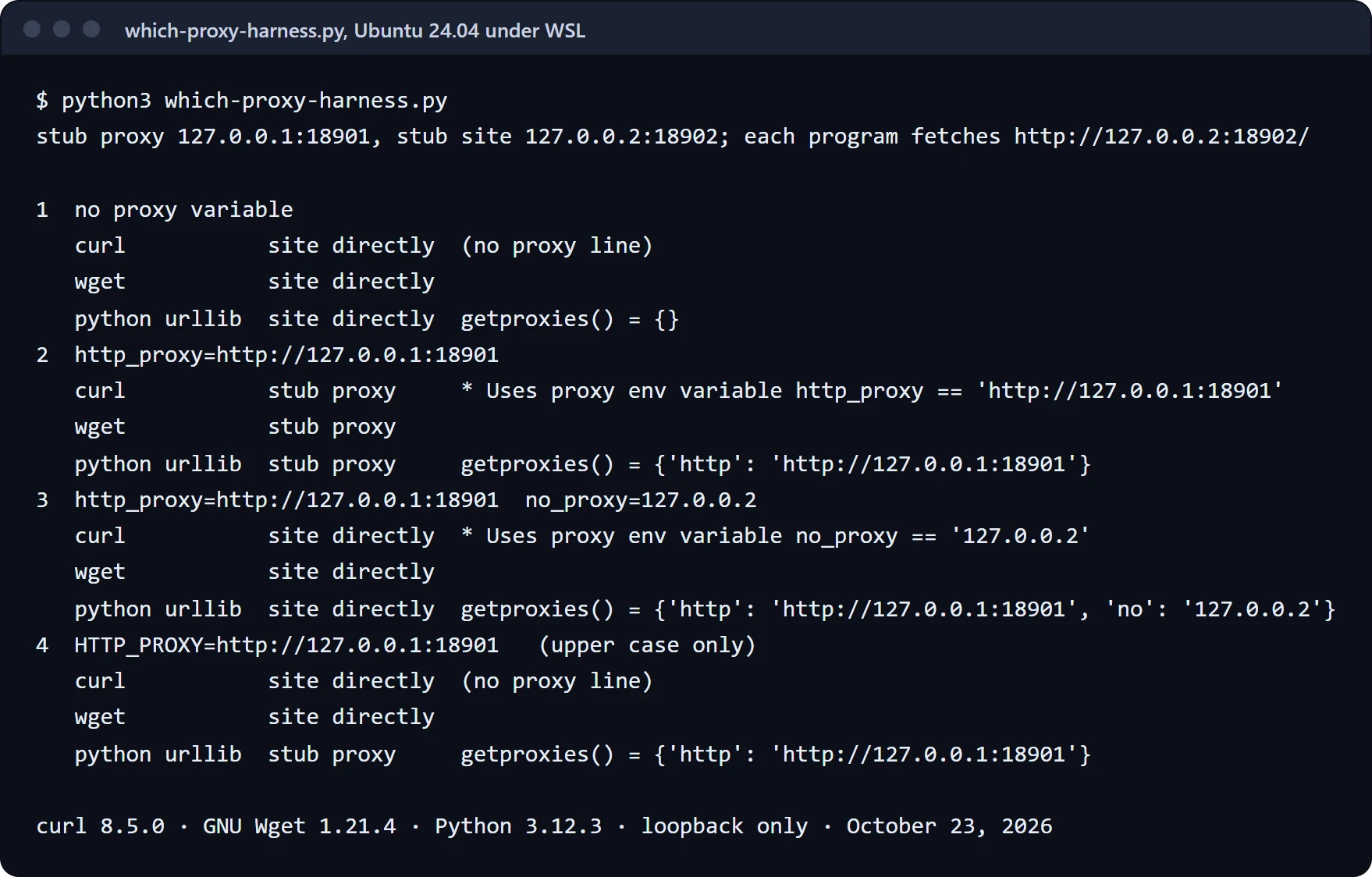
- No proxy variable. All three programs reached the site directly.
http_proxyset to the stub. All three went through the proxy. curl's-voutput named its source:Uses proxy env variable http_proxy == 'http://127.0.0.1:18901'. The proxy received the request lineGET http://127.0.0.2:18902/ HTTP/1.1, the "absolute-form" that RFC 9112 requires for a request sent to a proxy.no_proxy=127.0.0.2added. All three went direct again, and curl said why:Uses proxy env variable no_proxy == '127.0.0.2'.- Only
HTTP_PROXY, in capitals. curl and Wget went straight to the site. Python went through the proxy.
Debian, with curl 8.14.1, Wget 1.25.0 and Python 3.13.5, gave the same four answers. So echo $http_proxy is not a complete check: it prints nothing when only the upper-case name is set, while Python still uses it. List both spellings at once:
# every proxy variable in this shell, in either case
env | grep -i _proxy
Find it on Windows
Microsoft says "Windows supports automatic detection, setup scripts, or manual configuration using server details". All three live in one place: Settings, then Network & internet, then Proxy. Under Manual proxy setup you see the address and port. Under Automatic proxy setup you see whether automatic detection is on and the script address, if there is one.
The settings page does not tell you what a script picks for a given site. PowerShell can ask Windows directly:
# the proxy Windows would use for one address
[System.Net.WebRequest]::GetSystemWebProxy().GetProxy([Uri]"https://example.com")
Microsoft's reference says the call returns "the URI of the proxy used to contact destination; otherwise null or destination itself". So if it prints https://example.com/ back, no proxy applies to that address. We ran it on Windows 11 with PowerShell 7.6.
Two more places matter on Windows. Services such as Windows Update read WinHTTP, which netsh winhttp show advproxy prints. Command-line tools read environment variables, which this lists:
Get-ChildItem Env: | Where-Object Name -like "*proxy*"
Our guide to turning off a proxy covers the WinHTTP layer step by step.
Find it on a Mac
Apple's path: "choose Apple menu > System Settings, click Network in the sidebar, click a network service, click Details, then click Proxies". Each protocol that is switched on shows its server and port. Automatic proxy configuration shows a script address. For tools in Terminal, check the environment with env | grep -i _proxy.
Find it on Linux
Command-line tools read environment variables, so env | grep -i _proxy comes first. They may be set in a shell profile such as ~/.bashrc or in /etc/environment. On a GNOME desktop, GNOME's help says to open Network and "Select Network proxy from the list on the left". There, Manual holds an address and port per protocol, and Automatic holds "A URL pointing to a resource" with the configuration. Our Linux proxy setup guide covers the other desktops and package managers.
Find it in a browser
Chrome and Edge follow the system setting, so the Windows and Mac steps above apply. Two exceptions change that. A shortcut or a program can start Chrome with its own proxy flag, and chrome://version shows the flag in its Command Line row. An extension with the proxy permission can set one too, through the chrome.proxy API, so check your extensions when the settings look clean. Older guides point to chrome://net-internals/#proxy. In our run of Chrome 155, that tab showed only two buttons, "Re-apply settings" and "Clear bad proxies", and no settings.
Firefox keeps its own proxy screen, under Network Settings in its settings. Its default choice is the system setting, so Firefox follows the system until someone picks a manual proxy or a script address there. Our turn-off guide shows the screen.
On a phone or a console
On iPhone and Android, each Wi-Fi network carries its own proxy setting. Open the network's details and look for the proxy section. Manual shows a server and port, and Automatic shows a script address. Our turn-off guide shows both phones screen by screen. Consoles keep the proxy in their network setup, and our PS5, PS4 and Switch guide shows where.
Am I using a proxy?
Check the settings above first, then confirm from the outside. Look up the address websites see with our IP lookup, and compare it with your own connection. If it belongs to a hosting company, or sits in another country, something in the path changed it, a proxy or a VPN.
A setting that keeps coming back after you clear it usually has a writer: a VPN or security program, a profile, or a policy. Our guide to proxy settings that keep turning back on covers those.
Test the address you found
An address in a settings box can still be dead. Paste it into our online proxy checker to see whether it answers, where it exits and how fast. A proxy locked to your own IP can only be tested from your own connection, which our free HProxy app does. The four manual tests are in how to check if a proxy is working. Our curl guide covers curl's proxy options.
A provider's address works the same way. Our residential proxies answer on gateways: Residential Lite on gw.hproxy.com, port 6969 for HTTP and 9696 for SOCKS5. Residential Premium answers on premium.hproxy.com. HTTP runs on port 9000 with a new exit per request, and on 10000 and up with a sticky exit. SOCKS5 runs on 11000, and on 12000 and up with a sticky exit. Put the login from your dashboard in place of YOUR-LOGIN and YOUR-PASSWORD:
curl -x http://YOUR-LOGIN:YOUR-PASSWORD@premium.hproxy.com:9000 https://example.com/
Residential Lite costs $0.50/GB for one GB, falling to $0.44/GB at 2,000 GB+. Residential Premium costs $1.49/GB for one GB, falling to $1.00/GB at 1,000 GB+.
Sources
- Chromium: Network Settings, design document, read October 23, 2026.
- Firefox source, modules/libpref/init/StaticPrefList.yaml,
network.proxy.type, read October 23, 2026. - Chrome for Developers: chrome.proxy, read October 23, 2026.
- curl manual, Environment, read October 23, 2026.
- GNU Wget manual: Proxies, read October 23, 2026.
- Python documentation: urllib.request.getproxies, read October 23, 2026.
- Microsoft Support: Use a proxy server in Windows and .NET: IWebProxy.GetProxy, read October 23, 2026.
- Apple Mac User Guide: change proxy settings, read October 23, 2026.
- GNOME Help: Define proxy settings, read October 23, 2026.
- MDN: Proxy Auto-Configuration (PAC) file, read October 23, 2026.
- RFC 9112, HTTP/1.1, section 3.2.2, June 2022.
- Our own runs on October 23, 2026: curl, Wget and Python's urllib against stub servers on loopback in Ubuntu 24.04 and Debian under WSL, and Chrome 155 headless with a temporary profile. No system setting was changed and nothing outside the machine was contacted.