A proxy works when it answers in time, exits where you expect, is fast enough for the job, and does not pass your own address on. Test all four, right before you use it. We checked how much that matters on our own free list. Of 200 entries on ordinary addresses it showed as working on 28 September 2026 at 17:10 UTC, 89 answered our checker within 20 seconds. Only 57 answered within 8 seconds, and 3 within a second.
This page shows each test with curl, what our own recheck found, and the faster way with our free checker.
What working means
- It answers in time. Choose the time first. Our list counts a proxy as working if it answered within 90 seconds per protocol. Our checker waits 8 seconds unless you ask for more.
- It exits where you expect. The site sees the exit address, and that address has a country and a network.
- It is fast enough. A page that takes 30 seconds to load is of no use for most jobs.
- It keeps your address to itself. Some proxies pass your own address on to the site.
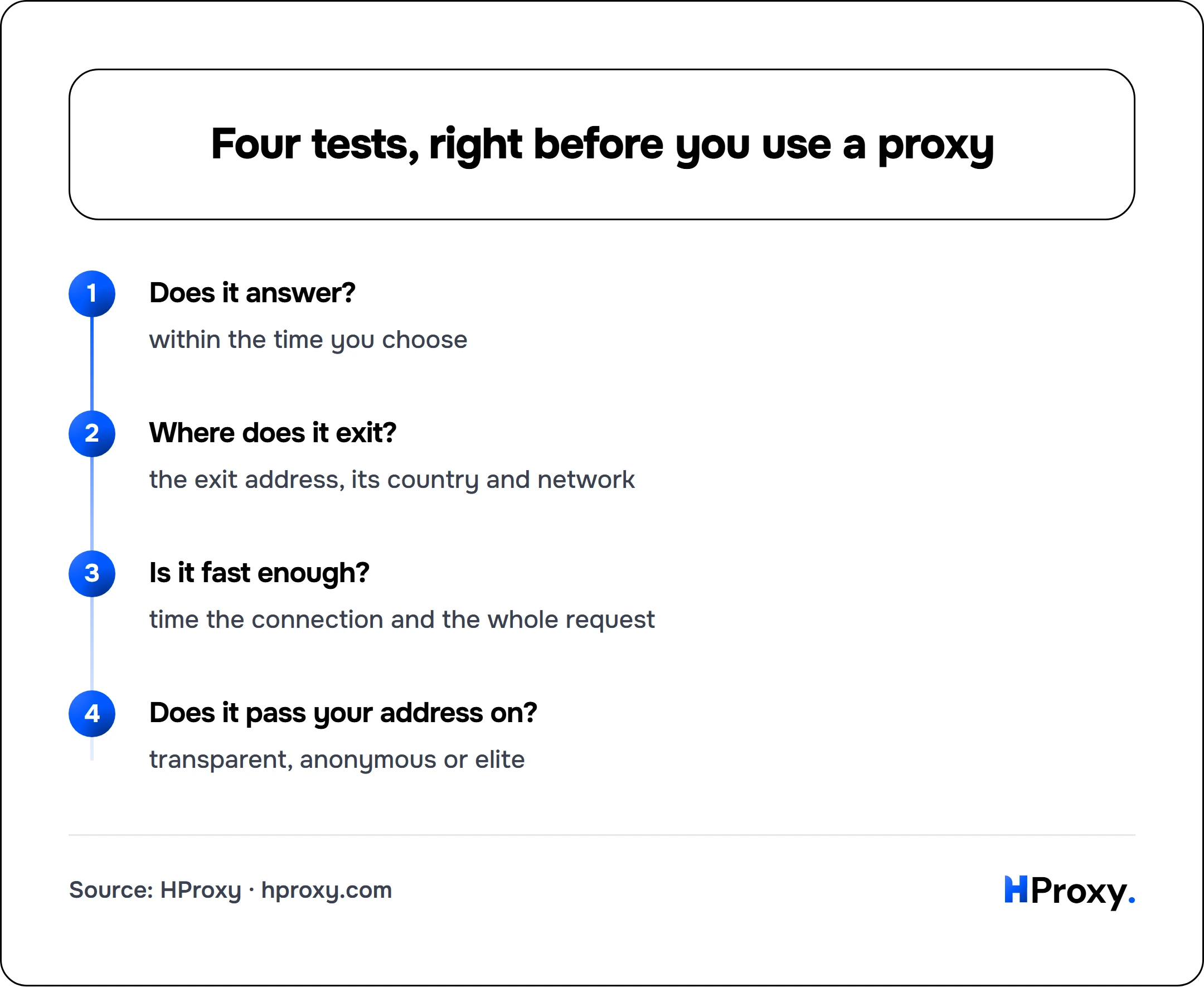
Does it answer?
within the time you choose
Where does it exit?
the exit address, its country and network
Is it fast enough?
time the connection and the whole request
Does it pass your address on?
transparent, anonymous or elite
A proxy can pass one test and fail another. Run all four.
Test 1: does it answer?
These examples use the documentation address 203.0.113.7. Put your proxy in its place.
# Sends one request through the proxy and gives up after 10 seconds
curl -x http://203.0.113.7:8080 --max-time 10 https://httpbin.org/ip
In the curl manual, -x means "Use the specified proxy", and --max-time means "Set the maximum time in seconds that you allow each transfer to take". A working proxy answers with the address the site saw:
{
  "origin": "203.0.113.7"
}
If the origin is your own address, the proxy did not carry the request. If curl stops at the time limit, the proxy is too slow or dead. The origin may differ from the address you dialled. Some proxy hosts send traffic out from another address, which is not a leak by itself. In our recheck, 31 of the 89 proxies that answered did so, and 40 of 109 in the second sample.
Test 2: where does it exit?
Look up the address from test 1. Our free IP lookup API returns its country, network number (ASN), network name, ISP and a datacenter label, with no key.
# Looks up one address, without any proxy
curl "https://hproxy.com/api/ip/203.0.113.7"
Do not trust the country a list prints. In our recheck, 2 of the 89 proxies that answered exited in another country than our own list showed for them, and 10 of 109 in the second sample.
Test 3: is it fast enough?
curl can time the TCP connection and the whole request. In its manual, time_connect is "The time, in seconds, it took from the start until the TCP connect to the remote host (or proxy) was completed", and time_total is "The total time, in seconds, that the full operation lasted".
# Prints how long the connection and the whole request took, and discards the page
curl -x http://203.0.113.7:8080 --max-time 20 -o /dev/null -s -w "Connect: %{time_connect}s  Total: %{time_total}s\n" https://httpbin.org/ip
On Windows, write -o NUL in place of -o /dev/null. Among the 89 proxies that answered our checker within 20 seconds, the median took 6.7 seconds. Only 3 of the 200 answered within a second.
Test 4: does it pass your address on?
Ask for the headers the site received, over plain HTTP:
# Shows the request headers as the site received them
curl -x http://203.0.113.7:8080 --max-time 10 http://httpbin.org/headers
It has to be plain HTTP. Over HTTPS, the proxy opens a tunnel with the CONNECT method and then limits itself to "blind forwarding of data", as RFC 9110 puts it. It cannot add headers there, so a leaky proxy would look clean. In the answer, look for these:
- Your own address. Usually in X-Forwarded-For, which RFC 7239 names among "the non-standard header fields" used to pass it on, or in Forwarded, X-Real-IP or Client-IP. That makes the proxy transparent.
- A proxy header without your address. Such as Via, which RFC 9110 says "indicates the presence of intermediate protocols and recipients" on the way. That makes it anonymous.
- Neither. That makes it elite, and the site sees an ordinary visitor.
For a SOCKS5 proxy, change the scheme: curl -x socks5://203.0.113.7:1080 --max-time 10 https://httpbin.org/ip. curl also takes socks5h://, socks4:// and socks4a:// there. Our explainer on what a SOCKS5 proxy is covers the difference, and our guide on using proxies with curl covers the rest of curl.
What we found when we checked our own list again
We took 200 entries at random from those our free list API showed as working, on addresses that held fewer than 20 entries of the list. Seconds later, we checked each one again with our own checker, allowing 20 seconds per probe. Seven minutes later, we did it again with another 200.
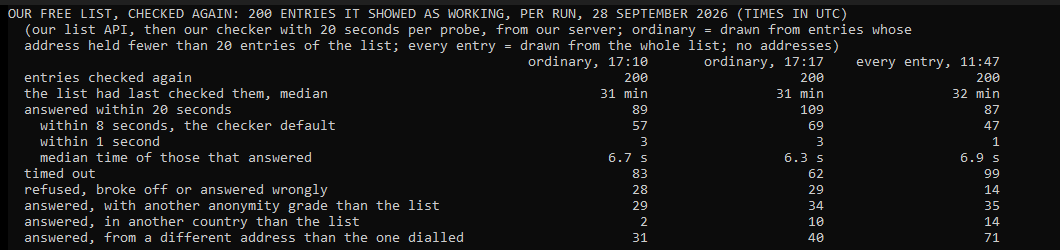
- Answered. 89 of 200 answered within 20 seconds, and 109 in the second sample. Drawn from every entry of the list at 11:47 UTC, 87 of 200 did.
- Speed. Only 57 of the 89 answered within 8 seconds, the default of our checker, and 3 within a second.
- Timed out. 83 gave no answer within 20 seconds. The list had last checked them a median 31 minutes earlier.
- Grade and country. 29 of the 89 came back with another anonymity grade than the list showed, and 2 in another country. In the second sample, 34 and 10 of 109.
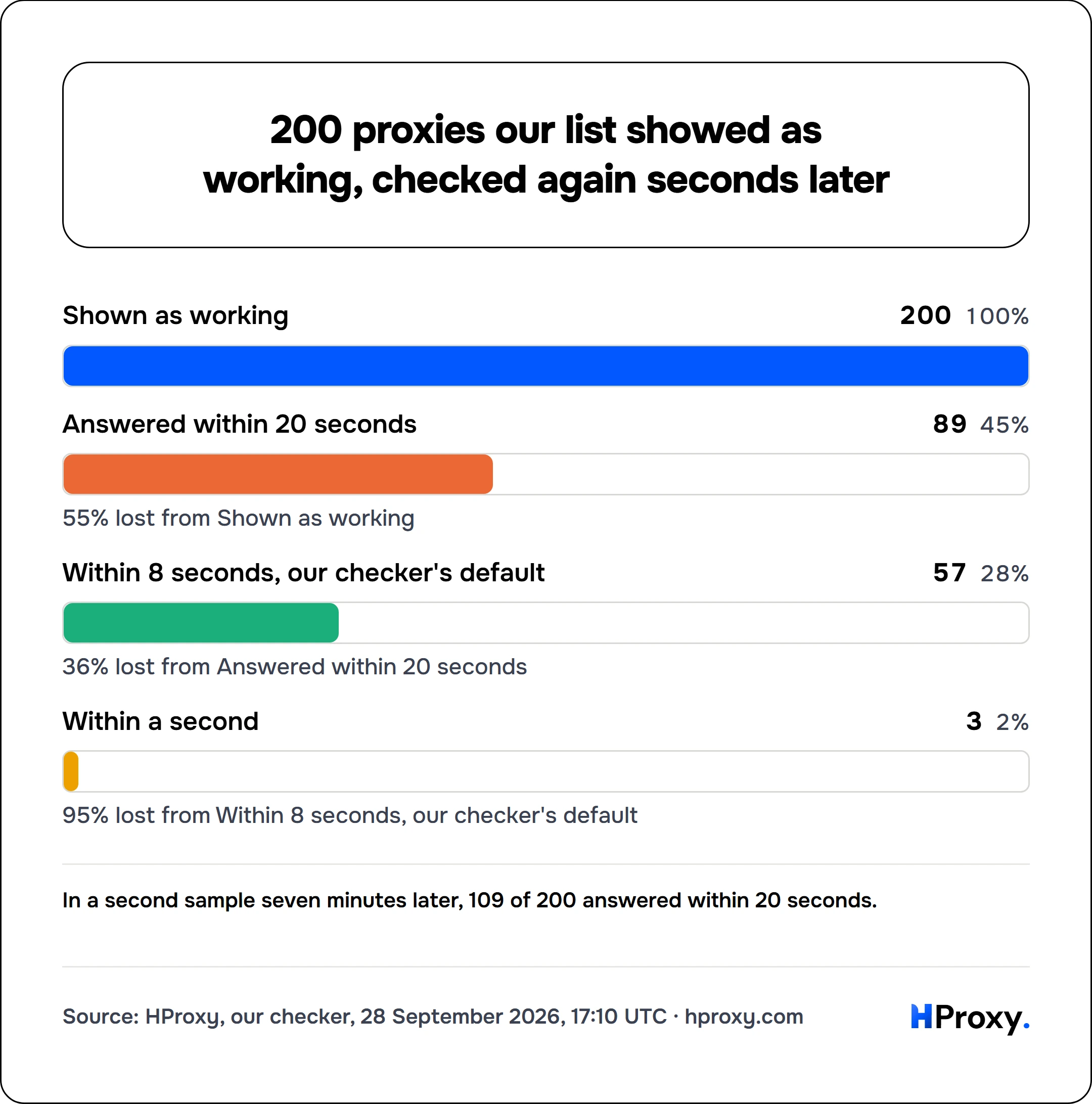
55% lost from Shown as working
36% lost from Answered within 20 seconds
95% lost from Within 8 seconds, our checker's default
Part of the gap is by design. Our list gives each check 90 seconds per protocol, because a slow proxy is still a working one. For you, a proxy that needs 40 seconds is useless. The rest is time: a proxy can stop between two checks. So decide how long you will wait before you test.
The faster way: our free checker
Paste any proxy into our free proxy checker, with no signup. It makes a real connection through the proxy and reports the exit address, country, latency and anonymity grade. From the command line, it is one request:
# Tests one proxy from our server: alive or dead, protocols, anonymity, latency, country
curl "https://hproxy.com/api/proxy-check?proxy=203.0.113.7:1080"
For a longer wait, the streaming checker takes a per-probe budget. Its documentation lists it in milliseconds: "Per-probe budget, 1,000 to 60,000. Default 8,000".
# Checks two proxies with 20 seconds per probe, one line per proxy as each one finishes
curl -N -X POST https://hproxy.com/api/free-proxy/check -H "Content-Type: application/json" -d '{"proxies": ["203.0.113.7:1080", "198.51.100.3:8080"], "timeout_ms": 20000}'
To pull entries into your own tools, our free proxy list API serves the same list we checked.
Check right before you use it
A proxy that passed all four tests an hour ago may be gone now. Those in our pool that worked and then stopped lasted a median 10 days, counting only addresses with fewer than 20 of them, without Amazon's networks or one June evening when our checker failed (measured 2026-09-28), and their grades and exits change in between. Our guide to free anonymous proxies goes deeper into the grades, and when free proxies are fine covers the jobs that fit.
When free is not enough
For web tasks that have to keep running, such as checking your own site from another country, a residential proxy is the better tool. Its address belongs to a home connection, and it stays up while you work. Ours start at $0.44/GB, pay as you go, and purchased traffic has no scheduled expiry date.
The plain answer
Check a proxy for four things, right before you use it: that it answers within the time you choose, where it exits, how fast it is, and whether it passes your address on. On our own free list, about half of the entries shown as working answered within 20 seconds, and fewer than two in five within 8 seconds. Test first, then trust.
How we measured
On 28 September 2026 at 17:10 and 17:17 UTC, we asked our free list API for every entry it showed as working. Each time we took 200 at random from the entries whose address held fewer than 20 entries of the list. Seconds later, we checked each one with the streaming endpoint of our checker, allowing 20 seconds per probe, from our server in the United States. The figures over every entry come from a sample of 200 drawn from the whole list at 11:47 UTC with the same method. The latency is the fastest answer across the protocols of each proxy. We store no proxy addresses from these checks, and every time is in UTC.
Sources
- The curl manual: curl.se/docs/manpage.html, read 28 September 2026.
- httpbin.org, the /ip and /headers endpoints, read 28 September 2026.
- IETF, RFC 9110: HTTP Semantics, June 2022, sections 7.6.3 on Via and 9.3.6 on CONNECT.
- IETF, RFC 7239: Forwarded HTTP Extension, June 2014.
- HProxy documentation: the proxy checker API and the IP lookup API, read 28 September 2026.