Most writing about proxy detection comes from the outside, from people trying to get past a wall. We spend our time on the other side of it. Alongside our proxy network we run FFraud, an IP-intelligence engine that scores millions of addresses for the same fraud and bot signals defended websites act on. So when we explain how websites detect proxies, we are describing a seat we actually sit in, not guessing at it from the doorway.
Here is the first thing that seat teaches you: a site almost never catches "a proxy." It catches a collection of small mismatches that, added together, do not look like a person. This guide walks the whole detection stack in the order a site reads it, from the network the IP belongs to up through your browser's fingerprint and behavior, so you can see which signals give a proxy away and which ones a clean setup quietly satisfies.
How do websites detect proxies?
Websites detect proxies by combining signals rather than catching the proxy itself. They classify the IP's network (hosting ranges look nothing like home ISPs), compare your TLS and HTTP/2 fingerprint against the browser your headers claim, watch your request rate and navigation, and look for DNS or WebRTC leaks that expose your real address. No single check convicts you. The stack does.
It starts with the network, not the IP
The first thing our engine looks at, and the first thing a defended site looks at, is not your specific address. It is the network that owns it. Every IP on the internet belongs to an ASN (Autonomous System Number), a public identifier for the organization that holds the range. That mapping is not secret. Anyone can look up that 203.0.113.0/24 belongs to a hosting company and 198.51.100.0/24 belongs to a consumer ISP.
That one lookup does most of the sorting. No ordinary person browses a shopping site from a rack in a data center, so an IP whose ASN belongs to AWS, Google Cloud, or any hosting provider starts with a trust deficit before it sends a single byte of real traffic. A consumer ISP address starts clean, because it looks like exactly what it is: someone at home. This is the whole reason datacenter proxies fail on defended sites while residential ones keep working: they lose at the very first gate.
Reputation then stacks on top of classification. On our side we aggregate the things a site cannot compute on its own in real time: whether the IP sits on public blocklists, whether it has been reported for abuse, whether it is a known VPN or proxy exit, and how many unrelated services one address has touched recently. Those roll up into a single risk score, and a high one means friction (a challenge, a slow lane, or a flat block) without the site ever watching what you do. Free proxies are almost always already deep in this territory, which is one more reason free proxies get flagged so fast.
Your TLS handshake names your client
Suppose the IP passes. The next signal arrives before you send a single request, in the TLS handshake that opens the HTTPS connection. Your client sends a ClientHello that lists its cipher suites, extensions, and elliptic curves in a specific order, and that order is characteristic of the software that built it. Real Chrome produces one pattern, Firefox another, and Python's requests, Go's net/http, and curl each produce something no browser ever sends.
Sites hash that handshake into a JA3 or JA4 fingerprint and compare it against the browser your User-Agent claims to be. JA3, which Salesforce published in 2017, concatenates five fields from the ClientHello in a fixed order (the TLS version, cipher suites, extensions, elliptic curves, and curve point formats) and hashes them into a 32-character MD5. JA4, the newer version from FoxIO, keeps a structured, readable format instead of one opaque hash, which makes it harder to defeat by shuffling the fields. Cloudflare is one defender that computes both during the TLS handshake and exposes them as bot signals, and because the fingerprint stays stable across destination IPs and ports, it identifies the same tool no matter which exit it rides. This is the mismatch that catches people who fixed only their IP: a pristine residential address presenting a Python TLS fingerprint is telling two stories that do not agree, and the disagreement is the flag. A proxy cannot fix this, because it forwards your bytes untouched. The handshake is yours, and it travels with you through any tunnel.
HTTP/2 rhythm and header order
Two more layers sit inside the same request. Browsers speak HTTP/2 with a recognizable rhythm: particular SETTINGS frame values, a specific window size, and a fixed order for the pseudo-headers (:method, :authority, :scheme, :path). Most scraping libraries either drop back to HTTP/1.1 or send an HTTP/2 pattern no browser produces. That is a second fingerprint, and a site reads it the same way it reads your TLS. The technique comes from Akamai's 2017 research on passive HTTP/2 fingerprinting, which showed that the SETTINGS values, the window size, and the pseudo-header order together identify the client software behind a request even when the User-Agent lies, and it is now standard in commercial anti-bot stacks.
Then there are the ordinary headers. A real browser sends a dozen or more of them, in a consistent order, including Accept-Language, the sec-ch-ua client hints, and the sec-fetch headers. A bare HTTP client sends three or four. Even the ordering matters: browsers arrange their headers deterministically, and a library that sorts them differently or alphabetically stands out even when every header is technically present. A thin or oddly ordered header set is one of the most common reasons a request comes back challenged rather than answered.
Behavior, once you are through
Everything above is visible in the very first request. The next set of signals appears once you start moving. A single IP pulling sixty requests a second on an exact interval, always hitting deep data URLs, never loading a stylesheet or an image or a favicon, reads as automation no matter how clean its fingerprint is. Humans are slow and irregular. They pause, scroll, misclick, and load the whole page, sub-resources and all.
This is where pacing and session shape matter as much as identity. Firing requests on a perfect metronome, rotating your IP mid-session so a logged-in user appears to teleport between countries, or crawling only the endpoints that hold data are all patterns a scoring model learns quickly. We cover the request-side discipline in depth in how to avoid IP bans while scraping, and the challenge that suspicious behavior triggers in why you keep hitting reCAPTCHA. The short version: a clean IP with a bot's rhythm still scores as a bot.
Leaks that expose you behind the proxy
The last category is the one people forget, because it undoes a good proxy from inside your own machine. If you drive a real browser through a proxy but your DNS queries resolve outside the tunnel, the site can see a resolver in a different country than your exit. WebRTC is worse: left enabled, it can reveal your real local and public IP through a STUN request that your HTTP proxy never touched, handing the site the exact address you were trying to hide. Timezone and locale add a quieter version of the same problem, a browser reporting America/New_York from a German exit IP is its own small contradiction.
None of these are things the proxy can fix, because they leak around it rather than through it. They are configuration, and they are the difference between a proxy that hides you and one that only appears to.
The whole stack, and what each layer reveals
Put together, here is the stack a defended site reads, and what each layer tells it:
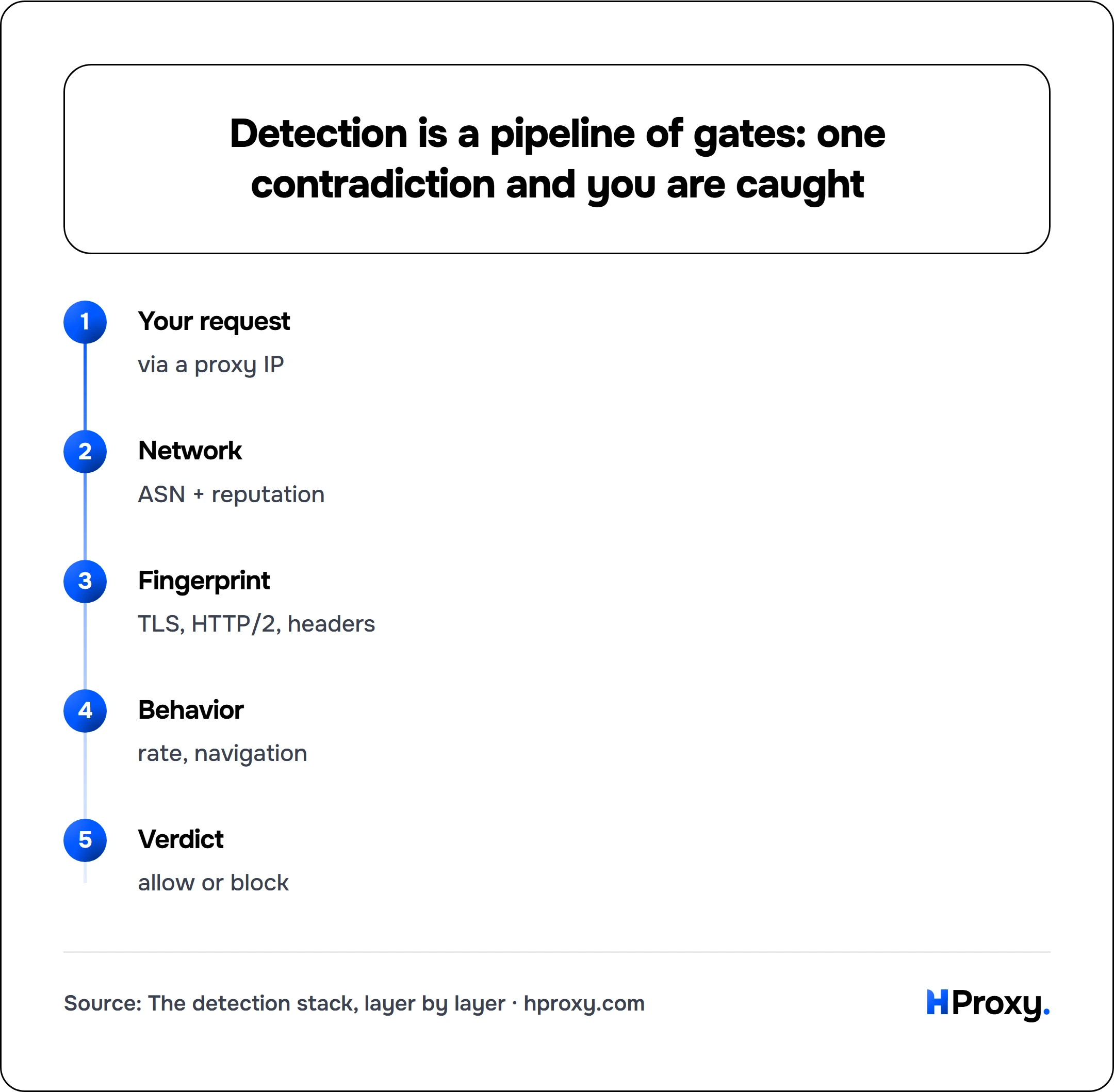
Your request
via a proxy IP
Network
ASN + reputation
Fingerprint
TLS, HTTP/2, headers
Behavior
rate, navigation
Verdict
allow or block
| Signal | What the site reads from it |
|---|---|
| ASN and IP reputation | Whether the address is a hosting range or a real ISP, plus its abuse history |
| TLS fingerprint (JA3/JA4) | Which client or browser actually opened the connection |
| HTTP/2 fingerprint | Whether your HTTP/2 stack matches the browser you claim |
| Header set and order | Whether a real browser or a bare script built the request |
| Request rate and timing | Whether one address behaves like a person or a machine |
| Navigation pattern | Whether you load pages like a browser or pull data like a bot |
| DNS and WebRTC | Whether your real IP or location leaks around the proxy |
How a clean setup passes
Read that table top to bottom and the winning setup writes itself. What wins is the absence of any mismatch. A residential IP clears the first and most important gate, because its ASN looks like a person and its reputation is clean. A client that produces a genuine browser's TLS and HTTP/2 fingerprint makes the next two layers agree with the User-Agent. A full, correctly ordered header set removes the fourth. Human pacing and normal navigation satisfy the behavioral model, and a browser with DNS routed through the tunnel and WebRTC disabled closes the leaks.
When all of that lines up, there is no single signal left for the site to catch, because every layer tells the same consistent story: an ordinary person on an ordinary home connection. That is the entire game. Detection is a search for contradictions, and a clean setup simply does not offer one.
What this means when you buy
This is why cheap datacenter proxies fail the moment a site actually cares. They lose at the very first layer, the ASN lookup, and no amount of header tuning saves an IP that announces "hosting provider" before the request even starts. It is also why residential plus good hygiene works: the IP passes the gate that stops everyone else, and a matched fingerprint with human behavior handles the rest.
If you are buying proxies to get through defended sites, start with the layer that decides the most, which is the IP, and vet the provider's IPs before you pay. Our residential proxies route through real consumer ISPs, so they clear the ASN and reputation checks that sink datacenter ranges. And because we run the scoring engine too, you can check your own exit before a site does. Drop an IP into our proxy checker to see the network and location a site will read, or run it through FFraud to see the fraud score it already carries. One request also shows you the header set and any leak a site would see:
# What a site sees: your headers and their order, plus any proxy leak in them
curl -x http://203.0.113.10:8080 -s http://httpbin.org/headers
If the IP reads as a hosting range or a flagged exit, or your real address shows up in those headers, you have found your problem before it cost you a single blocked request. That check is worth running before survey research in particular, since panels screen on ASN and reputation before a questionnaire finishes loading.
Sources
- JA3 TLS fingerprinting (Salesforce): the five ClientHello fields and the MD5 hash.
- JA4+ TLS fingerprinting (FoxIO): the structured successor to JA3.
- Cloudflare: JA3/JA4 fingerprint: how a defender computes and uses these at the handshake.
- Akamai: Passive Fingerprinting of HTTP/2 Clients: the origin of HTTP/2 client fingerprinting.
- MDN: Navigator.webdriver: the automation flag defended sites read in JavaScript.