This tutorial builds a working web scraper in Python. The requests library downloads the pages, BeautifulSoup reads them, and the csv module saves the results. The scraper collects every book on a practice site, 50 pages in all.
We ran every line on our server on October 11, 2026. The scraper read all 1,000 books in about 70 seconds, most of it pauses we added on purpose. On the way, we hit an encoding bug that none of the nine tutorials we read explains. We also found two proxy settings that do not do what they seem to.
What you need
You need Python 3 and three packages from PyPI:
pip install requests beautifulsoup4 lxml
We used Python 3.12.3 with requests 2.34.2, beautifulsoup4 4.15.0 and lxml 6.1.3. BeautifulSoup uses lxml as its parser in this tutorial.
The site is books.toscrape.com, built for practice: its makers describe it as "A fictional bookstore that desperately wants to be scraped". A banner on every page says its prices "were randomly assigned and have no real meaning". Its robots.txt answers 404, so it sets no rules.
Step 1: download a page, then read the bytes
Start with one page. This snippet downloads page 1 and reads the first price on it twice:
import requests
from bs4 import BeautifulSoup

r = requests.get("https://books.toscrape.com/catalogue/page-1.html", timeout=10)
print(r.headers["Content-Type"], r.encoding)
print(BeautifulSoup(r.text, "lxml").select_one("p.price_color").get_text())
print(BeautifulSoup(r.content, "lxml").select_one("p.price_color").get_text())
text/html ISO-8859-1
£51.77
£51.77
Same page, two prices, and the first one is broken.
The server says the page is text/html, but not which character set it uses. For that case, requests picks ISO-8859-1. Its source code says so in two lines: with "text" in the type and no charset, it returns "ISO-8859-1". Its documentation gives the reason: "RFC 2616 specifies that the default charset must be ISO-8859-1." HTTP dropped that default in 2014, in RFC 7231.
The page is really UTF-8, and its own meta tag says so, but r.text never reads that tag. BeautifulSoup does when it gets the raw bytes in r.content: it "uses a sub-library called Unicode, Dammit to detect a document's encoding". So give BeautifulSoup the bytes.
Sites that name the charset in their header, such as quotes.toscrape.com, decode fine either way. Seven of the nine tutorials we read pass r.text, and none of them explains what happens when the charset is missing.
The timeout=10 matters just as much. The requests documentation warns that without a timeout, your program can "hang indefinitely". The number is not a limit on the whole download, but on how long requests waits without receiving a single byte. Only one of the nine tutorials sets a timeout. Our guide to timeouts in Python requests goes further.
Step 2: find the data with CSS selectors
Open the page in a browser, right-click a book and choose Inspect. Each book is an article with the class product_pod. This is the first one, with what the scraper keeps from it:
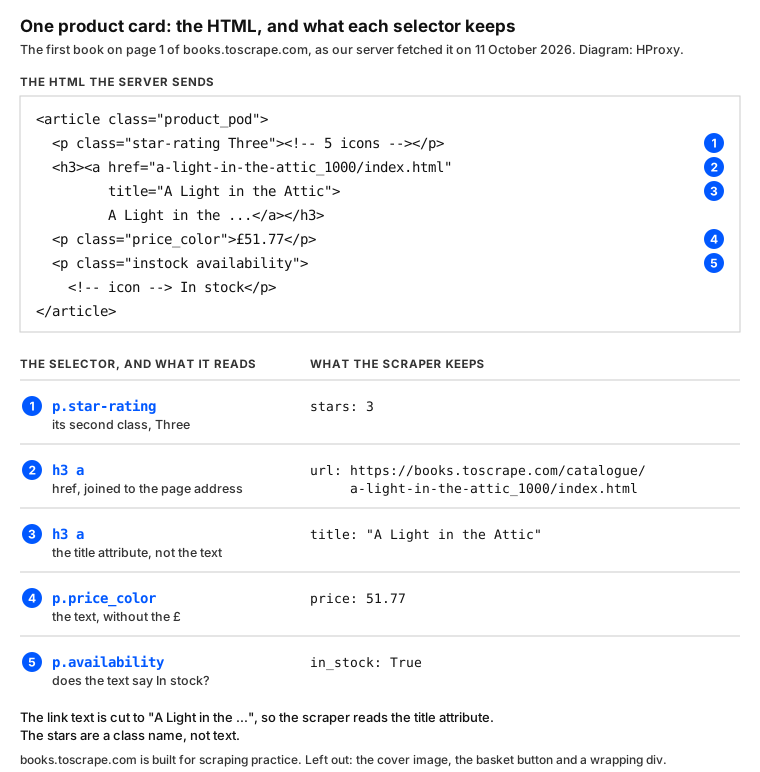
select() returns every match for a CSS selector, and select_one() returns the first. Two details on this card would trip up a first scraper:
- The link text is cut short: "A Light in the ...". The full title sits in the link's
titleattribute. - The rating sits in a class name,
star-rating Three, so the code turns "Three" into 3.
The link is relative, too, so urljoin() turns it into a full address based on the page it came from. This function reads one page:
STARS = {"One": 1, "Two": 2, "Three": 3, "Four": 4, "Five": 5}


def parse(html, base_url):
    soup = BeautifulSoup(html, "lxml")
    books = []
    for card in soup.select("article.product_pod"):
        link = card.select_one("h3 a")
        books.append({
            "title": link["title"],
            "price": float(card.select_one("p.price_color").get_text().lstrip("£")),
            "in_stock": "In stock" in card.select_one("p.availability").get_text(),
            "stars": STARS[card.select_one("p.star-rating")["class"][1]],
            "url": urljoin(base_url, link["href"]),
        })
    next_link = soup.select_one("li.next a")
    return books, urljoin(base_url, next_link["href"]) if next_link else None
The last two lines look for the "next" button. Page 50 has none, so parse() returns None and the crawl ends there. To choose between CSS selectors and XPath, see our test of XPath against CSS selectors.
Step 3: follow the pages, slowly
def crawl(start=START, delay=1.0, proxies=None):
    books, url = [], start
    with requests.Session() as session:
        session.headers.update(HEADERS)
        while url:
            response = session.get(url, timeout=10, proxies=proxies)
            response.raise_for_status()
            page_books, url = parse(response.content, response.url)
            books += page_books
            time.sleep(delay)
    return books
Five lines do the careful work:
requests.Session()keeps one connection open from page to page. As the requests documentation puts it, "the underlying TCP connection will be reused".HEADERSsends a User-Agent that names the scraper and links to this page, so the site knows who is calling.raise_for_status()stops on an error page instead of reading it as if it held books.parse(response.content, response.url)passes the bytes, and the final address for the relative links.time.sleep(delay)waits one second after each page. Of the 70 seconds our crawl took, 50 were these pauses.
This site invites scraping, but a real site may not, so read its robots.txt and its terms first. Our page on whether web scraping is legal explains what to check.
Step 4: save the rows to a CSV file
def save(books, path="books.csv"):
    with open(path, "w", newline="", encoding="utf-8") as f:
        writer = csv.DictWriter(f, fieldnames=books[0].keys())
        writer.writeheader()
        writer.writerows(books)
DictWriter turns each book into a row, with the keys as the header. Keep the newline="": Python's documentation says a CSV file "should be opened with newline=''". Without it, Windows adds an extra \r to every row, and line breaks inside a field are not read back correctly.
The whole scraper
Put together, the file is 52 lines:
import csv
import time
from urllib.parse import urljoin

import requests
from bs4 import BeautifulSoup

START = "https://books.toscrape.com/catalogue/page-1.html"
HEADERS = {"User-Agent": "hproxy-tutorial/1.0 (+https://hproxy.com/blog/web-scraping-with-python)"}
STARS = {"One": 1, "Two": 2, "Three": 3, "Four": 4, "Five": 5}


def parse(html, base_url):
    soup = BeautifulSoup(html, "lxml")
    books = []
    for card in soup.select("article.product_pod"):
        link = card.select_one("h3 a")
        books.append({
            "title": link["title"],
            "price": float(card.select_one("p.price_color").get_text().lstrip("£")),
            "in_stock": "In stock" in card.select_one("p.availability").get_text(),
            "stars": STARS[card.select_one("p.star-rating")["class"][1]],
            "url": urljoin(base_url, link["href"]),
        })
    next_link = soup.select_one("li.next a")
    return books, urljoin(base_url, next_link["href"]) if next_link else None


def crawl(start=START, delay=1.0, proxies=None):
    books, url = [], start
    with requests.Session() as session:
        session.headers.update(HEADERS)
        while url:
            response = session.get(url, timeout=10, proxies=proxies)
            response.raise_for_status()
            page_books, url = parse(response.content, response.url)
            books += page_books
            time.sleep(delay)
    return books


def save(books, path="books.csv"):
    with open(path, "w", newline="", encoding="utf-8") as f:
        writer = csv.DictWriter(f, fieldnames=books[0].keys())
        writer.writeheader()
        writer.writerows(books)


if __name__ == "__main__":
    books = crawl()
    save(books)
    print(f"Saved {len(books)} books to books.csv")
Save it as books.py and run it:
python books.py
Saved 1000 books to books.csv
Our test script ran the same functions with checks added:
It took 70.0 seconds for 50 pages and found 1,000 books at 1,000 different addresses, priced from £10.00 to £59.99. The CSV file has 1,001 lines: the header and one line per book.
Step 5: send the scraper through a proxy
A proxy matters when a site limits how many pages one address may load. An HTTP 429 error is the usual sign, and our guide to fixing 429 errors covers the causes. The scraper already takes a proxy:
proxies = {
    "http": "http://USER:PASS@HOST:PORT",
    "https": "http://USER:PASS@HOST:PORT",
}
books = crawl(proxies=proxies)
We tested this with 3proxy, a free proxy server, running on our own server. Two settings did not do what they seem to.
Trap 1: one key is not enough
The key is the scheme of the page you load, not of the proxy, so an https:// page looks up the "https" key. We gave requests a dead proxy under "http" only, and the https:// page loaded anyway, with status 200. The request had skipped the proxy, and nothing said so.
Trap 2: session.proxies can lose
The requests documentation warns: "Setting session.proxies may behave differently than expected. Values provided will be overwritten by environmental proxies". We set the HTTPS_PROXY environment variable to a dead port and session.proxies to our working proxy. The request went to the dead port and failed, while with proxies= on the call it went through. That is why crawl() passes the proxies on every request.
Prove that it went through the proxy
Point the scraper at a port where nothing listens: it must fail, and ours raised ProxyError. If a dead proxy still gives you pages, your requests are not using it.
One session, one tunnel
For an https:// page, requests asks the proxy to open a tunnel to the site. We loaded pages 41 to 50 through the proxy in two ways:
The Session opened one tunnel for ten pages, while calling requests.get() for each page opened ten. In one run, the Session took 14.2 seconds and requests.get() took 21.1, both with ten 1-second pauses. In another run, it was 12.8 against 14.5: the times moved between runs, and the tunnel counts did not.
The proxy logged one request per tunnel, and every one was CONNECT books.toscrape.com:443. Over HTTPS, a proxy sees the site and the port, not the pages you read. For more on proxy setup, see our guide to proxies with Python requests.
When requests is not enough
- Pages built by JavaScript. The requests library downloads the HTML the server sends and does not run the page's scripts. If the data you see in the browser is missing from
r.content, use a browser tool such as Playwright or Selenium. - Large crawls. Scrapy is a framework built for crawling many pages.
- PDF files. Tables often come as PDFs. Our PDF scraping test compares four libraries on a real one.
What this page could not check
- One practice site: plain HTML, no JavaScript and no blocking.
- One server, and a proxy on that same server, not a proxy network.
- Timings varied between runs. The books and the tunnel counts did not.
- We did not test logins, retries or sites that block scrapers.
- We will rerun these tests with current versions by January 12, 2027.
Sources
- Requests documentation, Advanced Usage (sessions, proxies, encodings): requests.readthedocs.io.
- Requests documentation, Quickstart (encodings, timeouts): requests.readthedocs.io.
- requests 2.34.2 source, get_encoding_from_headers: github.com.
- Beautiful Soup documentation, encodings: crummy.com.
- Python documentation, the csv module: docs.python.org.
- RFC 7231, Appendix B, changes from RFC 2616 (June 2014): rfc-editor.org.
- toscrape.com and books.toscrape.com, the practice site and its banner, read on October 11, 2026.
- Our own tests on our server, October 11, 2026: run_books.py at 22:45 UTC, books.py at 22:53 UTC, a charset check of three practice sites at 22:43 UTC, and a reading of the code in nine tutorials at 22:58 UTC.