To send Python requests through a proxy, pass a dictionary to the proxies argument. Give it an http key and an https key, both set to the proxy URL, and set a timeout. The keys name the scheme of the page you request, not the protocol of the proxy. If the https key is missing, https:// pages skip the proxy.
import requests

proxies = {
    "http": "http://203.0.113.7:8080",
    "https": "http://203.0.113.7:8080",
}
r = requests.get("https://example.com", proxies=proxies, timeout=(6.05, 30))
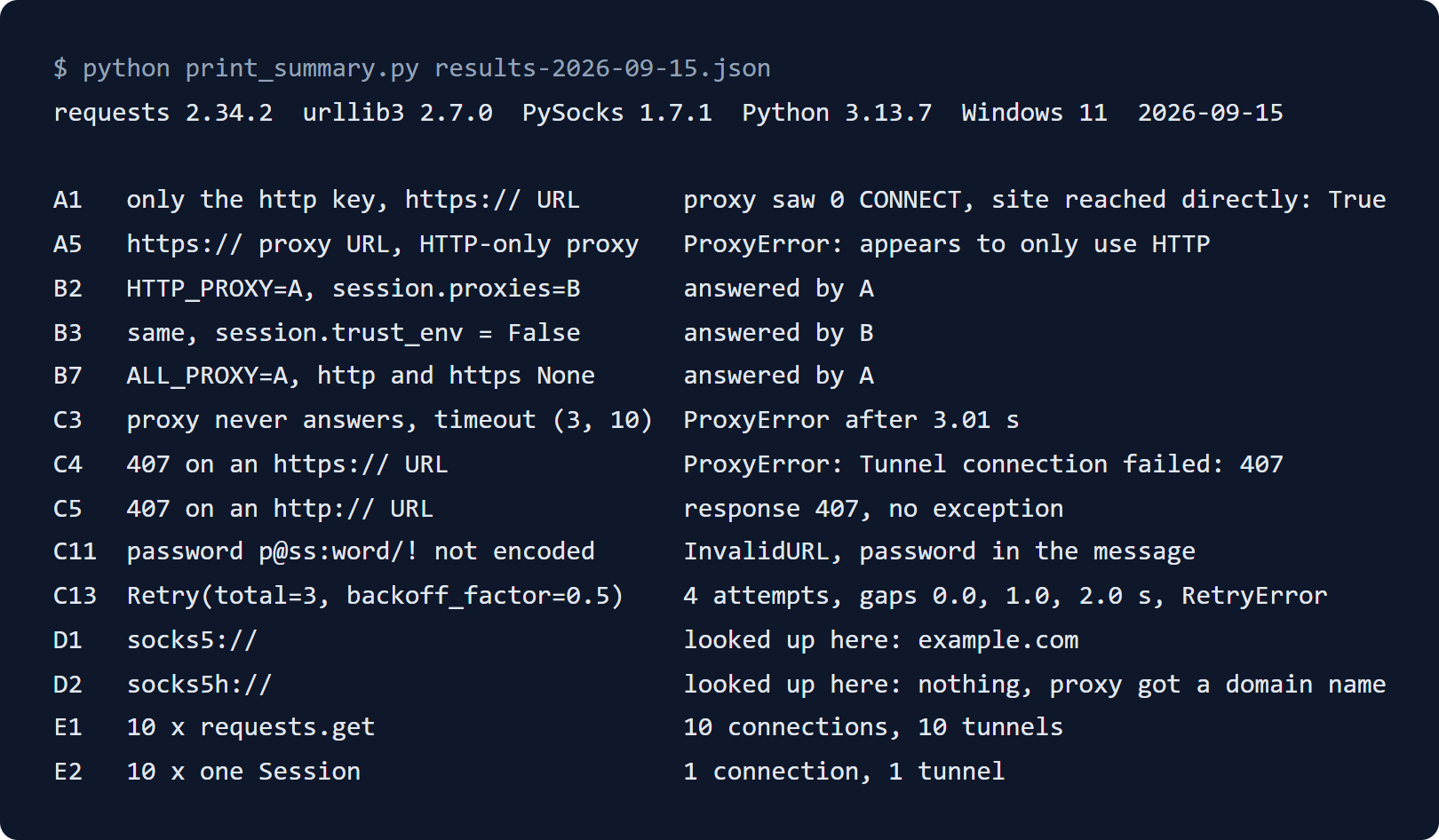
We tested each behaviour on this page on 15 September 2026. We used requests 2.34.2, urllib3 2.7.0 and PySocks 1.7.1 on Python 3.13, against test proxies on our own machine. So the results show what requests does, not what one provider does. Where a result differs from the guides that rank for this topic, the section says so.
Before you start
- Python 3.10 or later. PyPI lists that as the minimum for requests 2.34.2, released on 14 May 2026.
- requests itself:
python -m pip install requests. Check your version withpython -m pip show requests, and use 2.31.0 or later (see step 2). - For SOCKS proxies:
python -m pip install "requests[socks]". - A proxy address: host, port, and a username and password if the proxy asks for them. For a test, our free proxy API returns addresses from our checked free pool as plain text, with no key.
Step 1: set the proxies dictionary
The dictionary maps a URL scheme to a proxy URL. requests reads the scheme of the page you request and picks the matching key. So the https key means: send my https:// requests through this proxy. The scheme inside the value, http:// here, says how requests talks to the proxy itself.
An HTTP proxy carries https:// traffic through a tunnel. requests sends the proxy a CONNECT request, and TLS then runs inside the tunnel to the site. RFC 9110 defines that method in section 9.3.6. That is why "https": "http://..." is the normal pair.
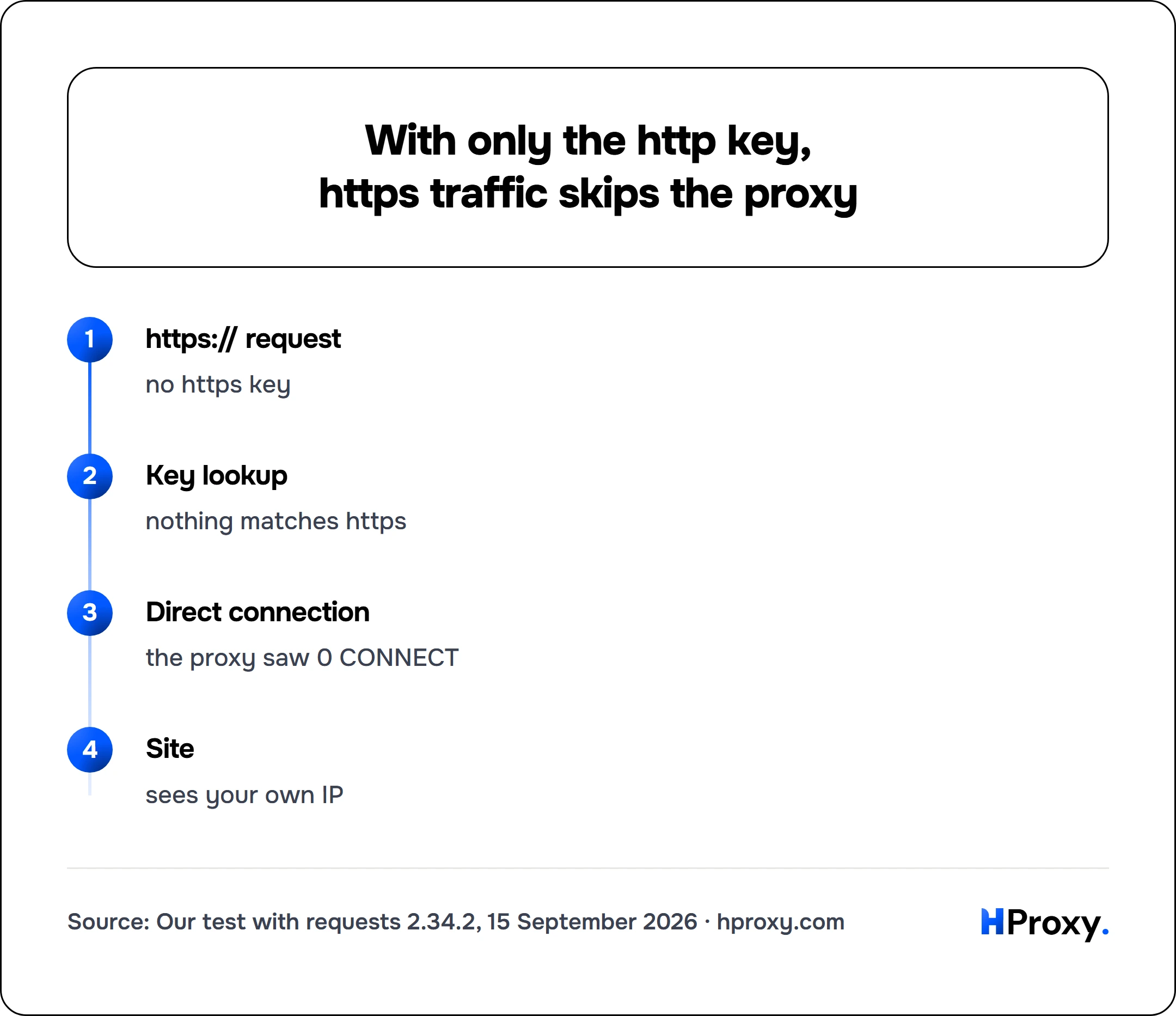
With only an http key, https:// requests do not use the proxy. In our test, the proxy saw no CONNECT at all, and the request reached the site directly. The site then sees your own IP address, and no error tells you.
https:// request
no https key
Key lookup
nothing matches https
Direct connection
the proxy saw 0 CONNECT
Site
sees your own IP
Do not give the https key an https:// proxy URL unless your provider says the proxy takes TLS connections. Several of the guides that rank for this topic show that pair. Against a plain HTTP proxy, it fails before any request leaves:
requests.exceptions.ProxyError: ... (Caused by ProxyError('Unable to connect to proxy. Your proxy appears to only use HTTP and not HTTPS, try changing your proxy URL to be HTTP. ...'))
Two more keys help. A key with a scheme and a host, such as https://api.example.com, wins over the plain https key for that host. An all key covers every scheme that has no key of its own. requests checks the keys in this order: scheme and host, scheme, all with host, then all.
proxies = {
    "https": "http://203.0.113.7:8080",                      # every https:// page
    "https://api.example.com": "http://198.51.100.14:3128",  # this host only
}
Always write the scheme in the proxy URL. A bare 203.0.113.7:8080 worked in our test, but the requests documentation says proxy URLs must include the scheme.
Step 2: add the username and password
Put the username and password in the proxy URL, as user:password@host:port. requests sends them to the proxy in a Basic Proxy-Authorization header.
proxy = "http://myuser:mypassword@203.0.113.7:8080"
proxies = {"http": proxy, "https": proxy}
r = requests.get("https://example.com", proxies=proxies, timeout=(6.05, 30))
Encode the password if it contains @, : or /. Without that, requests 2.34.2 raised InvalidURL: Failed to parse in our test. The message printed the whole proxy URL, password included, so keep such errors out of shared logs. Use quote() with safe="", because by default it leaves / as it is:
from urllib.parse import quote

user = "myuser"
password = quote("p@ss:word/!", safe="")   # p%40ss%3Aword%2F%21
proxy = f"http://{user}:{password}@203.0.113.7:8080"
proxies = {"http": proxy, "https": proxy}
requests decodes the password before it sends it. In our test, the proxy received p@ss:word/! exactly.
A wrong or missing password shows up in two ways. RFC 9110 defines status 407 for a proxy that needs a login, sent with a Proxy-Authenticate challenge. On an http:// page, requests returns that 407 as a normal response, with no exception. On an https:// page, the 407 answers the CONNECT, and requests raises this instead:
requests.exceptions.ProxyError: ... (Caused by ProxyError('Unable to connect to proxy', OSError('Tunnel connection failed: 407 Proxy Authentication Required')))
Check your version too. requests 2.3.0 to 2.30.0 could leak the Proxy-Authorization header to the site on redirects to HTTPS, when the password sat in the proxy URL. The advisory for CVE-2023-32681, published on 22 May 2023, names 2.31.0 as the fix. In our test with 2.34.2, a site that redirected between two https:// pages never received the header.
The requests documentation also warns against keeping proxy passwords in a variable of the shell or in a file under version control.
Step 3: reuse one Session
requests.get() creates a new Session for each call, so each call opens a new connection. A requests.Session keeps its connections and reuses them. In our test, ten requests.get() calls through one proxy opened 10 connections and 10 CONNECT tunnels. Ten requests on one Session opened 1 connection and 1 tunnel.
s = requests.Session()
s.proxies.update(proxies)

r1 = s.get("https://example.com/one", timeout=(6.05, 30))
r2 = s.get("https://example.com/two", timeout=(6.05, 30))   # same tunnel
There is one trap. If HTTP_PROXY or HTTPS_PROXY is set, requests uses it instead of session.proxies. In our test, a Session sent its request through the HTTP_PROXY proxy, although session.proxies named another one. The requests documentation warns about this and links issue #2018. That issue was opened on 25 April 2014 and was still open on 15 September 2026.
Two fixes worked in our test. Pass proxies= on each request, which beat the variable. Or set trust_env = False on the Session:
s = requests.Session()
s.trust_env = False          # ignore proxy variables and system proxy settings
s.proxies.update(proxies)
r = s.get("https://example.com", timeout=(6.05, 30))
Why does requests use a proxy you did not set?
When a request carries no proxies=, requests reads http_proxy, https_proxy, all_proxy and no_proxy, in lowercase or uppercase. When none is set, Python looks for the system proxy settings: the registry on Windows and System Configuration on macOS. So a proxy set for the whole system can carry your script's traffic too.
Session.trust_env switches all of this off. In the requests 2.34.2 code, trust_env = False skips the proxy variables and system settings. It also skips passwords from a .netrc file and the REQUESTS_CA_BUNDLE and CURL_CA_BUNDLE variables. Our test confirmed the proxy, .netrc and CA bundle cases.
This is what we measured with requests 2.34.2:
| Setting in our test | Proxy that handled the request |
|---|---|
HTTP_PROXY set, no proxies= in the code | The HTTP_PROXY proxy |
HTTP_PROXY set, session.proxies names another proxy | The HTTP_PROXY proxy |
The same, with session.trust_env = False | The session.proxies proxy |
HTTP_PROXY set, proxies= passed on the request | The proxy passed on the request |
HTTP_PROXY set, NO_PROXY=localhost, request to localhost | None, the request went direct |
HTTP_PROXY set, NO_PROXY=* | None, the request went direct |
HTTP_PROXY set, proxies={"http": None} | None, the request went direct |
ALL_PROXY set, proxies={"http": None, "https": None} | The ALL_PROXY proxy |
proxies holds an http proxy and "no_proxy": "localhost" | The http proxy, for localhost too |
Two rows are easy to get wrong. Setting both keys to None does not switch off ALL_PROXY, because requests falls back to the all key. And a no_proxy key inside the dictionary only filters proxies taken from the environment, not the proxies in the same dictionary.
If you rely on NO_PROXY rules, test them after an upgrade. The notes for requests 2.34.0, released on 11 May 2026, say it no longer performs greedy matching on no_proxy domains.
Step 4: use a SOCKS5 proxy
requests speaks to HTTP proxies by itself. SOCKS needs the socks extra, which installs PySocks:
python -m pip install "requests[socks]"
Without it, a SOCKS proxy URL raises InvalidSchema: Missing dependencies for SOCKS support. Once it is installed, use a socks5h:// URL:
proxy = "socks5h://myuser:mypassword@203.0.113.7:1080"
proxies = {"http": proxy, "https": proxy}
r = requests.get("https://example.com", proxies=proxies, timeout=(6.05, 30))
The h decides who looks up the host name. The requests documentation says socks5 resolves names on the client and socks5h on the proxy. We checked what reaches the proxy. With socks5://, our machine looked up example.com, and the proxy received an IPv6 address. With socks5h://, our machine made no lookup, and the proxy received the name example.com. SOCKS5 allows either form, as RFC 1928 defines.
So use socks5h:// when the lookups should not come from your own network, or when a name only resolves on the proxy's side. The username and password from the URL reached our test proxy through SOCKS5 login, the method RFC 1929 defines.
A SOCKS proxy that refused the connection raised requests.exceptions.ConnectionError in our test, not ProxyError. Catch both if you mix proxy types. Our guide to SOCKS5 proxies covers the protocol itself.
Step 5: set a timeout
requests does not time out unless you set a timeout. Its documentation warns that code without one may hang for minutes or more. Pass two numbers: the first limits the connection, the second limits the wait for data. The documentation suggests a connect value a little above a multiple of 3, the default TCP retry window.
r = requests.get("https://example.com", proxies=proxies, timeout=(6.05, 30))
The second number is not a limit on the whole download. The documentation says it is the wait between bytes from the server. A download that keeps sending data can run longer than the number you set.
Through a proxy, the two numbers apply in ways that are easy to misread. With timeout=(3, 4) on an http:// page, a proxy that took the connection and went silent raised ReadTimeout after 4 seconds. On an https:// page, a proxy that never answered the CONNECT, or went quiet after it, raised ReadTimeout after 3 seconds. The message reported a read timeout of 3, the connect value.
Step 6: catch the error the failure really raises
The exception names do not always match the problem. We caused each failure on purpose against a test proxy. This is what requests 2.34.2 raised:
| What went wrong | What requests raised | What to check |
|---|---|---|
| Nothing listens on the proxy port | ProxyError: Unable to connect to proxy | Host and port |
| The proxy address never answers | ProxyError after the connect timeout, not ConnectTimeout | The address, and whether the proxy is up |
Wrong or missing password, https:// page | ProxyError: Tunnel connection failed: 407 | Username, password, encoding |
Wrong or missing password, http:// page | No exception; r.status_code is 407 | The same, then the status code |
https:// proxy URL for an HTTP proxy | ProxyError: proxy appears to only use HTTP | Change the value to http:// |
| The proxy takes the connection, then stays silent | ReadTimeout | The proxy, or another address |
| The site is slow behind a working proxy | ReadTimeout after the read timeout | The site, or a longer read timeout |
| A SOCKS proxy refuses the connection | ConnectionError | The SOCKS address and its rules |
| A SOCKS URL without PySocks | InvalidSchema: Missing dependencies for SOCKS support | pip install "requests[socks]" |
A password with @, : or /, not encoded | InvalidURL: Failed to parse | quote(password, safe="") |
In requests, ProxyError is a kind of ConnectionError, and ConnectTimeout is both a ConnectionError and a Timeout. All of them come from RequestException. Order the except blocks from the most specific to the most general:
from requests.exceptions import ConnectionError, ProxyError, ReadTimeout, RequestException

try:
    r = requests.get(url, proxies=proxies, timeout=(6.05, 30))
    r.raise_for_status()
except ProxyError as e:
    print(f"proxy failed: {e}")         # unreachable, silent, or asking for a login
except ReadTimeout:
    print("no data in time")            # connected, then nothing arrived
except ConnectionError as e:
    print(f"connection failed: {e}")    # SOCKS refusals and other connection errors
except RequestException as e:
    print(f"request failed: {e}")
An except ConnectTimeout block does not catch a proxy that never answers. Two of the guides we read use one for proxy timeouts, and in our test that failure raised ProxyError.
Do not switch off certificate checks to make an error go away. The requests documentation says verify=False leaves an application open to man-in-the-middle attacks, and should only be set for testing.
Step 7: retry with backoff
requests does not retry failed connections by default. A urllib3 Retry mounted on the Session adds retries with a growing pause:
from requests.adapters import HTTPAdapter
from urllib3.util.retry import Retry

s = requests.Session()
retry = Retry(
    total=3,
    backoff_factor=0.5,                       # 0 s, 1 s, 2 s between tries
    status_forcelist=[429, 500, 502, 503, 504],
    allowed_methods={"GET", "HEAD"},
)
adapter = HTTPAdapter(max_retries=retry)
s.mount("http://", adapter)
s.mount("https://", adapter)
We ran this against a proxy that answered 503 every time. requests made 4 attempts, 0, 1 and 2 seconds apart, then raised RetryError. In the urllib3 code, the first retry comes at once, and each later pause doubles, up to 120 seconds by default.
All 4 attempts went to the same proxy, because the retries run inside one request. So use Retry for short failures on a stable proxy. To try a different address, rotate in your own code.
Step 8: rotate across a pool
To spread requests over several addresses, pick one per attempt and move on when it fails:
import random
import requests

POOL = [
    "203.0.113.7:8080",
    "203.0.113.24:3128",
    "198.51.100.14:8080",
    "198.51.100.66:8000",
]

def get_rotating(url, tries=4):
    for _ in range(tries):
        address = random.choice(POOL)
        proxies = {"http": f"http://{address}", "https": f"http://{address}"}
        try:
            r = requests.get(url, proxies=proxies, timeout=(6.05, 30))
            r.raise_for_status()
            return r
        except requests.RequestException:
            continue   # dead or blocked address, try another
    raise RuntimeError(f"all {tries} tries failed for {url}")

html = get_rotating("https://example.com").text
You can fill the list from our free proxy API. It returns plain text by default, and protocol and limit narrow the list. Add recent=true to include addresses that worked in the last 48 hours as well.
POOL = requests.get(
    "https://hproxy.com/api/proxy-list",
    params={"format": "txt", "protocol": "http", "limit": 50},
    timeout=15,
).text.split()
Step 9: check that the proxy works
Check a proxy before you trust it. Compare the address a server sees with and without the proxy. Our echo endpoint returns the address it sees and the request headers as JSON:
import requests

ECHO = "https://hproxy.com/api/free-proxy/echo"
proxies = {"http": "http://203.0.113.7:8080", "https": "http://203.0.113.7:8080"}

direct = requests.get(ECHO, timeout=10).json()
via_proxy = requests.get(ECHO, proxies=proxies, timeout=(6.05, 30)).json()

print("without proxy:", direct["ip"])
print("with proxy:   ", via_proxy["ip"])
assert direct["ip"] != via_proxy["ip"], "the proxy is not changing your address"

# Your own address in any header means the proxy passes it on.
leaks = [name for name, value in via_proxy["headers"].items() if direct["ip"] in value]
print("headers with your address:", leaks or "none")
If both addresses match, the proxy is not carrying your traffic. Check the https key from step 1 first.
Our proxy checker shows the same in a browser. For each proxy, it lists the status, protocol, anonymity, location, network and latency.
Where free proxies stop working
Free proxies are fine for testing the code on this page. For a script that runs unattended, the numbers from our own free pool show the limit. On 5 September 2026, the pool held 9,451 live proxies out of 72,230 in rotation. The median live proxy passed 45.5 percent of its own checks. Of the 691,179 proxies we watched die, the median one lasted 144.5 hours, and 22.6 percent died within the first hour.
A paid pool removes that list work. With our residential proxies, a username without a session ID rotates the exit address, and a username with one keeps it. They are billed per gigabyte.
Where to go from here
Our cURL guide shows the same settings in a shell, and proxies for web scraping covers the choice of proxy type. How to avoid IP bans while scraping is the checklist for when rotation is not enough. For a larger crawler, proxies with Scrapy moves rotation and retries into a framework. To manage proxies from code, see our API documentation.
What this page could not check
We ran every test on Windows 11, against test proxies on our own machine, not against a provider's gateway. The exception classes come from requests and urllib3 code that is the same on every system. The text inside them differs, such as Windows error numbers. We did not test proxies that take TLS connections, Digest proxy logins, or async clients such as httpx and aiohttp. The HTTP_PROXY rule over session.proxies is tracked in an open issue, so a later release may change it. We will check these results again by 15 March 2027.
Sources
- Requests documentation, Advanced Usage: proxies, SOCKS, timeouts and retries, read 15 September 2026: requests.readthedocs.io/en/latest/user/advanced.
- Requests documentation, API reference: Session.trust_env, verify and the exceptions, read 15 September 2026: requests.readthedocs.io/en/latest/api.
- Requests documentation, Quickstart: timeouts, read 15 September 2026: requests.readthedocs.io/en/latest/user/quickstart.
- Requests source code, release 2.34.2 of 14 May 2026, on GitHub: github.com/psf/requests.
- Requests release history, entries for 2.31.0 and 2.34.0: HISTORY.md.
- GitHub Security Advisory GHSA-j8r2-6x86-q33q, CVE-2023-32681, 22 May 2023: github.com/psf/requests/security/advisories.
- Requests issue #2018, Re-order proxy precedence, opened 25 April 2014: github.com/psf/requests/issues/2018.
- urllib3 source code, release 2.7.0, on GitHub: github.com/urllib3/urllib3.
- Python documentation, urllib.request.getproxies, read 15 September 2026: docs.python.org.
- Python documentation, urllib.parse.quote, read 15 September 2026: docs.python.org.
- RFC 9110, HTTP Semantics, June 2022: rfc-editor.org/rfc/rfc9110.
- RFC 1928, SOCKS Protocol Version 5, March 1996: rfc-editor.org/rfc/rfc1928.
- RFC 1929, Username/Password Authentication for SOCKS V5, March 1996: rfc-editor.org/rfc/rfc1929.
- RFC 3986, URI Generic Syntax, January 2005: rfc-editor.org/rfc/rfc3986.
- PyPI, requests 2.34.2: pypi.org/project/requests.
- Our own test run of requests 2.34.2 against local test proxies, 15 September 2026, and our free pool measurements of 5 September 2026, logged in the research folder for this page.