Almost every Selenium tutorial routes the browser straight out of your own IP, which is fine right up until the target starts counting requests per address. The moment you are scraping at any real scale, testing geo-specific behavior, or driving more than one account, you need proxies in Selenium, and Selenium's proxy handling is quirkier than most people expect.
The short version: a Selenium proxy is set once, when you build the driver, and the way you set it differs between Chrome and Firefox. The part that trips everyone up is authentication, because the flag Chrome uses to accept a proxy quietly refuses a username and password. This guide covers both browsers, the auth fix that actually works, rotation across sessions, the headless caveats, and where a proxy stops helping you.
How do you set a proxy in Selenium?
Set it when you create the driver, not after. In Chrome, add a launch flag: options.add_argument("--proxy-server=http://203.0.113.10:8080") and pass those options to webdriver.Chrome. In Firefox, set the network.proxy.* preferences on the options object instead. Either way the proxy applies to that one browser, for the life of that session.
Set a proxy in Chrome with Selenium
Chrome takes its proxy from a command-line flag, and Selenium lets you add that flag through ChromeOptions. This is the same --proxy-server mechanism from our Chrome proxy guide, driven from code instead of the terminal.
from selenium import webdriver
from selenium.webdriver.chrome.options import Options

options = Options()
options.add_argument("--proxy-server=http://203.0.113.10:8080")

driver = webdriver.Chrome(options=options)
driver.get("https://httpbin.org/ip")   # shows the exit IP the site sees
print(driver.page_source)
driver.quit()
Selenium 4 finds and manages the matching driver binary for you, so there is nothing else to download. For a SOCKS5 proxy, just change the scheme:
options.add_argument("--proxy-server=socks5://198.51.100.42:1080")
One flag applies to the whole browser, so every tab and every request in that Chrome goes through the proxy. If you need different tabs on different proxies, you run separate drivers, which is the rotation pattern further down.
Selenium also exposes a browser-agnostic way to set this: build a Proxy object with ProxyType.MANUAL and set httpProxy, sslProxy, or socksProxy on it, then assign it to options.proxy. The --proxy-server launch flag shown here is the simpler route on Chromium and the one most code uses, but the Proxy capability is the documented, cross-browser equivalent if you prefer to stay off command-line flags.
Set a proxy in Firefox with Selenium
Firefox does not use a launch flag. It reads its proxy from its own preferences, and Selenium sets those with set_preference on the Firefox options. network.proxy.type = 1 means manual configuration, and then you point each protocol at your proxy.
from selenium import webdriver
from selenium.webdriver.firefox.options import Options

options = Options()
options.set_preference("network.proxy.type", 1)             # 1 = manual
options.set_preference("network.proxy.http", "203.0.113.10")
options.set_preference("network.proxy.http_port", 8080)
options.set_preference("network.proxy.ssl", "203.0.113.10")    # HTTPS traffic
options.set_preference("network.proxy.ssl_port", 8080)

driver = webdriver.Firefox(options=options)
driver.get("https://httpbin.org/ip")
driver.quit()
For a SOCKS5 proxy, set the SOCKS preferences instead. The socks_remote_dns line is worth keeping: it resolves DNS through the proxy rather than on your machine, which closes one of the leaks that gives a proxied browser away.
options.set_preference("network.proxy.type", 1)
options.set_preference("network.proxy.socks", "198.51.100.42")
options.set_preference("network.proxy.socks_port", 1080)
options.set_preference("network.proxy.socks_version", 5)
options.set_preference("network.proxy.socks_remote_dns", True)   # DNS via the proxy
The older FirefoxProfile object did the same job and you will still see it in old code, but setting preferences on the options object is the current way and the one to copy.
The authentication problem (and the selenium-wire fix)
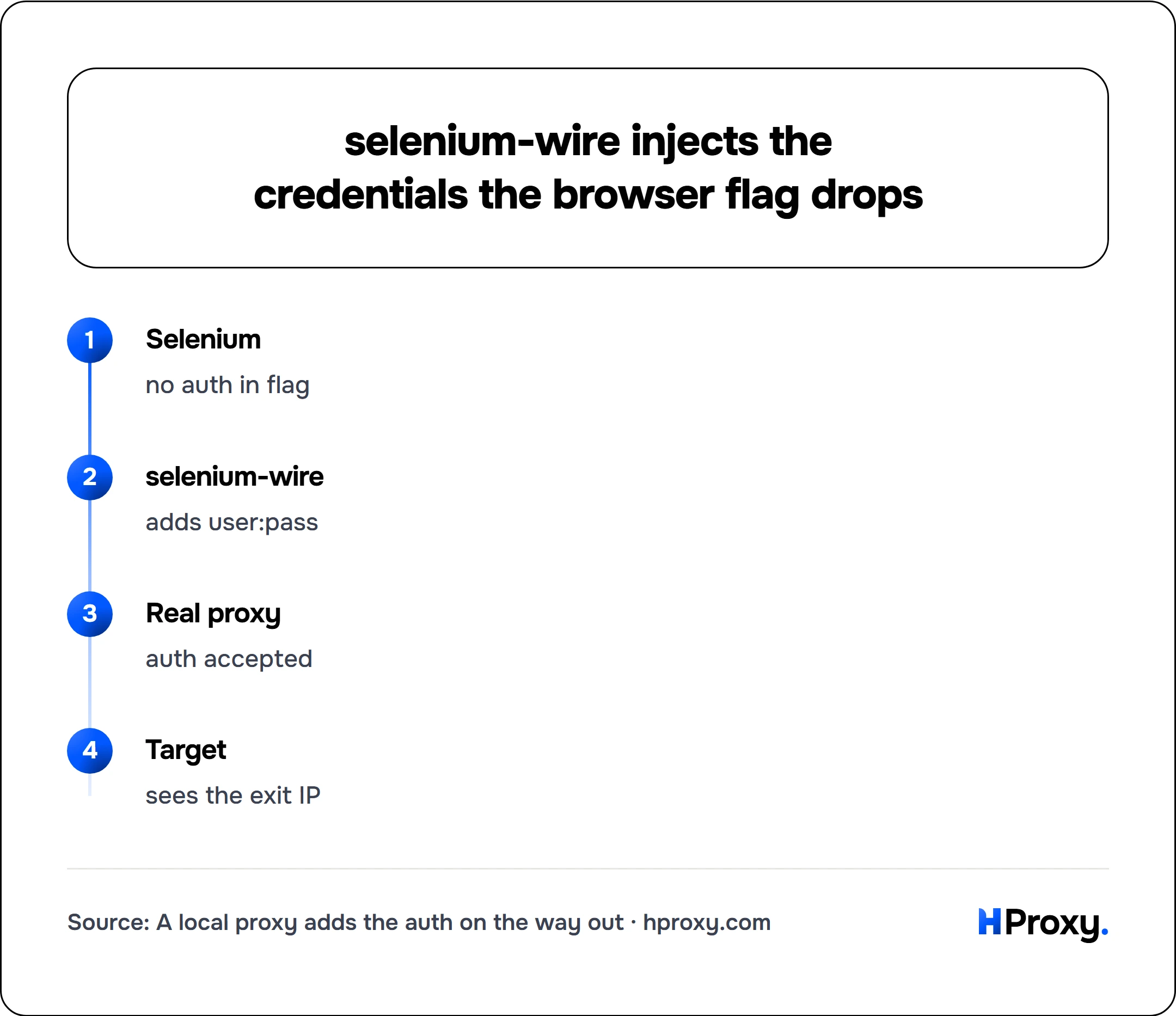
Here is the wall almost everyone hits. Most paid proxies authenticate with a username and password, and neither Chrome's --proxy-server flag nor Firefox's preferences accept credentials in the address. Write http://user:pass@203.0.113.10:8080 and Chrome throws away the user:pass part, then pops a native operating-system login box that Selenium cannot type into. Your script just hangs on a grey dialog.
There are two clean ways out.
The zero-code path: IP authentication
If your provider lets you allowlist the IP of the machine running Selenium, do that. The proxy then trusts your server by its address, no username or password rides in the flag at all, and the plain examples above work as written. This is the simplest setup and the one we recommend whenever the machine has a stable IP.
The code path: selenium-wire
When you have to send a username and password (rotating residential gateways almost always work this way), selenium-wire is the common fix. One caveat: it is no longer actively developed. Its last release (5.1.0) was in October 2022 and the maintainer has since archived the repository, though it still installs and works on current Selenium. If you would rather not lean on an unmaintained dependency, the IP-allowlist route above avoids proxy auth entirely, and Playwright takes proxy credentials natively in its own API if you are open to switching driver. selenium-wire runs a small local proxy that your browser talks to without auth, and it injects your credentials on the way out to the real proxy. Install it with pip install selenium-wire and import its drop-in webdriver:
from seleniumwire import webdriver   # drop-in replacement for selenium.webdriver

seleniumwire_options = {
    "proxy": {
        "http": "http://user:pass@203.0.113.10:8080",
        "https": "http://user:pass@203.0.113.10:8080",
        "no_proxy": "localhost",
    }
}

driver = webdriver.Chrome(seleniumwire_options=seleniumwire_options)
driver.get("https://httpbin.org/ip")
driver.quit()
The credentials live in seleniumwire_options, never in a browser flag, so the login dialog never appears. The same seleniumwire_options block works for webdriver.Firefox too. The one tradeoff is that selenium-wire sits in the request path, so on very high-throughput jobs it adds a little overhead, but for the vast majority of Selenium work you will never notice it.
Selenium
no auth in flag
selenium-wire
adds user:pass
Real proxy
auth accepted
Target
sees the exit IP
Rotating proxies across sessions
A Selenium proxy is fixed the instant the driver starts. You cannot swap --proxy-server on a browser that is already open, so the only way to rotate with plain Selenium is one driver per proxy: build it, use it, quit it, move to the next.
from selenium import webdriver
from selenium.webdriver.chrome.options import Options

proxies = [
    "http://203.0.113.10:8080",
    "http://203.0.113.11:8080",
    "http://198.51.100.42:8080",
]

for proxy in proxies:
    options = Options()
    options.add_argument(f"--proxy-server={proxy}")
    driver = webdriver.Chrome(options=options)
    try:
        driver.get("https://httpbin.org/ip")
        # ... your work for this identity ...
    finally:
        driver.quit()   # always quit, or you leak browsers
selenium-wire can go one better and let you reassign driver.proxy on a live browser, so the next request uses a new exit without relaunching Chrome. That is handy, but a fresh driver per identity is usually cleaner, because relaunching also drops the cookies and local storage from the previous run, so the new IP is not instantly tied to the old session.
For most people the simpler answer is to not rotate in code at all. Point Selenium at a single rotating residential gateway, one host and port, and let the pool hand you a different exit on each connection. Your script stays a plain one-proxy script and the rotation happens upstream. It is also the pattern that behaves best, because how you rotate matters as much as whether you rotate, which we get into in avoiding IP bans while scraping and the broader proxies for web scraping guide.
Headless caveats
Everything above works the same with headless Chrome, which you turn on with the current flag:
options.add_argument("--headless=new")
options.add_argument("--proxy-server=http://203.0.113.10:8080")
Two things change once there is no visible window. First, there is no UI, so a native proxy-auth dialog can never be clicked away. In headless mode, solving authentication in code is not optional: use IP authentication or selenium-wire, or the run hangs forever on a box you cannot see. Second, headless browsers are easier to detect, not harder. A headless session leaks automation tells that a normal window does not, and pairing it with a proxy is one of the most suspicious combinations you can present: a fresh unknown IP arriving with an obviously automated fingerprint. If a target is defended, headed Selenium on a residential IP is far less conspicuous than headless.
A proxy fixes the IP, not the fingerprint
This is the part worth being blunt about, because it is where Selenium scrapers waste the most time. A proxy changes the address a site sees. It does nothing about the many other signals that give automation away. Selenium-driven Chrome sets navigator.webdriver to true, a property the W3C WebDriver standard defines precisely so a page can tell it is being automated, exposes artifacts of the DevTools connection it runs on, and moves with a mechanical precision no hand produces. A serious anti-bot system reads all of that no matter how clean your exit IP is.
We wrote the full breakdown from the defender's seat in how websites detect proxies: the ASN behind the IP, the TLS and HTTP/2 fingerprint, header order, request pacing, and DNS or WebRTC leaks. The good news for Selenium specifically is that a real browser wins the hardest layers for free, because its TLS and HTTP/2 handshake genuinely are Chrome's: it genuinely is Chrome. What remains are the JavaScript-level automation flags and your behavior. Patched drivers such as undetected-chromedriver hide some of the flags, and human-like pacing handles the behavior, but no proxy and no patch makes a bot invisible on a site that truly cares. Set expectations accordingly: a good residential IP plus a real browser gets you a long way, and it is not a magic cloak.
Where to point Selenium
For anything facing real defenses, the exit IP is the layer that decides the most, so start there. Our residential proxies route through real consumer ISP connections and rotate from a single gateway, which is exactly the shape Selenium wants: one host and port in your options, a fresh believable IP per session, and no rotation code to maintain. If you only need to authenticate by IP, allowlist your machine and skip selenium-wire entirely.
Before you trust any proxy in a run, confirm what it actually looks like from the outside. Drop the exit into our proxy checker to see its real exit IP, its anonymity grade and its speed, so you know the address Selenium will wear is clean before a target does. Get the IP right and the proxy side of Selenium stops being the hard part, which frees you to spend your time on the browser automation you were actually trying to write. For suites that provision their own IPs before a run, the REST endpoints cover ordering and plan generation with no dashboard involved.
Sources
- Selenium: driver options: the
Proxyobject withProxyType.MANUALand thehttpProxy/sslProxy/socksProxyfields. - selenium-wire on PyPI: the authenticated-proxy workaround, last released in 2022.
- MDN: Navigator.webdriver: the automation flag Selenium exposes to every page.