
A PDF stores characters at positions on a page, with no tables or paragraphs, so scraping one means rebuilding the structure from those positions.
We tested four Python libraries on a real table on October 11, 2026: IRS Publication 1040 for 2025, 28 pages of tax tables. One library was 60 times faster than another, both table finders split the rows, and one method rebuilt every row.
The test file
The IRS publishes the tax tables as a PDF. Works of the US government carry no copyright in the US: "Copyright protection under this title is not available for any work of the United States Government". The IRS robots.txt sets no rule for the /pub/ folder the file sits in.
We picked one row and read it by eye on the rendered page. At least $50,000 but less than $50,050, the tax is 5,920, 5,526, 5,920 and 5,663 for the four filing statuses:
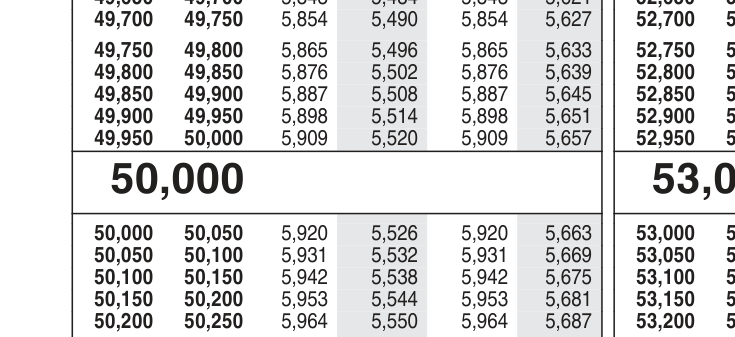
Every result below is checked against that row.
Text: which library keeps the row
We read the whole file with each library, three times, on our server:
PyMuPDF took 0.45 seconds. pypdf took 10.25, pdfplumber 23.56 and pdfminer.six 28.20. Three of the four kept the test row in order.
pdfminer.six did not. Its output mixed the first two columns, so the row never came out in order. Its documentation explains the approach: its layout analysis "groups characters into words and lines, then it groups lines into boxes". On this page, those boxes did not follow the rows.
Tables: why the table finders failed
pdfplumber and PyMuPDF both have a table finder, and both found three tables on page 8. Neither gave the row as six cells. Both put 50,000, 50,050 and 5,920 into one cell, together with the 19 rows below them. Only the two shaded columns came out one value per row.
The reason is in the settings. By default, pdfplumber draws cell borders from "the page's graphical lines", and the sides of rectangles count as lines. The IRS table shades two columns with gray boxes, so the borders followed the shading, not the rows. PyMuPDF's finder takes the same settings and gave the same split.
Switching both to the text strategy, which places borders between words, kept every value. But it put all three blocks of the page in one wide row and split 50,000 into "5" and "0,000".
What worked: words by their position
What worked was to skip the table finder. PyMuPDF can return every word with its coordinates. Group the numbers by the line they sit on, read them left to right, and cut each line into blocks of six:
import re
from collections import defaultdict

import pymupdf

NUMBER = re.compile(r"\d{1,3}(?:,\d{3})*")


def rows_by_position(path):
    rows = []
    with pymupdf.open(path) as doc:
        for page in doc:
            text = page.get_text()
            if "Tax Table" not in text or "EIC" in text:
                continue  # tax-table pages only
            lines = defaultdict(list)
            for x0, y0, x1, y1, word, *_ in page.get_text("words"):
                if NUMBER.fullmatch(word):
                    lines[round(y1)].append((x0, word))
            for _, words in sorted(lines.items()):
                values = [w for _, w in sorted(words)]  # left to right
                if len(values) >= 6 and len(values) % 6 == 0:
                    rows += [tuple(values[i:i + 6]) for i in range(0, len(values), 6)]
    return rows


rows = rows_by_position("p1040.pdf")
len(rows)
# 2066
("50,000", "50,050", "5,920", "5,526", "5,920", "5,663") in rows
# True
That took 0.61 seconds for the whole file. It found 2,066 rows: 2,062 distinct ones, plus the 4 rows of a sample table on page 2. Every row started where the one before it ended, from $0 to $100,000.
Then check the result. We tested each row against the one before it. The same file, read with one pattern of six numbers over the plain text, gave 3,296 broken rows and missed the test row.
Scanned PDFs need OCR
A scanned page is a picture of text, not text. We saved page 8 as an image inside a PDF, the way a scanner does. All four libraries returned 0 characters:
with pymupdf.open("scanned-page8.pdf") as doc:
    doc[0].get_text()
# ''
So check each page for text first. Pages that come back empty need an OCR engine, and the rest do not. We had no OCR engine on our server, so this page does not test one.
Downloading PDFs from a website
Fetching a PDF is an ordinary download. Before you script hundreds of them, read the site's robots.txt and terms, as with any scraping. Our page on whether web scraping is legal covers what to look for.
A proxy matters only at that step, when a site limits how many files one address may fetch. Our guide to proxies for web scraping shows the setup.
Check the license
All four libraries are free to download, but not under the same terms:
| Library | Version tested | Licence on PyPI |
|---|---|---|
| pypdf | 6.20.0 | BSD-3-Clause |
| pdfminer.six | 20260107 | MIT |
| pdfplumber | 0.11.10 | MIT |
| PyMuPDF | 1.28.2 | GNU AGPL 3.0 or Artifex commercial |
If you build a product on PyMuPDF, read the AGPL or Artifex's commercial terms first, or use one of the other three.
What this page could not check
- One PDF on one server, three runs per library. Other tables may suit the table finders better.
- The position method fits this table's layout. Other documents need their own grouping.
- We did not test OCR, camelot or tabula.
- We will rerun these tests on the next edition of the tables by January 11, 2027.
Sources
- IRS, Publication 1040 (2025), Tax and Earned Income Credit Tables: irs.gov.
- 17 U.S.C. 105, works of the United States Government: law.cornell.edu.
- pdfminer.six, converting a PDF file to text: pdfminersix.readthedocs.io.
- pdfplumber, README (table extraction settings): github.com.
- PyMuPDF, Page: pymupdf.readthedocs.io.
- PyPI package pages for pypdf, pdfplumber, pdfminer.six and PyMuPDF, read October 11, 2026: pypi.org.
- Our own tests on our server, October 11, 2026: pdf_test.py at 21:57 UTC, extract_rows.py at 21:57 UTC, table_strategies.py at 22:05 UTC.