The message means the site looked up the address your connection comes from. The site, or a detection service it pays for, filed that address under VPN, proxy or hosting network. Netflix says "You seem to be using a VPN or proxy" and asks you to turn such services off. BBC iPlayer will not play a program when it detects one. Shops and banks can run the same check and answer with an extra verification step. The usual fix is to turn the VPN or proxy off for that site. If you use none, something in your path looks like one, and the steps below find it.
This page is written for the person who sees the message: on a VPN for privacy, on a shared or carrier address, or flagged by mistake. Everything here comes from the detection services' and platforms' own documentation and from internet standards, read on October 13, 2026. It explains how the check works and the legitimate ways through it. It gives no steps for hiding a VPN from a site that forbids one.
What the message means
A site that shows this message has made a rule about how you connect. Netflix's help page says a VPN can "make your device or network look like it's connecting from somewhere other than your physical location". BBC iPlayer gives its reason in one line: "This is because we will not be confident of your location". Google Search shows a different text, "Our systems have detected unusual traffic from your computer network", and its help page names VPN networks among the causes. Other sites say "anonymous proxy detected", and our guide to that message explains it.
Not every site blocks. IPinfo, one of the detection services, describes a shop that checks each login for a VPN, a proxy or an unusual location. "If detected, the platform can trigger additional authentication steps, such as two-factor authentication or email verification". Banks in the EU work under similar rules. The EU's standards for strong customer authentication list an "abnormal location of the payer" among the signals that stop a payment from skipping the extra check.
What platforms say, and what they ask you to do
| Platform | What you see | What its help or rules say |
|---|---|---|
| Netflix | You seem to be using a VPN or proxy (E106) | Turn the VPN off; VPNs are not supported for live events or ad-supported plans |
| BBC iPlayer | A message that you are outside the UK | Disable the VPN or proxy; ask IT on work networks; ask your ISP about new addresses |
| Google Search | Unusual traffic from your computer network | Uninstall the VPN or contact the VPN provider |
| Steam | No message; a rule in the agreement | IP proxying to disguise where you live can end the account |
| EU banks | An extra verification step | An abnormal location rules out skipping strong customer authentication |
Netflix Help Center, BBC iPlayer help, Google Search Help, Steam Subscriber Agreement, Delegated Regulation (EU) 2018/389 Article 18; read October 13, 2026
People look these messages up word for word. Google's unusual-traffic message drew 14,800 searches worldwide in September 2026, about three and a half times its average month of the year before. Netflix's old wording, "you seem to be using an unblocker or proxy", held between 4,400 and 5,400 searches every month.
- Google's unusual traffic message
- Netflix's old unblocker or proxy wording
- proxy detected
How sites tell an address is a VPN or proxy
Most of the check is about your address, and that part can run before the page loads. Our guide on how websites detect proxies covers the full stack from the site's side. These are the parts that decide the message.
Address lists and network classes
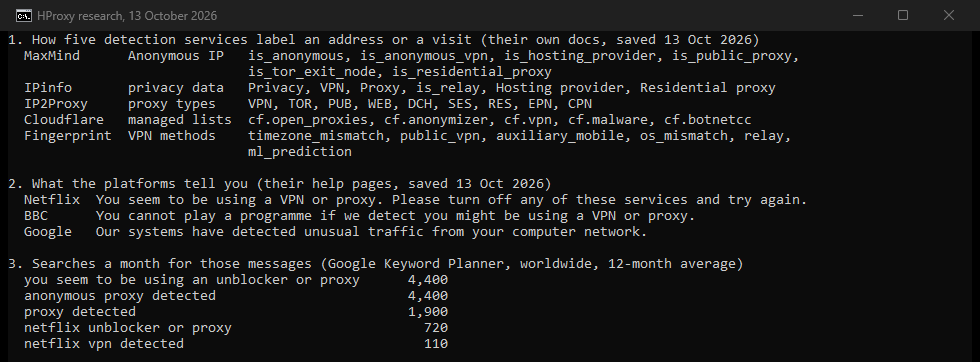
Detection services keep lists of addresses with a label on each. MaxMind's Anonymous IP database has a field for each class: is_anonymous_vpn, is_hosting_provider, is_public_proxy, is_tor_exit_node and is_residential_proxy. Its docs add a detail that explains many VPN flags. When a VPN provider does not register its subnets under its own name, MaxMind will "likely only flag their IP ranges using the is_hosting_provider flag". From May to August 2026 that database held between 133,000 and 166,000 IPv4 networks.
IP2Location's IP2Proxy database lists nine types, among them VPN, Tor exits, data centers, residential proxies, "consumer privacy networks (CPN), and enterprise private networks (EPN)". IPinfo flags VPNs, proxies, Tor, relays and hosting providers. Cloudflare offers its Enterprise customers ready-made lists, such as cf.vpn, described as "IP addresses of known VPN servers", and cf.anonymizer.
Headers that announce a proxy
Some proxies add headers to your request. RFC 9110 defines Via, which "indicates the presence of intermediate protocols and recipients between the user agent and the server". RFC 7239 defines Forwarded and notes that X-Forwarded-For is a common non-standard way to pass the client's address on. It also says the Forwarded header "should be turned off by default". A site that reads one of these knows a proxy sits in the path. Our page on transparent, anonymous and elite proxies shows which headers each kind sends.
WebRTC and DNS
WebRTC, the browser's real-time calling system, asks a STUN server for your address. MDN describes the reply: the server answers "with the client's public address". RFC 8828, the standard for how browsers handle those addresses, lists what can leak. With a split-tunnel VPN, "WebRTC can discover not only the public address for the VPN, but also the ISP public address over which the VPN is running". Behind a proxy set in the browser, on a network that also allows direct access, "WebRTC's STUN checks will bypass the proxy and reveal the public IP address of the client".
DNS plays a part too. Netflix's own troubleshooting asks your ISP to "confirm your connection uses their DNS server" when your location looks wrong.
Your time zone against your address
A page can read the time zone your system is set to. MDN's example shows timeZone returning values such as "Europe/Brussels". Fingerprint, a device-detection service, compares that zone with the address's location in a method called timezone_mismatch. Its docs say the system zone holds even on a VPN, so "it can be used as a true timezone of origin". The check is country-level: a visitor in Prague on a Berlin server counts as a mismatch, though both cities share an offset.
Shared addresses
One address can carry many people. RFC 6598 reserves a block of addresses for carrier-grade NAT, the system that puts many customers behind one public address. RFC 7021 reports that anti-abuse limits can misread "address sharing as too many connections from a single device". Google's help says the unusual traffic message can come from others "that use the same Virtual Private Network (VPN) you use".
Your request
arrives from one address
Address lookup
VPN, proxy, relay, hosting lists
Browser signals
time zone, WebRTC, headers
The site's rule
allow, extra check or block
Why you see it without a VPN
The platforms' help pages name the usual causes.
- Antivirus with a VPN. "Some antivirus software comes with a VPN that might be turned on", Netflix notes.
- Work and school networks. BBC iPlayer: "The company or organisation might route data outside of the UK or could be using a proxy service".
- Data savers and accelerators. Some mobile browsers "route data outside the UK when data reduction features are used", BBC iPlayer explains. A web accelerator is itself "a proxy server".
- A new address. Databases can take "a few weeks" to place an address your ISP has only recently obtained, again per BBC iPlayer.
- iCloud Private Relay. It replaces your address with a relay address that "may be shared among more than one Private Relay user". Fingerprint flags such addresses with its
relaymethod, and IPinfo withis_relay. - Bought address space. Google advises network administrators to test address space from an IP broker before they buy it, "to make sure it can access major websites" and carries no existing blocks.
- A proxy setting left on. Our guide to turning a proxy off shows where the proxy switch lives on each system and how to prove it is off.
Causes without a VPN, and where to start
| Cause | Named by | First step |
|---|---|---|
| Antivirus with a built-in VPN | Netflix | Turn the VPN feature off, or ask the antivirus maker |
| Work, school or hospital network | BBC iPlayer | Ask the IT team |
| Mobile data saver, web accelerator | BBC iPlayer | Turn the feature off, or try the app |
| New address, databases behind | BBC iPlayer | Ask your ISP, then the site |
| iCloud Private Relay | Apple, Fingerprint, IPinfo | Turn Private Relay off and reload |
| Shared carrier address | RFC 7021, Google | Contact the site with your IP and ISP |
| Network settings | Netflix | Reset the device's network settings |
Netflix Help Center, BBC iPlayer help, Apple, Fingerprint and IPinfo documentation, RFC 7021, Google Search Help; read October 13, 2026
What to do when a site says VPN or proxy detected
Work through these in order. Each one comes from the platforms' own help pages.
Clear a VPN-or-proxy message the legitimate way
- 1
See the address and country the site sees
Netflix suggests fast.com: run the test, click Show more info, and note the country and IP address next to Client. FFraud's proxy and VPN detection test then shows whether that address reads as a VPN, proxy, data center or consumer line.
- 2
Turn the VPN or proxy off for this site
Then reload the page, or in an app go back and select the program again, as BBC iPlayer advises. To keep the VPN for everything else, use split tunneling.
- 3
Using no VPN? Check what routes your traffic
Look for antivirus with a VPN, a web accelerator, a mobile data saver and iCloud Private Relay, and turn each off in turn.
- 4
On a work or school network, ask IT
The network may route traffic abroad or through a proxy, which only its administrators can change.
- 5
Ask your ISP
Give them the country and IP address you noted. Netflix asks you to have them confirm the location and that your connection uses their DNS server; BBC iPlayer asks you to check whether the address is new.
- 6
Contact the site
Include your IP address, your ISP and the steps you tried, as BBC iPlayer asks.
Split tunneling is a VPN setting with a precise meaning. Microsoft's documentation describes it this way: "routes can be specified to go over VPN and all other traffic will go over the physical interface". On Super User, a 2019 question with 21,327 views asked why the external address did not change on a VPN. The accepted answer explains that a VPN can carry all traffic or "just traffic going to certain subnets".
If you use a VPN for privacy
A VPN for privacy and a site's location rule can coexist, with limits. On Netflix's ad-free plans a VPN may only show "TV shows and movies Netflix has worldwide licensing for". VPNs are not supported for live events or ad-supported plans. Split tunneling sends the excluded site your real address, by design. RFC 8828 adds that on a split-tunnel VPN, WebRTC can learn your ISP address as well.
iCloud Private Relay users meet a softer version. Apple says that without your real address, "some websites may require extra steps to sign in or access content". You can turn it off on an iPhone under Settings, your name, iCloud, Private Relay. Apple also suggests that website owners treat relay addresses "like larger carrier-grade NAT or enterprise IP addresses". It notes that fraud checks based on IP addresses "might need to be adjusted" so that legitimate users are not affected.
When a site asks for two-factor authentication or an email code, finishing that check is the way through. It is the extra step IPinfo describes.
If the verdict is wrong
The databases can be out of date for your address. BBC iPlayer says updates "could take a few weeks". MaxMind's site has a "Submit a data correction" link. Netflix says that when the details match your home, your ISP will need to work with Netflix directly. RFC 7021 puts the shared-address problem plainly: if a carrier-grade NAT address "is added to a blacklist (e.g., for SPAM)", it "could negatively impact legitimate users". A reading of your address is a snapshot, as our page on what a clean IP is explains. Our page on IP fraud scores shows how scores are read.
What the site's own rules allow
The message points at a rule, and the rule decides what fixes are allowed. Netflix's Terms of Use, section 1.5, say: "You may access Netflix content primarily within the country in which you have established your account and only in geographic locations where we offer your subscription plan and have licensed such content". BBC iPlayer says programs "cannot be streamed outside the UK, even on holiday" because of rights agreements.
Steam's Subscriber Agreement is stricter. Users agree that they "will not use IP proxying or other methods to disguise the place of your residence", and Valve "may terminate your access to your Account" if they do. On sites like these, the only fix that keeps your account safe is to connect the way the rules allow. If a block itself is a mistake, the site's support is where it gets fixed. Our page on why an IP gets blocked covers blocks that are about the address and nothing else.
Where HProxy fits
We sell proxies, so we will say it plainly: a proxy is the wrong tool for a site that refuses VPNs and proxies. Where our proxies do fit is the other side of this page. If you run a site with a VPN or proxy rule, an address from each class shows you what flagged visitors meet. Our datacenter proxies cost $1.58 per IP for a month. Our residential proxies cost $0.50/GB for one GB, falling to $0.44/GB at 2,000 GB+. Residential Premium costs $1.49/GB for one GB and holds one address for up to 24 hours, which a sign-in test needs. Our page on sticky and rotating sessions explains why. Our free app on the proxy checker page shows the fraud score of an address before you test with it. A residential proxy is an address that detection services now list as well.
What we could not find out
- Which service a given site uses. The message rarely names it, and sites do not publish it.
- How often each service is wrong. None of the documentation we read gives a false-positive rate. IPinfo sells an extended dataset "designed to reduce false positives", without a number.
- Whether a site checks your time zone or WebRTC. These checks run in the page and are not announced.
- Search volumes for most VPN wording. Keyword Planner returned no data for phrases such as "vpn detected" or "website says i'm using a vpn". The old Netflix wording, "you seem to be using an unblocker or proxy", still draws 4,400 searches a month, while Netflix's help page now says "VPN or proxy".
- Other streaming services. Our searches for Hulu's and Disney+'s help pages were refused on the day, so this page quotes Netflix and BBC iPlayer only.
Sources
All read on October 13, 2026, except the monthly search series, read October 22.
- Netflix Help Center, the page on the VPN or proxy message.
- Netflix Help Center, "Watching TV shows and movies through a VPN" and "Netflix thinks I'm in a different country".
- Netflix Terms of Use, section 1.5.
- BBC iPlayer help, on why iPlayer can think a viewer is outside the UK.
- Google Search Help: "Unusual traffic from your computer network".
- Steam Subscriber Agreement.
- Commission Delegated Regulation (EU) 2018/389, Article 18, as it stood on January 31, 2020, read on legislation.gov.uk.
- MaxMind, GeoIP Anonymous IP database documentation.
- IPinfo, data types and privacy detection.
- IP2Location, IP2Proxy database.
- Fingerprint, Smart Signals reference.
- Cloudflare docs, Managed Lists.
- Apple Developer, Prepare your network or web server for iCloud Private Relay.
- Apple Support, About iCloud Private Relay, and Apple's iCloud User Guide.
- Microsoft Learn, VPN routing decisions.
- MDN, Introduction to WebRTC protocols.
- MDN, Intl.DateTimeFormat resolvedOptions.
- RFC 8828, WebRTC IP Address Handling Requirements.
- RFC 7021, on the impact of carrier-grade NAT.
- RFC 6598, Shared Address Space.
- RFC 7239, the Forwarded header.
- RFC 9110, the Via header.
- Super User question 1501851 and its accepted answer, read through the Stack Exchange API.
- Google Keyword Planner, worldwide volumes for the message wording, and the monthly series behind the chart.