You pressed Edit on Wikipedia and got a block notice, often without ever having edited before. You are most likely not the target. The notice says so itself, in bold: "Most people who see this message have done nothing wrong."
Wikipedia blocks single addresses and whole ranges of addresses, not only people. If your connection runs through a VPN, a proxy, iCloud Private Relay or a hosting network, a block on that network reaches you. The same happens when you share an address with someone who was blocked. This guide shows which case you are in and the ways back that Wikipedia itself allows.
We also checked 300 working public proxies against the Wikipedia block lists on September 26, 2026. 99 of them were already blocked from editing, and every one of those 99 refused new accounts too.
Blocked, or is the page protected?
Two different things can stop an edit. A block stops you on every page, and a notice says your address or account "has been blocked from editing Wikipedia". Protection locks one page. A protected page carries a padlock icon at its top right, and you can still view its source.
Protection depends on your account, not your address:
- Semi-protected: the page needs an account at least 4 days old with at least 10 edits.
- Extended confirmed: the page needs an account at least 30 days old with more than 500 edits.
Logged-out editors can edit any page that is not protected. On a protected page, propose your change on its talk page, and add an edit request if needed. New users can also ask for the confirmed right.
Why you are blocked when you never edited
Wikipedia can block an account, a temporary account, a single address or a whole range. Since November 4, 2025, logged-out edits on English Wikipedia no longer show your IP address. They go to a temporary account, and only admins and temporary account IP viewers can see the address, for 90 days. Blocks still act on addresses, though. The cause is usually one of these.
- A VPN, a proxy or Private Relay: Wikipedia may block open proxies, Tor and many public VPNs "for any period at any time". It names iCloud Private Relay and Microsoft Edge Secure Network as possible causes of a block message. The notice for a webhost or VPN block reads: "Your current IP address is blocked from editing Wikipedia because it appears to belong to a VPN or proxy service".
- A range block: one block can cover a whole range of addresses, and everyone inside it. The blocking policy calls the innocent people caught this way collateral damage.
- An autoblock: when an account is blocked, Wikipedia can also block the last address it used and any address it tries next. Other accounts on that address are caught for 24 hours, and the notice says the address was "automatically blocked".
- A new address from your provider: many providers rotate addresses, so you can land on one that was blocked. Wikimedia says you "should be able to edit again within a few hours or after reconnecting".
- A global block: stewards can block an address across the Wikimedia wikis at once. A global block refuses new accounts by default and can stop logged-in editing too.
- The temporary account limit: since December 2025, one address can create at most one temporary account in 10 minutes, two in 24 hours, four in 7 days and six in 30 days. Everyone behind the address shares that limit. Past it, a logged-out editor sees an error when trying to edit.
- Malware, rarely: malware can turn a home computer into an open proxy. Wikimedia suggests checking your address on a blocklist such as the Spamhaus Exploits Block List.
Read the notice: which block is it?
The notice holds most of what you need. It names the account, address or range that was blocked, who blocked it and why. It says when the block ends, or that "This block will not expire". For a block on an address, it also shows your current IP address. A global block notice adds the start date and a block ID.
| What the notice shows | What it is | Your way back |
|---|---|---|
| Your account name | A block on you | Appeal it; a new account counts as block evasion |
| "automatically blocked" | An autoblock from someone else | The unblock-auto request from the notice, on your talk page |
| "a VPN or proxy service" | A webhost or proxy block | Turn off the VPN, proxy or Private Relay |
| A range such as 203.0.113.0/24 | A range block | Log in, or create an account on another network |
| A global block, "Open proxy/Webhost" | A block across the Wikimedia wikis | Turn off the proxy, or write to the stewards |
| No notice, a padlock on the page | Page protection | Propose the change on the talk page |
One more detail decides whether logging in helps. A soft block on an address stops only logged-out editing. A hard block stops logged-in accounts on that address too. Long blocks on addresses and ranges are normally soft. Blocks on proxies and hosting networks often are not, as our test shows.
What we found: most blocked proxies stop accounts too
We took 300 working proxies from our own free proxy list on September 26, 2026. Our checker flags 150 of them as datacenter addresses and 150 as not. For each address we asked the public Wikipedia API for blocks on English Wikipedia and for global blocks across the Wikimedia wikis. Nothing was edited, and the lookups did not go through any proxy.
99 of the 300 were blocked from editing: 82 of 150 datacenter addresses and 17 of 150 others. 95 of the 99 carried a block that stops logged-in accounts too, and all 99 refused new accounts. All 30 English Wikipedia blocks we found covered a whole range, and 29 of them cite web hosting or a proxy. 96 of the 97 global blocks name an open proxy or a webhost as the reason. 109 of the 127 blocks run until 2027 or later.
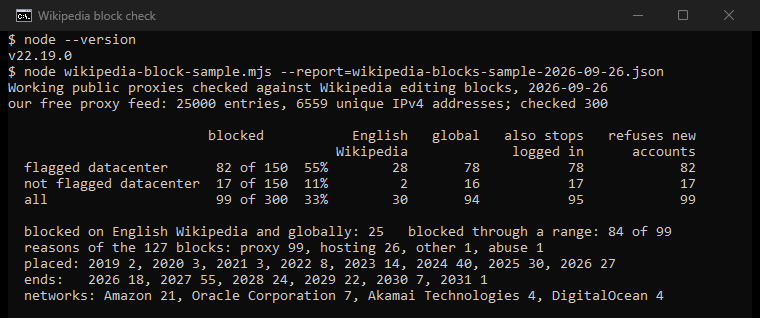
So a VPN or proxy is not a way past a Wikipedia block. A third of the working proxies we checked were blocked already, and more than half of the datacenter ones. The global Wikimedia policy is plain about the rest: "Publicly available proxies (including paid proxies) may be blocked for any period at any time." That includes proxies like ours. We sell residential proxies for other work, and they are not a way around a Wikipedia block.
The ways back, in order
- Switch off whatever hides your address. Turn off any VPN, proxy, iCloud Private Relay or Edge Secure Network, then try again. Check the proxy setting of your browser too: Wikimedia notes that many people use a proxy without knowing it. On an iPhone or iPad, Wikipedia suggests its app as another way to edit.
- Reconnect. If your provider moved you onto a blocked address, Wikimedia says you should be able to edit again within a few hours or after reconnecting.
- Log in, or create an account on another network. An account normally edits past a block on an address, unless the block is hard. Create it somewhere else: global blocks refuse new accounts by default, and every blocked proxy in our test did. Wiki Education gives classes the same advice, and an instructor can create accounts for students. If you have no other network, the global block FAQ says the stewards, or the Request an Account service of English Wikipedia, can create one for you.
- Ask for IP block exemption. It is for editors in good standing who are caught by blocks meant for others. Ask through the Unblock Ticket Request System or the unblock template on your talk page. Experienced editors usually get it for 12 months, and newer ones may get a shorter term. Editing through Tor needs this exemption too, because Tor is blocked automatically.
- Write to the stewards for a global block. They can remove it or give your account an exemption. A global exemption lifts only global blocks, so a local block on English Wikipedia needs a local exemption as well.
- Use the autoblock request. The autoblock notice gives you an unblock-auto request to paste on your talk page, which usually gets a faster answer than the ticket system. A blocked editor can usually still edit their own talk page. If autoblocks hit your school or office again and again, the notice suggests asking the provider or IT department to contact the Wikimedia XFF project about X-Forwarded-For headers.
- Appeal a block on your own account. Follow the Wikipedia guide to appealing a block.
What does not work
- A VPN or proxy to get past the block. 99 of 300 working proxies were already blocked, and the Wikimedia policy covers paid proxies too.
- A new account to get around a block on your own account. Wikipedia treats it as block evasion and blocks the new account as well.
- Clearing cookies for a fresh temporary account. It ends your temporary account, and each new one counts against the limit for your address.
Check your own address
You can ask Wikipedia directly. First find your public address with our proxy IP checker, which also shows the provider and network behind it and whether it reads as a datacenter or a consumer connection. Then put your address in place of 203.0.113.7 in these two links:
https://en.wikipedia.org/w/api.php?action=query&list=blocks&bkip=203.0.113.7
https://meta.wikimedia.org/w/api.php?action=query&list=globalblocks&bgip=203.0.113.7
The first lists blocks on English Wikipedia, the second global blocks. Both return every block that applies to the address, range blocks included. An empty list means no block on record.
To see how an address reads to fraud checks, use the free IP check at FFraud, our sister product, which scores an address "for VPN, proxy, Tor, datacenter and abuse". If you run proxies for other work, our proxy checker shows the country and network of each one. A clean reading is a snapshot, not a promise, as what a clean IP is explains. What a residential proxy is covers why home and hosting addresses read so differently, and why is my IP blocked covers shared address reputation beyond Wikipedia.
How we checked
We read our own free proxy feed on September 26, 2026: 25,000 entries, 6,559 unique IPv4 addresses our checker had seen working. We split them by the datacenter flag of our checker and took the first 150 of each group, in an order fixed by a SHA-256 hash of the address. For each address we asked English Wikipedia (list=blocks) and Meta-Wiki (list=globalblocks) which blocks apply, one request at a time, with a user agent that names us. Both answers say whether a block is anonymous-only and whether it refuses new accounts. We ran the check twice that day and got the same 99.
The limits are real. These are public proxies, not home connections, so the numbers show how likely a proxy is to be blocked, not how many ordinary editors are. Our datacenter flag misses some hosts. Blocks change every day. We keep the tool, the saved run and every block it found, with dates and reasons.
Sources
- Wikipedia, "Wikipedia:Blocking policy", revision of September 22, 2026: what can be blocked, soft and hard blocks, autoblocks, collateral damage, temporary accounts since November 4, 2025.
- Wikipedia, "Wikipedia:Open proxies", revision of July 30, 2026: proxies and VPNs, iCloud Private Relay, Edge Secure Network.
- Wikimedia Meta-Wiki, "No open proxies", revision of May 26, 2026: the global rule, including paid proxies.
- Wikimedia Meta-Wiki, "Global blocks" and its FAQ, revisions of September 6 and March 26, 2026.
- Wikimedia Meta-Wiki, "Help:blocked" of the open proxies project, revision of October 29, 2025: rotation, malware.
- Wikipedia, "Wikipedia:IP block exemption", revision of September 20, 2026.
- Wikipedia, "Help:I have been blocked", revision of January 24, 2026.
- Wikipedia, the block notices "Template:Blocked text", "MediaWiki:Autoblockedtext" and "Template:Webhostblock".
- Wikipedia, "Wikipedia:Temporary accounts", revision of September 18, 2026: the 90 days and the limits per address.
- Wikipedia, "Wikipedia:Protection policy", revision of September 4, 2026.
- Wiki Education, "How can we create accounts when our IP address is blocked?", read September 26, 2026.
- MediaWiki API help for list=blocks and list=globalblocks, read September 26, 2026.