An IP ban is a verdict. A site looks at the traffic your scraper sends from one IP address and decides it is not a person, then shuts the door. It rarely knows your name or your intent. It knows a pattern: one address pulling hundreds of pages a minute, no cookies, a User-Agent that reads python-requests/2.31, and requests to paths that robots.txt marks as off limits. Every defense the site owns is built to catch exactly that shape.
Prevention is the work of erasing that shape. A healthy scraper does not look like one aggressive bot. It looks like many ordinary visitors: different IPs, human timing, real browsers, and traffic that stays inside the site's stated rules. Get that picture right and most bans never fire. This guide is the checklist for getting there. When a block slips through anyway, the specific error guides linked below handle the cleanup.
How do you avoid getting your IP banned when scraping?
Spread your requests across a pool of rotating IPs, slow down to a human pace with delays between requests, and send realistic browser headers including a real User-Agent. Honor robots.txt, keep sessions sticky when a site tracks state, and back off when you see 429 or 403 responses.
Rotate across a pool of IPs, not one address
One IP is one visitor. The more you ask from a single address, the faster you cross whatever threshold the site set. A pool spreads your requests so no single IP looks busy enough to flag. This is the single most effective change you can make, and on defended targets it is close to mandatory.
The type of IP matters as much as the count. Datacenter ranges are cheap and fast, but they are registered to hosting companies and easy to identify and block in bulk. Residential IPs come from real home connections through ordinary ISPs, so they blend into normal traffic and survive on sites that block datacenter ranges outright. For anything with serious bot defense, a residential pool is the tool that keeps working. If you're weighing a rotating pool against fixed addresses, rotating vs static residential proxies breaks down which fits which job.
As a rough starting point, keep each IP under the request rate one engaged human would produce, then divide your target throughput by that number to size the pool. If you need 600 requests a minute and you cap each IP at 10, you need at least 60 healthy IPs in rotation, with headroom for the ones that die or get flagged mid-run.
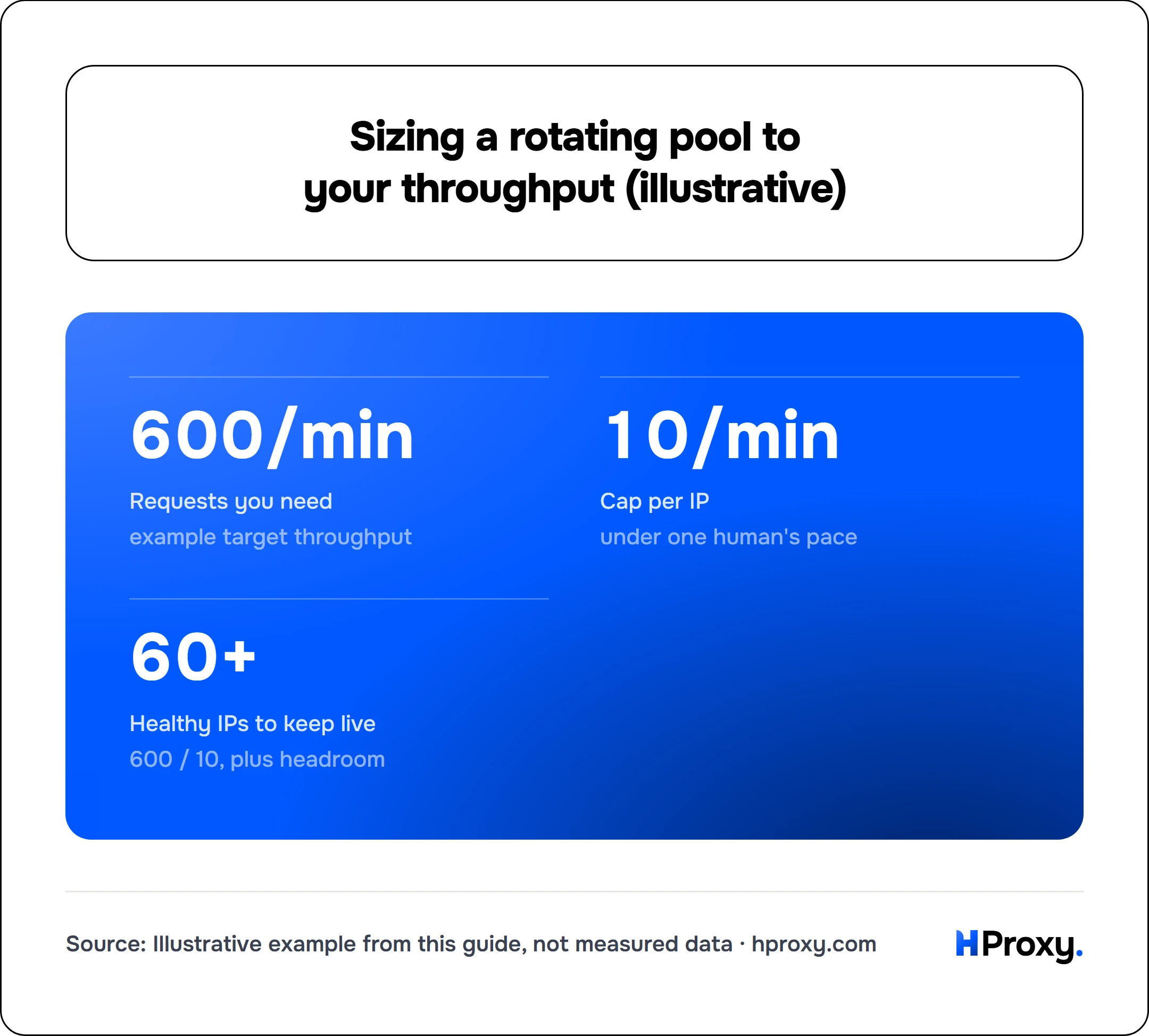
- 600/min
- Requests you need
- 10/min
- Cap per IP
- 60+
- Healthy IPs to keep live
example target throughput
under one human's pace
600 / 10, plus headroom
Before you trust any proxy, test it. Dead or already-flagged IPs waste requests and skew your data. Our proxy checker confirms an IP is alive and shows its real exit location, and the free proxy list is a low-stakes place to rehearse the pipeline before you scale.
Slow down and put space between requests
Humans do not open 50 pages a second. A scraper that does is announcing itself. Add a delay between requests and randomize it, because a perfect 1.000 second gap is its own tell. Real browsing is uneven: a burst, a pause to read, another click. Aim for that rhythm.
Cap your concurrency too. Ten parallel workers pounding one host will trip a rate limit no matter how clean your headers are. Pushing too hard is the direct cause of a 429 response, and how to fix 429 too many requests covers the response side, but the cheaper move is to never earn one.
Send realistic headers and a real User-Agent
Open a request library and the defaults give you away. curl/8.6 and python-requests/2.31 appear in no real browser's traffic. A genuine browser sends a dozen headers at once, and their absence is an easy thing for a filter to flag.
Match a real browser. At minimum set a current User-Agent, an Accept header, and an Accept-Language:
curl -x http://203.0.113.10:8080 \
  -H "User-Agent: Mozilla/5.0 (Windows NT 10.0; Win64; x64) AppleWebKit/537.36 (KHTML, like Gecko) Chrome/126.0.0.0 Safari/537.36" \
  -H "Accept: text/html,application/xhtml+xml,application/xml;q=0.9" \
  -H "Accept-Language: en-US,en;q=0.9" \
  https://example.com/catalog
Keep the set consistent with the browser you claim to be, and rotate through a small set of real User-Agents rather than one string repeated a million times. A thin or contradictory header set is one of the most common reasons a request comes back 403 forbidden.
Two details separate a convincing browser from an obvious script. Set a Referer that matches how a person would have arrived, so a product page request looks like it followed a category page rather than appearing out of nowhere. And know that advanced defenses read your TLS handshake, not just your headers: a Python client presenting a Chrome User-Agent but a Python TLS fingerprint is an easy catch. Browser-based tooling or a fingerprint-aware client closes that gap, which is exactly what sites behind Cloudflare and DataDome inspect.
Honor robots.txt and behave like a guest
Read the target's robots.txt and respect what it disallows. The format is standardized as RFC 9309, the Robots Exclusion Protocol from 2022, which defines the User-Agent, Allow, and Disallow rules a well-behaved crawler follows. Honor any Crawl-delay a site sets, but know it is a common non-standard extension, not part of RFC 9309, so not every tool reads it. This is partly ethics and partly camouflage: traffic that stays inside the rules draws no attention, and traffic that ignores them stands out at once.
Be light on the server. Cache pages you already pulled so you never request them twice. Prefer off-peak hours. Take only the data you need. A scraper that acts like a considerate guest is both easier to defend and far less likely to get its whole IP range blacklisted for everyone.
Hold a sticky session where the site tracks state
Some targets follow you across pages with cookies: a login, a cart, a multi-step search. Rotate your IP in the middle of that and you look impossible, like a single user who jumps to a new country between two clicks. Sites read that as fraud and shut it down.
Use a sticky session to hold one IP for the life of a single logical session, then switch IPs only between sessions. Stateful flows stay coherent while your total load still spreads across the pool. The rotating vs static guide goes deeper on when to pin an IP and when to let it change.
Retry with backoff instead of pounding
Blocks happen. What you do next decides whether one 429 turns into a full ban. Retrying the same request straight away is the worst option, because it confirms you are automated and adds to the load that tripped the limit.
Back off instead. Wait, then wait longer on each successive failure, and add a little randomness so your retries don't line up into a pattern of their own. If the response carries a Retry-After header, obey it exactly. Then ease your overall rate down, not just for the failed request but for the whole run.
Spread the work across time
Volume crammed into a short window is one of the loudest signals there is. One million requests in an hour looks nothing like a human audience. The same million spread across a day and across a rotating pool can pass unnoticed. Queue your targets and drip them out. Patience is the cheapest anti-ban tool you own, and it costs nothing but a schedule.
Watch for soft blocks, not just hard bans
Not every block announces itself with an error code. A site that suspects you might keep answering with a 200 status while quietly serving a captcha page, an empty result set, or subtly wrong data meant to poison your dataset. If your success rate looks perfect but your parsed output is thinning out, you may be soft-blocked. Log the status code, the response size, and a hash of the body for every request, and alert yourself when any of them drift. Catching a soft block early saves you from scraping a thousand pages of garbage.
The whole checklist in one place
Here is the whole checklist in one place. A scraper that survives usually does all of this at once:
- Rotates requests across a pool of IPs, residential for defended targets.
- Paces requests with randomized delays and a sane concurrency cap.
- Sends a full, consistent set of real browser headers.
- Respects robots.txt and stays light on the server.
- Holds sticky sessions for stateful flows, and rotates between them.
- Backs off with jitter the moment it sees 429 or 403.
- Spreads large jobs across hours instead of minutes.
No single item saves you. The picture only works when the parts agree.
When a block gets through anyway
Even a careful scraper meets a wall sometimes, and you will usually see one of two responses. A 403 forbidden means the site refused this request outright, most often because something about the IP or the headers looked non-human. A 429 too many requests means your pace crossed a line. Each has its own fix, and the linked guides walk through them step by step. For the wider view of tooling and targets, proxies for web scraping pulls the whole workflow together.
Treat every block as feedback. It tells you which part of the picture still reads as a bot, so you can close that one gap and keep the rest of the run clean.
When you can avoid the ban problem entirely
The checklist above is what you need when you own the request. You do not always have to. Where your target is one of the platforms we already cover, our scraper APIs return parsed JSON from a single call and the rotation, pacing and header hygiene all happen on our side, so there is no ban surface in your code to manage. For anything outside that catalog, the checklist stands.
Sources
- RFC 9309: Robots Exclusion Protocol: the 2022 standard for robots.txt, and why crawl-delay sits outside it.
- JA3 TLS fingerprinting (Salesforce): the handshake signal that catches a Python client wearing a Chrome User-Agent.