A 415 Unsupported Media Type error means the server refused your request because the body is in a format it does not accept here. The server usually judges that from the Content-Type header. The most common cause is a client that sends the wrong header or none. Python requests with data=json.dumps(payload) sends no Content-Type, curl -d sends a form type, and fetch with a string body sends text/plain. Send the body as JSON with a JSON Content-Type, and the 415 goes away.
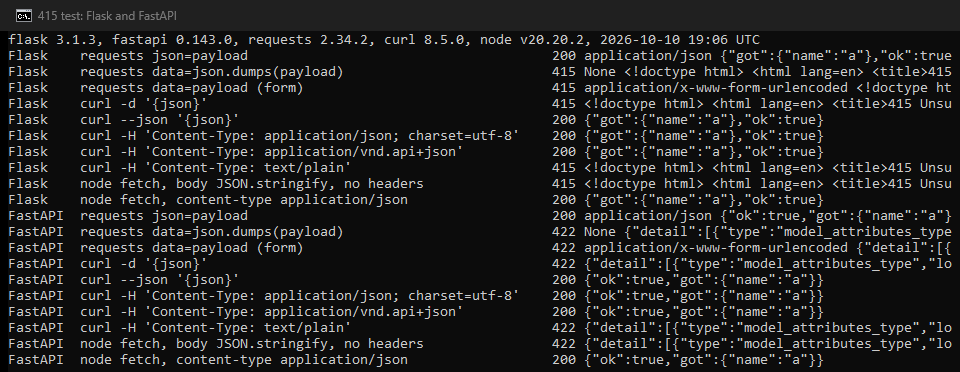
We tested ten ways of sending the same JSON to two small Python apps on October 10, 2026: Flask 3.1.3 and FastAPI 0.143.0. Flask answered 415 to every request without a JSON type. FastAPI answered 422 to the same requests, which is why some readers search for the wrong error.
What the 415 error looks like
This is the full reply our Flask app sent when the request had no JSON Content-Type:
415 Unsupported Media Type
Did not attempt to load JSON data because the request Content-Type was not 'application/json'.
FastAPI answered the same mistakes with a 422 and a validation message:
422 {"detail":[{"type":"model_attributes_type","loc":["body"],"msg":"Input should be a valid dictionary or object to extract fields from", ...
The HTTP standard, RFC 9110, defines 415 as a refusal "because the content is in a format not supported by this method on the target resource". It adds that the problem "might be due to the request's indicated Content-Type or Content-Encoding". A server can list the types it does accept in the Accept header of its reply, so check that header first.
What your client really sends
We pointed each client at a small echo server that printed the Content-Type it received. These are the headers that arrived:
| Client and call | Content-Type that arrived | Fix |
|---|---|---|
Python requests, data=json.dumps(payload) | none at all | json=payload |
Python requests, data=payload with a dict | application/x-www-form-urlencoded | json=payload |
Python requests, json=payload | application/json | nothing to fix |
curl, -d '{"name":"a"}' | application/x-www-form-urlencoded | --json instead of -d |
curl, --json '{"name":"a"}' | application/json | nothing to fix |
fetch, body: JSON.stringify(...), no headers | text/plain;charset=UTF-8 | add a content-type header |
Each row matches the tool's own documentation. The requests quickstart warns that the data=json.dumps(...) form "will NOT add the Content-Type header". The curl manual says -d sends "the content-type application/x-www-form-urlencoded". The Fetch Standard sets the type of a string body to text/plain;charset=UTF-8.
How do you fix a 415 in your client?
Python requests
import requests

r = requests.post("https://api.example.com/items", json={"name": "a"}, timeout=(3.05, 27))
The json= argument encodes the body and sets application/json. If you build the body yourself, set the header too: headers={"Content-Type": "application/json"}. To see what you sent, print r.request.headers after the call.
curl
curl --json '{"name":"a"}' https://api.example.com/items
--json is short for --data-binary with Content-Type: application/json and Accept: application/json. It exists from curl 7.82.0. On an older curl, set the header by hand:
curl -H "Content-Type: application/json" -d '{"name":"a"}' https://api.example.com/items
fetch, in a browser or Node
await fetch("https://api.example.com/items", {
  method: "POST",
  headers: { "content-type": "application/json" },
  body: JSON.stringify({ name: "a" }),
});
In our test, all three of these got a 200 from both apps.
Which JSON types pass?
Both apps accepted application/json; charset=utf-8 and application/vnd.api+json, and both refused text/plain with a JSON body. A charset parameter or a +json type did not cause a 415. An API can still be stricter than these two, so match the type in its documentation exactly.
Why the same mistake can be 415, 422 or 400
Frameworks report a missing JSON type in different ways:
| Request | Flask 3.1.3 | FastAPI 0.143.0 |
|---|---|---|
No Content-Type (data=json.dumps) | 415 | 422 |
Form type (curl -d, data= dict) | 415 | 422 |
text/plain (fetch with a string body) | 415 | 422 |
application/json, with or without charset | 200 | 200 |
| Flask 3.1.3 | FastAPI 0.143.0 | |
|---|---|---|
| No Content-Type | 415 | 422 |
| A form type | 415 | 422 |
| text/plain | 415 | 422 |
| application/json, with or without charset | 200 | 200 |
FastAPI's code sends every validation error with status_code=422, and a body that does not parse as an object fails validation. Flask's documentation says get_json() raises "a 415 Unsupported Media Type" when the type is not JSON. The same page notes that it raised 400 in versions 2.1 and 2.2, before version 2.3. Django REST framework answers 415 when "there are no parsers that can handle the content type of the request data". So a 422 or a 400 from a JSON API can have the same cause as a 415.
Can a proxy cause a 415?
Rarely, and you can check it in a minute. For an https:// address, your client first asks the proxy for a tunnel with CONNECT. The standard says the proxy then keeps to "blind forwarding of data, in both directions". So the headers inside the tunnel reach the server as you sent them. The proxy cannot add, drop or change your Content-Type.
Our own gateway does not send 415 either. The gateway status codes we document for our proxy lines are 407, 403, 464 to 467, 568 and 5xx. Each has its own meaning. A 415 comes from the API you called. To be sure, send the same request once without the proxy. If the 415 stays, the fix is in the request.
When none of this works
Work through these in order:
- Print the headers you send (
r.request.headersin requests,curl -von the command line) and compare the Content-Type with the API's documentation. - Read the
Acceptheader of the 415 reply. A server that sets it is telling you which types it takes. - Check the body format the endpoint expects. A file upload often needs
multipart/form-data, and some APIs wantapplication/xmlor a vendor type such asapplication/vnd.api+json. - Check
Content-Encoding. The standard says a 415 can come from an encoding the server does not accept, such as a gzip body sent to an endpoint that does not take one. - Do not retry. The same request gets the same 415.
If you call APIs through proxies, our guide to using proxies with Python requests covers the setup. Python requests timeout covers the errors that do come from the proxy hop.
What this page could not check
We ran two Python frameworks on one machine. Spring, ASP.NET Core, Express and the many public APIs that answer 415 were not part of the test. Real APIs may add checks of their own. Django REST framework's behavior comes from its documentation, not from our test. We did not test file uploads or encoding problems, which can also lead to a 415. The proxy point rests on the HTTP standard and our own gateway's documented codes, not on a test through other proxy networks. Framework defaults change between releases, so we will run the test again by January 15, 2027.
Sources
- RFC 9110, HTTP Semantics, IETF, June 2022: 15.5.16 415 Unsupported Media Type, and 9.3.6 CONNECT.
- Flask API documentation, Request.get_json, Flask 3.1.x, read October 10, 2026.
- FastAPI source code, fastapi/exception_handlers.py, read October 10, 2026.
- Django REST framework documentation, Exceptions: UnsupportedMediaType, read October 10, 2026.
- curl manual, options -d and --json, read October 10, 2026.
- WHATWG Fetch Standard, extract a body, last updated October 6, 2026.
- Requests documentation, Quickstart: More complicated POST requests, for Requests 2.34.2, read October 10, 2026.
- HProxy documentation: gateway status codes, read October 10, 2026.
- Our own test on October 10, 2026: Flask 3.1.3 and FastAPI 0.143.0 against requests 2.34.2, curl 8.5.0 and Node 20.20.2 fetch.