The XPath function contains() matches part of a text or an attribute, which makes it a favorite for messy pages. It also fails quietly. Some uses match too much, some match nothing, and none of them raises an error.
contains()
XPath 1.0 function
contains(a, b) is true when the string a contains b. The first argument can be an attribute, such as @title, or the element's own text, written as a dot. It compares characters, not words, and it is case sensitive.
- Example
- //a[contains(@title, 'Lamp')]
On October 12, 2026, we ran 20 cases on a small test page of our own, and on October 13 four more, for not(), or and ids. We used three engines: lxml, parsel (the selector library inside Scrapy) and Chrome, and they agreed on every case.
The basics
from lxml import html

doc = html.document_fromstring(open("contains-page.html", encoding="utf-8").read())

print(len(doc.xpath("//a[contains(@title, 'Lamp')]")))
print(len(doc.xpath("//p[contains(., 'on sale')]")))
1
1
contains(a, b) is true when the string a contains b. The first argument can be an attribute, such as @title, or the element's own text, written as a dot.
Classes: contains(@class) matches too much
print([p.get("class") for p in doc.xpath("//p[contains(@class, 'price')]")])
print([p.get("class") for p in doc.xpath("//p[contains(concat(' ', normalize-space(@class), ' '), ' price ')]")])
['price', 'price_color', 'old-price', 'price sale']
['price', 'price sale']
The short form matched four elements, because contains() works on characters, not on words. Comparing with @class='price' went wrong the other way: it found only the element whose whole class is "price" and missed "price sale".
The longer form puts a space on each side of the class list and of the word, so only whole words match. It found the 2 right elements. In CSS, p.price does this for you; see our test of XPath against CSS selectors.
print([e.get("id") for e in doc.xpath("//*[contains(@id, 's')]")])
['s1', 's2', 'sku']
An id overshoots the same way. Searching for "s" found the two spans with the ids s1 and s2, and also the div whose id is sku. When you know the whole id, compare it in full, as in @id='s1'.
Text: use the dot, not text()
print(len(doc.xpath("//p[contains(text(), 'on sale')]")))
print(len(doc.xpath("//p[contains(., 'on sale')]")))
0
1
The test paragraph is <p>Price: <b>£10</b> on sale today</p>, and the first expression found nothing:
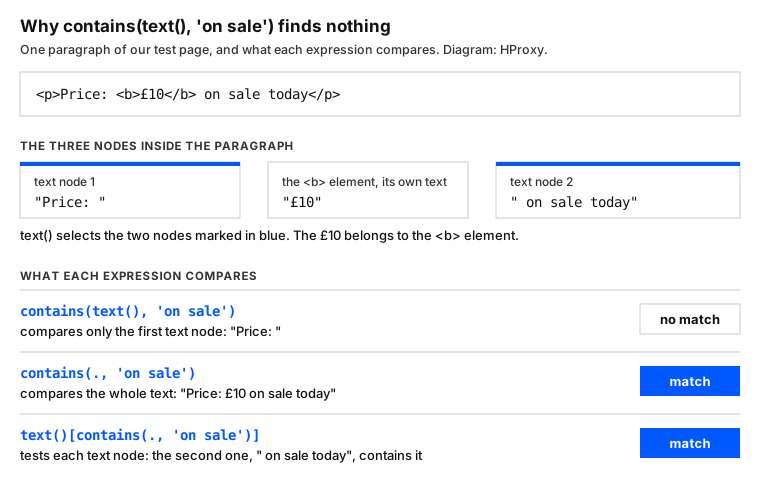
The paragraph holds three nodes, and text() selects the two text nodes. When contains() gets a set of nodes, XPath 1.0 keeps only one. The standard turns a set of nodes into "the string-value of the node in the node-set that is first in document order". So contains(text(), 'on sale') only looked at "Price: ". The dot stands for the whole text of the element, child tags included.
Case: contains() is case sensitive
LOWER = "translate(@title, 'ABCDEFGHIJKLMNOPQRSTUVWXYZ', 'abcdefghijklmnopqrstuvwxyz')"
print(len(doc.xpath(f"//a[contains({LOWER}, 'lamp')]")))
2
contains(@title, 'Lamp') found only "Desk Lamp" and missed "desk lamp, black". XPath 2.0 has a lower-case() function, but lxml, parsel and Chrome speak XPath 1.0, and all three rejected it with an error. translate() swaps each capital letter for its small one, and then the search found both titles.
Spaces: normalize-space() and the non-breaking space
print(len(doc.xpath("//span[contains(normalize-space(.), 'Out of stock')]")))
print(len(doc.xpath("//span[contains(translate(., ' ', ' '), 'In stock')]")))
1
1
Pages often carry extra spaces, and normalize-space() folds each run into one, so "Out of stock" matched. It does not touch a non-breaking space, the of HTML. XPath counts as white space only what XML does: the space, the tab and the two line breaks. Our "In stock" with a non-breaking space matched only after translate() turned it into a plain space.
An empty value matches everything
sku = ""  # a value that came back empty
print(len(doc.xpath("//*[contains(@data-sku, $sku)]", sku=sku)), len(doc.xpath("//*")))
17 17
Say the value comes from a variable and is empty. Then contains() is true for every element of the page, including the 16 without a data-sku attribute. The XPath rules explain why. A missing attribute becomes an empty string, and every string contains the empty string. Check the value before you search; passing it as an XPath variable, as here, does not change the result.
Not contains: not() and the missing attribute
print([p.get("class") for p in doc.xpath("//p[not(contains(@class, 'old'))]")])
print([p.get("class") for p in doc.xpath("//p[@class and not(contains(@class, 'old'))]")])
['price', 'price_color', 'price sale', None]
['price', 'price_color', 'price sale']
not() turns a test around, and the empty-string rule above comes with it. The first line returned four paragraphs, and the last of them, the None, has no class attribute at all. Its missing class counts as an empty string, which does not contain "old", so not() lets it through. Put @class in front, as in the second line, to keep only the paragraphs that have a class.
starts-with(), and ends-with() in XPath 1.0
from lxml import etree

print(len(doc.xpath("//p[starts-with(@class, 'price')]")))

try:
    doc.xpath("//p[ends-with(@class, 'price')]")
except etree.XPathEvalError as e:
    print(e)
print(len(doc.xpath("//p[substring(@class, string-length(@class) - string-length('price') + 1) = 'price']")))
3
Unregistered function
2
starts-with() is part of XPath 1.0 and found the 3 classes that begin with "price". ends-with() arrived with XPath 2.0, and all three engines refused it. The substring() form compares the end of the string instead and found the 2 classes that end in "price".
Any attribute, and two values with and or or
print(len(doc.xpath("//*[@*[contains(., 'lamp')]]")))
print(len(doc.xpath("//p[contains(., 'Price') and contains(., 'on sale')]")))
print([p.get("class") for p in doc.xpath("//p[contains(@class, 'old') or contains(@class, 'sale')]")])
1
1
['old-price', 'price sale']
@* means every attribute of the element, so the first line finds elements with "lamp" in any attribute. To require two texts, join two contains() with and. To accept either of two values, join them with or: the third line found the class with "old" and the one with "sale".
The same in Selenium and in the browser
Selenium sends your XPath to the browser. The WebDriver standard says the browser runs it with its own evaluate(), the function behind our Chrome column. So in Selenium with Chrome, the results on this page hold. All 24 cases gave the same answers in lxml, parsel and Chrome:
These selectors usually run inside a scraper. Our Python scraping tutorial builds one. When a site limits your requests, see our guide to proxies for web scraping.
What this page could not check
- One test page we made, in three engines: lxml, parsel and Chrome 143.
- We did not run Firefox, Safari or an XPath 2.0 engine, and did not run Selenium itself.
- We will rerun these tests by April 12, 2027.
Sources
- W3C, XML Path Language (XPath) 1.0: w3.org.
- W3C, XML 1.0, white space: w3.org.
- W3C, XPath and XQuery Functions and Operators 3.1: w3.org.
- lxml, XPath and XSLT with lxml: lxml.de.
- W3C, WebDriver, the XPath locator strategy: w3.org.
- Our own tests on our server, October 12, 2026: contains_test.py at 00:26 UTC (lxml 6.1.3, parsel 1.12.1, Chrome 143) and the code on this page at 00:25 UTC. Cases 20 to 23 and the new code blocks ran on October 13, 2026, at 23:22 UTC, with the first 20 cases giving the same answers again.