To run Chrome headless in Selenium with Python, add --headless=new to ChromeOptions and pass the options to webdriver.Chrome(). Since Chrome 132, plain --headless starts the same mode, and --headless=old fails. The old engine lives on as a separate program, chrome-headless-shell. Give the window a size as well. A headless Chrome still tells sites it is headless in its user agent, and Selenium sets navigator.webdriver to true in every mode.
We tested this on our own server on October 12, 2026, with Selenium 4.51.0, Python 3.12.3 and Chrome for Testing 143. A test page of our own recorded what each setup sent, and a script on the page read what it could. Every example below ran there, and its output is pasted under it.
What you need
- Python 3.10 or newer. Selenium 4.51.0 came out on October 9, 2026, and needs it.
- Chrome, and Selenium itself:
pip install selenium. Selenium fetches the matching driver for you. - On Linux as the root user, the
--no-sandboxflag as well. Started as root without it, Chrome quit at once. The runs behind this page also passed--no-sandboxand--disable-dev-shm-usage, outside the examples.
Step 1: start Chrome headless
from selenium import webdriver

options = webdriver.ChromeOptions()
options.add_argument("--headless=new")
options.add_argument("--window-size=1920,1080")
driver = webdriver.Chrome(options=options)

driver.get("https://hproxy.com/blog/web-scraping-with-python")
print(driver.title)
print(driver.get_window_size())
driver.save_screenshot("page.png")
Web Scraping With Python: Step by Step, Tested | HProxy
{'width': 1920, 'height': 1080}
--headless=new starts Chrome without a window. --window-size matters as much: without it, the window was 780 by 580 pixels, as the section on the window below shows. save_screenshot() works headless too and saves what the page shows.
Step 2: check what the page sees
Every page can read a few facts about the browser with one line of JavaScript each. Check them in your own setup.
seen = driver.execute_script("""
return {
  userAgent: navigator.userAgent,
  webdriver: navigator.webdriver,
  window: outerWidth + "x" + outerHeight,
  screen: screen.width + "x" + screen.height,
};
""")
for name, value in seen.items():
    print(f"{name:10} {value}")
screen     800x600
userAgent  Mozilla/5.0 (X11; Linux x86_64) AppleWebKit/537.36 (KHTML, like Gecko) HeadlessChrome/143.0.0.0 Safari/537.36
webdriver  True
window     1920x1080
Three things stand out. The user agent says HeadlessChrome. navigator.webdriver is true. And the window is larger than the screen, which stayed at 800 by 600. The sections below show where each one comes from and which flag changes it.
--headless, --headless=new, --headless=old or the shell?
Chrome had two headless modes. Its documentation explains that the old one "was a separate, alternate browser implementation". Since Chrome 132, the old mode "is only available as a standalone binary named chrome-headless-shell". Chrome's announcement put it plainly: "Running Chrome with --headless or --headless=new runs the new Headless mode".
We started each option through Selenium and recorded what a page got.
| Setup | Starts? | User agent | Plugins | Window |
|---|---|---|---|---|
--headless=new | yes | HeadlessChrome/143.0.0.0 | 5 | 780 x 580 |
--headless | yes | HeadlessChrome/143.0.0.0 | 5 | 780 x 580 |
--headless=old | no: the browser exits | |||
| the headless shell | yes | HeadlessChrome/143.0.7499.192 | 0 | 800 x 600 |
| no headless flag, no display | no: the browser exits |
--headless and --headless=new gave the same result in every column we read. With --headless=old, the browser printed "Old Headless mode has been removed from the Chrome binary" and exited. So use --headless=new: it means the same today and states your choice.
The headless shell is the old engine as its own program. It is easy to tell apart. It sent the full version, 143.0.7499.192, and a "HeadlessChrome" brand in its client hints. It also had no plugins, no window.chrome object, and notifications set to "denied". New headless gave "default" there.
Is headless faster?
We could not compare headless Chrome with a visible window: our server has no display. We could compare the two headless builds. Chrome's documentation says the shell has "substantially fewer dependencies" and is "in some ways more performant". We started each one 10 times, in turn, and loaded the same page.
| Median of 10 starts | New headless | Headless shell |
|---|---|---|
| Start | 0.93 s | 0.36 s |
| Page load | 0.309 s | 0.197 s |
| Screenshot | 0.157 s | 0.082 s |
| Private memory | 135 MB | 75 MB |
| Processes | 8 | 6 |
The shell started more than twice as fast and needed a little over half the memory. The page loads overlapped too much to call: new headless took 0.106 to 0.683 s, and the shell 0.142 to 1.185 s. Chrome's documentation makes the same split. It calls the shell "suitable for use cases such as automated screenshotting or web scraping", and new headless "the real Chrome browser".
Why options.headless = True does nothing
Older tutorials set options.headless = True. Selenium deprecated that property in version 4.8.0 and removed it from the Python bindings in 4.13.0. Today the line still runs.
old = webdriver.ChromeOptions()
old.headless = True
print(old.arguments)
[]
No error, and no headless argument either. Chrome then starts with a window. On a server without a display, that start fails with "session not created: Chrome instance exited". Selenium's blog explains the change: headless "is not actually going away, just the convenience method to set it in Selenium". Add --headless=new as an argument instead.
The headless window is small
New headless opened a window of 780 by 580 pixels. The screenshot, which is what the page shows, was 780 by 388. A page can change its layout at a width like that. Our test page hid its menu below 1,024 pixels.
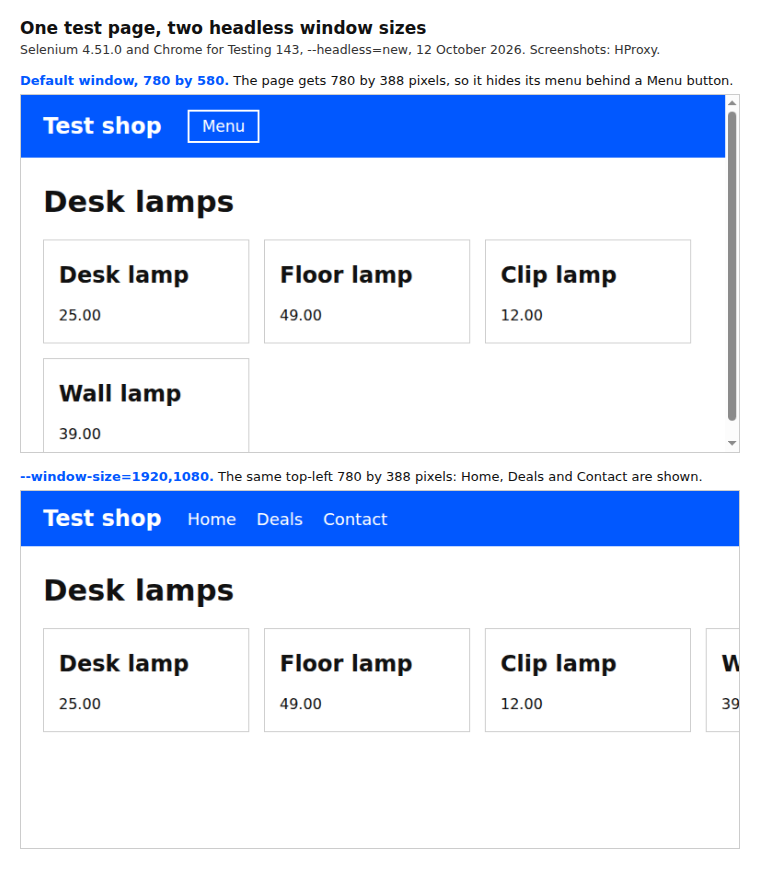
At the default size, the Deals link was not displayed: Selenium's is_displayed() returned false for it. Our page on finding elements in Selenium shows what that does to a search. These setups gave these sizes.
| Setup | Window | Visible page | Screen |
|---|---|---|---|
--headless=new | 780 x 580 | 780 x 388 | 800 x 600 |
plus --start-maximized | 800 x 600 | 800 x 408 | 800 x 600 |
plus --window-size=1920,1080 | 1920 x 1080 | 1920 x 888 | 800 x 600 |
plus --screen-info={1920x1080} | 1920 x 1080 | 1920 x 888 | 1920 x 1080 |
--start-maximized fills an 800 by 600 screen, so it is no fix. --window-size is. The screen stays at 800 by 600 because headless Chrome draws on a virtual screen. Chrome's documentation says its size "can be specified using the --screen-info command line switch".
driver.quit()
options.add_argument("--screen-info={1920x1080}")
driver = webdriver.Chrome(options=options)
driver.get("https://hproxy.com/blog/web-scraping-with-python")
print(driver.execute_script("return [screen.width, screen.height, outerWidth, outerHeight]"))
driver.quit()
[1920, 1080, 1920, 1080]
What a site can see, and what each flag changes
These are the signals our test page read. Each row shows new headless as it starts, then the flag that changed the signal in our test.
| Signal | New headless | What changed it |
|---|---|---|
User-Agent header and navigator.userAgent | HeadlessChrome/143.0.0.0 | --user-agent, or the user agent override below |
Sec-CH-UA header (client hints) | "Chromium";v="143", "Not A(Brand";v="24" | nothing needed, but an override can remove it |
navigator.webdriver | true | --disable-blink-features=AutomationControlled |
| Screen | 800 x 600 | --screen-info |
| Window | 780 x 580 | --window-size |
The user agent is the plainest signal. You can change it on a running browser with a DevTools command. The catch is the client hints. A normal Chrome sends the Sec-CH-UA header with its brands by default, in MDN's words "without the server opting in". Override the user agent alone, and that header disappears.
hints = driver.execute_script("return {brands: navigator.userAgentData.brands, platform: navigator.userAgentData.platform}")
ua = driver.execute_script("return navigator.userAgent").replace("HeadlessChrome", "Chrome")

driver.execute_cdp_cmd("Network.setUserAgentOverride", {"userAgent": ua})
driver.get("https://hproxy.com/blog/web-scraping-with-python")
print(driver.execute_script("return [navigator.userAgent, navigator.userAgentData.brands.length]"))
['Mozilla/5.0 (X11; Linux x86_64) AppleWebKit/537.36 (KHTML, like Gecko) Chrome/143.0.0.0 Safari/537.36', 0]
The user agent now says Chrome, and the browser reports 0 brands. Our test server saw no Sec-CH-UA header at all for this setup. The DevTools Protocol states the rule: "userAgentMetadata must be set for Client Hint headers to be sent". So pass the browser's own brands along, read before the override.
driver.execute_cdp_cmd("Network.setUserAgentOverride", {
    "userAgent": ua,
    "userAgentMetadata": {"brands": hints["brands"], "platform": hints["platform"], "platformVersion": "",
                          "architecture": "", "model": "", "mobile": False},
})
driver.get("https://hproxy.com/blog/web-scraping-with-python")
print(driver.execute_script("return navigator.userAgentData.brands.map(b => b.brand + ' ' + b.version)"))
['Chromium 143', 'Not A(Brand 24']
With the metadata, our test server got the Sec-CH-UA header back. Read navigator.userAgentData after opening an https page: MDN marks it "available only in secure contexts (HTTPS)". The --user-agent flag at start changed both user agents in our test and kept the client hints. It needs the full string written out, so it goes stale when Chrome updates.
navigator.webdriver is a different story. It was true in every setup Selenium started, new headless and the shell alike. The WebDriver standard sets it whenever "the user agent is under remote control". Only --disable-blink-features=AutomationControlled turned it false in our test, and the user agent still said HeadlessChrome.
None of these flags changes the address a site sees. If a site still refuses the browser after these checks, the address may be the reason. Our guide to proxies in Selenium shows how to set one, and our residential proxies are the paid option. Our BrowserScan page explains what a full fingerprint test looks at.
Errors that stop a headless start
Each of these setups failed in our tests, and Selenium reported the same line for all of them: "session not created: Chrome instance exited".
| Cause | What the browser itself said | Fix |
|---|---|---|
| No headless flag, no display | Missing X server or $DISPLAY | Add --headless=new |
options.headless = True | the same, since no flag is sent | Add --headless=new |
--headless=old | Old Headless mode has been removed from the Chrome binary | Use --headless=new or the shell |
Run as root without --no-sandbox | (Chrome exited at once) | Add --no-sandbox |
Older Stack Overflow questions quote such failures as "DevToolsActivePort file doesn't exist", which chromedriver 143 did not print in our tests. When the message says nothing useful, start the browser by hand with the same flags. Started that way with --headless=old or without a display, Chrome's first error line named the cause in our tests.
What this page could not check
- No visible window: our server has no display, so we could not compare headless with a normal window.
- One browser build: Chrome for Testing 143, stable since December 2, 2025. Its client hints say Chromium, and Google Chrome's own build may differ. The stable Chrome on October 11, 2026, was 155, and the default window may differ there.
- Firefox and Edge were not tested.
- Times and memory come from one busy server and moved between runs. Over six runs, new headless started in a median 0.71 to 1.16 s and the shell in 0.27 to 0.59 s.
- We read the signals listed above, not a full browser fingerprint.
- We will rerun these tests by January 12, 2027.
Sources
- Chrome for Developers, Chrome Headless mode: developer.chrome.com.
- Chrome for Developers blog, Removing --headless=old from Chrome (October 23, 2024): developer.chrome.com.
- Chrome for Developers, chrome-headless-shell: developer.chrome.com.
- Chrome for Developers, headless screen configuration: developer.chrome.com.
- Chrome DevTools Protocol, setUserAgentOverride: chromedevtools.github.io.
- W3C WebDriver (Level 2), navigator.webdriver: w3.org.
- MDN Web Docs, Navigator.webdriver: developer.mozilla.org.
- MDN Web Docs, Sec-CH-UA: developer.mozilla.org.
- MDN Web Docs, Navigator.userAgentData: developer.mozilla.org.
- Selenium blog, Headless is Going Away! (January 29, 2023): selenium.dev.
- Selenium Python bindings, release notes (4.8.0 and 4.13.0): github.com.
- Selenium documentation, Firefox options: selenium.dev.
- selenium 4.51.0 on PyPI (released October 9, 2026): pypi.org.
- Chromium release schedule (Chrome 143) and Chrome for Testing versions: chromiumdash.appspot.com and googlechromelabs.github.io.
- Our own tests on our server, October 12, 2026: headless_tests.py at 05:50 UTC and the code on this page at 05:53 UTC, on a test page of our own and on hproxy.com.