The requests.post() function sends data to a server: a form, a JSON body or a file. Which one the server gets depends on the argument you use, and some calls send something you did not mean without raising an error.
We sent every kind of body to a small server of our own on October 11, 2026. It answers with exactly what it received, so the results below are what arrived, not what the code seemed to say.
Send a form
import requests

URL = "http://127.0.0.1:31290/echo"  # our test server: it answers with what it received

requests.post(URL, data={"name": "Ada", "lang": "Python"}, timeout=10)
The dict arrived as name=Ada&lang=Python, with the header application/x-www-form-urlencoded: the format of an HTML form. The address is our own test server, so put your own in its place.
Send JSON
requests.post(URL, json={"name": "Ada", "tags": ["a", "b"]}, timeout=10)
With json=, requests turns the dict into JSON text and sets the header Content-Type: application/json. Use it whenever the server expects JSON.
Upload a file
requests.post(
    URL,
    data={"note": "weekly"},
    files={"file": ("report.csv", b"day,visits\nmon,12\n", "text/csv")},
    timeout=10,
)
With files=, requests sends multipart/form-data: one part for the note field and one for the file, with its name and type. Instead of the tuple, you can pass a file opened in binary mode, as the requests documentation shows.
Our test script sent each kind of body, then the four calls below, and printed what arrived:
Four calls that send something else
None of these raised an error. Each one sent a body the server would read differently from what the code seems to say.
1. JSON through data= without a header
import json

requests.post(URL, data=json.dumps({"name": "Ada"}), timeout=10)  # no Content-Type
requests.post(URL, json={"name": "Ada"}, timeout=10)  # Content-Type: application/json
Both lines send the same text, but the first sends no Content-Type header at all, so the server cannot tell that it is JSON. The requests documentation warns about exactly this: "Please note that the above code will NOT add the Content-Type header". Use json=. One of the six tutorials we read posts JSON the first way.
2. A nested dict in data=
requests.post(URL, data={"user": {"name": "Ada", "id": 7}}, timeout=10)
This arrived as user=name&user=id. The values Ada and 7 are gone. A form is flat, and requests reads the inner dict the way Python loops over any dict: it gets the keys. Send nested data with json=. None of the six tutorials we read mentions this.
3. data= and json= in the same call
requests.post(URL, data={"a": "1"}, json={"b": 2}, timeout=10)
Only a=1 arrived, and the JSON was dropped without a warning. The documentation does say so: "Note, the json parameter is ignored if either data or files is passed". Choose one: a form with data=, or JSON with json=.
4. A redirect that turns your POST into a GET
r = requests.post("http://127.0.0.1:31290/redirect/302", data={"name": "Ada"}, timeout=10)
print(r.history, r.request.method)
[<Response [302]>] GET
The server answered 302 and pointed to another address. requests followed it with a GET and dropped the body. We tried every redirect code:
| The server answered | It arrived as | The body |
|---|---|---|
| 301 | GET | empty |
| 302 | GET | empty |
| 303 | GET | empty |
| 307 | POST | name=Ada |
| 308 | POST | name=Ada |
- 301arrived as a GET, the body empty
- 302arrived as a GET, the body empty
- 303arrived as a GET, the body empty
- 307a POST with name=Ada
- 308a POST with name=Ada
This is on purpose. A comment in the requests source reads "Do what the browsers do, despite standards". HTTP itself allows it: "For historical reasons, a user agent MAY change the request method from POST to GET for the subsequent request". If a POST seems to do nothing, check r.history and post to the final address.
Keep a login with a Session
with requests.Session() as s:
    s.post("http://127.0.0.1:31290/login", data={"user": "ada", "password": "x"}, timeout=10)
    r = s.get("http://127.0.0.1:31290/account", timeout=10)
print(r.status_code)
200
Two separate calls do not share cookies: our login with requests.post() followed by requests.get() got a 401. On one Session, the login cookie came back with the next request and the page answered 200. The documentation says a Session "persists cookies across all requests made from the Session instance".
Always set a timeout
requests has no default timeout. In the words of its documentation, "If no timeout is specified explicitly, requests do not time out". Every call on this page passes timeout=10, and only two of the six tutorials we read set one. Our guide to timeouts in requests explains what the number limits.
Send a POST through a proxy
proxies = {
    "http": "http://USER:PASS@HOST:PORT",
    "https": "http://USER:PASS@HOST:PORT",
}
requests.post(URL, data={"user": "ada", "password": "x"}, proxies=proxies, timeout=10)
Give both keys. An https:// address looks up the "https" key, and with only "http" the request skips the proxy without an error. We measured that, and a second trap with the HTTPS_PROXY variable, in our web scraping tutorial.
What the proxy sees depends on the address. We sent the same login through 3proxy, a free proxy server, on our own server:
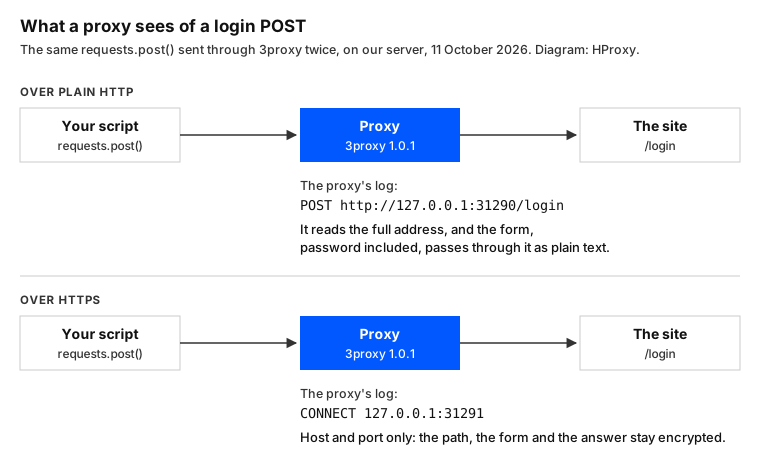
Over plain HTTP, the proxy logged the full address, POST http://127.0.0.1:31290/login. The form passed through it as plain text, password included. Over HTTPS it logged only CONNECT 127.0.0.1:31291, the host and the port. So send logins over HTTPS, through a proxy or not. Our guide to proxies with Python requests covers the setup.
What this page could not check
- One version of requests, against our own test server. Real servers may treat a body without a Content-Type in their own way.
- The proxy ran on the same server as the test, not on a proxy network.
- We did not test retries, login schemes, streaming uploads or async clients.
- We will rerun these tests with the current requests by January 12, 2027.
Sources
- Requests documentation, Quickstart (POST requests, timeouts): requests.readthedocs.io.
- Requests documentation, Advanced Usage (Session objects): requests.readthedocs.io.
- requests 2.34.2 source, models.py: github.com.
- requests 2.34.2 source, sessions.py: github.com.
- RFC 9110, HTTP Semantics, the redirect codes (June 2022): rfc-editor.org.
- Our own tests on our server, October 11, 2026: post_tests.py at 23:38 UTC and the code on this page at 23:46 UTC, both against our own test server, and a reading of six tutorials' code at 23:33 UTC.