PHP's cURL extension or Guzzle downloads pages, and the Dom\HTMLDocument class that came with PHP 8.4 reads them. chrome-php drives Chrome for pages that build their content with JavaScript.
We ran every program on this page with PHP 8.5.11 on our server on October 12, 2026, against a test site of our own. The cURL extension and Guzzle were still waiting on a silent server after 250 seconds. DOMDocument, the parser that eight of the guides we read use, built a different page than Chrome on three of six broken snippets.
The short answer
- One page: the cURL extension with
Dom\HTMLDocument. Set a User-Agent and a timeout, because the defaults have neither. - Many pages: Guzzle's
Poolwith a limit, here 8 at a time. - Parse like a browser:
Dom\HTMLDocumenton PHP 8.4 or newer. It matched Chrome on 6 of 6 broken pages,DOMDocumenton 3. - Big pages: raise
memory_limit. The new parser needed 152 MB of PHP memory for a 12.8 MB page. - Pages built by JavaScript: chrome-php, which needs PHP's sockets extension.
The tools
We ran all of them except Panther. Versions, dates and stars are from Packagist, read on October 12, 2026.
| Tool | What it does | Latest version | GitHub stars |
|---|---|---|---|
| cURL extension | PHP's binding to libcurl | part of PHP 8.5.11 | counted with PHP |
| Dom\HTMLDocument | PHP's HTML5 parser, since PHP 8.4 | part of PHP 8.5.11 | counted with PHP |
| DOMDocument | PHP's older parser, built on libxml2 | part of PHP 8.5.11 | counted with PHP |
| Guzzle | HTTP requests, many at once with Pool | 8.2.0, September 6, 2026 | 23,451 |
| Symfony HttpClient | HTTP requests, many at once | 8.1.8, September 24, 2026 | 2,031 |
| Symfony DomCrawler | CSS and XPath on top of the DOM | 8.1.5, August 21, 2026 | 4,026 |
| chrome-php | drives Chrome | 1.16.1, July 6, 2026 | 2,681 |
| Symfony Panther | drives browsers | 2.4.0, January 8, 2026 | 3,068 |
We used PHP 8.5.11 of September 24, 2026. Ubuntu 24.04's own packages ship PHP 8.3.6, which has no Dom\HTMLDocument. PHP 8.3 gets security fixes until December 31, 2027, and PHP 8.1 lost them on December 31, 2025.
Scrape one page with the cURL extension and Dom\HTMLDocument
This program reads one product page of our test site. It needs PHP 8.4 or newer with the curl and dom extensions, and no packages.
<?php
$ch = curl_init('http://127.0.0.1:8301/product/25');
curl_setopt_array($ch, [
    CURLOPT_RETURNTRANSFER => true,
    CURLOPT_TIMEOUT => 15,
    CURLOPT_USERAGENT => 'lamp-scraper/1.0 (you@example.com)',
]);
$html = curl_exec($ch);
$status = curl_getinfo($ch, CURLINFO_RESPONSE_CODE);
if ($html === false || $status !== 200) {
    fwrite(STDERR, 'Failed: ' . ($html === false ? curl_error($ch) : "HTTP $status") . "\n");
    exit(1);
}

$doc = Dom\HTMLDocument::createFromString($html, LIBXML_NOERROR);
$product = $doc->querySelector('#product');
echo $product->querySelector('h1')->textContent, "\n";
echo $product->querySelector('.price')->textContent, "\n";
echo $product->getAttribute('data-sku'), "\n";
Save it as fetch_one.php and run it.
php fetch_one.php
It printed the product's name, price and code.
Lampe à poser 25
£34.99
LMP-025
Three settings in it change the cURL extension's defaults, and each one fixes something we measured.
- The User-Agent. Our echo page saw no User-Agent from a default cURL request, and none from
file_get_contents. Ours names the scraper and a way to reach its owner. - The timeout. libcurl's documentation gives the default as 0, "which means it never times out during transfer". A default request to our silent server was still waiting when we stopped it at 250 seconds.
- The status check. The cURL extension returned our 404 page like any other page, so the program checks the status code itself.
On PHP 8.3, which has no Dom\HTMLDocument, parse with DOMDocument::loadHTML and DOMXPath instead. The broken-HTML test below shows where the two differ.
Crawl many pages with Guzzle
This crawler follows the five list pages of our test shop and saves all 100 products, 8 at a time.
<?php
require 'vendor/autoload.php';

use GuzzleHttp\Client;
use GuzzleHttp\Pool;
use GuzzleHttp\Psr7\Request;
use GuzzleHttp\Psr7\Uri;
use GuzzleHttp\Psr7\UriResolver;

$client = new Client([
    'timeout' => 15,
    'headers' => ['User-Agent' => 'lamp-scraper/1.0 (you@example.com)'],
]);

function parse(string $html): Dom\HTMLDocument
{
    return Dom\HTMLDocument::createFromString($html, LIBXML_NOERROR);
}

$links = [];
$page = new Uri('http://127.0.0.1:8301/');
while ($page !== null) {
    $doc = parse((string) $client->get($page)->getBody());
    foreach ($doc->querySelectorAll('a.product') as $a) {
        $links[] = UriResolver::resolve($page, new Uri($a->getAttribute('href')));
    }
    $next = $doc->querySelector('a.next');
    $page = $next ? UriResolver::resolve($page, new Uri($next->getAttribute('href'))) : null;
}

$rows = [];
$requests = function () use ($links) {
    foreach ($links as $link) {
        yield new Request('GET', $link);
    }
};
$pool = new Pool($client, $requests(), [
    'concurrency' => 8, // 8 pages at a time
    'fulfilled' => function ($response) use (&$rows) {
        $product = parse((string) $response->getBody())->querySelector('#product');
        $rows[] = [
            $product->querySelector('h1')->textContent,
            $product->querySelector('.price')->textContent,
            $product->getAttribute('data-sku'),
        ];
    },
    'rejected' => function ($reason) {
        throw $reason;
    },
]);
$pool->promise()->wait();

usort($rows, fn($a, $b) => strcmp($a[2], $b[2]));
$csv = fopen('products.csv', 'w');
fputcsv($csv, ['name', 'price', 'sku'], escape: '');
foreach ($rows as $row) {
    fputcsv($csv, $row, escape: '');
}
fclose($csv);
echo count($rows), " products\n";
Add Guzzle with Composer, save the program as crawl.php and run it.
composer require guzzlehttp/guzzle:8.2.0
php crawl.php
It saved 100 rows, and products.csv starts like this.
name,price,sku
"Desk lamp 1",£10.99,LMP-001
"Desk lamp 2",£11.99,LMP-002
Three parts of it come from our tests, and one gap remains.
- 8 at a time. The
Poolsends at most 8 requests at once, and the test site saw 8. With every page at once, the crawl failed, as the next section shows. - An exact timeout. Guzzle's
'timeout' => 15gave up on our silent server after 15,010 milliseconds, and the site saw a single request. Guzzle sent no second try. - One failure stops the crawl. The
rejectedfunction throws the error again, so a page that times out ends the whole run with an exception, as our test without a limit showed. - The gap: null.
querySelectorreturns null when nothing matches. ReadingtextContenton that null gave only a warning in our test, and callingquerySelectoron it threw anError. So a product page without#productwould stop this crawl.
The same job, five ways
We timed five versions of the job: 5 list pages and 100 product pages of 80 KB, with every answer 0.1 seconds late. Each version ran five times, taking turns.
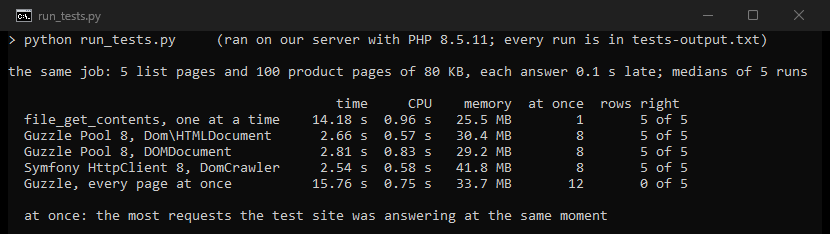
| Setup | Time | CPU | Memory | Requests at once |
|---|---|---|---|---|
file_get_contents and DOMDocument, one page at a time | 14.18 s | 0.96 s | 25.5 MB | 1 |
Guzzle Pool and Dom\HTMLDocument, 8 at once | 2.66 s | 0.57 s | 30.4 MB | 8 |
Guzzle Pool and DOMDocument, 8 at once | 2.81 s | 0.83 s | 29.2 MB | 8 |
| Symfony HttpClient and DomCrawler, 8 connections | 2.54 s | 0.58 s | 41.8 MB | 8 |
Guzzle Pool, every page at once | failed 5 of 5 | 0.75 s | 33.7 MB | 12 |
The second row is the crawler above. Symfony's HttpClient with DomCrawler took about as long and 11 MB more memory. The first four saved all 100 products correctly in every run.
Every page at once failed in all five runs, after about 16 seconds. Five more runs printed the error each time: "cURL error 28: Operation timed out". Our small test server keeps a queue of only 5 waiting connections. With a queue of 128, the same program finished five of five runs in 0.9 to 1.7 seconds. Keep a limit like the crawler's 8.
The crawler used 0.57 seconds of processor time. Our crawlers in other languages needed more for the same job, 8 at a time. Go took 1.34 seconds, Ruby 1.76, C# 2.97 and Java 7.13.
What the defaults do
Our probes asked the test site's special pages with each client's defaults.
| Client | User-Agent | A silent server | A redirect | A 404 page |
|---|---|---|---|---|
file_get_contents | none | gave up after 60.1 s | followed | returned false and a warning |
| cURL extension | none | still waiting at 250 s | returned the 301 | returned the page |
| Guzzle | GuzzleHttp/8 | still waiting at 250 s | followed | threw ClientException |
| Symfony HttpClient | Symfony HttpClient (Curl) | gave up after 60 s | followed | threw ClientException |
file_get_contents and Symfony's client wait for PHP's default_socket_timeout, 60 seconds unless you change it. Guzzle's own source gives its timeout as "default=0" and calls that "the default behavior": no total timeout. Symfony's HttpClient::create also allows 6 connections to a host unless you pass another number.
Broken HTML: DOMDocument against Dom\HTMLDocument
DOMDocument::loadHTML parses with libxml2, here version 2.9.14. PHP's manual itself points elsewhere. It says: "For parsing that conforms to the HTML5 specification, use Dom\HTMLDocument::createFromString() or Dom\HTMLDocument::createFromFile(), added in PHP 8.4". We parsed six broken snippets with both, with Chrome's own parser as the referee.
| Snippet | Chrome builds | DOMDocument | Dom\HTMLDocument |
|---|---|---|---|
<a></p> | <a><p></p></a> | <a></a> | same as Chrome |
<ul><li>one<li>two</ul> | two sibling <li> | same as Chrome | same as Chrome |
<p>first<p>second | two sibling <p> | same as Chrome | same as Chrome |
<div><span>a</div>b | <div><span>a</span></div>b | same as Chrome | same as Chrome |
<b><i>x</b>y</i> | <b><i>x</i></b><i>y</i> | <b><i>x</i></b>y | same as Chrome |
A <p> inside a <table> | the <p> moved before the table | left inside the table | same as Chrome |
| DOMDocument | Dom\HTMLDocument | |
|---|---|---|
| <a></p> | no | yes |
| <ul><li>one<li>two</ul> | yes | yes |
| <p>first<p>second | yes | yes |
| <div><span>a</div>b | yes | yes |
| <b><i>x</b>y</i> | no | yes |
| A <p> inside a <table> | no | yes |
Dom\HTMLDocument matched Chrome on all six, DOMDocument on three. On a table written without <tbody>, Chrome and Dom\HTMLDocument add one, so #prices > tbody > tr finds the 2 rows. With DOMDocument, only the XPath //*[@id='prices']/tr finds them.
Symfony's DomCrawler 8 parses with the new class too. Its addHtmlContent calls Dom\HTMLDocument::createFromString and copies the result into a DOMDocument.
Pages that are not UTF-8
We served one French product page in windows-1252 three ways: with the charset in the header, only in a <meta> tag, and nowhere.
| How the page was read | In the header | In <meta> only | Nowhere |
|---|---|---|---|
cURL, then createFromString | wrong | right | wrong |
| The same, with the header's charset passed | right | right | wrong |
createFromFile(url) | right | right | wrong |
cURL or file_get_contents, then DOMDocument | right | right | right |
| Guzzle, then DomCrawler | right | right | right |
createFromString never sees the HTTP header, so a charset named only there was lost. Its third argument fixed that: we passed the charset from curl_getinfo($ch, CURLINFO_CONTENT_TYPE). DOMDocument and DomCrawler got the last column right because both fall back to ISO-8859-1 when nothing names a charset. Our page only used "à" and "£", which ISO-8859-1 and windows-1252 store the same way.
The reverse case is the classic PHP trap. A UTF-8 page that names no charset came out of DOMDocument::loadHTML as "Lampe à poser 25, 30 â¬". Dom\HTMLDocument read the same bytes as "Lampe à poser 25, 30 €".
Big pages and memory_limit
Our 12.8 MB test page holds 50,000 items. DOMDocument read all of them. Dom\HTMLDocument stopped with "Fatal error: Allowed memory size of 134217728 bytes exhausted": that is PHP's default limit of 128 MB.
With the limit lifted, the new parser needed 152.2 MB of PHP memory for this page, and the whole process 240.4 MB. DOMDocument showed only 24.0 MB inside PHP's count, and 156.4 MB for the whole process. Raise memory_limit before the new parser reads pages of this size.
Pages built by JavaScript: chrome-php
The parsers only read the HTML the server sends. On our test page, a script adds 10 products half a second after it starts. The cURL extension with Dom\HTMLDocument found 0 of them. chrome-php starts Chrome, lets the page run and then reads it.
<?php
require 'vendor/autoload.php';

use HeadlessChromium\BrowserFactory;

$browser = (new BrowserFactory())->createBrowser();
try {
    $page = $browser->createPage();
    $page->navigate('http://127.0.0.1:8301/js')->waitForNavigation();
    $page->waitUntilContainsElement('.product h2', 10000); // the page adds its products after 0.5 s
    $names = $page->evaluate("[...document.querySelectorAll('.product h2')].map(e => e.textContent)")
        ->getReturnValue();
    printf("%d products, from %s to %s\n", count($names), $names[0], end($names));
} finally {
    $browser->close();
}
chrome-php starts the Chrome named in CHROME_PATH, or looks for google-chrome, chromium-browser, chrome and chromium. It needs PHP's sockets extension: Composer refused to install it on our first PHP build, which lacked that extension. Add the package, save the program as js.php and run it.
composer require chrome-php/chrome:v1.16.1
php js.php
It found all ten.
10 products, from Desk lamp 1 to Desk lamp 10
Each of three runs took 3.1 to 3.8 seconds, with Chrome's start. The program and Chrome together used up to 290 MB of private memory, over 14 processes.
Proxies in PHP
We set the http_proxy environment variable to a counting proxy of our own and asked for 20 pages of our plain-HTTP test site. We asked once at 127.0.0.1 and once at shop.localtest.me, a public name for 127.0.0.1, and both gave the same counts. Then we named the proxy in the code.
| Client | From the environment | Named in the code |
|---|---|---|
file_get_contents | 0 requests at the proxy | 20 requests on 20 connections |
| cURL extension | 20 requests on 1 connection | 20 requests on 1 connection |
| Guzzle | 20 requests on 1 connection | 20 requests on 1 connection |
| Symfony HttpClient | 20 requests on 2 connections | 20 requests on 3 connections |
file_get_contents ignores http_proxy, and its 20 connections through the proxy each asked to close. The other three sent even 127.0.0.1 through the proxy. Our tests in Go, Java and Ruby skipped local addresses. Guzzle also reads the upper-case HTTP_PROXY, but only from the command line. Its source says "We can only trust the HTTP_PROXY environment variable in a CLI process".
Our PHP proxy guide covers Guzzle's proxy option, CURLOPT_PROXY, the request_fulluri setting that file_get_contents needs, SOCKS5 and rotation. All of our tests stayed on our own server, and real sites also judge the address a request comes from. Our residential proxies start at $0.44/GB. Before you scrape a site, read its terms and its robots.txt, and our page on whether web scraping is legal.
What other guides get wrong
We read 14 guides on PHP scraping from companies in our market. Eight parse with DOMDocument::loadHTML, and none uses Dom\HTMLDocument.
- One explains PHP 8.4's new DOM selector with code that calls
querySelectoron aDOMDocument. On PHP 8.5.11, that call stopped with "Call to undefined method DOMDocument::querySelector()". - One was "tested using PHP 8.1.18", out of support since December 31, 2025. Two others name PHP 8.0 and PHP 7.4 as the minimum, out of support since 2023 and 2022.
- One switches off certificate checks with
CURLOPT_SSL_VERIFYPEERand'verify' => false, "for simplicity". - Four fetch with Guzzle or the cURL extension and set no total timeout. One of them sets only
CURLOPT_CONNECTTIMEOUT, which leaves a silent download waiting. In our test, both clients still waited at 250 seconds. - One still builds on Goutte, which Packagist marks as abandoned in favor of symfony/browser-kit. Its last release came out on April 1, 2023. Another parses with paquettg/php-html-parser, last released on November 1, 2020.
- One puts
<?xml encoding="UTF-8">in front of the HTML beforeloadHTML, a workaround for the UTF-8 problem above.Dom\HTMLDocumentreads UTF-8 without it. - One says PHP with Guzzle "is within ~30% of Python httpx for typical workloads", with no measurement on the page.
What this page could not check
- One server and a test site of our own on 127.0.0.1, with every answer 0.1 seconds late. Real sites add their own delays, limits and bot defenses.
- Other work on our server kept its load between 9.5 and 14.8 during the timed runs. Five runs each and their medians soften its effect.
- We built PHP 8.5.11 ourselves, against Ubuntu 24.04's libxml2 2.9.14 and libcurl 8.5.0.
DOMDocument's tree comes from libxml2, so another build can differ. - One version of each: Guzzle 8.2.0, Symfony HttpClient 8.1.8, DomCrawler 8.1.5 and chrome-php 1.16.1. We did not run Panther or simple_html_dom.
- Our server runs Chrome as root, so
CHROME_PATHpointed at a short wrapper that adds--no-sandbox. - Our test server's queue of 5 waiting connections broke the test without a limit; a queue of 128 did not.
- Our referee for broken HTML was the DOMParser of Chrome 143, on six snippets. Our page that is not UTF-8 used windows-1252 only.
- Our proxy test used a counting proxy of our own and plain-HTTP pages.
- We will check this page again by January 12, 2027.
Sources
- PHP manual,
DOMDocument::loadHTMLandDom\HTMLDocument::createFromString: php.net and php.net. - PHP manual,
default_socket_timeoutanduser_agent: php.net. - PHP's supported and unsupported branches: php.net and php.net.
- libcurl,
CURLOPT_TIMEOUTandCURLOPT_USERAGENT: curl.se and curl.se. - Guzzle 8.2.0 source: github.com.
- Symfony HttpClient and DomCrawler 8.1 source: github.com and github.com.
- chrome-php 1.16.1 source: github.com.
- Versions, dates, stars and the abandoned flags from Packagist, read on October 12, 2026.
- Our own tests on our server, October 12, 2026: run_tests.py from 18:24 to 18:33 UTC, backlog_check.sh at 18:22 UTC and reader_flow.sh at 18:20 UTC.
- Our same-job tests in other languages: Go, Java, C# and Ruby.