.NET's HttpClient downloads pages. HtmlAgilityPack or AngleSharp reads them, and Playwright for .NET runs the pages that build their content with JavaScript.
We ran every program on this page with .NET 10 on our server on October 12, 2026, against a test site of our own. The two HTML parsers disagreed on five of our six broken pages, and only one of them agreed with Chrome.
The short answer
- One page:
HttpClientwith HtmlAgilityPack. Set a User-Agent, becauseHttpClientsends none, and a timeout shorter than its 100 seconds. - Many pages: one
HttpClientfor the whole crawl,Parallel.ForEachAsyncwith a limit, and a retry for dropped connections. - Pages that must parse like a browser: AngleSharp. It matched Chrome on 6 of 6 broken pages, HtmlAgilityPack on 1.
- Pages built by JavaScript: Playwright for .NET.
- Older tutorials: check the .NET version. Two of the eleven guides we read build on .NET 5 or 6, out of support since 2022 and 2024.
The libraries
We ran the first four. Release dates are from NuGet and stars from GitHub's API, both read on October 12, 2026.
| Library | What it does | Latest version | GitHub stars |
|---|---|---|---|
| HttpClient | .NET's own HTTP client | part of .NET 10 | counted with .NET |
| HtmlAgilityPack | reads HTML with XPath | 1.13.0, August 24, 2026 | 2,851 |
| AngleSharp | reads HTML like a browser, with CSS selectors | 1.8.4, October 7, 2026 | 5,541 |
| Playwright for .NET | drives browsers | 1.63.0, September 23, 2026 | 3,016 |
| PuppeteerSharp | drives Chrome | 25.13.1, October 11, 2026 | 3,925 |
| Selenium | drives browsers | 4.51.0, October 9, 2026 | 34,539 |
HtmlAgilityPack, AngleSharp, Playwright for .NET and PuppeteerSharp use the MIT license, and Selenium uses Apache-2.0.
We used .NET 10, a long-term support release with support until November 14, 2028. Microsoft ends support for .NET 8 and .NET 9 on November 10, 2026.
Scrape one page with HttpClient and HtmlAgilityPack
This program reads one product page of our test site.
using HtmlAgilityPack;

using var http = new HttpClient { Timeout = TimeSpan.FromSeconds(15) };
http.DefaultRequestHeaders.UserAgent.ParseAdd("lamp-scraper/1.0 (you@example.com)");

using var response = await http.GetAsync("http://127.0.0.1:8281/product/25");
response.EnsureSuccessStatusCode();

var doc = new HtmlDocument();
doc.LoadHtml(await response.Content.ReadAsStringAsync());
var product = doc.DocumentNode.SelectSingleNode("//div[@id='product']");
Console.WriteLine(product.SelectSingleNode(".//h1").InnerText);
Console.WriteLine(product.SelectSingleNode(".//p[@class='price']").InnerText);
Console.WriteLine(product.GetAttributeValue("data-sku", ""));
Create a console project and add HtmlAgilityPack. Replace the generated Program.cs with the code above before the last command.
dotnet new console -o FetchOne
cd FetchOne
dotnet add package HtmlAgilityPack --version 1.13.0
dotnet run
It printed the product's name, price and code.
Lampe à poser 25
£34.99
LMP-025
The build warns with CS8602, "Dereference of a possibly null reference", because SelectSingleNode returns null when nothing matches, as its documentation says. On a page without that element, the program would throw. Three lines in it change .NET's defaults, and each one fixes something we measured.
- The User-Agent. Our echo page saw no User-Agent from a default
HttpClient, only aHostheader. Ours names the scraper and a way to reach its owner. - The timeout. The default is 100 seconds. Against a silent server, the request ended after 100.1 seconds with "The request was canceled due to the configured HttpClient.Timeout of 100 seconds elapsing".
- The status check.
GetAsyncreturned our 404 page with no exception.EnsureSuccessStatusCodethrows on it, andGetStringAsyncthrows by itself.
Crawl many pages with Parallel.ForEachAsync
This crawler follows the five list pages of our test shop and saves all 100 products, 8 at a time.
using System.Collections.Concurrent;
using HtmlAgilityPack;

var http = new HttpClient { Timeout = TimeSpan.FromSeconds(15) }; // one client for the whole crawl
http.DefaultRequestHeaders.UserAgent.ParseAdd("lamp-scraper/1.0 (you@example.com)");

async Task<HtmlDocument> Get(string url)
{
    for (var attempt = 1; ; attempt++)
    {
        try
        {
            using var response = await http.GetAsync(url);
            response.EnsureSuccessStatusCode();
            var doc = new HtmlDocument();
            doc.LoadHtml(await response.Content.ReadAsStringAsync());
            return doc;
        }
        catch (HttpRequestException e) when (attempt < 3 && (e.StatusCode == null || (int)e.StatusCode >= 500))
        {
            await Task.Delay(500 * attempt); // a dropped connection or a server error: wait, then ask again
        }
    }
}

var links = new List<string>();
for (Uri? page = new("http://127.0.0.1:8281/"); page != null;)
{
    var doc = await Get(page.ToString());
    foreach (var a in doc.DocumentNode.SelectNodes("//a[@class='product']"))
        links.Add(new Uri(page, a.GetAttributeValue("href", "")).ToString());
    var next = doc.DocumentNode.SelectSingleNode("//a[@class='next']");
    page = next == null ? null : new Uri(page, next.GetAttributeValue("href", ""));
}

var rows = new ConcurrentBag<string[]>();
await Parallel.ForEachAsync(links, new ParallelOptions { MaxDegreeOfParallelism = 8 }, async (link, _) =>
{
    var p = (await Get(link)).DocumentNode.SelectSingleNode("//div[@id='product']");
    rows.Add([p.SelectSingleNode(".//h1").InnerText, p.SelectSingleNode(".//p[@class='price']").InnerText,
              p.GetAttributeValue("data-sku", "")]);
});

var lines = rows.OrderBy(r => r[2]).Select(r => string.Join(",", r));
await File.WriteAllLinesAsync("products.csv", lines.Prepend("name,price,sku"));
Console.WriteLine($"{rows.Count} products");
Save it as Program.cs in a second project the same way.
dotnet new console -o Crawl
cd Crawl
dotnet add package HtmlAgilityPack --version 1.13.0
dotnet run
It saved 100 rows, and products.csv starts like this.
name,price,sku
Desk lamp 1,£10.99,LMP-001
Desk lamp 2,£11.99,LMP-002
Two parts of it come from our tests, and one gap remains.
- One
HttpClient. Through a counting proxy, one shared client sent 20 pages over 1 connection. A new client per request opened 20 connections. Microsoft's documentation warns that a client per request will exhaust the sockets "under heavy loads". - The retry. Our small test server sometimes closed a connection early during the parallel crawl. Without a retry, 2 of 10 crawls stopped with "The response ended prematurely", and 1 of 10 even after we enlarged the server's queue. With the retry and the small queue, 10 of 10 finished.
- The gap: no null check.
SelectNodesreturns null when nothing matches, as its documentation says. Aforeachover that null threw aNullReferenceExceptionin our test, so a list page without products would stop the crawl.
The same job, five ways
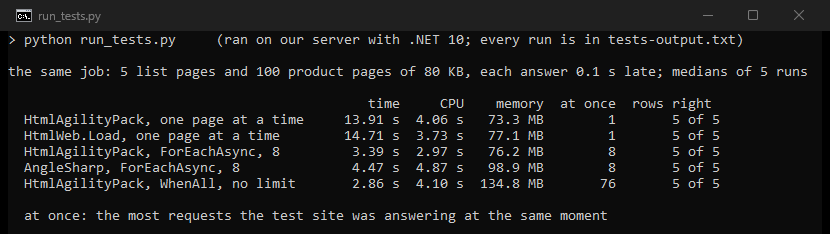
We timed five versions of the job: 5 list pages and 100 product pages of 80 KB, with every answer 0.1 seconds late. Each version ran five times, taking turns, and saved all 100 products correctly every time. The test server's listen queue was raised to 128 for these runs.
| Setup | Time | CPU | Memory | Requests at once |
|---|---|---|---|---|
| HtmlAgilityPack, one page at a time | 13.91 s | 4.06 s | 73.3 MB | 1 |
| HtmlWeb.Load, one page at a time | 14.71 s | 3.73 s | 77.1 MB | 1 |
HtmlAgilityPack, Parallel.ForEachAsync, 8 | 3.39 s | 2.97 s | 76.2 MB | 8 |
AngleSharp, Parallel.ForEachAsync, 8 | 4.47 s | 4.87 s | 98.9 MB | 8 |
HtmlAgilityPack, Task.WhenAll, no limit | 2.86 s | 4.10 s | 134.8 MB | 76 |
The third row is the crawler above, with its retry. Task.WhenAll with no limit was the fastest here, with up to 100 requests at once. On a real site, that many requests from one address can look like an attack. AngleSharp needed about one second more than HtmlAgilityPack for the same 100 pages.
In our Go guide, the same job with 8 goroutines took 2.62 seconds and 13.9 MB. In our Java guide, Java with 8 virtual threads took 4.72 seconds and 130.8 MB.
What the defaults do
HtmlAgilityPack's HtmlWeb.Load(url) is the way four of the guides we read fetch pages. Our probes ran it and HttpClient with their defaults.
| HttpClient | HtmlWeb | |
|---|---|---|
| Timeout | 100 s | 100 s |
| User-Agent | none | Firefox on Windows XP, with "x.x" for a version |
| A redirect | followed | followed |
| A 404 page | GetStringAsync throws, GetAsync returns it | returned and parsed, no exception |
| A page that is not UTF-8 | right only when the header names the charset | right in all three of our cases |
| A 12.8 MB page | read in full | read in full |
| The HTTP stack | current | HttpWebRequest, obsolete since .NET 6 |
HtmlWeb sent Mozilla/5.0 (Windows; U; Windows NT 5.1; en-US; rv:x.x.x) Gecko/20041107 Firefox/x.x. Its timeout ended with a WebException, which comes from HttpWebRequest, the class HtmlWeb creates in its source. .NET marked that class obsolete in .NET 6, under the warning SYSLIB0014. HtmlWeb.Load is also synchronous, so each call holds a thread while it waits. The class has an async method too, LoadFromWebAsync, which we did not test.
Broken HTML: HtmlAgilityPack against AngleSharp
Real pages often have broken HTML, and a browser repairs it by the rules of the HTML standard. We parsed six broken snippets with both libraries, with Chrome's own parser as the referee.
| Snippet | Chrome builds | HtmlAgilityPack | AngleSharp |
|---|---|---|---|
<a></p> | <a><p></p></a> | <a></a> | same as Chrome |
<ul><li>one<li>two</ul> | two sibling <li> | the second <li> inside the first | same as Chrome |
<p>first<p>second | two sibling <p> | the second <p> inside the first | same as Chrome |
<div><span>a</div>b | <div><span>a</span></div>b | same as Chrome | same as Chrome |
<b><i>x</b>y</i> | <b><i>x</i></b><i>y</i> | <b><i>x</i></b>y | same as Chrome |
A <p> inside a <table> | the <p> moved before the table | left inside the table | same as Chrome |
| HtmlAgilityPack | AngleSharp | |
|---|---|---|
| <a></p> | no | yes |
| <ul><li>one<li>two</ul> | no | yes |
| <p>first<p>second | no | yes |
| <div><span>a</div>b | yes | yes |
| <b><i>x</b>y</i> | no | yes |
| A <p> inside a <table> | no | yes |
AngleSharp matched Chrome on all six, HtmlAgilityPack on one. The difference reaches your selectors too. On a table written without <tbody>, Chrome and AngleSharp add one, so #prices > tbody > tr finds the 2 rows. In HtmlAgilityPack only //*[@id='prices']/tr finds them.
AngleSharp's README says its parser "is built upon the official W3C specification". Copy a selector from your browser's developer tools, and AngleSharp is more likely to find the same elements.
Pages that are not UTF-8
We served one French product page in windows-1252 three ways: with the charset in the header, only in a <meta> tag, and nowhere.
| How the page was read | Charset in the header | In <meta> only | Nowhere |
|---|---|---|---|
GetStringAsync, then LoadHtml | right | wrong | wrong |
GetStreamAsync, then Load(stream) | wrong | wrong | wrong |
HtmlWeb.Load(url) | right | right | right |
AngleSharp OpenAsync(url) | right | right | wrong |
Wrong means "Lampe à poser 25" came out with a replacement character where the "à" should be. HtmlWeb.Load was the only method that got all three right.
Pages built by JavaScript: Playwright for .NET
HtmlAgilityPack only reads the HTML the server sends. On our test page, a script adds 10 products half a second after it starts, and HtmlAgilityPack found 0 of them. Playwright for .NET starts a browser, lets the page run and then reads it.
using Microsoft.Playwright;

using var playwright = await Playwright.CreateAsync();
await using var browser = await playwright.Chromium.LaunchAsync();
var page = await browser.NewPageAsync();
await page.GotoAsync("http://127.0.0.1:8281/js");

var products = page.Locator(".product h2");
await products.First.WaitForAsync(); // the page adds its products after 0.5 s
var names = await products.AllTextContentsAsync();
Console.WriteLine($"{names.Count} products, from {names[0]} to {names[^1]}");
Add the package to a third project. Playwright's documentation installs its browsers with pwsh bin/Debug/net8.0/playwright.ps1 install, adjusted to your framework folder. Our server already had Playwright's browsers from an earlier test.
dotnet new console -o Browser
cd Browser
dotnet add package Microsoft.Playwright --version 1.63.0
dotnet run
It found all ten.
10 products, from Desk lamp 1 to Desk lamp 10
Each of three runs took 2.8 to 4.1 seconds, with the browser's start. The program, Playwright's driver and Chrome together used up to 245 MB of private memory. The program waits for the first product before it reads the list, because the page adds them half a second late.
Proxies in C#
With no proxy in the code, HttpClient takes one from the environment. We set HTTP_PROXY to a counting proxy of our own and sent 20 pages of our plain-HTTP test site.
| Setup | Requests at the proxy | Connections to the proxy |
|---|---|---|
One HttpClient for all 20 pages | 20 | 1 |
A new HttpClient for every page | 20 | 20 |
One HttpClient, target on 127.0.0.1 | 20 | 1 |
The last row differs from our Go and Java tests, where 127.0.0.1 skipped the proxy. In .NET 10's source code, the environment proxy has no exception for loopback: a host goes direct only when NO_PROXY lists it. List localhost and 127.0.0.1 there if a local service must go direct.
Our C# proxy guide covers WebProxy on the handler, proxy logins, SOCKS5 and rotation with one client. It also shows which variable covers which kind of address. All of our tests stayed on our own server, and real sites also judge the address a request comes from. Our residential proxies start at $0.44/GB. Before you scrape a site, read its terms and its robots.txt, and our page on whether web scraping is legal.
What other guides get wrong
We read eleven guides on C# scraping from companies in our market. Most show how to use HtmlAgilityPack. None says that HttpClient sends no User-Agent or that it waits 100 seconds by default.
- Two build on .NET versions out of support. One was "tested with .NET Core 3 and .NET 5", and the other uses ".NET 6.0 for this guide". Microsoft ended support for .NET 5 on May 10, 2022, and for .NET 6 on November 12, 2024.
- One says ".NET 8 changed the game with cross-platform support". .NET Core 1.0 shipped on June 27, 2016, with builds for Ubuntu, Debian, Fedora, CentOS, openSUSE and macOS.
- One labels AngleSharp, an HTML parser, as an "HTTP client".
- Two praise HtmlAgilityPack as "tolerant" of broken HTML. It never failed on our snippets, and its tree differed from Chrome's on 5 of 6.
- One has a "Performance benchmarks" section with benchmark code and no results.
- Four fetch pages with
HtmlWeb.Loadand say nothing of its User-Agent or its old HTTP stack. - One presents
HttpWebRequestas a way to make requests. .NET marked it obsolete in .NET 6. - One disposes its
HttpClientand builds a new one each time it rotates the proxy. In our test, a new client per page opened 20 connections for 20 pages.
What this page could not check
- One server and a test site of our own on 127.0.0.1, with every answer 0.1 seconds late. Real sites add their own delays, limits and bot defenses.
- Our test server dropped some connections in bursts. We ran the timings with a larger listen queue and did not find the exact cause of the drops.
- Our referee for broken HTML was the DOMParser of Chrome 143, on six snippets.
- One version of each: .NET SDK 10.0.401, HtmlAgilityPack 1.13.0, AngleSharp 1.8.4 and Playwright for .NET 1.63.0. We did not run PuppeteerSharp or Selenium.
- Our proxy test used a counting proxy of our own and plain-HTTP pages.
- We will check this page again by January 12, 2027.
Sources
- .NET 10,
HttpClient,HttpClientHandlerandHttpClient.Timeoutdocumentation: learn.microsoft.com. - HttpClient guidelines: learn.microsoft.com.
- SYSLIB0014, WebRequest and HttpWebRequest obsolete: learn.microsoft.com.
- .NET release index, support dates: builds.dotnet.microsoft.com.
- .NET 10 runtime source,
HttpEnvironmentProxy: github.com. - HtmlAgilityPack documentation and
HtmlWebsource: github.com. - AngleSharp README: github.com.
- Playwright for .NET, installation: playwright.dev.
- Release dates from NuGet and stars from GitHub's API, both read on October 12, 2026.
- Our own tests on our server, October 12, 2026: run_tests.py from 15:44 to 15:52 UTC, backlog_check.sh at 15:52 UTC and reader_flow.sh at 15:54 UTC.
- Our same-job tests in Go and Java: hproxy.com and hproxy.com.