Java's own HttpClient downloads pages, and the jsoup library downloads and parses them. HtmlUnit runs pages that build their content with JavaScript.
We ran every program on this page with Java 25 on our server on October 12, 2026, against a test site of our own. jsoup and HttpClient made different choices on almost every default, from timeouts to redirects.
The short answer
- One page, or a list of known pages: jsoup. Set a timeout and a User-Agent, and know that it cuts every answer at 2 MB.
- Many pages: jsoup in virtual threads, capped with a
Semaphore. Ours read 100 pages in 4.72 seconds. - Pages built by JavaScript: HtmlUnit 5, which needs Java 17 or newer and the package name
org.htmlunit. - Java's HttpClient on its own: set a timeout and follow redirects yourself. By default it does neither.
- Proxies: Java reads
-Dhttp.proxyHostand ignores theHTTP_PROXYvariable.
The libraries
We ran the first three of these. Release dates are from Maven Central and stars from GitHub's API, both read on October 12, 2026.
| Library | What it does | Latest version | GitHub stars |
|---|---|---|---|
| jsoup | fetches pages and reads HTML with CSS selectors | 1.23.2, August 26, 2026 | 11,409 |
| HttpClient | the JDK's own HTTP client, since Java 11 | in the JDK, here 25.0.4.1 | none (part of the JDK) |
| HtmlUnit | runs pages with JavaScript, without a browser | 5.6.0, October 11, 2026 | 952 |
| Selenium | drives real browsers | 4.51.0, October 9, 2026 | 34,539 |
| Playwright for Java | drives browsers through Playwright | 1.63.0, September 14, 2026 | 1,558 |
jsoup uses the MIT license, the other three projects Apache-2.0. Since version 1.21.1 of June 2025, jsoup sends its requests through Java's HttpClient when it can.
Scrape one page with jsoup
Save this program as FetchOne.java. It reads one product page of our test site.
import org.jsoup.Jsoup;
import org.jsoup.nodes.Document;
import org.jsoup.nodes.Element;

public class FetchOne {
    public static void main(String[] args) throws Exception {
        Document doc = Jsoup.connect("http://127.0.0.1:8271/product/25")
                .userAgent("lamp-scraper/1.0 (you@example.com)")
                .timeout(15_000)
                .get();
        Element product = doc.selectFirst("#product");
        System.out.println(product.selectFirst("h1").text());
        System.out.println(product.selectFirst(".price").text());
        System.out.println(product.attr("data-sku"));
    }
}
You need no build tool for this. Download the jsoup jar next to it and let Java compile and run the file in one step.
curl -sO https://repo1.maven.org/maven2/org/jsoup/jsoup/1.23.2/jsoup-1.23.2.jar
java -cp jsoup-1.23.2.jar FetchOne.java
It printed the product's name, price and code.
Lampe à poser 25
£34.99
LMP-025
In a Maven project, add jsoup to the <dependencies> of your pom.xml instead. The second block is HtmlUnit, which we use further down.
    <dependency>
      <groupId>org.jsoup</groupId>
      <artifactId>jsoup</artifactId>
      <version>1.23.2</version>
    </dependency>
    <dependency>
      <groupId>org.htmlunit</groupId>
      <artifactId>htmlunit</artifactId>
      <version>5.6.0</version>
    </dependency>
Two lines of FetchOne change jsoup's defaults. Its timeout is 30 seconds, and its default User-Agent claims to be Chrome 137 on a Mac. Name your scraper honestly, and choose how long it may wait.
Crawl many pages with virtual threads
Virtual threads arrived as a final feature in Java 21. They are lightweight, so one thread per page is cheap. A Semaphore keeps the number of requests at once where you want it.
import java.io.PrintWriter;
import java.util.ArrayList;
import java.util.Comparator;
import java.util.List;
import java.util.concurrent.ExecutorService;
import java.util.concurrent.Executors;
import java.util.concurrent.Future;
import java.util.concurrent.Semaphore;
import org.jsoup.Jsoup;
import org.jsoup.nodes.Document;
import org.jsoup.nodes.Element;

public class Crawl {
    static final Semaphore LIMIT = new Semaphore(8); // at most 8 requests at once

    static Document get(String url) throws Exception {
        LIMIT.acquire();
        try {
            return Jsoup.connect(url)
                    .userAgent("lamp-scraper/1.0 (you@example.com)")
                    .timeout(15_000)
                    .get();
        } finally {
            LIMIT.release();
        }
    }

    public static void main(String[] args) throws Exception {
        List<String> links = new ArrayList<>();
        for (String page = "http://127.0.0.1:8271/"; page != null; ) {
            Document doc = get(page);
            for (Element a : doc.select("a.product")) links.add(a.absUrl("href"));
            Element next = doc.selectFirst("a.next");
            page = next == null ? null : next.absUrl("href");
        }

        List<String[]> rows = new ArrayList<>();
        try (ExecutorService pool = Executors.newVirtualThreadPerTaskExecutor()) {
            List<Future<String[]>> jobs = new ArrayList<>();
            for (String link : links) {
                jobs.add(pool.submit(() -> {
                    Element p = get(link).selectFirst("#product");
                    return new String[] {p.selectFirst("h1").text(), p.selectFirst(".price").text(), p.attr("data-sku")};
                }));
            }
            for (Future<String[]> job : jobs) rows.add(job.get());
        }

        rows.sort(Comparator.comparing(r -> r[2]));
        try (PrintWriter out = new PrintWriter("products.csv", "UTF-8")) {
            out.println("name,price,sku");
            for (String[] r : rows) out.println(String.join(",", r));
        }
        System.out.println(rows.size() + " products");
    }
}
Run it the same way, with the jar from the first step.
java -cp jsoup-1.23.2.jar Crawl.java
It followed the five list pages, saved 100 products and took 7.0 seconds, compiling included. The file starts like this.
name,price,sku
Desk lamp 1,£10.99,LMP-001
Desk lamp 2,£11.99,LMP-002
The same job, four ways
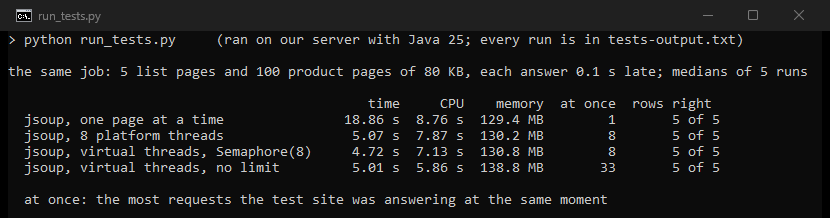
We timed four versions of the job: 5 list pages and 100 product pages of 80 KB, with every answer 0.1 seconds late. Each version ran five times, taking turns, and saved all 100 products correctly every time.
| Setup | Time | CPU | Memory | Requests at once |
|---|---|---|---|---|
| jsoup, one page at a time | 18.86 s | 8.76 s | 129.4 MB | 1 |
| jsoup, 8 platform threads | 5.07 s | 7.87 s | 130.2 MB | 8 |
jsoup, virtual threads, Semaphore(8) | 4.72 s | 7.13 s | 130.8 MB | 8 |
| jsoup, virtual threads, no limit | 5.01 s | 5.86 s | 138.8 MB | 33 |
Eight at once cut the time to about a quarter, with platform threads or virtual ones. Without a limit, Java sent up to 52 requests at once and finished no sooner. A cap protects the site and costs nothing here.
Most of that memory belongs to the Java virtual machine: even one page at a time used 129.4 MB. The same job in Go with 8 goroutines took 2.62 seconds and 13.9 MB, in our Go scraping guide.
What the defaults do
jsoup and HttpClient disagree on almost every default. Our probes ran both as they come.
| jsoup 1.23.2 | Java's HttpClient | |
|---|---|---|
| Timeout | 30 s: gave up after 31.2 s | none: still waiting at 120 s |
| User-Agent | a Chrome 137 string | Java-http-client/25.0.4.1 |
| A redirect | followed | not followed: you get the 301 itself |
| A 404 page | HttpStatusException | status 404, no exception |
| JSON and other types | UnsupportedMimeTypeException | returned as text |
| A page over 2 MB | cut at 2 MB, no error | read in full |
| A page that is not UTF-8 | right when the header or a <meta> tag names the charset | right only when the header names it |
The HttpClient documentation says the default client has "a redirection policy of NEVER". On a request with no timeout, "The effect of not setting a timeout is the same as setting an infinite Duration, i.e. block forever". Use HttpClient.newBuilder() with followRedirects(HttpClient.Redirect.NORMAL), a connectTimeout, and a timeout on each request.
On plain http:// addresses both clients asked the server to switch to HTTP/2, with Upgrade: h2c in the headers. Chrome 153 asked for the same page with Connection: keep-alive and no Upgrade header, so a site could tell the two apart.
Pages bigger than 2 MB
jsoup's documentation says it plainly: "The default maximum is 2MB". Our test site served one list page of 12,789,038 bytes with 50,000 items and an end marker.
The default connection kept the first 2,097,152 bytes, found 8,229 items and missed the end marker, with no error. maxBodySize(0) read all 50,000.
Pages that are not UTF-8
We served one French product page in windows-1252 three ways: with the charset in the header, only in a <meta> tag, and nowhere.
| How the page was read | Charset in the header | In <meta> only | Nowhere |
|---|---|---|---|
Jsoup.connect(url).get() | right | right | wrong |
HttpClient ofString, then Jsoup.parse | right | wrong | wrong |
HttpClient ofInputStream, Jsoup.parse(in, null, url) | wrong | right | wrong |
HttpClient ofInputStream, the header's charset passed on | right | right | wrong |
| Charset in the header | In <meta> only | Nowhere | |
|---|---|---|---|
| Jsoup.connect(url).get() | yes | yes | no |
| HttpClient ofString, then Jsoup.parse | yes | no | no |
| HttpClient ofInputStream, Jsoup.parse(in, null, url) | no | yes | no |
| HttpClient ofInputStream, the header's charset passed on | yes | yes | no |
Wrong means "Lampe à poser 25" came out with a replacement character where the "à" should be. Jsoup.connect reads both the header and the <meta> tag, so let jsoup fetch when you can. No Java setup read the page without a declared charset correctly: all four read its bytes as UTF-8.
Pages built by JavaScript: HtmlUnit
jsoup only reads the HTML the server sends. On our test page, a script adds 10 products half a second after it starts, and jsoup found 0 of them. HtmlUnit runs the page's JavaScript in Java, without a browser.
import org.htmlunit.WebClient;
import org.htmlunit.html.DomNode;
import org.htmlunit.html.DomNodeList;
import org.htmlunit.html.HtmlPage;

public class Js {
    public static void main(String[] args) throws Exception {
        try (WebClient client = new WebClient()) {
            client.getOptions().setCssEnabled(false);
            HtmlPage page = client.getPage("http://127.0.0.1:8271/js");
            client.waitForBackgroundJavaScript(2_000); // the page adds its products after 0.5 s
            DomNodeList<DomNode> names = page.querySelectorAll(".product h2");
            System.out.println(names.size() + " products, from " + names.get(0).asNormalizedText()
                    + " to " + names.get(names.size() - 1).asNormalizedText());
        }
    }
}
HtmlUnit and jsoup come to 15 jars, so let Maven collect them. Put the pom.xml from above next to Js.java, then run these two commands.
mvn dependency:copy-dependencies -DoutputDirectory=lib
java -cp "lib/*" Js.java
It found all ten.
10 products, from Desk lamp 1 to Desk lamp 10
Each of three runs took 4.1 to 5.0 seconds and up to 173 MB. HtmlUnit's README says that "Starting with version 5.0.0, JDK 17 or higher is required". Version 4 stays available for Java 8.
Older HtmlUnit code no longer compiles
HtmlUnit 3.0 of March 2023 renamed its packages. Its migration notes say to "Replace all usages of com.gargoylesoftware.htmlunit" with org.htmlunit. We compiled the same program with the old imports against HtmlUnit 5.6.0.
<work>/code/old/Js.java:1: error: package com.gargoylesoftware.htmlunit does not exist
    import com.gargoylesoftware.htmlunit.WebClient;
                                        ^
The compiler reported 9 errors in all. The old code still compiles and runs with the last release under the old name, net.sourceforge.htmlunit:htmlunit:2.70.0 from January 2023. On our Java 25 it found the 10 products in 4.29 seconds.
Proxies in Java
Java reads proxy settings from system properties and from code, never from HTTP_PROXY. We sent 20 pages through a counting proxy of our own to see what each setup does.
| Setup | Requests at the proxy | Connections to the proxy |
|---|---|---|
jsoup, -Dhttp.proxyHost and -Dhttp.proxyPort set | 20 | 1 |
| HttpClient, the same properties | 20 | 1 |
| Either one, target on 127.0.0.1 | 0 | 0 |
Either one, only HTTP_PROXY set | 0 | 0 |
Both clients kept one connection to the proxy for all 20 pages. A target on 127.0.0.1 skipped the proxy because the JDK's own net.properties sets http.nonProxyHosts=localhost|127.*|[::1]. Change that property when you test a proxy against a local server.
Two jsoup releases matter here. Its changelog says that through HttpClient, "any system default proxy (ProxySelector.getDefault()) was ignored" until version 1.22.1 of January 2026. Version 1.22.2 of April 2026 fixed per-request SOCKS proxies, which "the JDK would silently ignore" and connect directly instead. Use jsoup 1.22.2 or newer behind a proxy.
A proxy login over HTTPS needs one more setting. Our Java proxy guide shows why Java sends no password through a tunnel by default, and how to change that.
All of our tests stayed on our own server. Real sites also judge the address a request comes from. Our residential proxies start at $0.44/GB. Before you scrape a site, read its terms and its robots.txt, and our page on whether web scraping is legal.
What other guides get wrong
We read thirteen guides on Java scraping from companies in our market. Most show working jsoup code and skip the defaults above.
- One tells readers to add
log4j-core2.14.1. Apache lists that version among those affected by CVE-2021-44228, scored "10.0 CRITICAL" and fixed in 2.15.0. Apache's summary: "JNDI lookup can be exploited to execute arbitrary code loaded from an LDAP server". - Two of the three with HtmlUnit code import
com.gargoylesoftware.htmlunit, which no longer compiles against HtmlUnit 3 or newer. - One says Java 8 "is the only version that currently supports HtmlUnit". HtmlUnit 5 requires Java 17, and both versions we tried ran on Java 25.
- One table says Java has "Strict parsing, struggles with malformed HTML". In our language test, jsoup built the same tree as Chrome in 6 of 6 broken pages.
- Pinned versions run old: Selenium 3.141.59 from 2018, Playwright 1.27.0 from 2022, and two guides on jsoup 1.21.2, which ignored the JVM's proxy settings.
- The best of them sets timeouts on
HttpClientand caps its thread pool.
What this page could not check
- One server and a test site of our own on 127.0.0.1, with every answer 0.1 seconds late. Real sites add their own delays, limits and bot defenses.
- One version of each: Java 25.0.4.1, jsoup 1.23.2, HtmlUnit 5.6.0 and 2.70.0, Maven 3.9.16. We did not run Selenium or Playwright for Java.
- Memory depends on the JVM's settings and the machine. We left both at their defaults.
- Our proxy test used a counting proxy of our own and plain-HTTP pages.
- We will check this page again by January 12, 2027.
Sources
- Java 25,
HttpClientandHttpRequestdocumentation, and the JDK'snet.properties: docs.oracle.com. - jsoup 1.23.2 source and documentation,
ConnectionandHttpConnection: jsoup.org. - jsoup changelog: github.com.
- HtmlUnit README and migration notes: github.com and htmlunit.org.
- Apache Log4j security page, CVE-2021-44228: logging.apache.org.
- JEP 444, Virtual Threads: openjdk.org.
- Release dates from Maven Central and stars from GitHub's API, both read on October 12, 2026.
- Our own tests on our server, October 12, 2026: run_tests.py from 14:40 to 14:47 UTC and reader_flow.sh at 14:54 UTC.
- Our test of the same job in four languages: hproxy.com.