Instagram does not publish anything it calls an IP ban. What it runs is a limit on addresses that send too many requests, alongside restrictions on accounts that follow you to any network. From our own server, without a login, its public-profile API answered "Please wait a few minutes before you try again." over both IPv4 and IPv6, while the login page loaded. To tell which problem you have, open the same account on another connection, and another account on your usual one. If only your connection fails, wait and move off shared addresses. If the account fails everywhere, the fix is in Account Status, not in a new address.
On October 10, 2026, we read the help pages and the privacy policy of Instagram, the internet standards on rate limits and shared addresses, and the guides of two widely used tools. We also tested Instagram from one server over two addresses. No Instagram account was used at any point.
Does Instagram ban IP addresses?
It limits them, without calling it a ban. Its Help Center has no article on IP bans: a search for "ip ban" on October 10, 2026, gave 49 results, none about blocked addresses. The restrictions it does describe are written as restrictions on accounts.
The address still counts. The Instagram privacy policy lists your IP address among the information used to "Verify accounts, identity and activity" and to "Detect and prevent spam". Beside it, the policy lists identifiers that tell your device apart, and signals such as "if your mouse is moving (which can help tell humans from bots)". Instagram also sets your primary location from the address and uses it "to help keep your accounts secure".
The internet standard on shared addresses, RFC 6269, describes how such a limit works in general. A server that "sees too many requests from the same IPv4 address in a short period of time" may "put that address in a penalty box for a certain time during which requests are denied, or it may require completion of a CAPTCHA".
What we saw from one server
We asked Instagram for a public profile without logging in, once over the IPv4 address of our server and once over its IPv6 address. Our own IP lookup rates the first as a datacenter address and the second as not.
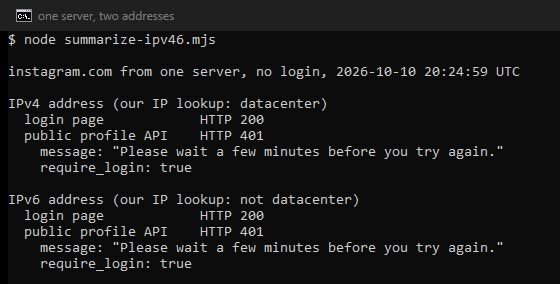
Both requests got the same answer: HTTP 401, "Please wait a few minutes before you try again.", with "require_login": true. The login page loaded over both addresses. A second address on the same network did not change the answer.
What does an Instagram IP limit look like?
Several messages get called an IP ban. Read which one you have:
| What you see | What it is | Where this comes from |
|---|---|---|
Please wait a few minutes before you try again. | A limit on requests. instagrapi reads it as "slow down for that account, device, or IP". | Our test; instagrapi guide |
| HTTP 429, Too Many Requests | The standard code for a rate limit, at times with a Retry-After header. | RFC 6585; Instaloader calls it a temporary ban |
The username you entered doesn't appear to belong to an account. with a correct username | instagrapi reports this as ProxyAddressIsBlocked, a blocked address. | instagrapi source code |
The IP address you are using has been flagged as an open proxy. | An answer to a sign-up, with the error type signup_block. | User reports from 2019 and 2022 |
| A box titled Try again later | A block on what the account may do, not on the address. | The web code of Instagram |
We did not find the open proxy text in the six script files instagram.com sent with its login page on October 10, 2026. Its wording here comes from what users posted, not from Instagram. For the Try again later box, see our guide to the Instagram action block.
How can you tell an IP ban from an account ban?
Run two tests, in this order:
| Test | If the address is the problem | If the account is the problem |
|---|---|---|
| Open the same account on another connection, such as mobile data. | It works there. | It fails there too. |
| Open another account on your usual connection. | It fails too. | It works. |
| If the address is the problem | If the account is the problem | |
|---|---|---|
| Open the same account on another connection, such as mobile data | It works there | It fails there too |
| Open another account on your usual connection | It fails too | It works |
If the account is the problem, look in Account Status, in Settings below More info and support, where Instagram lists the features you can no longer use. A disabled account says so when you try to log in.
Mobile data makes a fair second connection, with one catch. Many providers put customers behind carrier-grade NAT, as RFC 6598 describes, so the public address you get may be shared with other customers. RFC 6269 warns that on a shared address "one user who fails a number of login attempts may block out other users".
Browsing Instagram while logged out is not a reliable test. In our test, Instagram refused a logged-out profile request even from an address our lookup does not rate as datacenter. To see what kind of address you have, our IP lookup shows the network behind it and whether it is a datacenter address.
How long does an Instagram IP ban last?
Instagram publishes no length. RFC 6269 speaks of a penalty box "for a certain time", and RFC 6585 lets a server state the wait in a Retry-After header. Guides that promise anything from 24 hours to 3 weeks cite nothing for it.
The tools show the same picture. Instaloader treats a 429 as a temporary ban and retries "as soon as the temporary ban is assumed to be expired". Its own pacing allows 200 requests of most kinds per 11 minutes. That is an estimate by its maintainers, not a number Instagram publishes.
What fixes an Instagram IP ban?
- Stop sending from that address. For "Please wait a few minutes", the instagrapi guide says to stop write actions for a while and retry later with the same device settings.
- Run the two tests. If the account fails everywhere, go to Account Status. A new address will not help.
- Leave shared addresses. Public Wi-Fi, a VPN or a free proxy puts you on an address strangers use. The Instaloader maintainers report "significantly stricter limits for anonymous access" from cloud, VPN and public proxy services. On our own free list on October 10, 2026, 48.2 percent of the working proxies were datacenter addresses, and the 10 largest networks held 43.1 percent of them.
- In a tool, keep one address per account. The instagrapi guide recommends "one account per stable proxy/IP" and calls a shared pool of addresses "higher risk". The Instagram terms also forbid automated access without permission.
- For a sign-up flagged as an open proxy, use the official app. Create the account on your own home or mobile connection, not through a script.
- If nothing works, look at the account. Use Account Status, or the review that Instagram offers at login for a disabled account.
Does a VPN or proxy fix it?
A new address helps only when the old one was the problem, and only if the new one is not shared or flagged. In our test, a second address on the same network got the same refusal. The instagrapi guide puts it plainly: "Avoid treating any proxy type as a universal fix."
If you need an address of your own for Instagram, our Instagram proxies page sets out the options we recommend: mobile 4G and 5G, sticky residential, and static ISP addresses.
What this page could not check
We did not log in to any account, so we could not see how an address limit affects a logged-in user, trigger one, or time one. Instagram publishes no rule, threshold or duration for address limits. We had no clean home or mobile address to compare with our server, so our test is one server, two addresses and four requests on one day. The open proxy message comes from user reports, and the pacing of Instaloader is its own estimate. We will revisit this page by January 10, 2027.
Sources
- IETF, RFC 6269, "Issues with IP Address Sharing", June 2011: rfc-editor.org/rfc/rfc6269.
- IETF, RFC 6585, "Additional HTTP Status Codes", April 2012: rfc-editor.org/rfc/rfc6585.
- IETF, RFC 6598, "IANA-Reserved IPv4 Prefix for Shared Address Space", April 2012: rfc-editor.org/rfc/rfc6598.
- Meta, Privacy Policy as shown for Instagram (effective July 23, 2026), read on October 10, 2026: privacycenter.instagram.com.
- Instagram Help Center, "How does Instagram determine my primary location?", read on October 10, 2026: help article 658378635128234.
- Instagram Help Center, "Check your Account Status on Instagram" and "About disabled Instagram accounts", read on October 10, 2026: help article 338481628002750 and help article 366993040048856.
- Instagram Help Center, the article on accounts restricted for data scraping (read on October 10, 2026): help article 740480200552298.
- instagrapi, source code (mixins/private.py) and Best Practices guide, commit 11f8fd5, read on October 10, 2026, (github.com/subzeroid/instagrapi).
- Instaloader, Troubleshooting guide and source code (instaloadercontext.py), commit da65e69, read on October 10, 2026: instaloader.github.io.
- Stack Overflow question 74822862 (December 16, 2022) and a GitHub issue on an account-creation script (November 27, 2019), read on October 10, 2026, as user reports of the open proxy message.
- Our own measurements: requests to Instagram over IPv4 and IPv6 from our server on October 10, 2026, our free proxy list counted the same day, and searches of the Instagram Help Center, logged in the research folder for this page.