An Instagram action block stops one kind of action on your account, such as following, liking, commenting or messaging. Today the box is titled "Try again later" and says "We restrict certain activity to protect our community." Instagram publishes no fixed length for it. Meta says Account Status shows some restrictions and how long they last, so open that first. Then stop the blocked action, remove apps that hold your password, and come back slowly inside the limits Instagram publishes. A new IP address does not lift a block on the account, while a shared or free proxy can add to the trouble.
On October 10, 2026, we read the help pages of Instagram, the rules of Meta on spam and restrictions, and the code instagram.com sends to browsers. We also counted what the free proxies on our own list are. We used no Instagram account for any of it.
What does an Instagram action block look like?
The wording of the box has changed over the years. The code instagram.com sent to browsers on October 10, 2026, shows a title, "Try again later", and one line: "We restrict certain activity to protect our community." A report from December 2018 quotes the older box: "Action Blocked. This action was blocked. Please try again later." That version ended with "Tell us if you think we made a mistake" and two buttons, OK and Report a problem.
Tools that use the app API see the same kind of block as the error feedback_required, which our feedback required guide covers.
Instagram has no help article on blocked actions. A search for "action blocked" in its Help Center gave 50 results on October 10, 2026, all of them about blocking other people.
What causes an action block?
Instagram publishes few numbers, and those few are worth knowing.
| What | What Instagram publishes |
|---|---|
| Following | You cannot follow more than 7,500 accounts. |
| Mentions | At most 5 @mentions in one comment. |
| Hashtags | At most 30 hashtags in one comment. |
| Repeats | You cannot post the same comment several times. |
Instagram's published limits
- 7,500 accountsyou can follow, at most
- 30 hashtagsin one comment, at most
- 5 @mentionsin one comment, at most
Guides elsewhere add numbers of their own, such as 6,000 actions in 30 days or about 200 follows a day. They cite nothing for them.
Meta's spam policy names the main cause. It forbids engaging with content "either manually or automatically, at very high frequencies". It allows restrictions at lower speeds too, when other signs of spam or of inauthentic activity are present. It also forbids buying or selling likes, follows and views.
Third-party apps are the next cause. Instagram restricts accounts whose owners gave their password to an app or website, "like apps that offer likes or followers". It also warns that an account synced with an unauthorized app may be at risk.
How long does an Instagram action block last?
Instagram publishes no length for action blocks. The fixed lengths Meta does publish are for strikes: seven strikes bring a one-day restriction from creating content, and ten or more bring 30 days. Meta adds that "these restrictions only apply to Facebook accounts", although it counts strikes on Instagram too.
For Instagram, Meta points to Account Status. It says you can see there "some restrictions your account might have and how long they'll last". That is the place to look, rather than a table of hours on a blog.
Some guides sort blocks into four types: temporary, with an end date, without one, and permanent. None of the Instagram or Meta pages we read describes those types.
How do you get rid of an action block?
Work through these in order. The first step shows you what you face, and the rest remove the cause.
- Open Account Status. In Settings, it sits below More info and support. Features you can't use lists what is restricted, and Request a review appeals the decision.
- Stop the blocked action. Do not retry it again and again. The instagrapi guide counts retries "in a tight loop" among the habits that cause trouble.
- Remove apps that act for you. You can remove the access of a suspicious third-party app at any time. Then change the password, which logs you out of all other devices.
- Come back slowly, inside the published limits. The spam policy of Meta targets very high frequencies, so return to a pace a person would keep.
- Ask for a review if you think it is wrong. Meta says you can let it know in the app. If it agrees, it removes the strike and the restriction.
Reinstalling the app or clearing its data does not end a restriction on the account. The advice of Instagram to reinstall is for bugs, not for blocks.
Which proxy mistakes cause action blocks?
A proxy changes the address your actions come from, not what the account does. The tools' own documentation and our own data point to three mistakes.
Sharing one address with strangers. The instagrapi guide calls a shared pool of addresses "higher risk". It names "sharing one noisy IP across many unrelated accounts" as a common mistake. A free proxy is a public one, open to anyone who finds it.
Switching the address all the time. The same guide lists "switching proxies after every request" among the habits that cause trouble. It also warns: "Avoid treating any proxy type as a universal fix."
Trusting a free proxy with a login. We counted the working free proxies on our own list on October 10, 2026.
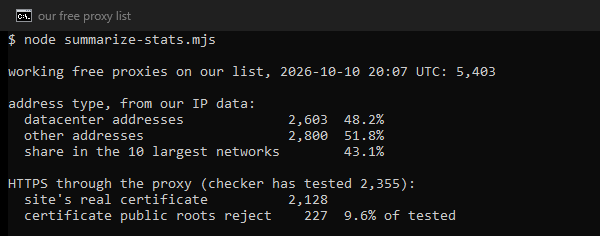
Nearly half were datacenter addresses, and the 10 largest networks held 43.1 percent of them. More alarming for a login, 227 of the 2,355 our checker had tested answered HTTPS with a certificate that public roots reject. Our checker records such a proxy as one that reads HTTPS. The Instaloader maintainers add that cloud, VPN and public proxy addresses face "significantly stricter limits for anonymous access". Our guide on whether free proxies are safe goes further.
- Answered with a certificate public roots reject10%
- Returned the site's real certificate90%
What a new address cannot do is lift the block. Instagram places these restrictions on the account, so a different address leaves them in place. Change the address only when the address itself is the problem.
If it is, our Instagram proxies page compares the three kinds we recommend for Instagram: mobile 4G and 5G, sticky residential, and static ISP addresses.
What this page could not check
No account was logged in, so we could not trigger a block, open Account Status for a blocked account, or time one. Instagram publishes no length for action blocks. The text of the box comes from the web code on one day and from a 2018 report, and the app may word it differently. Our free-list counts are one snapshot, and the HTTPS check had reached 2,355 of the 5,403 proxies when we counted. We could not test whether one proxy type makes blocks more likely than another. This page is set for review by January 10, 2027.
Sources
- Meta Transparency Center, "Restricting accounts", read on October 10, 2026: transparency.meta.com.
- Meta Transparency Center, Community Standards, "Spam" (last changed June 26, 2024), read on October 10, 2026: transparency.meta.com.
- Instagram Help Center, "Check your Account Status on Instagram", read on October 10, 2026: help article 338481628002750.
- Instagram Help Center, "Why Instagram tells you your account is at risk", read on October 10, 2026: help article 273359857992105.
- Instagram Help Center, "Why your account has been restricted for data scraping and what can you do", read on October 10, 2026: help article 740480200552298.
- Instagram Help Center, follow limit ("How many accounts you can follow on Instagram") and comment limits ("Why there's an error when you try to add a comment on Instagram"), read on October 10, 2026: help article 408167069251249 and help article 161863397286564.
- instagram.com, JavaScript files served with its login page on October 10, 2026, fetched and read on our server (static.cdninstagram.com).
- instagrapi documentation, Best Practices, commit 11f8fd5, read on October 10, 2026, (github.com/subzeroid/instagrapi).
- Instaloader documentation, Troubleshooting, commit da65e69, read on October 10, 2026: instaloader.github.io.
- Apple Community, thread 250016163 (December 11, 2018), read on October 10, 2026, as a user report of the older box (discussions.apple.com).
- Our own measurement: our free proxy list counted through our own API on October 10, 2026, and searches of the Instagram Help Center the same day, logged in the research folder for this page.