Free proxies are not safe for anything you would not do on a computer run by a stranger. A proxy sits in the middle of your traffic, and on a free list you do not know who runs it. We measured what the working free proxies in our own pool did on 28 September 2026, on addresses that held fewer than 20 of them. 1,708 of 3,870 working free web proxies opened no HTTPS tunnel in their latest check, and 925 passed your own address on. Through those that did open a tunnel, hundreds handed back a certificate that was not ours.
This page covers what a proxy can see, what we found in our pool, and how to use one without handing over an account.
What a free proxy can see
- Plain HTTP. Everything you load and everything you send, since nothing is encrypted between you and the website. The proxy can change the pages too. In 2015, Christian Haschek tested 443 free proxies and found 33 of the 199 that were online modifying web pages to inject ads.
- HTTPS. A proxy that opens an HTTPS tunnel only relays encrypted data. RFC 9110 defines the method: the proxy establishes "a tunnel to the destination origin server identified by the request target" and then limits itself to "blind forwarding of data". TLS, which secures the tunnel, "is designed to prevent eavesdropping, tampering, and message forgery". The proxy still sees which site you connect to.
- A fake certificate. A hostile proxy can present its own certificate and hope you click past the warning. A 2018 study of more than 107,000 listed open proxies found TLS man-in-the-middle attacks. Our own test, further down, found 326 such proxies among the 801 that finished a handshake with our site.
- Your address. A transparent proxy passes it on to the website, often in a header. RFC 7239 names X-Forwarded-For among "the non-standard header fields" used for that.
What we found in our pool
On 28 September 2026 at 18:28 UTC, we counted the working entries of our free proxy list by what their latest check showed. The query read counts only, from our server, and left out addresses that held 20 or more of the entries it counted.
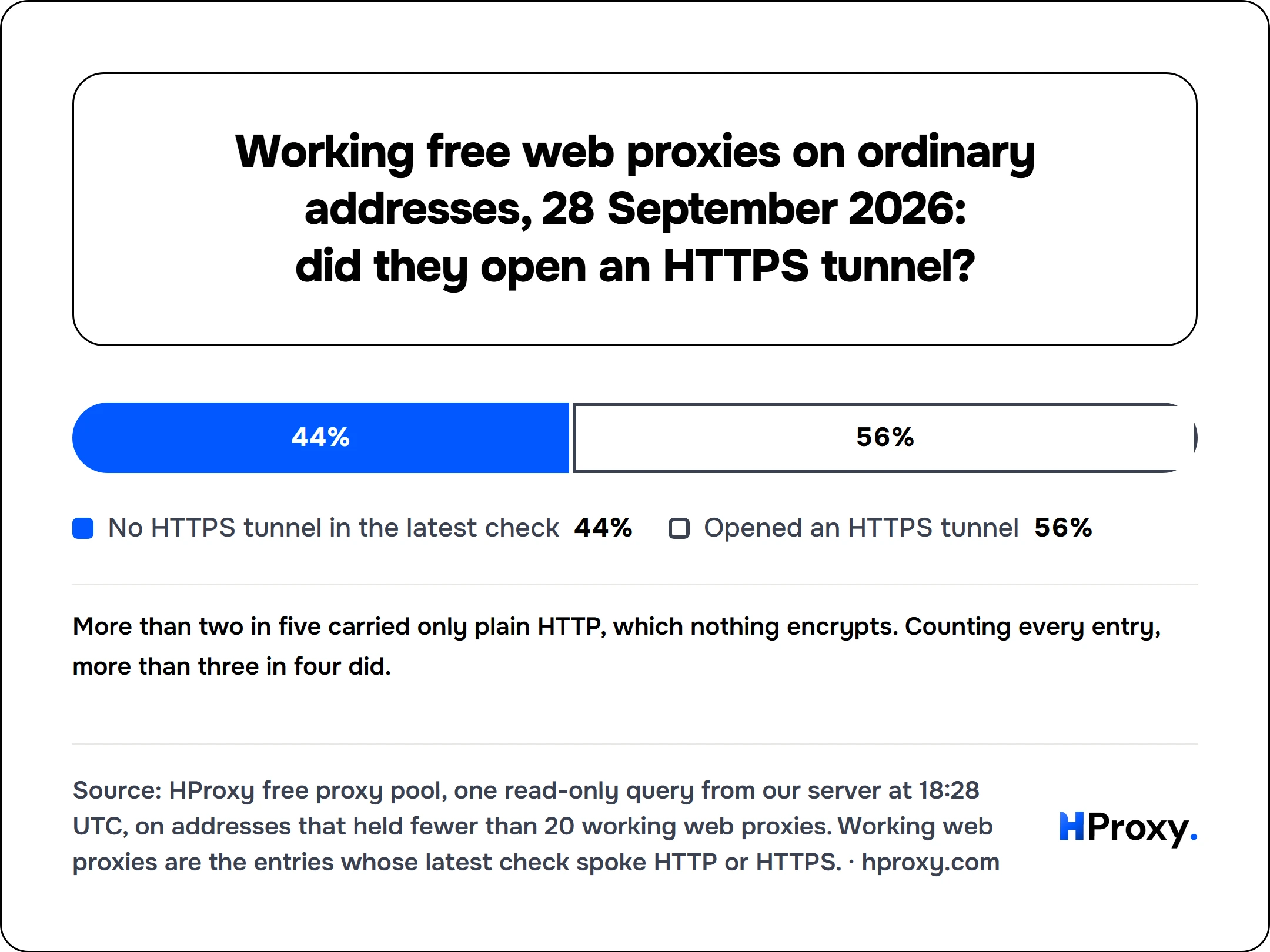
- No HTTPS tunnel in the latest check44%
- Opened an HTTPS tunnel56%
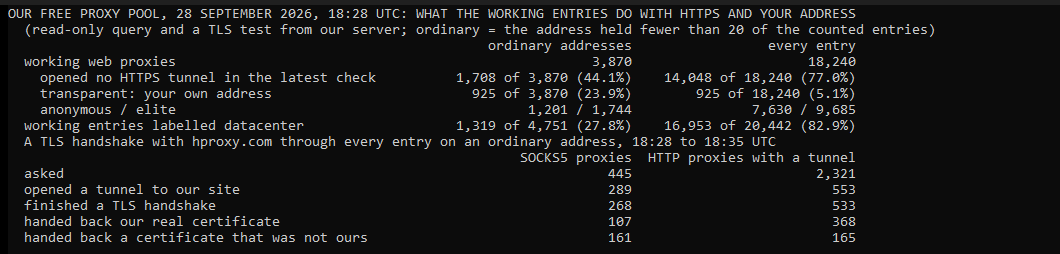
- HTTPS. 2,162 of 3,870 working free web proxies on ordinary addresses opened an HTTPS tunnel in their latest check. 1,708 did not, so through them only unencrypted pages load. Counting every entry, 14,048 of 18,240 opened none.
- Your address. 925 were transparent, 23.9 percent. 1,201 were anonymous and 1,744 elite. Counting every entry, 5.1 percent were transparent.
- Networks. 1,319 of 4,751 working entries on ordinary addresses were labelled datacenter, and 16,953 of 20,442 counting every entry. The label is the public network type of each address.
- Lifespan. Those that worked and then stopped lasted a median 10 days, counting only addresses with fewer than 20 of them, without Amazon's networks or one June evening when our checker failed (measured 2026-09-28).
What happened to HTTPS through them
On 28 September 2026, between 18:28 and 18:35 UTC, we took every SOCKS5 proxy and every HTTP proxy with an HTTPS tunnel that our free list showed as working. We left out addresses that held 20 or more of them. Through each one, we opened an encrypted connection to our own site, hproxy.com, and compared the certificate with the one our server gets directly. No request went through, only the handshake.
| On 28 September 2026, ordinary addresses | SOCKS5 proxies | HTTP proxies with an HTTPS tunnel |
|---|---|---|
| Asked | 445 | 2,321 |
| Opened a tunnel to our site | 289 | 553 |
| Finished a TLS handshake | 268 | 533 |
| Handed back our real certificate | 107 | 368 |
| Handed back a certificate that was not ours | 161 | 165 |
All 161 through SOCKS5 were made out to hproxy.com, the name we asked for, by an issuer called "None, LLC", and all had expired. 130 of them answered on port 4145, and every port-4145 entry that finished a handshake handed one back. Through HTTP proxies, 164 of the 165 were made out to hproxy.com too, and none checked out. Their issuers carried dozens of names, one of them mitmproxy, a tool built to intercept encrypted traffic. A proxy that makes up a certificate for the site you name sits in the middle of the connection. Counting every entry, our test of every SOCKS5 proxy at 15:05 UTC found 131 of 711, and a random sample of HTTP tunnels at 12:05 UTC found none of 32. A browser shows a warning for such a certificate. Clicking past it hands the proxy everything you send.
What the grades mean
| Grade | What the website sees | Share on 28 September 2026, ordinary addresses |
|---|---|---|
| Transparent | Your own address, often in a header | 23.9% |
| Anonymous | A proxy, but not your address | 31.0% |
| Elite | An ordinary visitor | 45.1% |
No grade hides your traffic from the proxy itself. The grades are about what the website learns.
How to use a free proxy more safely
- Public pages only. Never a login, a payment or a form with your name in it.
- HTTPS only. More than two in five working free web proxies in our pool could not open an HTTPS tunnel, so skip those. Never click past a certificate warning.
- Check it right before you use it. A proxy that worked an hour ago may be gone, or may have changed grade.
- Treat it as temporary. Throw it away after the job.
Our guide on when free proxies are fine covers the jobs that fit.
Test any proxy before you trust it
Paste any candidate into our free proxy checker, with no signup. It makes a real connection through the proxy and reports the exit address, country, latency and anonymity grade. From the command line, the same check is one request to our free checker API.
# Tests one proxy from our server: alive or dead, protocols, anonymity, latency, country
curl "https://hproxy.com/api/proxy-check?proxy=203.0.113.7:1080"
The full method is in how to check if a proxy is working.
When safe enough is not enough
For web tasks that have to keep running, such as checking your own site from another country, a residential proxy is the better tool. Its address belongs to a home connection, and it stays up while you work. Ours start at $0.44/GB, pay as you go, and purchased traffic has no scheduled expiry date. No proxy, paid or free, makes it safe to click past a certificate warning.
The plain answer
Free proxies are safe only for jobs with nothing to lose. In our pool on 28 September 2026, more than two in five working free web proxies on ordinary addresses opened no HTTPS tunnel. About one in four passed your own address on. HTTPS protects what you send, but only if you never accept a fake certificate, and 161 of 268 free SOCKS5 proxies in our test offered one. Never sign in or pay through a free proxy.
How we measured
We ran one read-only query of our free proxy pool from our server in the United States on 28 September 2026 at 18:28 UTC. It counted the entries that passed their latest check, and read three things from that check: whether the entry spoke HTTP, whether it opened an HTTPS (CONNECT) tunnel, and its anonymity grade. The datacenter label is the public network type of each address. Each figure leaves out addresses that held 20 or more of the entries it counts. Where the two differ a lot, the figure over every entry stands next to it. The certificate test opened a TLS handshake to hproxy.com through every SOCKS5 proxy and HTTPS tunnel of the list on such addresses, between 18:28 and 18:35 UTC. It compared each certificate with a direct connection. We read no other field, we store no proxy addresses, and every time is in UTC.
Sources
- IETF, RFC 8446: The Transport Layer Security (TLS) Protocol Version 1.3, August 2018.
- IETF, RFC 9110: HTTP Semantics, June 2022, section 9.3.6 on CONNECT.
- IETF, RFC 7239: Forwarded HTTP Extension, June 2014.
- Akshaya Mani, Tavish Vaidya, David Dworken and Micah Sherr, An Extensive Evaluation of the Internet's Open Proxies, arXiv 1806.10258, 27 June 2018.
- Christian Haschek, Analyzing 443 free proxies: Only 21% are not shady, 21 June 2015, read on 28 September 2026.
- HProxy documentation: the proxy checker API, read 28 September 2026.