The challenge_required error means Instagram wants the person behind a login to prove it is theirs. Tools that use the app API, such as instagrapi and Instaloader, report it as an error. The app itself shows the check: a code by email or text, a login to approve, or a video selfie. It usually follows a login from a device, browser or place that Instagram does not recognize. To clear it, finish the check in the official app or website, on a device that has logged in to the account before. Then retry with the same saved session and the same address.
challenge_required
Instagram API error
Instagram wants the person behind a login to prove it is theirs. The app API answers with HTTP 400 and this message; the app itself shows the check: a code by email or text, a login to approve, or a video selfie.
- Example
- "message": "challenge_required"
We read the help pages and terms of Instagram, and the source code and guides of instagrapi and Instaloader, on October 10, 2026. We also sent requests without a login from our own server. We did not log in to any account.
What does challenge_required mean on Instagram?
It is a check, not a crash. The app API answers with HTTP status 400 and a JSON body whose message is challenge_required. A developer posted a full answer on Stack Overflow in August 2020. Here it is as JSON, with the account number and the code replaced:
{
  "message": "challenge_required",
  "challenge": {
    "url": "https://i.instagram.com/challenge/ACCOUNT_ID/CODE/",
    "api_path": "/challenge/ACCOUNT_ID/CODE/",
    "hide_webview_header": true,
    "lock": true,
    "logout": false,
    "native_flow": true
  },
  "status": "fail",
  "error_type": "checkpoint_challenge_required"
}
The url and api_path fields point to the check itself, and tools that try to solve it call that path. The field to read first is native_flow. The instagrapi documentation says a check with native_flow set to true is a manual checkpoint. It offers no email, text or password step that a library could answer.
Each tool prints it in its own way.
| Where you see it | What it says | Where this comes from |
|---|---|---|
| Any client of the app API | HTTP 400 with "message": "challenge_required" and "error_type": "checkpoint_challenge_required" | A developer's report on Stack Overflow, August 2020 |
| instagrapi (Python) | ChallengeRequired, or AccountSuspended when the address of the check contains /suspended/ | instagrapi source code, read October 10, 2026 |
| Instaloader (Python) | Login: Checkpoint required. Point your browser to [link] - follow the instructions, then retry. | Instaloader source code, read October 10, 2026 |
| instabot (Python) | Instagram's error message: challenge_required and Checkpoint challenge required... | A user's log on Stack Overflow, February 2020 |
| The official app | A code by email or text, a login to approve, or a video selfie | Instagram Help Center |
Instagram has no help article for this error. We searched its Help Center for "challenge required" and for "challenge_required" on October 10, 2026. Each search gave 47 results, and none was about the error.
What Instagram sends a client without a login
We also sent three requests without a login, from our own server on October 10, 2026, and two of the answers matter here. Our own IP lookup classes that server's address as a datacenter address.
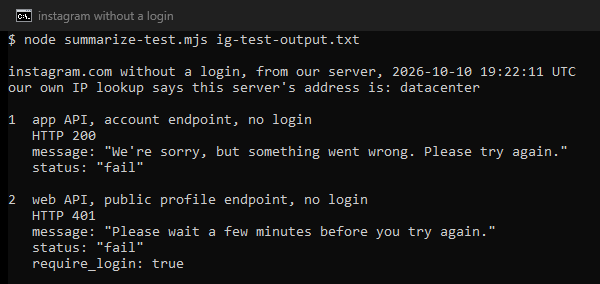
The app API answered with HTTP status 200, yet its body said "status": "fail" with the message We're sorry, but something went wrong. Please try again. A tool that trusts the status code alone would count that as a success. Read the status field and the message on every answer.
The web API refused a request for a public profile with HTTP 401: Please wait a few minutes before you try again., together with "require_login": true. The Instaloader maintainers describe the same pattern. They write that cloud, VPN and public proxy addresses "might be subject to significantly stricter limits for anonymous access".
What triggers the check?
There is no official list. Instagram does document how it treats a login it does not recognize, and the tools' maintainers report the rest.
- A device or browser it does not know. With two-factor authentication on, you get an alert "whenever someone tries logging in to your account from a device or web browser we don't recognize". A script is such a device. The instagrapi guide calls a fresh password login on every run "much more suspicious than reusing a stable device session".
- A new place or network. The login activity page lists each recent login with its device and location. The same guide says an account may be challenged "because the device/session and IP history do not look consistent".
- Addresses that change or are shared. It also names "switching proxies after every request" and "sharing one noisy IP across many unrelated accounts" among the habits that cause trouble.
- Automation itself. The terms forbid accessing or collecting information "in an automated way without our express permission", logged in or not.
- A check on the account, not the login. Some accounts must turn on two-factor authentication under Advanced Protection, and after a grace period Instagram locks them until they do. It can also ask for a video selfie and keep you out until it confirms you.
- A suspension. When the address of the check contains
/suspended/, instagrapi reportsAccountSuspended. That is a disabled account, not a login check.
What do the other answers mean?
Several answers look alike. Read the message before you act.
| What you see | What it is | What to do |
|---|---|---|
challenge_required with "native_flow": true | A manual check | Finish it in the official app, on a device that has logged in before. |
| A request for a code by email or text | A login check | Enter the code. instagrapi can do this with a handler. |
| A request for a video selfie | An identity review | Do it in the app. There is no access until you are confirmed. |
| A prompt to turn on two-factor authentication | Advanced Protection | Enroll. The account opens once you have. |
AccountSuspended, or /suspended/ in the address | A disabled account | Log in to the app and follow its steps to ask for a review. |
HTTP 401 with Please wait a few minutes before you try again. | A limit on requests | Stop and retry later with the same settings. |
HTTP 200 with "status": "fail" | An error inside a success code | Read the message, not the status code. |
How do you clear challenge_required?
Work down this list. The first steps stop the damage, and the later ones prevent the next check.
- Stop the tool. Instaloader stops by itself when it meets the check, "to stop producing more requests". The instagrapi guide warns against retrying checks "in a tight loop".
- Open the check in the official app or website. Use a phone or computer that has logged in to this account before. The instagrapi documentation says newer checks need "manual confirmation in the official Instagram app or web flow on a trusted device". Instaloader gives you the link to open in a browser.
- Confirm the login. If the app asks whether it was you, choose This Was Me. It sits in Accounts Center, under Password and security, then Where you're logged in. A code goes to the email or phone number on the account. For a video selfie, follow the steps in the app, because you may not get back in without it.
- Retry with the same identity. Keep the saved session, device settings, country and address you used before. The instagrapi guide says: "Do not rotate proxy identity in the middle of a challenge, password reset, or relogin loop." Instaloader recommends keeping its session file, so the tool skips the "failure-prone login procedure".
- Enroll if you are asked to turn on two-factor authentication. A locked Advanced Protection account opens once enrollment is done.
- If it comes back, find the pattern. The instagrapi guide says to stop and inspect the account by hand after repeated checks. It also says new or restored accounts should grow their activity "slowly over days, not minutes".
The instagrapi library can answer some checks for you. With challenge_code_handler and change_password_handler set, it handles email, text and password steps. Checks with native_flow set to true, Bloks redirects and selfie reviews still need the official app.
If you cannot finish the check at all, the help page for hacked accounts offers a login link sent to the email or phone on the account. For an account with photos of you, support may ask for a video selfie instead.
Does a new IP address or proxy fix challenge_required?
Not while the check is open. Finish it first, from the same address.
Afterwards, the address does matter. The instagrapi guide recommends one stable proxy per account for automation, and it warns: "Avoid treating any proxy type as a universal fix." It says residential, mobile, ISP and datacenter proxies "can all fail if they are abused, shared too widely, or rotated aggressively". Our test shows the other side: a datacenter address got a 401 from the web API without a login.
A fixed address that only your account uses removes two triggers: an address that keeps changing, and other users' history on it. It cannot answer the check, change the device Instagram sees or erase the history of the account. The terms stay the same too: automated access needs permission. Our guide to sticky and rotating sessions explains why one address per session matters.
For automating a business or creator account, Meta offers an official route. The Instagram API with Instagram Login covers messaging, publishing, comments, mentions and insights. Tools that copy the app API are not that API.
If your checks come from a shared or changing address, give that login one static address. Our ISP proxies keep one dedicated address for a login as long as you hold it, at $2.70 per IP for a month.
What this page could not check
We did not log in to any account, so we could not trigger a check, see one in the app or watch one clear. The text of the error comes from a developer's report and the tools' own code. Instagram publishes no list of triggers and no duration. The causes above are what Instagram documents about logins it does not recognize, plus what the tools' maintainers report. Our test is one server on one day. The tools change every week: we read instagrapi at commit 11f8fd5 and Instaloader at commit da65e69. The next review of this page is due by January 10, 2027.
Sources
- Instagram Help Center, "Turn login requests on or off on Instagram", read October 10, 2026: help article 154776793259282.
- Instagram Help Center, "Secure your Instagram account", read October 10, 2026: help article 369001149843369.
- Instagram Help Center, "View your recent Instagram login activity", read October 10, 2026: help article 2761108904184084.
- Instagram Help Center, "Why you might be asked to upload a video selfie to confirm your identity on Instagram", read October 10, 2026: help article 1053588012132894.
- Instagram Help Center, "If you think your Instagram profile has been hacked", read October 10, 2026: help article 149494825257596.
- Instagram Help Center, "About Advanced Protection on Instagram", read October 10, 2026: help article 945221763907783.
- Instagram Help Center, "About disabled Instagram accounts", read October 10, 2026: help article 366993040048856.
- Instagram, Terms of Use (effective January 1, 2025), read October 10, 2026: terms page.
- Meta for Developers, "Instagram Platform", read October 10, 2026: developers.facebook.com.
- instagrapi, source code (mixins/private.py, mixins/challenge.py) and documentation (Best Practices, Challenge Resolver), commit 11f8fd5, read October 10, 2026, (github.com/subzeroid/instagrapi).
- Instaloader, source code (instaloadercontext.py) and documentation (Troubleshooting), commit da65e69, read October 10, 2026: instaloader.github.io.
- Stack Overflow, questions 63235061 (August 3, 2020) and 60331183 (February 21, 2020), read October 10, 2026, as user reports (stackoverflow.com).
- Our own measurement: requests without a login from our server on October 10, 2026, and a search of the Instagram Help Center the same day, logged in the research folder for this page.