ixBrowser is an antidetect browser for Windows and macOS. It gives every account its own browser profile. Each profile has its own fingerprint, cookies, extensions and proxy, so to a website it looks like a separate computer. The free plan has no limit on the number of profiles. Paid plans start at $3.99 a month. They raise the daily limits, add team seats and add the API and the synchronizer.
This is a guest post. The ixBrowser team wrote it about their own product. HProxy edited it for length and checked every plan and number against ixBrowser's pricing page on October 16, 2026.
Who uses ixBrowser
ixBrowser is made for work that needs many accounts on one computer. Its users run affiliate campaigns, online stores, ad accounts and social media accounts, often as a team. One person can start on the free plan. A company can give every member a seat and share profiles between them.
What the plans cost
Every plan includes unlimited browser profiles. The plans differ in how many profiles you may create and open each day, and in the number of team seats.
| Plan | Price | Opens a day |
|---|---|---|
| Free | $0 | 100 |
| Professional | $3.99 a month | 1,000 |
| Business | $9.99 a month | 5,000 |
| Enterprise | $19.99 a month | 15,000 |
| Basic Developer | $9.99 a year | 100 |
The free plan creates 10 new profiles a day and opens profiles 100 times a day, with 2 team seats. Profile transfer, batch import and advanced fingerprint control come with every plan, the free one included. The API, the synchronizer and advanced cloud storage need a paid plan. Basic Developer is a yearly plan: the free plan's daily limits, 10 seats and every tool.
ixBrowser takes payment by card, Alipay, PayPal and cryptocurrency. The site comes in 13 languages, among them English, Chinese and Russian. Since the free plan never ends, there is no trial to sign up for.
What a browser fingerprint is
A fingerprint is what a website reads from a browser: the screen, the fonts, the graphics card, the time zone, the language and many smaller values. When two accounts show the same fingerprint, a platform can tell that they run on one computer. ixBrowser gives each profile a fingerprint of its own. The team checks its profiles against the public fingerprint test sites and publishes its own test results on its site.
The tools, one by one
API
The API does from a script what you would do by hand. ixBrowser's API guide lists calls to list, create, open and close profiles, to close them in batches and to change a profile's proxy.
Synchronizer
One main profile leads, and the other profiles follow it. Every mouse move and every key press repeats in all of them. The synchronizer can also type text into many profiles at once and arrange their windows with one click.
Extensions
ixBrowser keeps a set of common extensions ready to install. You can add others from the Chrome Web Store by their link, or upload your own extension as a ZIP file. Extensions can be set for one profile or for a whole group.
Batch work
Profiles can be imported, edited and deleted in batches. A team owner can also give sub-accounts the right to work in batches.
Profile transfer
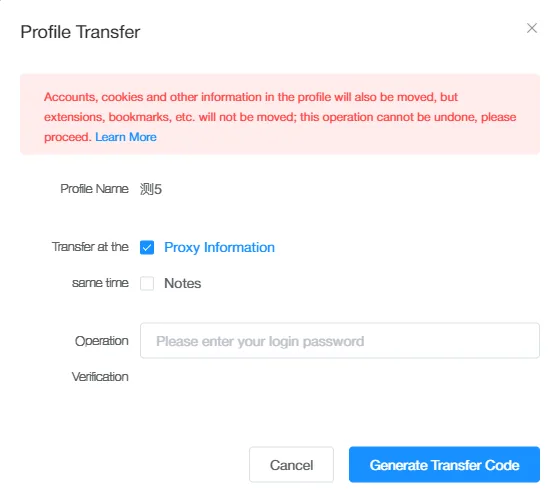
A profile can move to another ixBrowser user together with its proxy. The fingerprint and the proxy stay the same during the move, so the account inside the profile sees no change.
Passkeys
A passkey lets you sign in to a site without a password. ixBrowser can keep passkeys inside a profile, so a site that asks for one can be used from that profile. Four AAGUID modes decide which kind of passkey device the profile reports to the site, so profiles do not show one shared device.
Teams
Profiles and proxies can be shared with team members. Each member gets the rights that fit their work.
One proxy per profile
A profile shows the sites it visits one address: the address of its proxy. In ixBrowser you add a proxy to each profile by hand, or fetch proxies through an API link from your provider. The safe pattern is one sticky residential address per account, in the account's country, kept on that profile.
Using ixBrowser with HProxy. One HProxy residential plan covers every country, from $0.44 per GB. The generator hands out one sticky line per profile, up to 5,000 at a time on Residential Premium, ready for ixBrowser's batch import. Our guide shows every field: set up HProxy in ixBrowser.
Learning ixBrowser
The Help button at the top right of the client opens the guides: video lessons, a help center and the API documentation. The team also posts its videos on YouTube.
Support
The support team answers in English and Chinese, from 9:00 to 18:00 China time (UTC+8). Messages that come in outside those hours are answered as soon as the team is back. You can write through the feedback form in the client or by email to support@ixbrowser.com.
Sources
- ixBrowser, pricing page (ixbrowser.com/pricing), read from our server on October 16, 2026: the plans, prices, daily limits, team seats and the tools of each plan.
- The ixBrowser team, the text and screenshots of this guest post, sent to HProxy on October 16, 2026, including a screenshot of the API guide.
- HProxy, "Set up HProxy in ixBrowser" (hproxy.com/integrations/ixbrowser).