Proxyman (proxyman.com) is a web debugging proxy: it sits between your apps and the internet, decrypts HTTPS and lets a developer read and change each request. On 12 October 2026 one licence cost $89 for one device, with a year of updates, up from $49 in 2021. Charles still costs $50, as it has since at least 2009, and mitmproxy, HTTP Toolkit and Reqable's Community edition cost nothing. The comparison sets out each tool's price, systems and licence.
What Proxyman does, and what it costs
A debugging proxy works by being trusted. You install its certificate, point an app or a phone at it, and it shows every request and response in plain text, with tools to pause, rewrite or replay them. Proxyman began in 2019 as a native Mac app and now ships for macOS 14 or later, Windows and Linux, with separate apps for iOS and Android. Its site claims more than 800,000 users. A Network Extension, in beta since 10 October 2026, captures Mac apps that ignore the proxy settings; it needs macOS 26 and a paid licence.
Proxyman licences, 12 October 2026
| Licence | Seats | Price |
|---|---|---|
| Standard | 1 Mac, Windows or Linux device | $89 once |
| Personal | 2 devices, plus 2 phones for the iOS and Android apps | $99 once |
| Team | 5 seats or more, phone apps included | $99 a seat once |
| Team Subscription | 5 seats or more, phone apps included | $12 a seat a month, billed yearly |
proxyman.com/pricing, read from our server on 12 October 2026
One licence covers all three desktop systems, and a seat can move to a new device through the licence manager. Each licence includes a year of updates, and another year costs $49, or $79 for a Team seat. After the year of updates, the app keeps working at the last version you received. The phone apps come with the Personal and Team licences only. Students get half off by writing to support, and the fulfillment policy promises a 7-day money-back guarantee, with refunds processed within 5 to 7 business days.
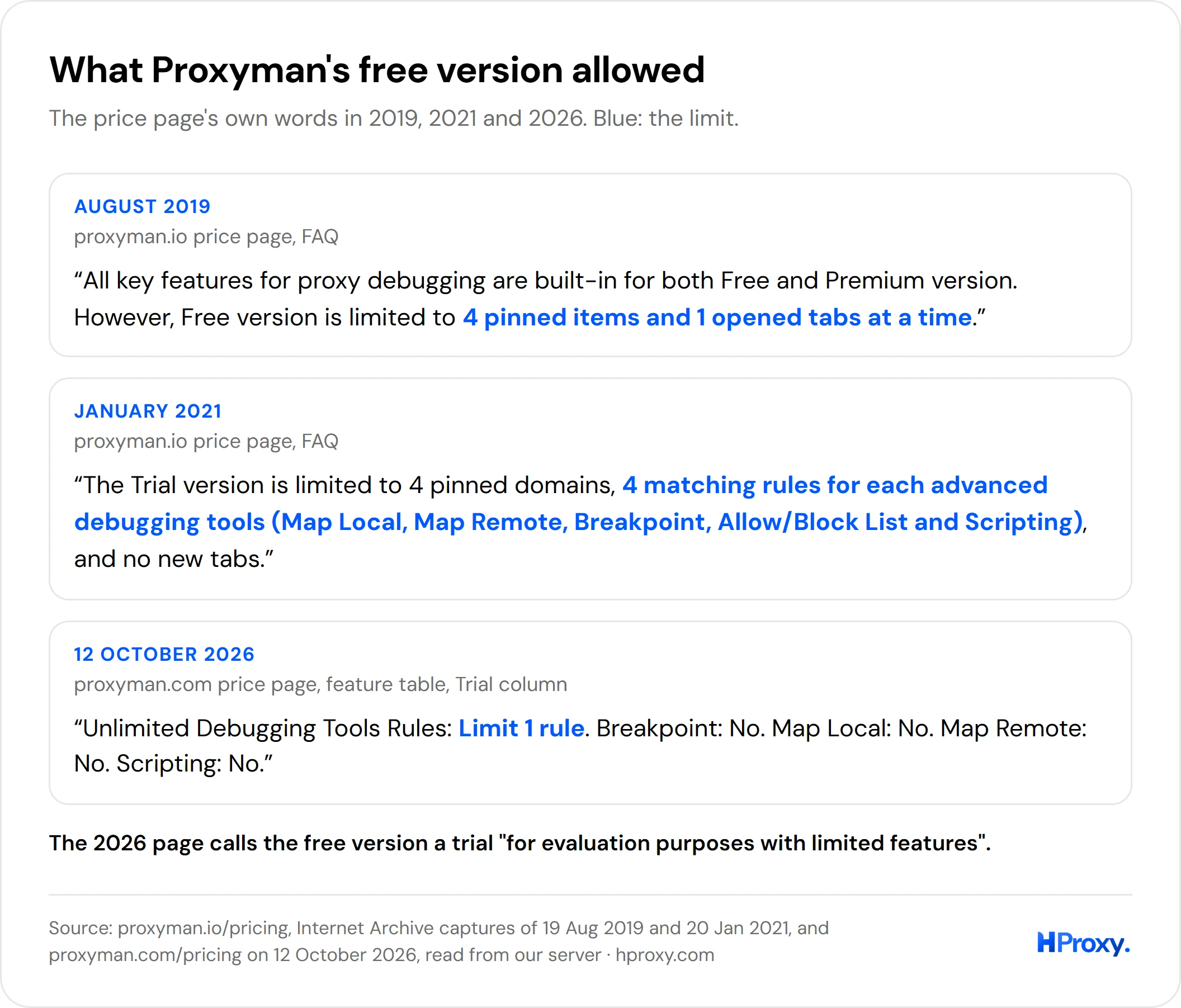
The free version is a trial "for evaluation purposes with limited features". It captures and previews traffic. The comparison table on the price page, though, allows it one debugging-tool rule and marks Breakpoint, Map Local, Map Remote, Scripting, the phone apps and forwarding to an external proxy as not included.
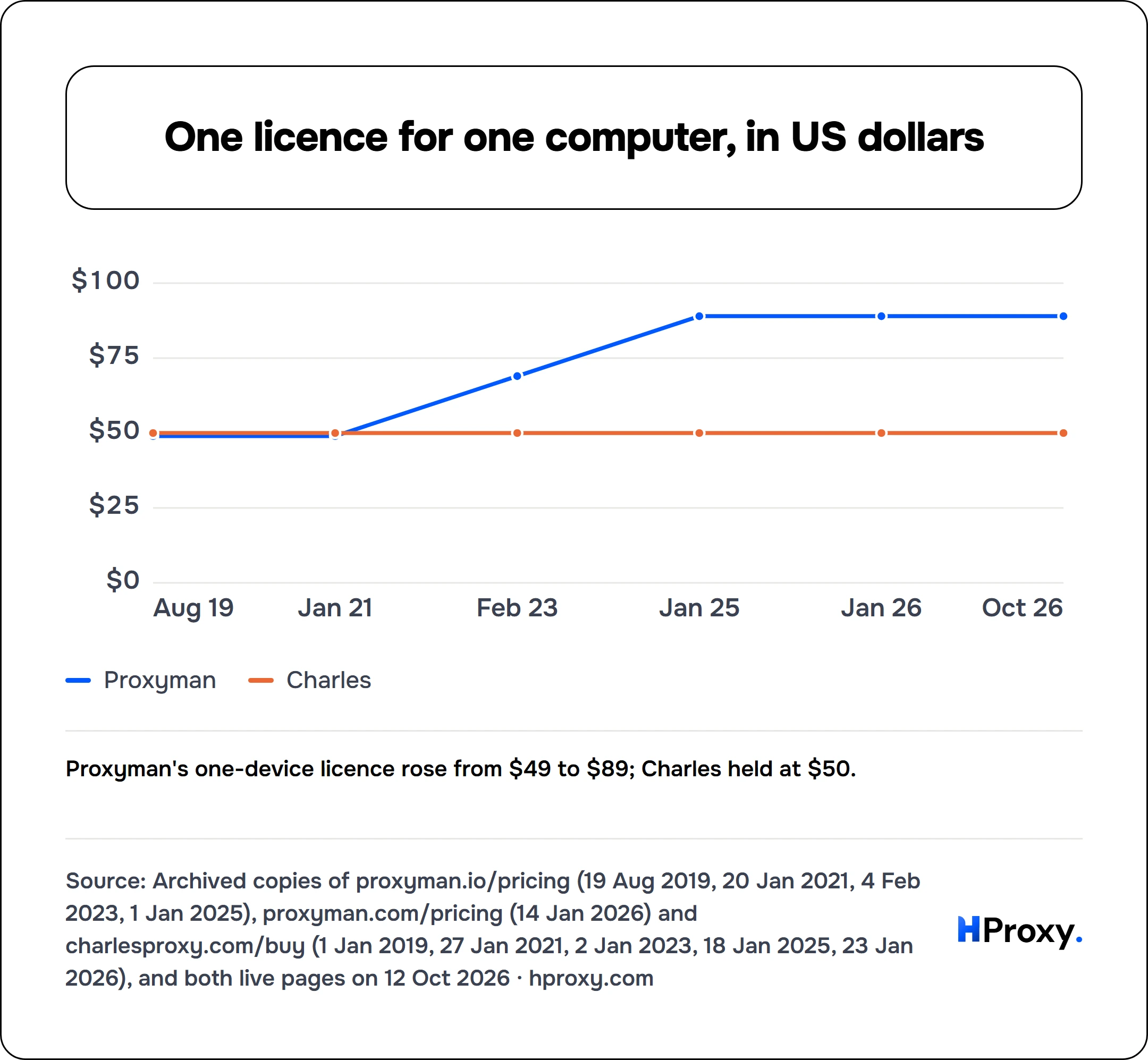
Proxyman's price since 2019, beside Charles
- Proxyman
- Charles
In August 2019, Proxyman's Personal licence cost $49 for one device, a Combo licence $59 for two, and a Volume licence $29 a device from three. In January 2021 the one-device licence, now called Standard, still cost $49 for one Mac. By February 2023 it cost $69 and covered one Mac or Windows device plus two iOS devices, and by January 2025 it cost $89. A year of renewed updates went from $25 in 2019 and 2021 to $39 in 2023 and $49 from 2025.
Team seats followed. In 2023 a seat cost $59, with at least 3 seats; in January 2025 it cost $69. By January 2026 a Team seat cost $99 with a year of updates, and a subscription appeared at $8 a seat a month. The capture of July 2026 shows the subscription at $12, and the live page asks for at least 5 seats.
The free version narrowed over the same years. In 2019 the price page said every key debugging feature was in both the free and the paid version, with the free one limited to pinned items and tabs.
Charles has not moved. Every copy of its shop we read, from May 2009 to January 2026, priced one licence at $50, $40 each from 5 licences, $30 each from 10, a site licence at $400 and a multi-site licence at $700. The live page on 12 October 2026 asks the same.
Who makes Proxyman
Proxyman's about page dates the app from 2019. Its licence agreement, last updated on 12 January 2026, names Proxyman LLC of 1209 Orange Street, Wilmington, Delaware, as the licensor, under the laws of Delaware. The footer of every page also names Proxyman Pte. Ltd., at 68 Circular Road in Singapore. The price pages of 2019 and 2021 were signed Proxyman Inc, and the 2019 home page said it was made in Singapore.
The site lived at proxyman.io until the move to proxyman.com, whose first Proxyman capture in the Internet Archive dates from January 2025; in July 2022 that address showed an unrelated webmail login. The same makers sell two companion apps, TinyShield and a packet viewer for the Mac, and a bundle of all three started at $138, or $183 for a lifetime licence, on 12 October 2026.
Why people look for an alternative
The suggestions Google offered on 12 October 2026 tell the story: "proxyman alternative free", "proxyman alternative open source", "proxyman alternative for windows" and "linux", "proxyman free vs paid" and "proxyman license cost". People also compare it with Charles, Fiddler, mitmproxy, HTTP Toolkit, Burp Suite, Wireshark and Postman.
The price explains much of it. One licence has risen by $40 since 2021, updates stop after a year unless renewed, and the phone apps need the Personal or a Team licence. The trial now locks Breakpoint, Map Local, Map Remote and Scripting, the tools most people buy a debugging proxy for; in 2019 the price page said every key debugging feature was free.
The alternatives side by side
Every price, licence and system below comes from each tool's own pages, read from our server on 12 October 2026. We installed none of them, so nothing here compares speed or how each one handles a difficult app.
Proxyman and seven alternatives, 12 October 2026
| Tool | Price for one person | Runs on |
|---|---|---|
| Proxyman | $89 once, a year of updates | macOS, Windows, Linux, iOS, Android |
| Charles | $50 once, updates to the next major version | Windows, macOS, Linux |
| Fiddler Everywhere | from $7 a month, billed yearly | Windows, macOS, Linux |
| Fiddler Classic | free, non-commercial use only | Windows |
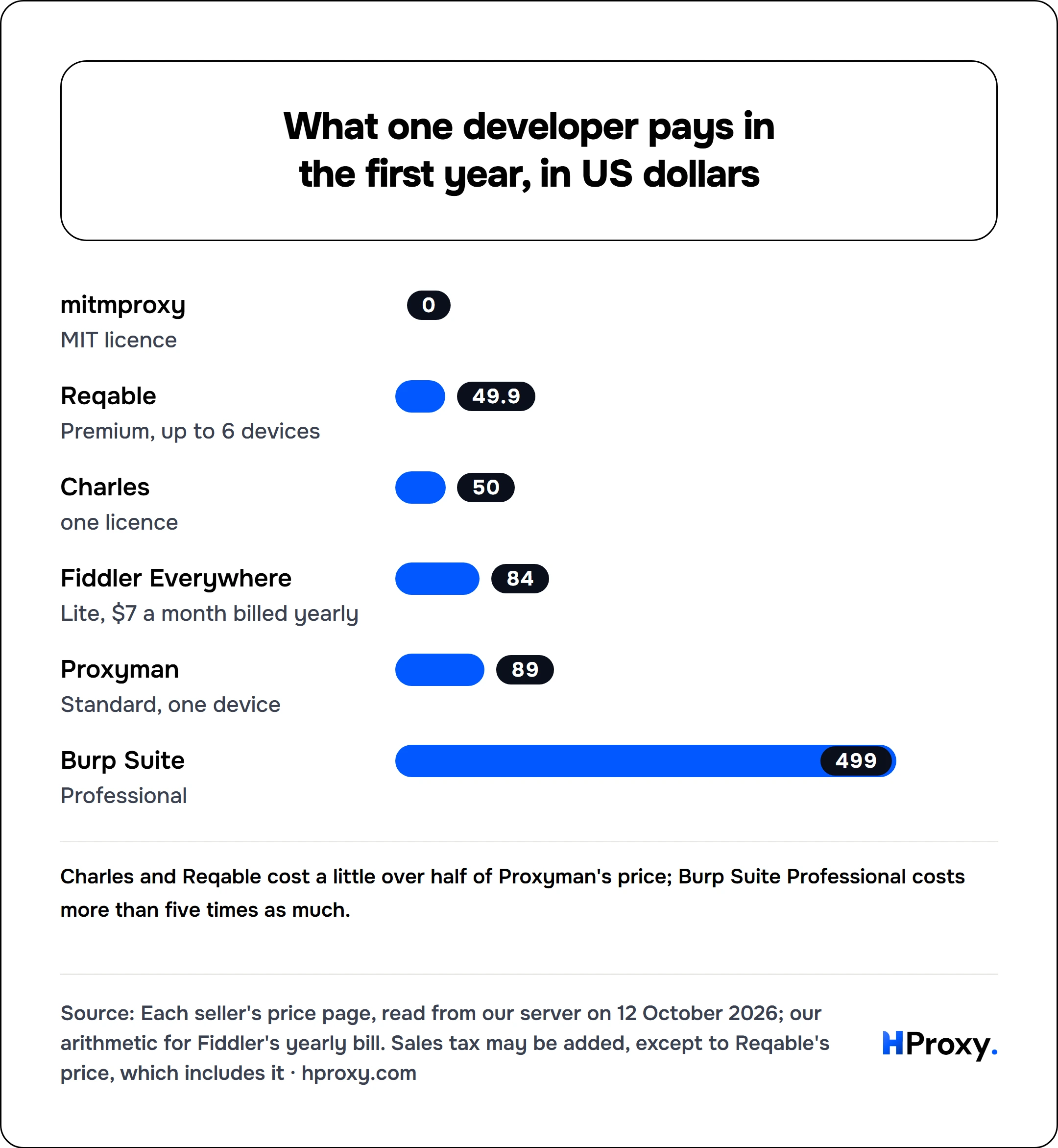
| mitmproxy | free, MIT licence | Windows, macOS, Linux |
| HTTP Toolkit | free Hobbyist plan; Professional by subscription | Windows, macOS, Linux |
| Burp Suite | Community free; Professional $499 | Windows, macOS, Linux |
| Reqable | Community free; Premium $49.90 a year | Windows, macOS, Linux, iOS, Android |
Each tool's price, download and licence pages, and GitHub records, read from our server on 12 October 2026
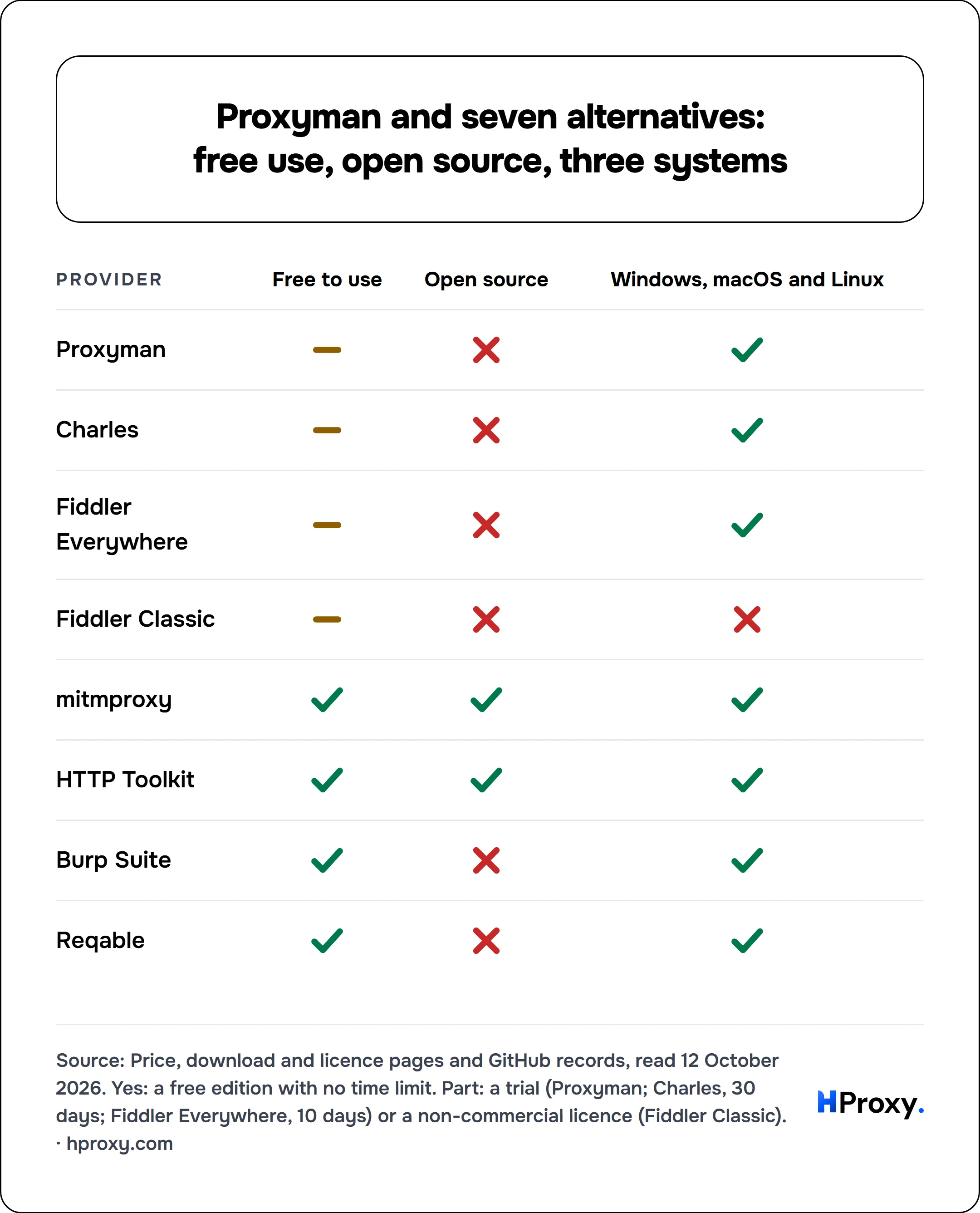
| Provider | Free to use | Open source | Windows, macOS and Linux |
|---|---|---|---|
| Proxyman | partly | no | yes |
| Charles | partly | no | yes |
| Fiddler Everywhere | partly | no | yes |
| Fiddler Classic | partly | no | no |
| mitmproxy | yes | yes | yes |
| HTTP Toolkit | yes | yes | yes |
| Burp Suite | yes | no | yes |
| Reqable | yes | no | yes |
Charles
Charles is the old standard. XK72 Limited of Auckland sells it under New Zealand law, through Paddle, which handles orders and returns. A licence covers the current major version and every update until the next one: Charles 4 came out on 1 August 2016 and Charles 5 on 12 March 2025. An upgrade costs 40% of the original price, and a licence bought less than three months before a new major version gets the upgrade free. The download page offered 5.2.2 for Windows on Intel and Arm, macOS and Linux, and the trial runs for 30 days. Its news page also records an iOS app, released in March 2018.
Fiddler Everywhere and Fiddler Classic
Telerik sells Fiddler in two forms. Fiddler Everywhere runs on macOS, Linux and Windows by subscription: Lite at $7 a user a month and Pro at $13 on yearly billing, $10 and $19 month to month, and Enterprise at $37, yearly only. It renews automatically, each licence covers one user, and a 10-day trial unlocks every paid feature. On Windows, its Network Capture Mode intercepts all traffic on the machine, whatever the proxy settings. Fiddler Classic is still a free download, but Telerik calls it "a legacy Windows tool licensed for individual, non-commercial use only", out of active development and with no commitment to releases, patches or support.
mitmproxy
mitmproxy is the free, open-source workhorse: MIT-licensed, on GitHub since February 2010, with 45,429 stars and release 12.2.3 of 12 May 2026. It runs on Windows, macOS and Linux, from the command line, a web interface (mitmweb) or a Python API (mitmdump), and handles HTTP/1, HTTP/2, HTTP/3 and WebSockets. Its documentation lists nine modes. Among them are local capture of apps on the same machine, on all three systems, a WireGuard mode for phones and other devices, a SOCKS5 server, and an upstream mode that chains it to another HTTP proxy.
HTTP Toolkit
HTTP Toolkit has a free Hobbyist plan and lists "100% Open Source" for every plan; its desktop app is published under AGPL-3.0 and reached 1.27.2 on 14 September 2026. Downloads cover Windows, Apple Silicon and Intel Macs, and Linux as DEB, RPM, Arch and AppImage packages. A Professional account works on as many devices as you like and is billed monthly, while Team accounts belong to the team rather than a person. The price page fills in the amounts by script, which our server could not read.
Burp Suite
Burp Suite is a security tool first. The free Community Edition includes the HTTP(S) and WebSockets proxy with its history, and the Repeater, Decoder, Sequencer and Comparer tools. Professional, which adds the web vulnerability scanner, project files and the full Intruder, showed $499 on PortSwigger's buy button, with a free trial. It runs on Windows on Intel, Linux on Intel or Arm, and macOS on Intel or Apple chips.
Reqable
Reqable combines a debugging proxy with a REST client. Its Community edition is free on every platform, and its FAQ answers "Can community edition be used commercially? Of course." Premium costs $49.90 a year with tax for up to 6 devices, with a lifetime option. It runs on Windows 7 or later, macOS 11 or later, Ubuntu and Debian Linux, Android 5 or later and iOS 13 or later. Its GitHub repository describes itself as an issue tracker and names no licence, so we count Reqable as free to use but not open source.
Wireshark, which is not a proxy
Wireshark appears in the same searches, but it does a different job. Its site calls it "the world's foremost network protocol analyzer" and a free, open-source tool, continuing a project that started in 1998, and it runs on Windows, Linux, macOS and more. It records traffic rather than sitting in its path, so it can show that a request left your machine, but it cannot pause the request and change it the way Proxyman can.
On a phone
Proxyman's iOS and Android apps capture HTTPS directly on the phone, and they come with the $99 Personal licence or with Team seats. Reqable also has iOS and Android apps. mitmproxy reaches a phone through its WireGuard mode, and the other desktop tools the classic way: the phone joins the same network, uses the computer as its proxy and trusts its certificate.
Where HProxy fits
A debugging proxy shows what an app sends; it does not change where the request appears to come from. To see what a site returns in another country, or behind a home connection, chain the debugging proxy to a second proxy. mitmproxy does this with its upstream mode. Proxyman's External Proxy setting, a paid feature, accepts HTTP, HTTPS, SOCKS and PAC proxies with basic authentication. Its documentation adds that "External SOCKS Proxy with authentication is not supported", so a proxy with a login goes in as HTTP.
Our residential proxies accept HTTP with a username and password, the form that setting takes. One gigabyte of Residential Lite, targeted by country, costs $0.50/GB; Residential Premium, which can also target a state, a city or an ISP, starts at $1.49. You pay by the gigabyte, with no subscription, and a balance you have not used stays on the account. Our guide to HTTP and HTTPS proxies explains the difference that matters here, and the free proxy checker confirms an address answers before you build it into a setup.
Which one to pick
- Stay with Proxyman if you debug iOS and Android apps from a Mac: the native app and the phone apps are its strength, and $99 covers two devices and two phones.
- For the lowest price on a desktop: Charles at $50 once, or Reqable at $49.90 a year with its phone apps.
- For free and open source: mitmproxy, or HTTP Toolkit if you want a graphical app.
- For a team with a fixed yearly budget: Fiddler Everywhere from $7 a user a month, or Proxyman's Team subscription at $12.
- For security testing: Burp Suite, starting with the free Community Edition.
- Not Fiddler Classic for work: its licence covers individual, non-commercial use only.
What we could not find out
We installed none of these tools, so this page says nothing about speed, stability or how each one copes with certificate pinning. HTTP Toolkit's Professional price loads by script and did not reach our server. PortSwigger's buy button shows $499 without saying for how long. We did not read Charles's or Proxyman's licence terms for business use beyond what their price pages say. Prices and versions change; this page is due for a fresh look by 12 January 2027.
Sources
- Proxyman: price page, download page, changelog, about page, licence agreement (12 January 2026), fulfillment policy (9 December 2024) and the External Proxy documentation. Read 12 October 2026.
- Internet Archive: proxyman.io/pricing (19 August 2019, 20 January 2021, 4 February 2023, 1 January 2025), proxyman.com/pricing (2025 to 2 October 2026), proxyman.io (December 2019), proxyman.com (2022 to 2025) and charlesproxy.com/buy (11 May 2009 to 23 January 2026). Read 12 October 2026.
- Charles: home, download and buy pages and its licence agreement. Read 12 October 2026.
- Telerik: Fiddler Everywhere price and product pages, and the Fiddler Classic and download pages. Read 12 October 2026.
- mitmproxy: home page and proxy-modes documentation; GitHub record of mitmproxy/mitmproxy.
- HTTP Toolkit price and download pages and GitHub records; Burp Suite Professional and Community Edition pages and system requirements; Reqable price and download pages and GitHub record; Wireshark's about page. Read 12 October 2026.
- Google search suggestions received by our server, and Keyword Planner volumes, worldwide, 12 October 2026.
- HProxy: product pages and guides, as of 12 October 2026.