CloakBrowser is a custom Chromium browser for web scraping and browser automation, with its fingerprints patched in the browser's C++ source. It ships no proxy IPs of its own, so you connect a proxy provider such as HProxy. This guide connects an HProxy residential proxy in Python and JavaScript, lines up the browser's timezone and locale with the exit IP, and keeps a browser profile between runs. The examples target the current CloakBrowser wrapper, version 0.7.0 or later.
CloakBrowser is a partner of HProxy, and the CloakBrowser team reviewed this guide before it went up. Every link to CloakBrowser on this page goes to its own site or its GitHub repository.
For a workflow that needs a stable address, use a sticky proxy session. A persistent browser profile saves the browser's data between runs, and the IP address it uses comes from the proxy session.
What you need
- Python 3.9 or later, or a Node.js version the current CloakBrowser package supports (
^20.19.0 || >=22.12.0at the time of writing). - A CloakBrowser license key. A free key is available at cloakbrowser.dev/free and allows one concurrent browser session. The first interactive launch can walk you through getting a key. For unattended runs, set
CLOAKBROWSER_LICENSE_KEYin the process environment before the script starts. Keep the key out of source code and logs. - An HProxy residential plan. Residential Lite starts at $0.44 per GB. Residential Premium adds more targeting controls and a sticky lifetime you choose, from 3 minutes to 24 hours. Use the current plan details and the generator in your dashboard.
The code CLOAKBROWSER20 gives 20% off Residential Premium, once per customer, for new and existing customers alike, until March 31, 2027.
Install the dependencies for the examples you will use. The Python examples turn on GeoIP, so install the extra:
pip install --upgrade "cloakbrowser[geoip]"
For JavaScript with Playwright:
npm install cloakbrowser playwright-core mmdb-lib
For JavaScript with Puppeteer:
npm install cloakbrowser puppeteer-core mmdb-lib
For JavaScript GeoIP over SOCKS5, also install:
npm install socks-proxy-agent
On first launch, CloakBrowser downloads and caches its Chromium build, roughly 200 MB. The first GeoIP lookup also downloads a database, roughly 70 MB. Allow time and network access for both downloads.
Check the setup with cloakbrowser info for Python or npx cloakbrowser info for JavaScript. On Linux and in Docker, install the system libraries and fonts your browser configuration needs; running the browser in a visible window does not add them. Follow CloakBrowser's Linux setup and troubleshooting.
Step 1: Generate a proxy line in HProxy
Open your residential plan in the HProxy dashboard and generate a line for the protocol and targeting you need. For a stable browser session, choose sticky mode and a lifetime your plan supports. For Residential Premium with UDP, generate a SOCKS5 line with UDP turned on.
The generator returns a line in this shape:
HOST:PORT:USERNAME:PASSWORD
CloakBrowser takes the matching URL:
http://USERNAME:PASSWORD@HOST:PORT
Use socks5:// for a SOCKS5 line. Copy the generated host, port, username and password exactly, because ports and username options can differ by protocol. To use SOCKS5, generate a SOCKS5 line; an HTTP line with only its scheme changed will fail. If the username or password contains characters that are reserved in URLs, percent-encode those parts when you build the URL. Our line generation docs list every targeting option and the rules for sticky sessions.
Set the complete URL in an environment variable named HPROXY_URL for the terminal or process that runs the examples. Use your own generated credentials, and never print or commit the URL. The examples read this variable, so no credential sits in the script.
Step 2: Launch CloakBrowser in Python
Save this as hproxy_example.py, then run python hproxy_example.py in your configured Python environment:
import os
from cloakbrowser import launch

browser = launch(
    proxy=os.environ["HPROXY_URL"],
    geoip=True,
    headless=False,
    humanize=True,
)
try:
    page = browser.new_page()
    page.goto("https://api.ipify.org?format=json", wait_until="domcontentloaded")
    print("Browser exit IP:", page.evaluate("() => JSON.parse(document.body.innerText).ip"))
    print(page.evaluate("""() => ({
        timezone: Intl.DateTimeFormat().resolvedOptions().timeZone,
        language: navigator.language
    })"""))
finally:
    browser.close()
geoip=True resolves the proxy's exit IP at launch and uses its location to set the timezone and locale. It also sets the IP that WebRTC presents to that resolved address. It reads the exit once, so it does not follow later proxy rotation, and it cannot promise that every network path uses the same IP. Prefer a sticky line when consistency matters; after an exit change, relaunch and check the browser again.
Ask for the exit IP
an echo service, through your proxy
Look it up
GeoLite2-City, about 70 MB, cached
Set the browser
timezone, locale, WebRTC IP
Load your pages
through the same exit
headless=False opens a visible browser window and needs a graphical session, so a server without a display needs a display setup or headless mode. humanize=True turns on human-like mouse, keyboard and scroll behavior. Neither option guarantees access to every website.
Step 3: Launch it in JavaScript with Playwright
Save this as hproxy-example.mjs so Node.js treats it as an ES module, then run node hproxy-example.mjs:
import { launch } from 'cloakbrowser';

const proxy = process.env.HPROXY_URL;
if (!proxy) throw new Error('Set HPROXY_URL before running this example.');

const browser = await launch({
  proxy,
  geoip: true,
  headless: false,
  humanize: true,
});
try {
  const page = await browser.newPage();
  await page.goto('https://api.ipify.org?format=json', { waitUntil: 'domcontentloaded' });
  console.log('Browser exit IP:', await page.evaluate(() => JSON.parse(document.body.innerText).ip));
  console.log(await page.evaluate(() => ({
    timezone: Intl.DateTimeFormat().resolvedOptions().timeZone,
    language: navigator.language,
  })));
} finally {
  await browser.close();
}
For Puppeteer, install the Puppeteer dependencies listed above and change the import to import { launch } from 'cloakbrowser/puppeteer';. The rest of this example uses methods both drivers support.
SOCKS5 and UDP
CloakBrowser supports authenticated SOCKS5 URLs directly. To run the Python or JavaScript example over SOCKS5, set HPROXY_URL to the complete SOCKS5 URL generated for your HProxy plan. Keep the GeoIP dependencies installed; JavaScript GeoIP over SOCKS5 also needs socks-proxy-agent.
CloakBrowser tunnels QUIC and HTTP/3 through SOCKS5 UDP ASSOCIATE when the proxy supports it. HProxy supports UDP on Residential Premium when you turn it on while generating the line. Even then, not every request uses HTTP/3, so test the protocol and the exit IP with your actual proxy configuration if your application depends on them.
A first navigation can use HTTP/2 before the browser learns that the server offers HTTP/3. HTTP/2 on that first load does not by itself prove that UDP is broken.
The proxy here applies to browser page traffic. Playwright's separate request client (page.request, context.request, route.fetch()) does not use the browser-level SOCKS5 or credentialed HTTP proxy, and it sends from your machine's own IP. Check the browser's proxy route with a page navigation, as the examples above do. For an API call that has to leave through the proxy, CloakBrowser's README suggests running fetch inside the page with page.evaluate.
Keep browser data between runs
Give each account its own profile directory and its own generated sticky session. With HPROXY_URL set to the sticky URL for this account:
import os
from cloakbrowser import launch_persistent_context

ctx = launch_persistent_context(
    "./profiles/account-1",
    proxy=os.environ["HPROXY_URL"],
    geoip=True,
    headless=False,
)
try:
    page = ctx.new_page()
    page.goto("https://api.ipify.org?format=json", wait_until="domcontentloaded")
    print("Browser exit IP:", page.evaluate("() => JSON.parse(document.body.innerText).ip"))
finally:
    ctx.close()
Cookies and local storage stay in ./profiles/account-1. The proxy IP follows HProxy's sticky-session lifetime and availability. It can change before that lifetime ends if the residential device leaves the network, and a saved browser profile does not extend it.
The current wrapper also keeps the persistent profile's fingerprint seed across launches. Reuse the same profile directory for a returning browser identity; a new folder starts a new profile. This persistence still does not reserve a proxy IP.
Use a separate session label for each profile, and check the resulting exit addresses if you need distinct IPs. Separate labels carry no promise of exclusive addresses. On rotating proxies, successive requests can use different exits, so a single GeoIP lookup at launch may no longer match later requests. Run several browser profiles one after another if you use the free CloakBrowser key's one-session allowance.
Check that the connection worked
The examples print the IP that an outside service sees through a browser page, and the first two print the timezone and language as well. Check that they match the location you intended. Repeat the IP check within your intended session window to catch unexpected changes.
Look up the printed IP's country, city and network at hproxy.com/ip-lookup. Its timezone row is the one to compare with the timezone your script printed. Geolocation is an estimate, especially at city level.
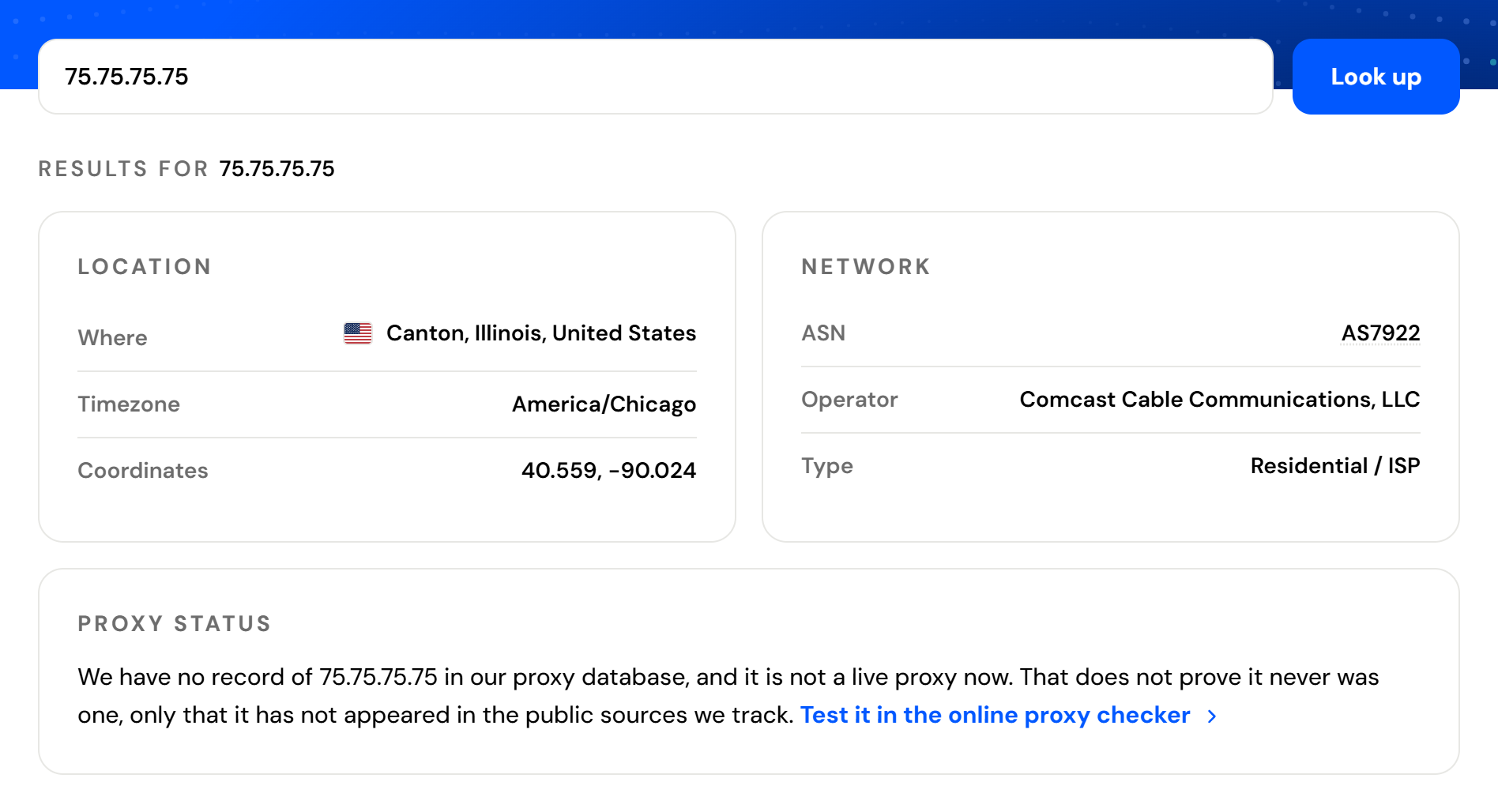
HProxy's free proxy checker app can also test a generated line from your computer before you use it in automation. A successful IP lookup does not by itself verify WebRTC or UDP behavior; check those separately if you need them.
When something goes wrong
- Missing license key: complete the interactive free-key setup, run
cloakbrowser loginfor Python ornpx cloakbrowser loginfor JavaScript, or give an unattended processCLOAKBROWSER_LICENSE_KEY. - Concurrent session limit: close the previous browser cleanly before you start another. A browser left running holds a session slot, and an abrupt exit may delay its release. Look for a browser that is still running before you launch a new one.
- Missing JavaScript module: install the driver you chose (
playwright-coreorpuppeteer-core),mmdb-libfor GeoIP, andsocks-proxy-agentfor JavaScript GeoIP over SOCKS5. Save ES-module examples with the.mjsextension. - 407 Proxy Authentication Required: confirm the generated credentials, protocol, host and port, then check the URL encoding and your account's access. A proxy answers 407 to credentials it rejects as well as to missing ones; our 407 guide walks through each cause.
- GeoIP fails or the timezone is unexpected: check the GeoIP dependencies, download and network errors, your targeting and the actual exit IP. A rotating or replaced exit can differ from the address resolved at launch. When the exit lookup through the proxy fails, CloakBrowser's GeoIP code falls back to the address the proxy's hostname resolves to, and for a gateway such as HProxy's that address puts the timezone at the gateway's location.
- A website still blocks the session: check IP reputation, session stability, request rate and the website's own requirements. A residential IP and humanized actions are no guarantee of acceptance.
What the proxy side costs
CloakBrowser prices its plans by concurrent browser sessions, and the proxy is priced by the GB of traffic it carries. GeoIP's lookup at launch travels through the proxy too, so it counts toward that traffic.
Residential Premium targets country, state, city and ISP, holds a sticky session for 3 minutes to 24 hours with each line its own session and no limit on how many you open, and relays UDP over SOCKS5 on lines generated with UDP. Its price per GB falls as the package grows, from $1.49 per GB for one GB to $1.00 per GB at 1,000 GB and above, and CLOAKBROWSER20 takes 20% off one order of any size. Residential Lite costs $0.50 per GB for one GB and $0.44 per GB at 2,000 GB and above, with country targeting.
- List price
- With CLOAKBROWSER20
Sources
- CloakBrowser on GitHub: installation, the launch options, SOCKS5, GeoIP, WebRTC, persistent profiles and the license key.
- CloakBrowser's JavaScript package.json: the Node.js range and the optional dependencies.
- CloakBrowser's GeoIP code: how the exit IP is found, the database download and the fallback.
- cloakbrowser.dev: the free key and the Pro session counts.
- HProxy residential plans and our line generation docs: the plans, sticky-session lifetimes and UDP.