An Amazon CAPTCHA is a check Amazon shows when a visit does not look like a person in a normal browser. There are three forms. One is a text CAPTCHA that asks for characters, and one is a robot check with a "Continue shopping" button. The third is a JavaScript challenge from AWS WAF, the bot defense Amazon also sells to other websites. Each one reads something different: your cookies, JavaScript, your sign-in history or your pace. For a shopper, the usual fix is to allow cookies and JavaScript and solve the check once. If it returns at every visit, something on your side keeps throwing the pass away.
We checked this on October 10, 2026, with seven requests to amazon.com from our own server in a US data center. We compared them with 102 requests from our earlier server in Germany, sent on September 16, 2026.
Which Amazon check are you seeing?
| What you see | Which check it is | What it reads | What to do |
|---|---|---|---|
| "Enter the characters you see", often at sign-in, as people report it | Amazon's text CAPTCHA | Not published. Amazon's sign-in help names cleared cookies and a new browser, device or location | Type the characters, keep cookies, and if it comes every time, clear the browser cache once |
| "Click the button below to continue shopping" | Amazon's robot check | Pace: in our September test it came after about 100 requests in 11 minutes | Click it in a browser. A script should stop and slow down |
| "In order to continue, we need to verify that you're not a robot. This requires JavaScript." | The AWS WAF JavaScript challenge | Whether the browser runs JavaScript and keeps the pass cookie | Turn on JavaScript, allow cookies, then reload |
| A puzzle with audio and visual options, on another site that runs on AWS | The AWS WAF CAPTCHA | That site's own rules | Solve it. The pass lasts 300 seconds by default |
The first three appear on amazon.com itself. The last one is the same product working for someone else.
Does Amazon use CAPTCHA?
Yes, in more than one form, and Amazon also sells one. AWS WAF, Amazon's firewall for websites, has a CAPTCHA action and a silent Challenge action. Its CAPTCHA answers with status 405 and the header x-amzn-waf-action: captcha. Its Challenge answers with status 202 and x-amzn-waf-action: challenge. When the request accepts web pages, both add a JavaScript page. Its puzzles and silent challenges run only over HTTPS.
On October 10, 2026, amazon.com used the challenge on us. A request for its home page with browser headers came back 202, only 2,007 bytes long. The page carried the text quoted in the table and a challenge.js script from a token.awswaf.com address.
Why is Amazon asking me for a CAPTCHA?
Your browser threw the pass away
AWS WAF keeps a passed check in a cookie named aws-waf-token. By default it honors the pass for 300 seconds. A site can set the CAPTCHA pass anywhere from 60 seconds up to three days. A browser that blocks cookies, or clears them on exit, loses the pass and meets the check again. Amazon does not publish its own setting.
JavaScript is off
The challenge page says it plainly: it "requires JavaScript". A browser with JavaScript off stays on that page. So does a blocker that stops the challenge script from loading.
Your sign-in looks new
Amazon says it asks for an extra sign-in step when your sign-in looks different. Its examples are cleared cookies and a new browser, device or location. The extra step can be a six-digit passcode sent to your email or phone. Sellers on Amazon's forum have reported a text CAPTCHA at nearly every sign-in.
Your pace or your address looks automated
In our September test, the robot check came after about 100 requests in 11 minutes from one address. It was still there 44 minutes later. If you share an address, on a VPN or a busy network, other people's requests count against it too. Our guide to temporary IP blocks explains why shared addresses get flagged.
What did amazon.com send our server?
We sent amazon.com seven requests on October 10, 2026, at least 10 seconds apart, with no cookies kept. Product, search and help pages came back whole, with no robot check. The home page with Python's default headers came back as the full store. The same home page with browser headers came back as a 2 KB page twice. The second time we saved it, and it was the AWS WAF challenge.
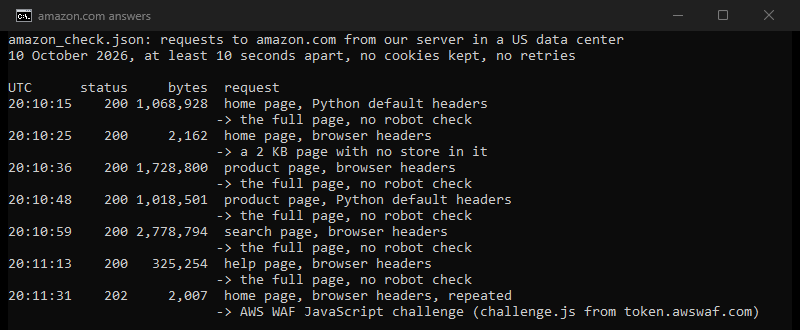
Two lessons follow. First, the check is not about the address alone. The same server got the store and the challenge a few seconds apart, depending on the request. Second, the status code does not tell you which page you got. The first small page came back with 200. In September the robot check came back with 200 as well, 3,781 bytes long.
In September, a cookie session's home page also came back 202, with 2,010 bytes. That is the same status and nearly the same size as today's challenge, but nothing proves it was the same page.
How do I stop seeing the Amazon CAPTCHA?
If you are shopping
- Allow cookies for amazon.com and keep them between visits. The pass lives in a cookie, so a browser that clears it starts over.
- Turn on JavaScript, and let the challenge script load. If a blocker stops scripts from token.awswaf.com, allow them for this page.
- Solve the check once in a normal browser window, then keep browsing in that window.
- If it appears at every sign-in, clear the browser cache once. Sellers on Amazon's forum reported that this stopped it.
- Sign in from a device and connection you use often. Amazon names a new browser, device or location as a reason for extra steps.
- If you are on a VPN or a busy shared network, try your own connection. A shared address carries other people's pace.
If a script or a price tracker gets it
- Check the page, not the status code. The robot check posts a form to validateCaptcha. The AWS challenge page asks for JavaScript and loads challenge.js, and it contains neither the word captcha nor validateCaptcha.
- Slow down. In September the check came after about 100 requests in 11 minutes from one address.
- Read Amazon's terms first. Amazon's Conditions of Use, last updated August 14, 2026, exclude "any use of data mining, robots, or similar data gathering and extraction tools" from the license. This page does not give legal advice.
- Use an official route where you qualify. Our Amazon price tracker guide compares Amazon's own price history and its APIs with a tracker of your own.
Will a different IP address stop the Amazon CAPTCHA?
| What sets off the check | Does an address that only you use change it? |
|---|---|
| A shared or VPN address carries other people's pace | Yes. Only your own requests count against it |
| Cookies or JavaScript are blocked | No. Allow them and the check can be passed |
| A sign-in that looks new | No. A new address is one of Amazon's reasons for an extra step |
| Your own script sends too fast | No. Slow it down first |
- A shared or VPN address carries other people's paceYes: only your own requests count against it
- Cookies or JavaScript are blockedNo: allow them and the check can be passed
- A sign-in that looks newNo: a new address is one of Amazon's reasons for an extra step
- Your own script sends too fastNo: slow it down first
An address nobody else uses fixes the first cause only. For price checks that run from a server, our proxies for Amazon page covers which address types fit the job. Amazon's Conditions of Use apply whatever the address.
What this page could not check
We did not meet the text CAPTCHA ourselves, so its wording comes from people's reports. Amazon publishes nothing about when its store shows a check. The triggers here come from AWS WAF's documentation, Amazon's sign-in help and our two tests. The 300 seconds is AWS's default for its customers, not a published Amazon setting. We used no Amazon account and did not test sign-in. Today's test was seven requests from one US address on one day, and September's was 102 requests from one German address. Amazon changes these pages and its rules without notice, so we will read every source here again by January 10, 2027.
Sources
- Amazon Web Services, AWS WAF Developer Guide, "CAPTCHA and Challenge in AWS WAF", read October 10, 2026: docs.aws.amazon.com.
- AWS WAF Developer Guide, "AWS WAF CAPTCHA puzzles", read October 10, 2026: docs.aws.amazon.com.
- AWS WAF Developer Guide, "CAPTCHA and Challenge action behavior", read October 10, 2026: docs.aws.amazon.com.
- AWS WAF Developer Guide, "Setting timestamp expiration and token immunity times", read October 10, 2026: docs.aws.amazon.com.
- AWS WAF Developer Guide, "AWS WAF token characteristics", read October 10, 2026: docs.aws.amazon.com.
- Amazon Customer Service, "About Multi-Factor Authentication", read October 10, 2026: amazon.com.
- Amazon, Conditions of Use, last updated August 14, 2026: amazon.com.
- What people reported: Amazon Seller Forums, "Captcha during login", read October 10, 2026.
- Our own measurements: seven requests to amazon.com from our US server on October 10, 2026, and 102 requests from our server in Germany on September 16, 2026, logged in the research folders for this page and for our Amazon price tracker guide.