A public IP address can be reached across the internet, and it is the address every website sees. A private IP address works only inside its own network, such as your home Wi-Fi, and many networks reuse the same ones. Your router translates between the two, and a proxy replaces the public one.
Only Public
- Reached from the internet
- One holder at a time
- Given by your provider
- Seen by websites
Both
- IPv4 or IPv6
- Joined by your router's NAT
Only Private
- Only inside its network
- Reused by many networks
- Given by your router
- Never seen by a website
We checked 14 addresses on October 10, 2026, with Python's standard library and our own IP lookup. Three results are easy to get wrong. 172.32.0.1 is a public address of T-Mobile USA. 100.64.0.1 is neither private nor public. And Python counts documentation addresses as private.
Public vs private at a glance
| Public IP address | Private IP address | |
|---|---|---|
| Reachable from | The whole internet | Only its own network |
| Unique | Yes, one holder at a time | No, many networks reuse the same ones |
| Handed out by | Your provider or a hosting company | Your router or the network's admin |
| Seen by websites | Yes | Never |
| What a lookup finds | Country, network, provider | Nothing: our lookup answers 400 private_ip |
| Example on this page | 203.0.113.7 (a documentation stand-in) | 192.168.1.20 |
Which IP addresses are private?
RFC 1918, published in February 1996, reserves three blocks "for private internets":
| Block | First to last address | Addresses |
|---|---|---|
10.0.0.0/8 | 10.0.0.0 to 10.255.255.255 | 16,777,216 |
172.16.0.0/12 | 172.16.0.0 to 172.31.255.255 | 1,048,576 |
192.168.0.0/16 | 192.168.0.0 to 192.168.255.255 | 65,536 |
The number after the slash is the prefix length. A /12 fixes the first 12 bits of the address and leaves 20 bits for hosts, so the block holds 2 to the power of 20 addresses. The same standard explains why they never cross the internet: "private addresses have no global meaning."
The middle block ends at 172.31.255.255, and the next address is public. Our lookup placed 172.32.0.1 with T-Mobile USA, network AS21928. So reading every 172 or 192 address as private is a mistake. In those ranges, only 172.16 to 172.31 and 192.168 are private.
Three of the six guides we read label the blocks class A, B and C. One gives the middle block "16 bits for the network". It has 12. RFC 1918 itself describes it in the old terms as "a set of 16 contiguous class B network numbers". The class system is legacy: RFC 4632 says equipment built on it "cannot be expected to work correctly" on the internet.
Addresses that are neither public nor private
Not every address outside those blocks is public. IANA keeps a registry of special-purpose addresses, last updated on October 9, 2025. It marks these as not globally reachable too:
100.64.0.0/10, shared address space. Providers that run carrier-grade NAT number the link to your router with it. RFC 6598 calls it "distinct from RFC 1918 private address space", because it is meant for providers' networks. Our guide to CGNAT covers it in depth.169.254.0.0/16, link-local. Valid only on the local link. The registry marks it as not forwardable at all.127.0.0.0/8, loopback. The machine talking to itself.192.0.2.0/24,198.51.100.0/24and203.0.113.0/24, documentation. Reserved for examples, like the ones on this page.
IPv6 has its own private range. RFC 4193 defines unique local addresses in fc00::/7, in practice fd00::/8. They "are not expected to be routable on the global Internet." Link-local IPv6 addresses sit in fe80::/10 (RFC 4291).
How a private address reaches the internet
Your router does the translation, called NAT. RFC 3022 calls the usual form NAPT: many private addresses and their ports "are translated into a single network address and its TCP/UDP ports." That is why every device on your Wi-Fi shows websites the same public address.
The shortage behind this is old news. On February 3, 2011, the Number Resource Organization announced that the free pool of IPv4 addresses was "fully depleted." Some providers now add a second NAT of their own. Your router then holds an address from 100.64.0.0/10, and the public address belongs to the provider.
Which address does a website see?
Always the public address at the end of the path: your router's, your provider's, or a proxy's. The private address never reaches the site, because NAT replaces it and the internet does not route it. It is also why a forged header fools only the servers that believe it, as our page on the fake IP address shows.
A public address tells a site where the connection comes from and which network runs it. A private one tells it nothing. Our IP lookup shows the difference. It answers a public address with a country and a network, and refuses the rest with 400 private_ip.
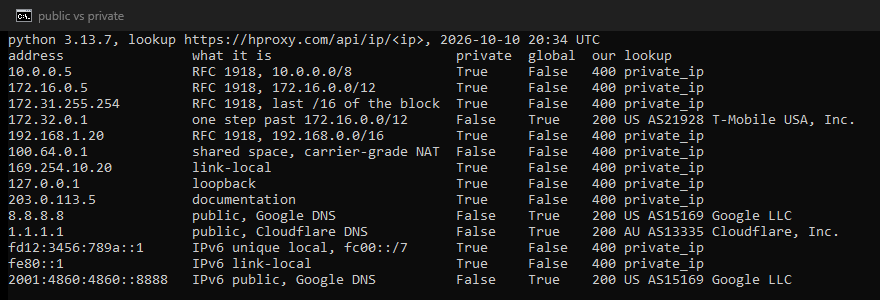
| Address | What it is | Python is_private / is_global | Our lookup |
|---|---|---|---|
192.168.1.20 | Private, RFC 1918 | True / False | 400 private_ip |
172.31.255.254 | Private, end of the middle block | True / False | 400 private_ip |
172.32.0.1 | One block past it | False / True | US, AS21928 T-Mobile USA |
100.64.0.1 | Shared, carrier NAT | False / False | 400 private_ip |
203.0.113.5 | Documentation | True / False | 400 private_ip |
8.8.8.8 | Public, Google DNS | False / True | US, AS15169 Google |
fd12:3456:789a::1 | IPv6 unique local | True / False | 400 private_ip |
How to tell public from private in code
In Python, is_global answers "is this public?". Do not read is_private as "RFC 1918". The Python documentation defines it by the IANA registry, so it is also True for loopback, link-local and documentation addresses. And is_private is the opposite of is_global with one exception: for the shared address space, 100.64.0.0/10, "they are both False."
To sort addresses into all four cases, test the blocks yourself:
import ipaddress

RFC1918 = [ipaddress.ip_network(n) for n in ("10.0.0.0/8", "172.16.0.0/12", "192.168.0.0/16")]
SHARED = ipaddress.ip_network("100.64.0.0/10")
UNIQUE_LOCAL = ipaddress.ip_network("fc00::/7")

def kind(address):
    ip = ipaddress.ip_address(address)
    if ip.is_global:
        return "public"
    if ip.version == 4 and any(ip in net for net in RFC1918):
        return "private (RFC 1918)"
    if ip.version == 4 and ip in SHARED:
        return "shared (carrier NAT)"
    if ip.version == 6 and ip in UNIQUE_LOCAL:
        return "private (unique local)"
    return "not public (reserved)"

for a in ["192.168.1.20", "172.32.0.1", "100.64.0.1", "203.0.113.5", "fd12:3456:789a::1"]:
    print(a, "->", kind(a))
We ran it with Python 3.13.7:
192.168.1.20 -> private (RFC 1918)
172.32.0.1 -> public
100.64.0.1 -> shared (carrier NAT)
203.0.113.5 -> not public (reserved)
fd12:3456:789a::1 -> private (unique local)
A common use is picking the client out of an X-Forwarded-For list, as a 2013 Network Engineering question asked. Skip what is not public, and count only the entries your own proxies added. The rest came from the client, and RFC 7239, the standard for the newer Forwarded header, warns that the client itself can change such values.
Which address do you need?
- Your router's admin page, a printer, a game on your LAN: the private address.
- An allowlist on a remote server, or a proxy provider's IP whitelist: the public address. The private one from
ipconfigis the wrong answer every time, because no remote server ever sees it. Our guide to IP whitelisting for proxies walks through the setup. - Behind carrier NAT: the public address is shared, so an allowlist entry admits your neighbors too. RFC 6269 warns that such lists "will fail when an IP address is no longer sufficient to identify a particular subscriber." Use username and password authentication instead.
- Where an address is and who runs it: only a public address has an answer.
- Hiding where you connect from: change the public address. Changing the private one changes nothing a site can see.
What a proxy changes
Only the public side. The site sees the proxy's exit address instead of your router's or your provider's. Your private address stays where it always was, inside your network. Our residential proxies give sites a home connection's address in place of yours. Our free proxy checker shows whether a proxy passes your own address on in a header.
What this page could not check
We did not test from a carrier NAT connection. That path rests on RFC 6598 and RFC 6269, not on our own trace. We tested with Python's library and our own lookup on one day, and did not compare other lookups. Our lookup lists 1.1.1.1 in Australia; we did not check location data against any other source. The registry and Python's rules change over time, and Python changed is_private in version 3.13. We will rerun the test and reread the registry by April 10, 2027.
Sources
- RFC 1918, Address Allocation for Private Internets, IETF, February 1996: section 3.
- RFC 4632, Classless Inter-domain Routing (CIDR), IETF, August 2006: section 3.1.
- RFC 6598, IANA-Reserved IPv4 Prefix for Shared Address Space, IETF, April 2012.
- IANA IPv4 Special-Purpose Address Registry, last updated October 9, 2025, read October 10, 2026.
- RFC 4193, Unique Local IPv6 Unicast Addresses, IETF, October 2005.
- RFC 3022, Traditional IP Network Address Translator (Traditional NAT), IETF, January 2001.
- Number Resource Organization, "Free Pool of IPv4 Address Space Depleted", February 3, 2011.
- RFC 6269, Issues with IP Address Sharing, IETF, June 2011: section 13.2.
- RFC 5737, IPv4 Address Blocks Reserved for Documentation, IETF, January 2010.
- RFC 6752, Issues with Private IP Addressing in the Internet, IETF, September 2012: section 3.
- RFC 4291, IP Version 6 Addressing Architecture, IETF, February 2006, and RFC 4862, IPv6 Stateless Address Autoconfiguration, IETF, September 2007.
- RFC 7239, Forwarded HTTP Extension, IETF, June 2014: section 8.1.
- Python documentation, ipaddress module, read October 10, 2026.
- Stack Exchange: Network Engineering question 2283 and Super User questions 777866 and 1107226, read October 10, 2026.
- HProxy documentation: IP location and ASN API, read October 10, 2026.
- Our own test on October 10, 2026: ip_test.py with Python 3.13.7 and our IP lookup.